dsh-traffic-light
yeah9right/dsh-traffic-light
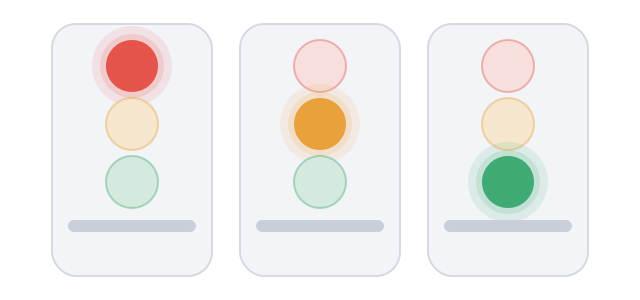
A draggable traffic light in the window overlay: red while an agent is running, yellow while an agent waits for your answer or approval, green when nothing is running. It reads one state endpoint on this machine once a second and sends nothing off the machine; on Windows it also opens an always-on-top desktop window so the light stays visible over other applications.
Установка
dsh plugin --profile web add github:yeah9right/dsh-traffic-lightREADME
红绿灯 · Traffic light
给 DeepSeek Harness Web GUI 挂一盏常驻、可拖动的红绿灯:红灯 = 有任务在跑,黄灯 = 等你确认,绿灯 = 空闲。
A draggable, always-on traffic light for the DSH Web GUI: red = an agent is running, yellow = waiting for you, green = idle.
它做什么
- 在窗口浮层里画一个圆形信号灯,所有会话共用一盏,取的是全局状态而不是某个会话的状态。
- 每秒向本机的一个状态接口(
/dsh-traffic-light/state)取一次状态;数据不出本机,也不写任何会话内容。 - 等待确认的状态有 30 分钟有效期(
OPEN_ASK_TTL_MS = 30 * 60 * 1000),过期自动转回绿灯或红灯,避免一直黄着。 - 关掉这个 bundle 就移除挂件,不留后台进程。
怎么操作
- 拖动:按住灯体拖到任意位置。
- 复位:双击灯体,或聚焦后按
Home。 - 微调:聚焦后用方向键移动。
- 位置会被记住,重启后仍在原处。
安装
三种方式,任选一种:
1. 插件市场(推荐)
装好 dshmarket 后打开 插件 页 → 插件市场,搜“红绿灯”或 traffic-light,一键安装。
2. 从 GitHub Release 装预构建包
gh release download --repo yeah9right/dsh-traffic-light --pattern '*.tgz'
然后在插件管理器里指向下载到的 dsh-traffic-light.tgz。
3. 本地开发(link)
把本目录链进 profile 的 dependencies,并在 dsh.profile.bundles 里列出 @yeah9right/dsh-traffic-light:
{"dependencies": {"@yeah9right/dsh-traffic-light": "link:D:/path/to/dsh-traffic-light"}}
改 Host 半(index.js)要重启 DSH;只改 Client 半(client.js)刷新页面即可。
平台限制
Web GUI 的浮层部分跨平台,只要 DSH Web 能跑就能用。
但本插件还带一个 Windows 专用的桌面浮窗:用 desktop/widget.ps1(PowerShell + WinForms)在本机拉一个常驻小窗,能让红绿灯在 DSH 窗口被遮挡或最小化时依然可见。这个桌面浮窗:
- 只在 Windows 上启用,靠
powershell.exe/pwsh启动; - 在 macOS / Linux 上会自动跳过,主 GUI 里的浮层照常工作;
- 启动参数含父进程 id,DSH 退出后小窗自己收摊。
依赖的宿主接口(升级需重验)
- Host 侧:
inject: ['webServer'],用ctx.webServer.getOrigin()与ctx.webServer.register()挂/dsh-traffic-light/state。 - Client 侧:
inject: ['slots'],ctx.slots.inject('shell.overlay')+ctx.slots.register({ name: 'shell.overlay', id: SLOT_ID, order: 40 }),require('react')。 - 语言包走
ctx.get('locale')。
宿主大版本升级后这些接口可能变,出问题先看这里。
文件
| 文件 | 作用 |
|---|---|
index.js | Host 半:状态接口 /dsh-traffic-light/state、状态聚合、桌面浮窗拉起 |
client.js | Client 半:shell.overlay 插槽里的浮层、指针/键盘交互、位置持久化 |
desktop/widget.ps1 | Windows 桌面浮窗(PowerShell + WinForms) |
desktop/position.json | 桌面浮窗默认位置 |
cordis.patch.yml | bundle 插入声明 |
locale/{zh,en}.json | 插件管理器显示的标题与说明 |
docs/ | 详情页素材 |
许可
MIT,见 LICENSE。
Похожие плагины
dsh-web (dsh-task-board)
zhu1090093659/dsh-web
dsh-web (dsh-web-all)
zhu1090093659/dsh-web
dsh-TUI
ccch1mneyyy/dsh-tui
dsh-web-ui (dsh-task-board)
zhu1090093659/dsh-web-ui