dsh-material-library
yingqi-studio/dsh-material-library
Material library for dsh: collect a folder, file or note from a conversation, keep it in real folders with tags, browse it Finder-style, reopen the source chat's output in one click. Ships a materials_archive tool plus auto-filing rules: file a task's deliverable once, and every later scheduled run files the new documents by itself.
Установка
dsh plugin --profile web add github:yingqi-studio/dsh-material-libraryREADME
dsh-material-library
A material library for DeepSeek Harness (dsh): collect what a conversation produced — a folder, a file, a note — keep it in real folders with tags, and jump back to the chat it came from in one click.
What it does
- Collect from a conversation. A button in the session header and a
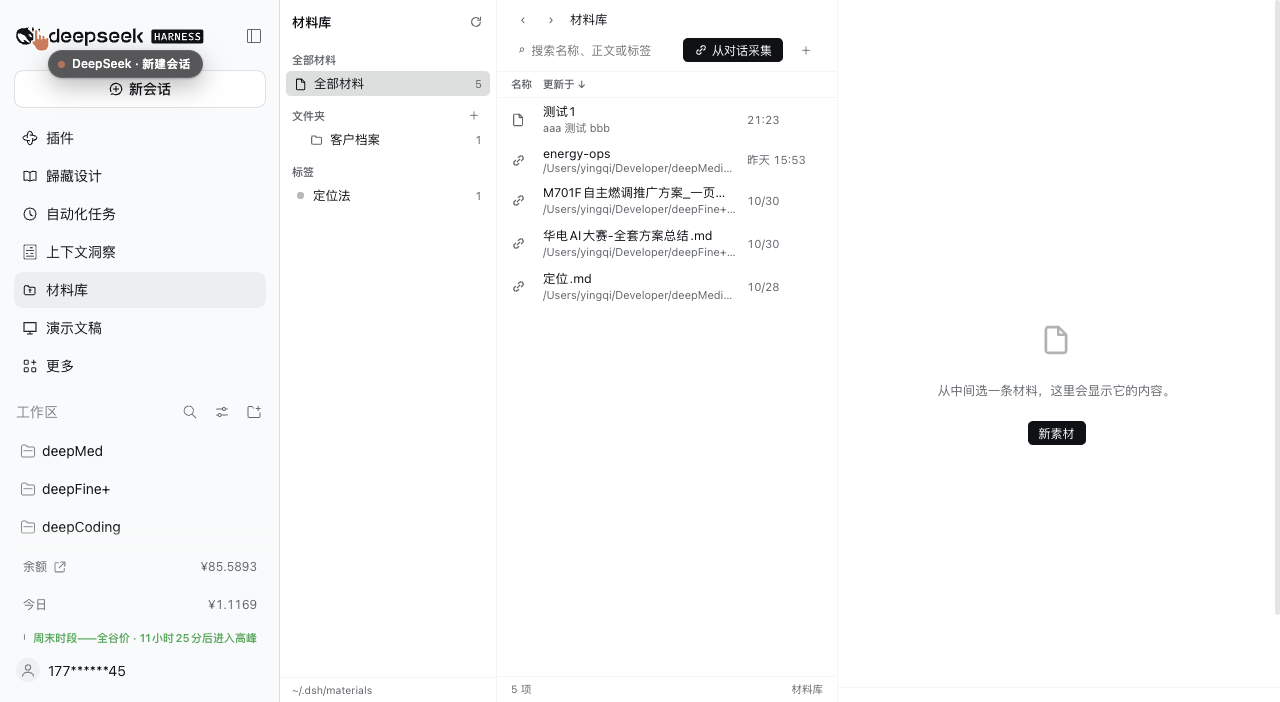
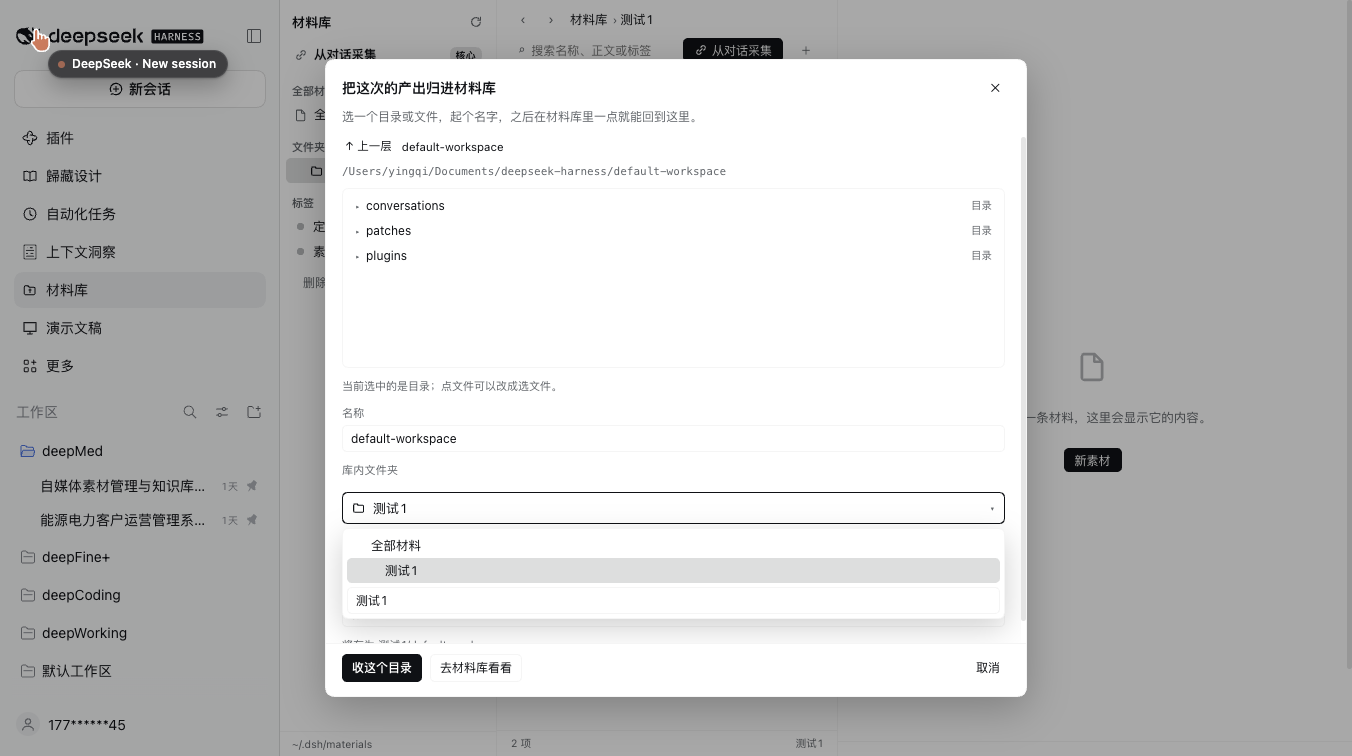
从对话采集 / Collect from chatbutton in the library open a picker: choose a conversation, browse its working directory, pick a folder or a file, name the entry, choose the library folder and tags. Entries point at the original path; nothing is copied. - Real folders, real files. A note is a
.mdfile on disk; the folder tree is the directory tree under the library root (default~/.dsh/materials). Tags live in.index.jsonbeside it. You can edit either from outside the app. - Finder-like browsing. Source list (all materials / folders / tags) · list view with name, updated, folder and tags · detail pane with a file card, a default-app button and an "open with…" menu.
- Open with… runs the macOS
opencommand: the default app, or another installed application picked from a menu, or reveal in Finder. Images preview inline; text and Markdown render in the detail pane. - Read like a chat. Markdown is rendered with the typography of conversation messages — headings, nested lists, quotes, code blocks, tables, rules — including when the entry is a reference to a file outside the library.
- Reopen the source. For a collected entry,
Open in original sessionswitches to that conversation and opens the folder in its right sidebar. - Everything is editable. Rename or delete a folder or tag from the sidebar (a tag rename rewrites it everywhere; a folder rename moves its files), edit name/folder/tags of any entry, search names, bodies and tags.
- Version history. Every save keeps the previous body under
.history/(up to 30 per file). OpenVersionsin the detail header, read any version in the pane, and restore it — restoring snapshots the current body first, so a restore is undoable. Notes kept: refs and folders have no versions. - Copy a reference into the library. A collected entry can be turned into a real file inside the library (
收进库 / Copy into library); the original is untouched. - Import a tree.
/importcopies a file or a directory from anywhere inside your home directory into the library (up to 2000 files per call), reusing the same collision-safe naming.
Install
dsh plugin --profile <your-profile> add dsh-material-library
Published on npm as dsh-material-library; installing straight from GitHub also works: dsh plugin --profile <your-profile> add github:yingqi-studio/dsh-material-library.
In DSH Desktop, open Plugins, search the name, and install it there. Restart dsh web (or refresh the page) and the library appears as an icon in the sidebar.
Requires a host with the sidebar-entry and right-sidebar slots (dsh.web 0.2.x). engines.dsh is declared as >=0.2.0.
Where things are stored
~/.dsh/materials/            # library root (override with the plugin config `root`)
├── .index.json              # tags for notes, plus the references you collected
├── .rules.json              # auto-filing rules (see below)
├── 使用说明.md               # a note = a real markdown file
└── 客户项目/                 # a folder = a real folder
    └── 需求.md
Set root in the plugin config to move the library elsewhere. Writes are serialized and atomic (.tmp + rename); paths are confined to the library root, and collected targets must stay inside your home directory.
HTTP API
The UI talks to the host over same-origin JSON routes under /api/dsh-materials (no generated remotes, so it stays dependency-free):
| Method | Route | Purpose |
|---|---|---|
| GET | /health | library root, readiness |
| GET | /home | home directory (fallback start for the picker) |
| GET | /state | folders, notes, references, tag counts |
| GET | /list?path= | list a directory outside the library (for the picker) |
| GET | /file?path= | read a note |
| GET | /ref/preview?id= | read a referenced text file for the detail pane |
| GET | /ref/raw?id= | raw bytes of a referenced file (images) |
| GET | /openers?path= | installed apps that can open a target, with icons |
| GET | /search?q=&tag= | search names, bodies and tags |
| GET | /session-times | last-modified time per session (picker ordering) |
| POST | /create /update /delete | notes |
| POST | /folder /folder/rename /folder/delete | folders |
| POST | /tag/rename /tag/delete | tags |
| POST | /ref/add /ref/update /ref/delete | collected references |
| POST | /open | open / reveal a target with the OS |
| GET | /versions?path= | saved versions of a note (id, time, size) |
| GET | /version?path=&id= | read one saved version |
| POST | /restore | restore a version (snapshots the current body first) |
| POST | /ref/copy | copy a collected reference into the library as a real file |
| POST | /import | copy a file or directory from inside the home directory into the library |
| POST | /archive | file files or a folder into the library as references (idempotent; merges tags on a path already filed) |
| GET | /rules | auto-filing rules (root, folder, tags, last run) |
| POST | /rules/run | run the rules of one session now |
| POST | /rules/delete | forget one rule |
Everything that mutates goes through one serialized store; conflicts (duplicate name, non-empty folder, unknown application) come back as readable 4xx errors.
Agent tool: materials_archive
A scheduled task can file its own output. The host registers one tool, materials_archive, available in every session:
materials_archive(path="out/", folder="日报/2026-11", tags=["日报"], include=".html,.md")
path— file or folder (supports~; a relative path resolves against the session's working directory). Omitted: the working directory.folder— library folder; empty/omitted files at the root. Created on demand.tags— merged with whatever the entry already carries.depth—1(default) files the files directly inside a folder,0files the folder itself as one entry, up to12.include— comma separated suffix/glob filter, e.g..html,.jpgor*.png.limit— stop after N entries (default 50, max 200).
It is idempotent per path: filing the same path again refreshes its tags and folder instead of adding a second entry, so a task that runs every day can just call it again. The files are never moved or copied — the entry is a reference.
For a scheduled task, end the task prompt with a line like:
跑完把 out/ 收进材料库,folder 用「日报/当月」,tags 用 ["日报"]。
Auto-filing: file it once, then it keeps filing
Filing a deliverable once is also a decision: "this keeps being produced". The library remembers it, and at the end of every later scheduled run that works in that folder it re-files the new documents by itself — no prompt instruction, no extra tool call.
The first filing is normally yours: you file the first 日报 the task produced. Nothing is remembered unless a filing actually happened, so a task nobody ever filed leaves no trace in the library.
materials_archive(path="out/", folder="日报", tags=["日报"])   # first run, by hand
# ... the task writes out/2026-11-03.html on its next run ...
# ... end of that run: out/2026-11-03.html is already in 日报 ...
- Scheduled runs only. A rule is created by any real filing (usually yours, in a chat), but it only fires at the end of a turn a scheduled task started — its user message carries the schedule reminder. An ordinary chat turn ends with nothing filed.
- A failed scheduled run is caught up, not lost. When a scheduled run ends with nothing new to file, the rule stays armed for up to a day; the next turn in that folder — typically your manual re-run of the failed task — files whatever appeared. A normal chat turn still files nothing of its own.
- A rule follows the folder, not the chat. It fires for the session that filed it and for any scheduled run whose working directory contains that folder, so it does not matter whether you filed the first one in the task's own session or in some other conversation.
- Deliverable, not scratch. Point it at a folder and only the documents are filed — pdf, word, excel, ppt, html, markdown, csv and friends (
.json,.log,.tmp, screenshots and dotfiles stay on disk). A folder with no document at all falls back to filing everything, so a task whose product really is a.jsonis not silently emptied. Passincludeto override. - A rule remembers which file types were filed: file
out/2026-11-02.htmland the rule watchesout/for.htmlonly. Filing a single file remembers its folder plus its type. - Filing a folder with a mix of four file types leaves no rule (that folder is not one deliverable); filing the working directory itself never becomes a rule either.
- Keyed by session + folder + type, so filing the same folder again only extends its tags. Depth is capped at 3, one run files at most 50 entries.
- The panel lists them under 自动归档 in the left pane. The number on a row is how many entries that folder holds right now; an orange dot means a scheduled run came back empty and the rule is waiting for the next re-run. Hover a row and click × to stop one.
- Rules live in
.rules.jsonat the library root; a target that disappeared is skipped, not fatal. - Filing in a chat works and files exactly what you point at; it also creates the rule, which then waits for the next scheduled run of that folder.
Notes and limits
- A collected entry is a reference, not a copy: if the original moves, the entry shows as missing.
- Automatic filing only ever runs for scheduled tasks, and only for the file type you filed once — an ordinary conversation never fills the library by itself.
- Only targets inside your home directory can be collected.
- Files you drop into the library by hand are listed but have no tags until you tag them in the UI.
- The Markdown renderer is built in (~150 lines, no dependency): it covers common syntax but not inline HTML, footnotes or task-list checkboxes.
- Versions exist for notes, not for references or folders.
materials_archivefiles references, so a re-run of a task that overwrites its output still points at the same (new) file; a task that writes a new timestamped file every run adds one entry per run.
中文说明
把对话里产出的目录、文件和笔记收进一个材料库:真实文件夹 + 标签,Finder 的观感,点开像对话消息一样阅读,一键跳回原始会话。
- 从对话采集:会话标题栏按钮 / 库内「从对话采集」按钮 → 选对话、浏览目录、选文件或目录、起名、选库内文件夹与标签。收进来的是引用,原文件不动。
- 真实目录:笔记就是磁盘上的
.md,文件夹就是目录树(默认~/.dsh/materials),标签存在.index.json。 - 三栏浏览:左栏 全部材料 / 文件夹 / 标签;中栏列表(名称、更新、文件夹、标签);右栏文件卡 + 默认应用 + 「打开方式」菜单。
- 打开方式:默认应用 / 其它已安装应用 / 在 Finder 中显示;图片行内预览,文本与 Markdown 在右栏渲染。
- 像对话一样阅读:标题、嵌套列表、引用、代码块、表格、分隔线,引用外部文件时同样渲染。
- 在原始会话右侧打开:切回那个对话并打开右侧文件面板。
- 都能改:文件夹、标签可就地改名或删除(标签改名全库生效、文件夹改名带走文件),条目的名称/文件夹/标签可编辑。
- 历史版本:每次保存都把上一版留在
.history/(每个文件最多 30 份);右栏头部「历史版本」→ 选中看正文 → 「恢复这个版本」。恢复前会先给当前内容拍一份快照,所以恢复本身也能撤回。 - 收进库:引用型条目可以复制成库里的真实文件,原件不动。
- 导入:
/import把 home 目录里的一个文件或一整个目录复制进库(单次上限 2000 个文件)。 - 只收文档类成品:指向一个目录时,默认只收 pdf / word / excel / ppt / html / markdown / csv 这类成品,过程文件(
.json/.log/.tmp/截图/.开头)留在原处;目录里一个文档都没有时退回全收(产物本来就是.json的任务不会被清空)。显式给include可覆盖。 - 定时失败也不会丢:定时那一轮如果什么都没产出,规则会挂一天的「待补收」;之后在这个目录里跑的任何一轮(通常是你手动重跑那条任务)都会把新出的成品补进来。普通对话轮次本身仍然什么都不收。
- 左栏「自动归档」怎么读:每行是「目录 → 库内文件夹」,右侧数字是这个文件夹现在有几条;圆点变橙色说明上一次定时跑空了、正等重跑补收。悬停点 × 即停。
- 自动归档规则:你手动收过一次,材料库就把这次收录记成规则——只记「哪个目录 + 哪几种文件类型」(收的是
日报.html,就只盯.html)。没有人手动收过,就什么都不记。规则只在该目录所属的定时任务跑完时触发,把新出的同类成品自动收进来;普通对话轮次结束不会自动收录。规则跟着目录走,所以第一次在哪个对话里收的都无所谓。左栏「自动归档」可看到规则,悬停点 × 即停。 - 给 agent 的工具
materials_archive:定时任务可以把最终成品收进库。任务 prompt 末尾加一句「跑完把 out/ 里最终成品收进材料库,folder 用日报/当月,tags 用 ["日报"]」即可;收过一次后同类文件以后自动进来,不必每次写。同一条路径重复归档只更新标签与文件夹,不会重复入库,原件不动。
安装:dsh plugin --profile <profile> add dsh-material-library(已发布在 npm;也可以 github:yingqi-studio/dsh-material-library 从仓库装)。
Changelog
- 1.4.4 — the 自动归档 row shows how many entries its folder holds now (not the last run's count); an orange dot marks a rule waiting for a re-run.
- 1.4.3 — a scheduled run that ends empty arms its rule for one catch-up pass, so re-running a failed task still files its output.
- 1.4.2 — the scheduled turn is now spotted behind the harness's own runtime note; rules follow folder renames and deletion, and a catch-up run only sees files newer than the last one.
- 1.4.1 — a rule is born from a filing (usually the human's first one) and follows the folder, not the chat.
- 1.4.0 — folder filings default to documents only; scratch files stay on disk.
- 1.3.x — auto-filing rules: file a folder once, it keeps filing (scheduled turns only).
- 1.2.0 — the
materials_archiveagent tool. - 1.1.x — version history, copy-into-library, import a tree.
更新记录
- 1.4.4 — 左栏「自动归档」每行的数字改成「该文件夹现在有几条」,橙色圆点表示等在重跑后补收。
- 1.4.3 — 定时那一轮跑空时挂起规则,重跑同一条任务也会把产出收进来。
- 1.4.2 — 修正「定时轮次识别」(真实触发消息后面还跟着一条运行时注记);规则跟着文件夹改名/删除走;补收只收比上次归档新的文件。
- 1.4.1 — 规则由一次真实收录产生(通常是你手动收的第一次),跟着目录走。
- 1.4.0 — 目录归档默认只收文档类成品,过程文件留在原处。
- 1.3.x — 自动归档规则:手动收过一次,定时任务以后自动收同类成品。
- 1.2.0 — agent 工具
materials_archive。 - 1.1.x — 历史版本、收进库、导入目录。
License
MIT
Похожие плагины
dsh-web-ui (dsh-chat-recovery)
zhu1090093659/dsh-web-ui
billion-context
ranxianglei/billion-context
dsh-synapse
liangmianya/dsh-synapse
dsh-archive-manager
michengai/dsh-archive-manager