dsh-power-suite
zephinel/dsh-power-suite
One DSH Web bundle that adds session artifacts with Quick Look, Dynamic Workspaces, prompt history, draft memory, interrupted-session recovery, a synced sidebar width and UI element annotation.
Установка
dsh plugin --profile web add github:zephinel/dsh-power-suiteREADME

DSH Power Suite


One plugin that makes DSH show the working session, not only the answer. It adds a Running & recent panel and activity buckets to the sidebar, a Session artifacts browser, prompt recall, draft memory and a multi-image composer gallery, interrupted-session recovery, and point-and-click UI annotation — all as one power-suite plugin row.
Install it from npm and start DSH:
dsh plugin --profile web add @zephinel/dsh-power-suite@0.2.1
dsh web
Status:
0.2.1is published on npm. Install the released bundle withdsh plugin --profile web add @zephinel/dsh-power-suite@0.2.1(see Install); the in-app update notice stays silent until a newer stable version is published.
Overview · Session artifacts · Composer · UI annotation · Features · Install · Quick start · Get the code · Prerequisites · Build, test and deploy · Documentation · Contributing
Overview
The suite works inside the native shell instead of beside it: it augments the sidebar, the Files pane and the composer with Host-backed state, and adds one annotation surface that never covers the page. Unloading the plugin restores the native surface.
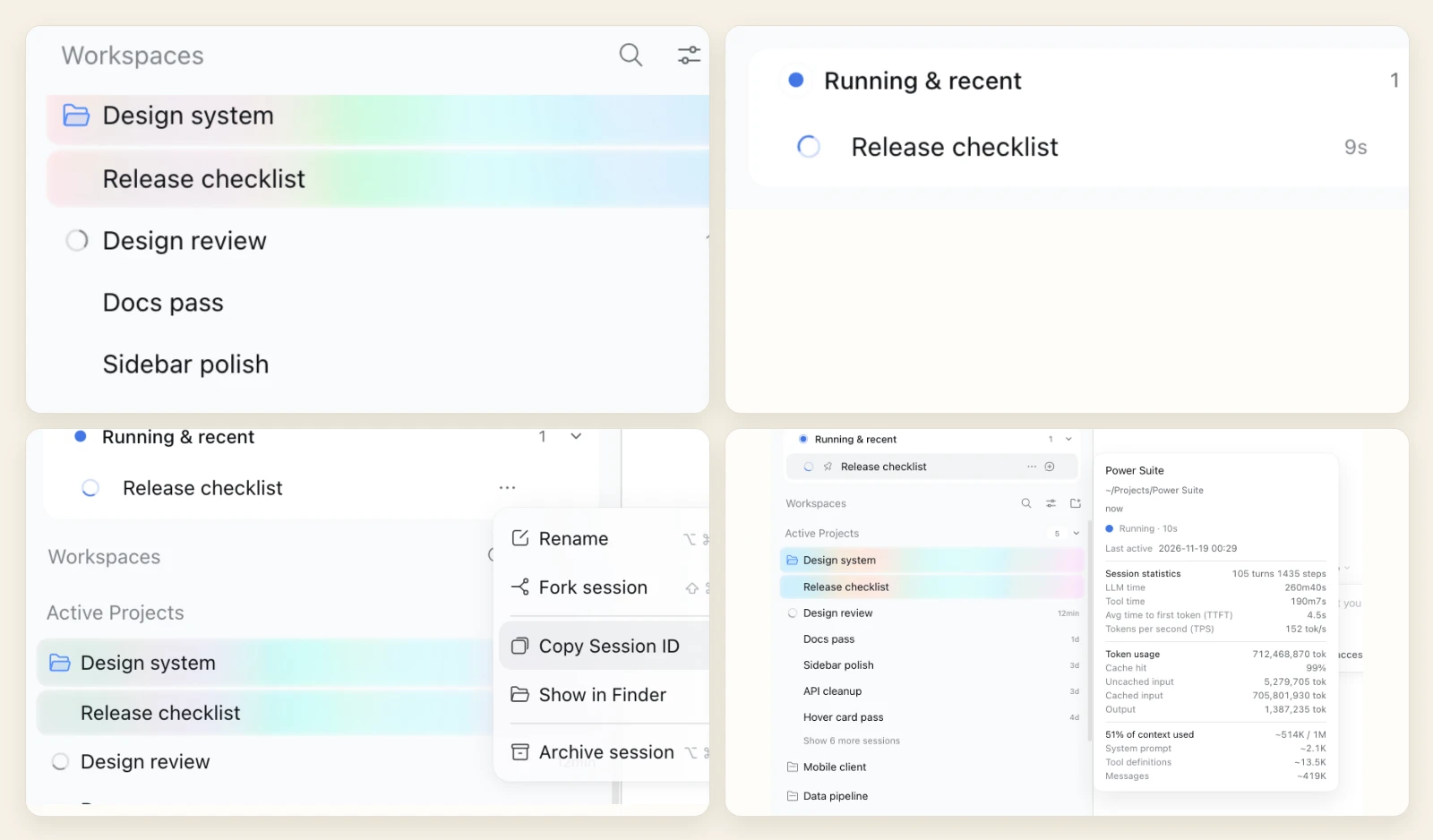
All screenshots come from a temporary, isolated DSH instance with demo Sessions and demo artifacts; no personal content is involved.
- Running & recent, at the top of the sidebar. The card lists running and recently finished Sessions, nests delegated subagent rows, shows an amber
flag-fillbefore the title of a Session waiting on a question, plan review or approval, and paints the current row with its rainbow glow. Hover a row for the native Session statistics, Token usage and Context usage figures. - Native row menus. A top-level row's "…" menu opens the shell's own shared context-menu popup with the native Session actions (Pin is left out): native material, icons, shortcut hints and footer.
- A width that stays put. The dragged left sidebar width is a Host-owned preference: it survives reloads and new tabs, matches across every browser paired with the same Host (last write wins), reopens at the stored width after a collapse, and no longer blinks the rainbow atmosphere while the handle is dragged.
- Read state shared by the Host. Read marks, card pins and event-sourced last-activity times live on the Host, so they persist across reloads and are shared by every browser on the same Host instead of belonging to one browser's storage.
Read more: Dynamic Workspaces · Sidebar width · Interrupted sessions.
Session artifacts
The right Sidebar's Files pane header carries an Artifacts button. It opens the current Session's list in place: every file the Session created or delivered, plus the images and files you attached to your own prompts.
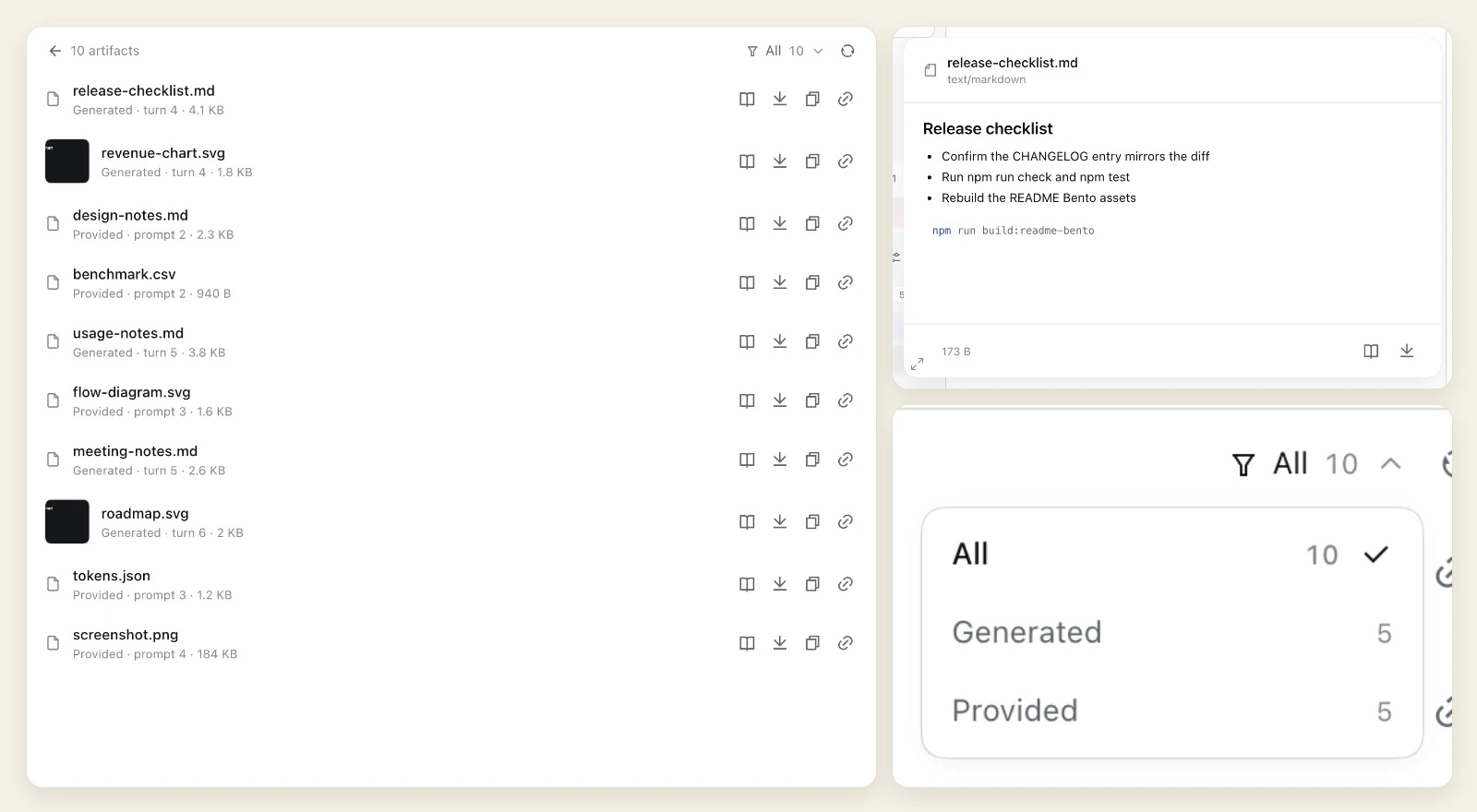
- One list, two sources. Generated files and provided attachments share one list; the header filter switches All / Generated / Provided with live counts.
- Look before you open. Hover a row for the shared Quick Look: Markdown, highlighted code, images, audio/video, PDF and HTML for generated files, and images, media and text-like files for provided attachments — all in a resizable card.
- The actions you need on a file. Open, download, copy content (text verbatim; images as a real clipboard picture in a secure context), and copy the authenticated LAN link.
- The same preview in the Workspace tree. The native Workspace files list gets the same Quick Look row, so files preview the same way in both places.
Read more: Session artifacts.
Composer: prompt recall, drafts, recovery
The composer keeps the work around the prompt: what you asked before, what you attached, and what happened when a turn did not finish.
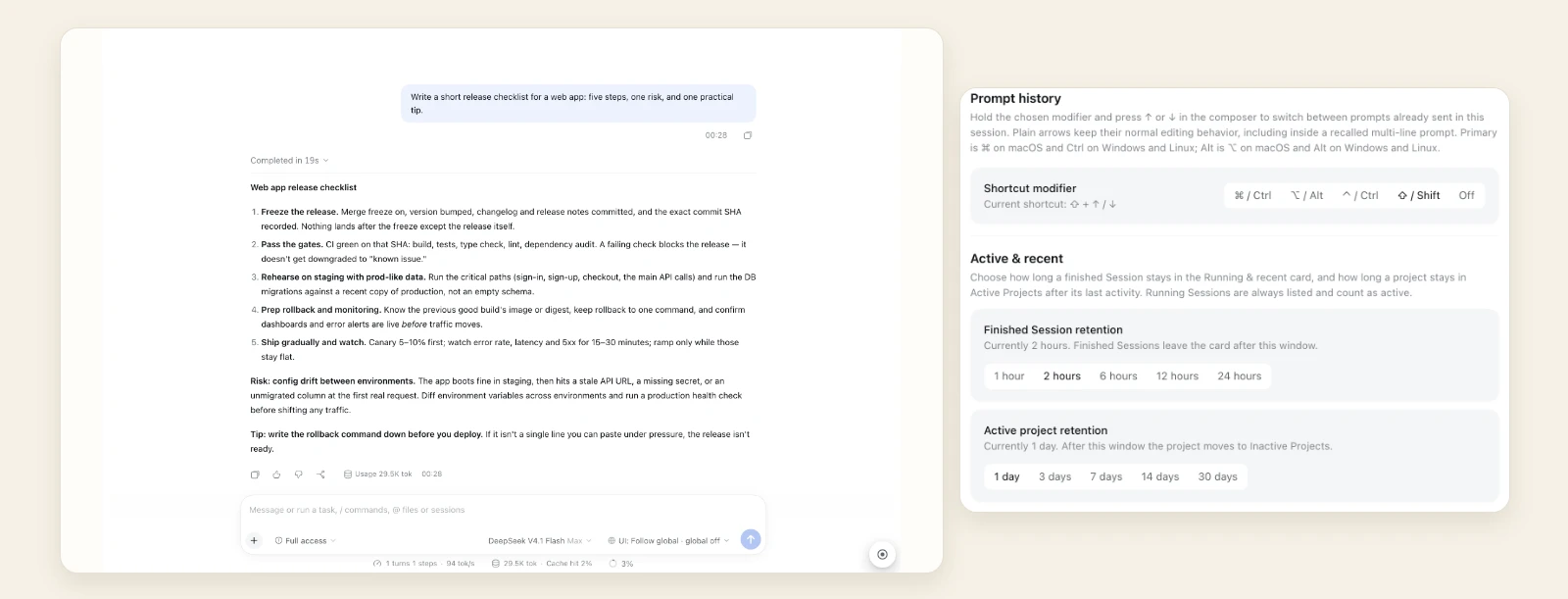
- Prompt history. The configured modifier + ↑/↓ recalls prompts already sent in this Session; plain arrows keep their native behavior. A rail at the conversation's right edge lists the same prompts as ticks, oldest first, with timestamps, a full-text hover preview, an inline search and click-to-copy.
- Draft attachments survive Session switches. Pasted, dropped or picked files stay with the draft when you open another Session and come back, for the page lifetime — the shell itself persists only the draft text.
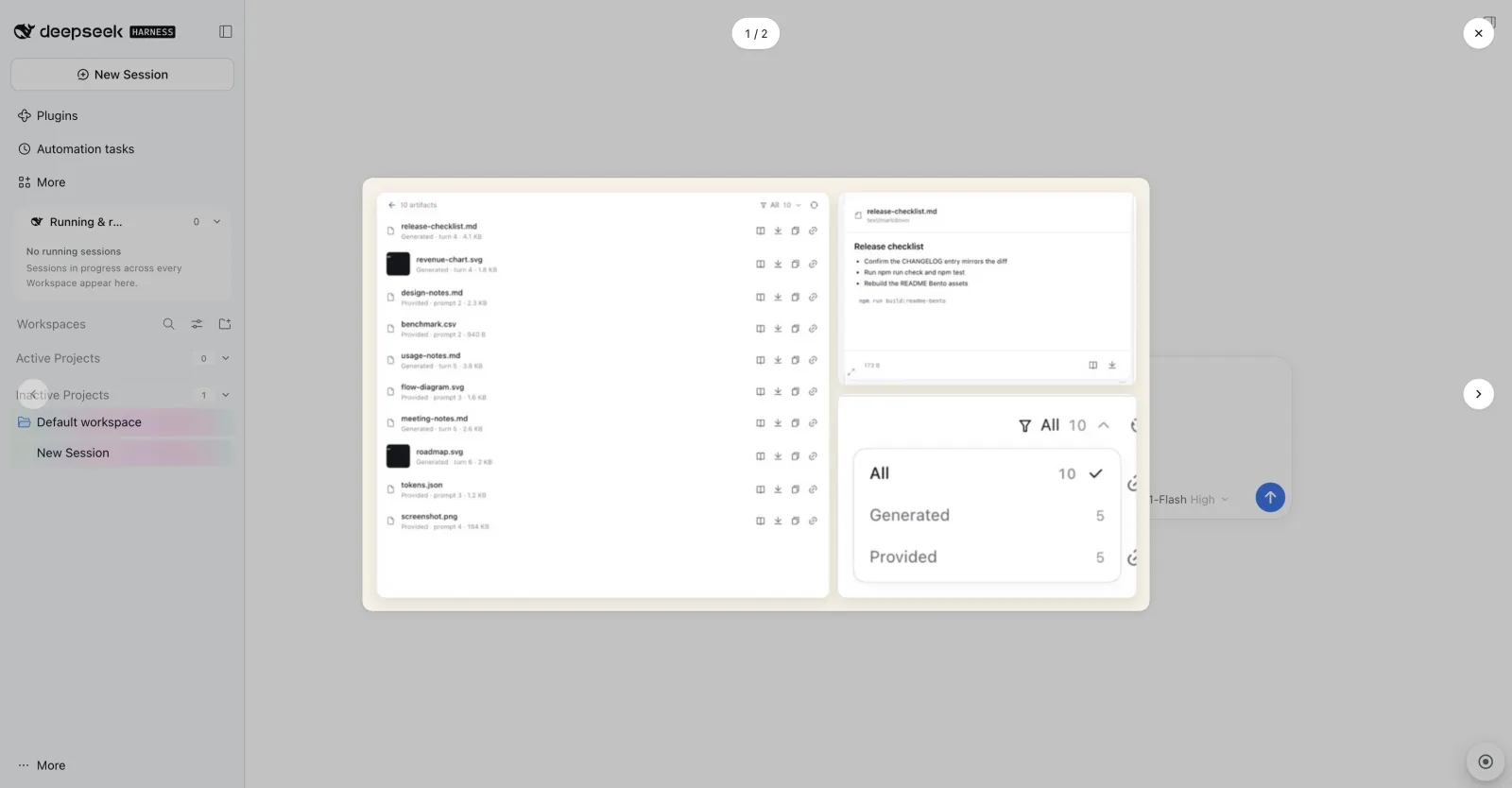
- A viewer for pasted screenshots. When the composer holds two or more pasted images, clicking one opens a continuous
N / Mviewer instead of the native single-image lightbox: previous/next buttons and ←/→ keys, one-step mouse-wheel navigation, Esc/backdrop/close returning focus to the thumbnail, and clamping when an image is removed while it is open (removing all closes it). A single image keeps the native lightbox.
- Interrupted Sessions are marked and recoverable. A Session whose last turn did not finish gets an amber title mark, a hover-revealed inline Continue triangle and a play-shaped composer submit control. Continuing is implicit and Host-owned, and an SSE stream keeps open pages in sync across devices.
- Settings in one place. The bundle's Plugins page holds the prompt-history modifier and the two retention windows for the Active/recent surfaces.
Read more: Prompt history, draft attachments, composer image gallery, interrupted sessions.
UI element annotation
A round launcher at the bottom-right of the page toggles a point-and-click annotation mode. The page makes room for a narrow right rail instead of being covered.
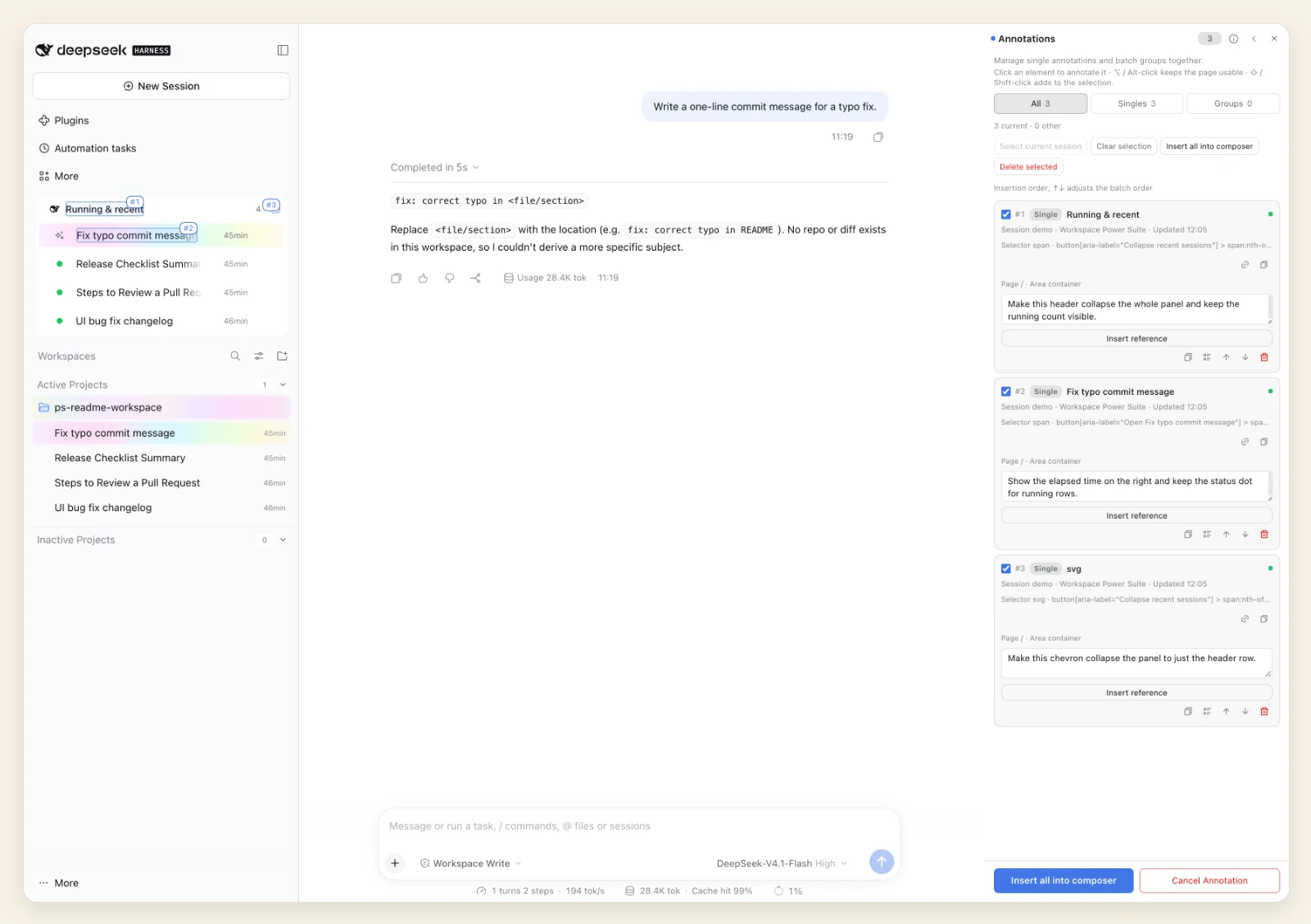
- Point at the element. Hovering outlines the element a click would select, including floating surfaces such as native hover preview cards, which can be drilled into. The popover carries the locator summary, live status, parent/child adjustment and the requested change.
- The note stays with the page. Each annotation becomes a persisted record with a page marker, a numbered requirement badge and a hover detail card; edit the requirement, relocate the target, copy the locator, or delete with a 5 s undo.
- Send it as a reference, not prose. References are inserted as native composer inline reference chips — one chip or one grouped batch — without sending. The rail's collection view edits, previews, reorders and batch-inserts annotations, with multi-select, marquee, ancestor adjustment and a pass-through modifier.
Read more: UI element annotation.
Features at a glance
| Feature | What it adds |
|---|---|
| Dynamic Workspaces | Active/Inactive activity buckets, the Running & recent card with Host-shared pinning and subagent rows, the native row menu, pending-interaction flags and the rainbow current row. |
| Session artifacts | The Files-pane Artifacts list for generated files and provided attachments, with Quick Look, open/download/copy actions and the All/Generated/Provided filter. |
| UI element annotation | Point-and-click annotation with a right rail, persisted page markers, a collection view and native composer reference chips. |
| Prompt history | Modifier + ↑/↓ recall plus a right-edge history rail with preview, search and click-to-copy. |
| Draft attachments | Browser-owned attachment memory across Session switches for the page lifetime. |
| Composer image gallery | A continuous N/M viewer for two or more pasted composer images, with keys/wheel navigation, focus return, removal clamping and native behavior for a single image. |
| Interrupted sessions | An amber mark, inline Continue and a play-shaped submit control for turns that did not finish, with Host-owned cross-device state. |
| Sidebar width | A Host-owned, durable left-sidebar width shared across browsers, restored after a collapse, with a flicker-free rainbow repaint. |
| Workspace presets | A Workspace context-menu submenu that sets the default agent preset for new Sessions in that Workspace. |
| Settings | The bundle's Plugins-page section: the prompt-history modifier and the two retention windows. |
| Update notice | A bottom-right Host-checked notice for a newer published version, with the version change and release highlights; silent until a newer version is published. |
The features ship in the single bundle @zephinel/dsh-power-suite (Loader row power-suite), so they install, enable and uninstall together. The browser half attaches to the Web platform only.
Install
The bundle is @zephinel/dsh-power-suite (Loader row power-suite). Install it into a DSH profile, then reload the plugin or restart the Web process so the Host half loads — a page refresh is not enough for Host code.
From npm:
dsh plugin --profile web add @zephinel/dsh-power-suite@0.2.1
Or use the in-app route: Plugins in the Web sidebar → Add plugin → enter @zephinel/dsh-power-suite@0.2.1 → Install → Enable now.
From this checkout (development): in the Plugins page choose Add plugin → Install a third-party plugin and enter the checkout's absolute path. From an agent session the same install is:
plugin_manager action=install_bundle target=/absolute/path/to/dsh-power-suite
The profile keeps a local checkout as a link: dependency, so the checkout is the code the Host runs after npm run build and a reload; removing the bundle removes the plugin.
Installation needs pnpm on PATH: dsh plugin add forwards to pnpm in the profile, and the Plugins page runs pnpm behind its install dialog.
Quick start
Start (or restart) DSH and open the URL it prints:
dsh web
- Expand the left sidebar: Running & recent sits above the native Workspaces header, and the Workspace list is split into Active Projects and Inactive Projects.
- Open a Session with at least two turns that has sent prompts: the prompt-history rail appears below the native turn rail, and the modifier + ↑/↓ recalls earlier prompts in the composer (one-turn Sessions keep the keyboard recall but have no native rail column to host the ticks).
- Open Files in the right sidebar and click Artifacts to list what the Session produced and what you attached.
- Click the round launcher at the bottom-right: the page narrows, and hovering outlines the element a click would annotate.
- Open the bundle's page under Plugins for its settings: the prompt-history modifier and the two retention windows.
The address and port come from the DSH profile. After a browser-code change, refresh the page; after a Host-code change, reload the plugin or restart the Web process.
Get the code
The publishing target is GitHub:
git clone https://github.com/Zephinel/dsh-power-suite.git
cd dsh-power-suite
There is no runtime dependency. Run npm ci once to install the esbuild/TypeScript dev dependencies, then npm run build to produce the gitignored lib/ entries (npm run check builds for you); npm test runs without the build.
Prerequisites
- DSH 0.2.2 plugin interface — the Host and browser halves target DSH 0.2.2. The Web Host used for this repository's browser checks runs 0.2.2-rc.1; later DSH versions are unverified. Install the CLI with
npm install -g @deepseek-ai/dsh. - Node.js 22.18 or newer —
package.jsondeclaresengines.node >= 22.18(the test suite imports the TypeScript sources through Node's native type stripping); the CI gate runs on Node 22 and 24. Runnpm cionce for esbuild and the typecheck tooling. - pnpm — needed to install profile bundles:
dsh plugin addforwards to it, and the in-app Plugins page runs it behind its dialog. - Git — needed only to get the code; the repository sets no minimum version.
- Google Chrome (optional) — only for the local browser suites; they use the standard macOS Chrome path and accept
CHROME_BINelsewhere.
Confirm the tools are present:
node --version   # v22 or newer
dsh --version    # verified: 0.2.2-rc.1
pnpm --version
git --version
Verified platform: macOS with DSH Web 0.2.2-rc.1. The plugin itself is a Web-platform bundle; other platforms are unverified.
Build, test and deploy
The build bundles src/index.ts and src/client.js into the gitignored lib/ entries with esbuild; there are no runtime dependencies. Run the commands below from the checkout root.
| Command | Purpose |
|---|---|
npm run build | node scripts/build.mjs — esbuild bundles src/ into the gitignored lib/index.js (Host ESM) and lib/client.js (browser entry: ESM source plus src/browser/ modules, bundled to a classic script); prepare runs it before npm pack/npm publish. |
npm test | node --test test/*.test.js — pure-logic tests importing the TypeScript Host sources through Node's native type stripping (Node 22.18+; no build needed). |
npm run typecheck | tsc --noEmit — no-emit strict TypeScript check over the Host and browser sources; a DOM-free Host profile, the browser DOM profile, a suppression-comment scan and a built lib/client.js execution smoke are also gated. |
npm run check | The full gate: builds the entries, then runs syntax, typecheck, package manifest, docs links, Node tests and the release-notes check, then pack:check. |
npm run pack:check | npm pack --dry-run --json — inspect the published file list. |
npm run check:release-notes | Validate the tag-pinned release highlights for the package version. |
npm run check:docs-links | Verify that local Markdown links and images resolve. |
npm run build:readme-bento | Compose the README Bento images from local captures (needs Chrome). |
The browser acceptance suites drive the real running DSH UI in a throwaway headless Chrome profile:
node test/browser/sidebar.e2e.mjs --smoke      # sidebar surfaces
node test/browser/annotation.e2e.mjs --smoke   # UI element annotation
node test/browser/update-prompt.e2e.mjs        # update notice
They need a running DSH Web and Chrome, and run one at a time; environment variables, per-mode checks and the full option list are in the browser harness guide. CI has no browser job — these are local pre-release checks.
Deploy means installing the bundle into the target DSH profile; there is no separate server or watch mode. The local install/reload loop and the tag-publish procedure (Trusted Publishing on a v* tag) are in docs/development.md.
Documentation
Detailed docs live in docs/ and ship with the package; the links below use
absolute GitHub URLs so they stay clickable from the npm README as well. Start
with the full documentation index.
Concepts
- Architecture — Host and browser halves, routes, slots, services and settings documents.
- Usage — what each feature does in the UI, step by step.
- Feature inventory — the full inventory plus the recipe for adding a feature.
Feature reference
- Dynamic Workspaces · Sidebar width · Session artifacts · Prompt history · Draft attachments · Interrupted sessions · UI element annotation · Workspace presets · Settings · Update notice
Development and verification
- Development — local install/reload loop, checks, the README capture and Bento pipeline, release flow.
- Verification — the checks and evidence for this checkout.
- Limitations — known bounds and unverified areas.
- Browser harness — the live-GUI acceptance suites, their modes and evidence.
- Changelog — release entries; the current published release is 0.2.1.
- Release notes — the tag-pinned Highlights format read by the update notice.
Contributing
- Bugs and feature requests go to GitHub Issues.
- Run
npm run checkbefore proposing a change. Host logic lives insrc/features/<name>/behind tests undertest/, and each feature has a page underdocs/; docs/development.md documents the feature recipe, the commit conventions and the release flow. - Behavior, copy or gate changes need the matching docs updated too: the feature reference,
CHANGELOG.mdanddocs/verification.md; the docs-sync procedure is.agents/skills/sync-power-suite-docs/SKILL.md. - Releases are cut from a tag by the publish workflow. Never run
npm publishlocally; the maintainer procedure is.agents/skills/release-power-suite/SKILL.md. - Maintainer: @Zephinel.
License
MIT. Third-party notices are in NOTICE: Remix Icon SVG path data inlined in the browser entry (Apache-2.0), and the DeepSeek Harness platform disclaimer.
Похожие плагины
dsh-web (dsh-task-board)
zhu1090093659/dsh-web
dsh-web (dsh-web-all)
zhu1090093659/dsh-web
dsh-TUI
ccch1mneyyy/dsh-tui
dsh-web-ui (dsh-task-board)
zhu1090093659/dsh-web-ui