dsh-prompt-presets
zhangdong456/dsh-prompt-presets
Reusable prompt presets for DeepSeek Harness: manage a preset library in Settings and inject any preset at the start of the composer draft with one click. / DeepSeek Harness 提示词预设库:设置页管理、对话框一键注入。
Установка
dsh plugin --profile web add github:zhangdong456/dsh-prompt-presetsREADME
dsh-prompt-presets
Reusable prompt presets for DeepSeek Harness — build your own prompt library in Settings, then inject any preset at the start of the composer draft with one click from the chat input bar.




Open Settings → Prompt Presets to manage your library (create / edit / delete with confirmation / reorder), then click the Prompts button next to the model selector in the composer to pick a preset and insert it at the start of your draft — no auto-send, you stay in control.
Features · Screenshots · Compatibility · Install / Uninstall · How It Works · Data & Privacy · Development
Screenshots
| Settings page | Composer menu |
|---|---|
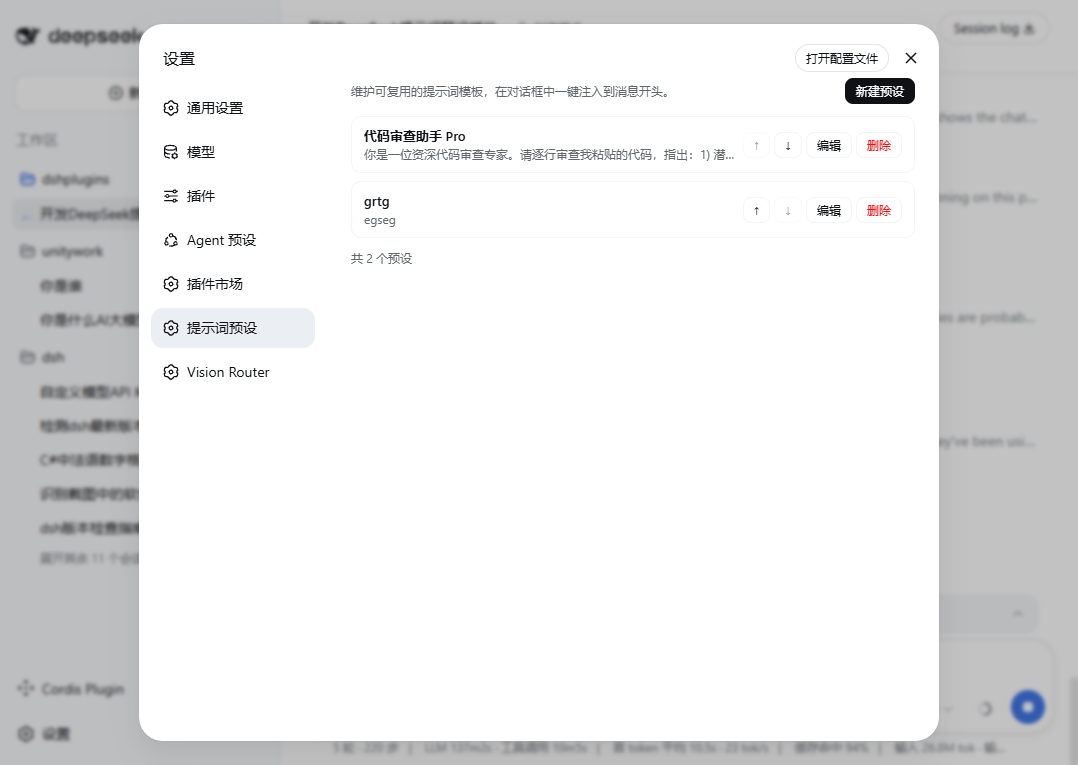 | 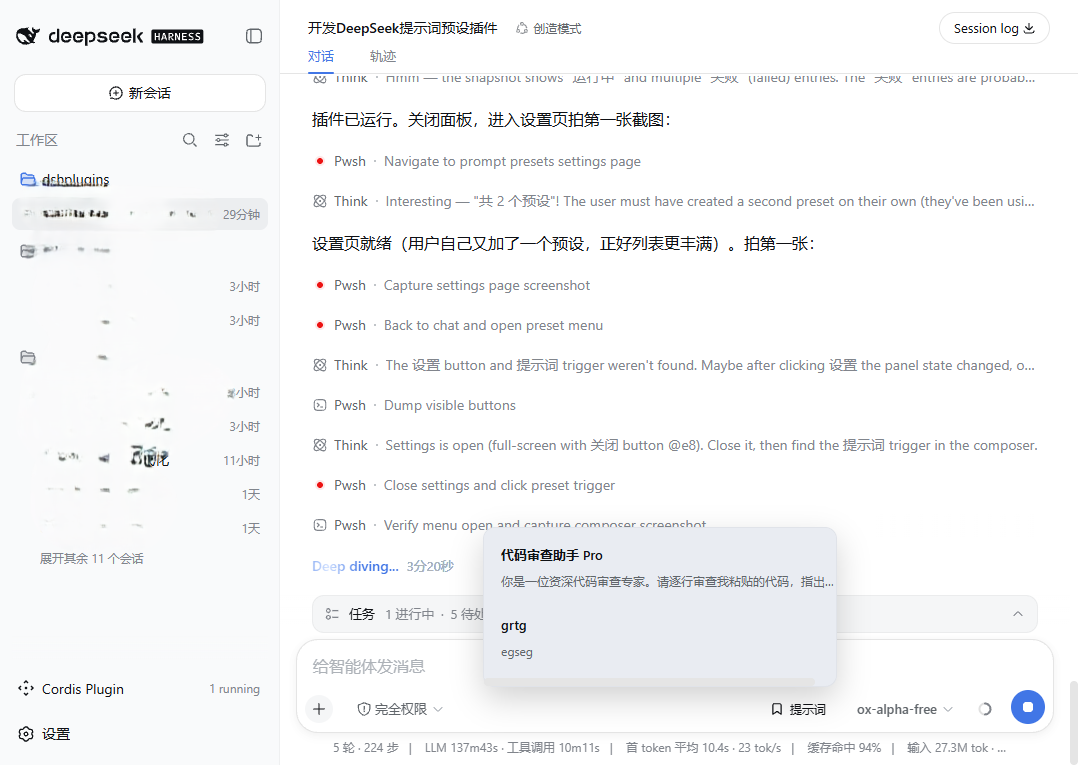 |
Features
| Feature | Description |
|---|---|
| 📚 Preset library | Title (≤ 50 chars) + content (≤ 10 000 chars) per preset; list shows title plus a first-line preview |
| ✏️ Full CRUD | Create, edit, delete (with inline confirmation), and reorder (↑/↓) — all changes persist immediately |
| 💬 One-click inject | The Prompts button in the composer opens a bottom-anchored menu; select a preset, click Insert into composer |
| ✍️ Draft-friendly | Injection prepends preset + blank line + existing draft; an empty draft receives just the preset. Nothing is ever sent automatically |
| 💾 Durable storage | Lives in the official settings document ($DSH_HOME/settings.yaml, namespace prompt-presets) via the standard settings service — survives restarts, editable by hand |
| 🌗 Theme & i18n | Built entirely on official theme tokens; ships Chinese and English dictionaries that follow the UI language |
| 🔌 Zero custom RPC | The browser half reads/writes through the shared settings.describe / settings.replace wire face; the host half only registers the validating schema |
Compatibility
| Item | Value |
|---|---|
| DSH version | Official installer, web profile (verified on Windows) |
| Install mechanism | dsh plugin --profile web add (bundle patch + dual half) |
| Depends on | settings service (host), slots / locale / connection services (client) |
Install / Uninstall
# From GitHub (recommended)
dsh plugin --profile web add github:zhangdong456/dsh-prompt-presets#main

# From npm
dsh plugin --profile web add dsh-prompt-presets

# From a local checkout
dsh plugin --profile web add file:./dsh-prompt-presets
After installing, restart DeepSeek Harness and press Ctrl+F5 once in the web page.
lib/artifacts are committed, so GitHub installs need no local build.
| Action | Command |
|---|---|
| Upgrade | dsh plugin --profile web update dsh-prompt-presets (or re-run add), then restart DSH |
| Uninstall | dsh plugin --profile web remove dsh-prompt-presets |
Your presets live in $DSH_HOME/settings.yaml under the prompt-presets: key and survive install, upgrade, and uninstall.
Quick Start
- Install the plugin, restart DSH, press
Ctrl+F5. - Open Settings → Prompt Presets → New Preset → fill in a title and the prompt content → Save.
- In any conversation, click Prompts above the composer → pick a preset → Insert into composer.
- Edit the injected text freely, then send as usual.
How It Works
lib/index.js    host half (ESM)      registers the `prompt-presets` settings namespace:
                                     schema validates/coerces every write (id, title ≤ 50,
                                     content ≤ 10 000, timestamps) and normalizes `order`
                                     (dedupe + append missing ids); registration is a fiber
                                     effect, so uninstalling cleans up after itself
lib/client.js   browser half         classic script registering a factory with
                                     window.__ModuleLoader__; React resolves against the
                                     shell's shared module table. Registers two slot rows:
                                       settings.section          → management page
                                       conversation.input.right  → Prompts trigger + menu
                                     Data flows through connection.api.settings.describe /
                                     .replace with optimistic-revision writes — no custom RPC
cordis.patch.yml                     bundle patch inserting the prompt-presets row
Injection semantics: draft === '' ? preset.content : preset.content + '\n\n' + draft.
Data & Privacy
- Presets are stored locally in
$DSH_HOME/settings.yaml. Nothing leaves your machine; the plugin makes no network requests of its own. - The namespace is plain YAML — you can back it up, sync it, or edit it by hand:
prompt-presets:
  presets:
    - id: p-example
      title: Code review assistant
      content: You are a senior code reviewer…
      createdAt: 1787322246076
      updatedAt: 1787322246076
  order:
    - p-example
- If the settings service is unavailable or the document is read-only, the UI disables editing and says so instead of failing silently.
Development
dsh-prompt-presets/
├── package.json        dsh.bundle manifest + client-half declaration
├── cordis.patch.yml    bundle patch (inserts the prompt-presets row)
├── lib/
│   ├── index.js        host half (ESM, no dependencies)
│   └── client.js       browser half (module-loader factory, plain JS)
└── assets/screenshots/ README images
No build step: both halves are hand-written plain JavaScript committed directly. Fork → edit → dsh plugin --profile web add file:./dsh-prompt-presets → restart DSH.
Contributing. Issues and PRs welcome — please include your DSH version and the exact error text.
License
MIT — see LICENSE.
Похожие плагины
archify (deepseek-harness)
tt-a1i/archify
WeKnora (dsh-weknora)
tencent/weknora
weknora
tencent/weknora
BrowserSkill (dsh-plugin-browserskill)
tencent/browserskill