dsh-model-value
znshmily/dsh-model-value
Ranks the models connected to DeepSeek Harness by unit price and Artificial Analysis intelligence, lists priced market models that are not connected yet, and recommends the best-value picks in the composer model menu with one-click switching. Its HTTP routes have no DSH access check, so a web page open in your browser could call them.
Установка
dsh plugin --profile web add github:znshmily/dsh-model-valueREADME
dsh-model-value



English · 中文
Know what a model costs before you pick it. This plugin ranks every model your DeepSeek Harness host already has by unit price, intelligence, and value for the money — and puts the answer where you actually choose a model: the composer's model menu.
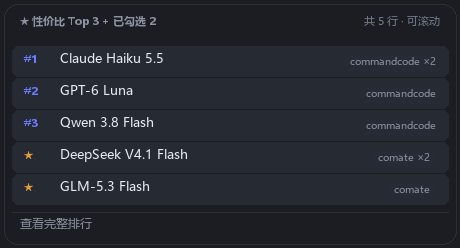
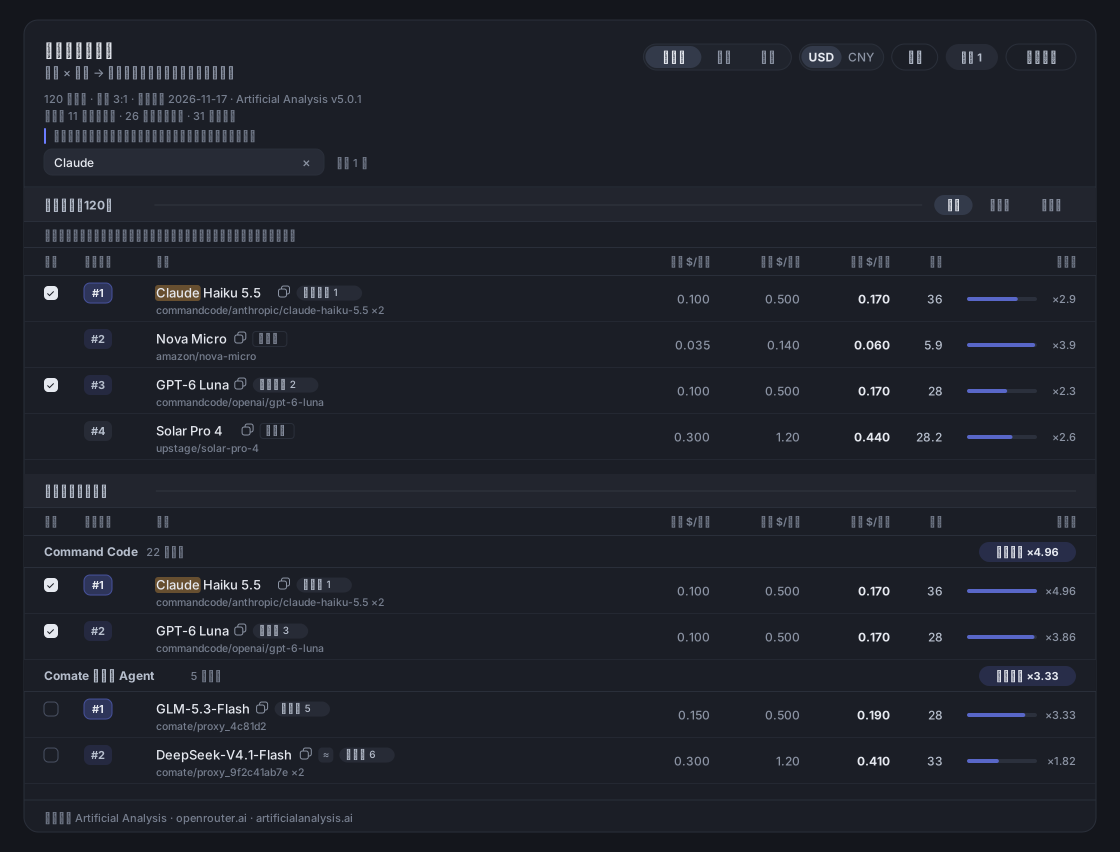
| Composer model menu | Ranking panel |
|---|---|
 |  |
What it does
- Best-value picks in the model menu. Three rows above the list, one per distinct model, picked by value. Pinned models follow with a ★. One click switches the session.
- A ranking panel with two questions on one page. "Which model is worth it overall?" and "Which model is worth it on this provider?" — the same table, two numberings.
- Models you have not connected yet. Priced and scored market models are listed alongside, ranked on the same scale, so you can see what a different provider would buy you.
- An agent tool.
model_value_rankreturns the same data to the model itself, so it can ask "what is cheap and good right now?" before choosing.
Install
dsh plugin add dsh-model-value                     # npm
dsh plugin add github:znshmily/dsh-model-value     # GitHub source
Or from the Plugins page of the DSH Desktop app / the Discover tab of the plugin market. A local checkout installs with the plugin manager (install_bundle <path>) — never edit the profile's package.json or cordis.patch.yml by hand.
Reload the session (or refresh the page) afterwards: the model menu gains a "★ Top 3 by value" block whose last row opens the full ranking.
Using it
The menu answers one question — which channel's which model do I switch to. Each row is a rank, the full model name (it wraps rather than truncates), and the provider that would serve it. Price and intelligence live in the panel; nothing is hidden behind a tooltip.
The panel has two blocks in one scroll container:
- All models (N) — connected channels and market models in a single table with one numbering. The scope chips narrow it to connected or not-connected; the title and count follow.
- By provider — the connected channels again, each with its own 1..N ranking, because "best on this provider" and "best overall" are different questions.
Both numberings stay visible: the rank column shows the one the table is sorted by, and a pill next to the name spells out the other. Headers and group titles stick while you scroll. The model cell is two lines — the name with its pills, then the raw provider/model id, which you can select and copy (that is where a provider's opaque proxy_<hash> shows up). A name search highlights matches without filtering anything, so ranks, order and checkboxes stay put. Every text is selectable, and each row has a copy button for the model name.
Pinning a row (the checkbox column) adds that channel's model to the menu after the Top 3. Pins are per channel instance — the same underlying model on two providers is two rows, and ticking one does not tick the other. The list is global and persists in the Host's state.json.
How the ranking is computed
Everything runs on the Host; the client only renders. Both the panel and the tool read one endpoint, /dsh-model-value/api/rank.
effectiveInput = input × (1 − cacheHitShare) + cacheRead × cacheHitShare
blended        = effectiveInput × wIn + output × wOut        (weights normalised, default 3:1)
value          = intelligence / blended                      (index points per $/M tokens)
cacheReadonly applies to models with a published cache price; the rest pay full input.cacheHitSharedefaults to 0.5.- Weights default to 3:1 input:output — coding sessions read far more than they write. Both zero falls back to 1:1.
- Free, unpriced and unscored models are not ranked. A free model has no finite value, and a missing score is not a low score; they are counted in the header line instead of being sorted next to real numbers.
≈on a price or a score means it was derived (inherited from the base serving tier, or from the parent model) rather than published. Hovering the badge says where it came from.- The value bar is normalised to the median of its own table, so
×4.96reads as "about five times the median value here" — the two blocks have separate medians and are not comparable to each other.
Configuration
Settings → Plugins → Plugins configuration → Model value (weightInput, weightOutput, cacheHitShare, currency, fx, includeFree, onlineRefresh, overridesJson).
| Field | Default | What it does |
|---|---|---|
weightInput / weightOutput | 3 / 1 | Input:output weights of the blended price. |
cacheHitShare | 0.5 | Share of input tokens billed at the cache-read price. |
currency / fx | USD / 7.2 | Display currency; the table itself is stored in USD per million tokens. |
includeFree | true | Show zero-price replicas as their own group. |
onlineRefresh | true | Pull live prices from OpenRouter; failures fall back to the bundled snapshot silently. |
overridesJson | "" | Hand overrides, e.g. {"models":{"vendor/model":{"input":0.3,"output":1.2}},"scores":{"vendor/model":48}}. |
Data
Bundled snapshot: 509 price entries and 176 intelligence scores (155 measured, 21 derived) from the Artificial Analysis Intelligence Index v5.0.1, prices as of 2026-11-17.
- Prices: the OpenRouter catalogue; intelligence: Artificial Analysis, via the public aiapiindex.com mirror (CC BY 4.0).
tools/sync-sources.mjsre-syncs,tools/fill-gaps.mjscovers models the mirror has not caught up with. tools/seed-market.mjsregenerates the market-model seed used by the panel.- The only outbound request the plugin makes is the optional OpenRouter price refresh. There is no telemetry, and no data leaves your machine otherwise.
Snapshot data can be wrong, and providers change prices without notice — treat the numbers as a shopping aid, not a bill.
Development
node test/units.mjs      # key matching, blended price, sorting, groups, payload, pins, tool, select route
node test/client.mjs     # headless render of the real client bundle (12 scenarios)
node --check index.js && node --check client.js
The panel and menu previews are drawn from the same geometry the stylesheet declares, so documentation cannot drift from the UI: tools/preview.py → docs/preview.svg, tools/preview_menu.py → the menu image, tools/make_icon.py → the storefront icon (the markets take raster images, not SVG). screenshots.json declares the images to the plugin market. vendor/ carries the Schemastery build, because a bare import of @deepseek-ai/schemastery does not resolve from a plugin linked in from outside the profile.
Full notes, including the layout and theme invariants the tests guard: docs/DETAIL.md.
License
Похожие плагины
dsh-our-free-model
ebony-vinyl/dsh-our-free-model
dsh-routing-suite
yjh051108/dsh-routing-suite
dsh-connect-workbuddy
dingminhua/dsh-connect-workbuddy
dsh-workbuddy-connect
corrinehu/dsh-workbuddy-connect