deepseek-harness-replay
zoyluoblue/deepseek-harness-replay
DeepSeek Harness (dsh) plugin that exports a session as a self-contained, replayable HTML file — full transcript, faithful tool cards, and playback at the original timing.
Install
dsh plugin --profile web add github:zoyluoblue/deepseek-harness-replayREADME
@zoytown/dsh-replay
English | 中文
A DeepSeek Harness plugin that turns a session into one self-contained HTML file — a full transcript you can open anywhere, with faithful tool cards and playback at the session's original timing.
The harness already ships /export, which downloads the raw session log as a ZIP. That artifact is for machines. This one is for people.
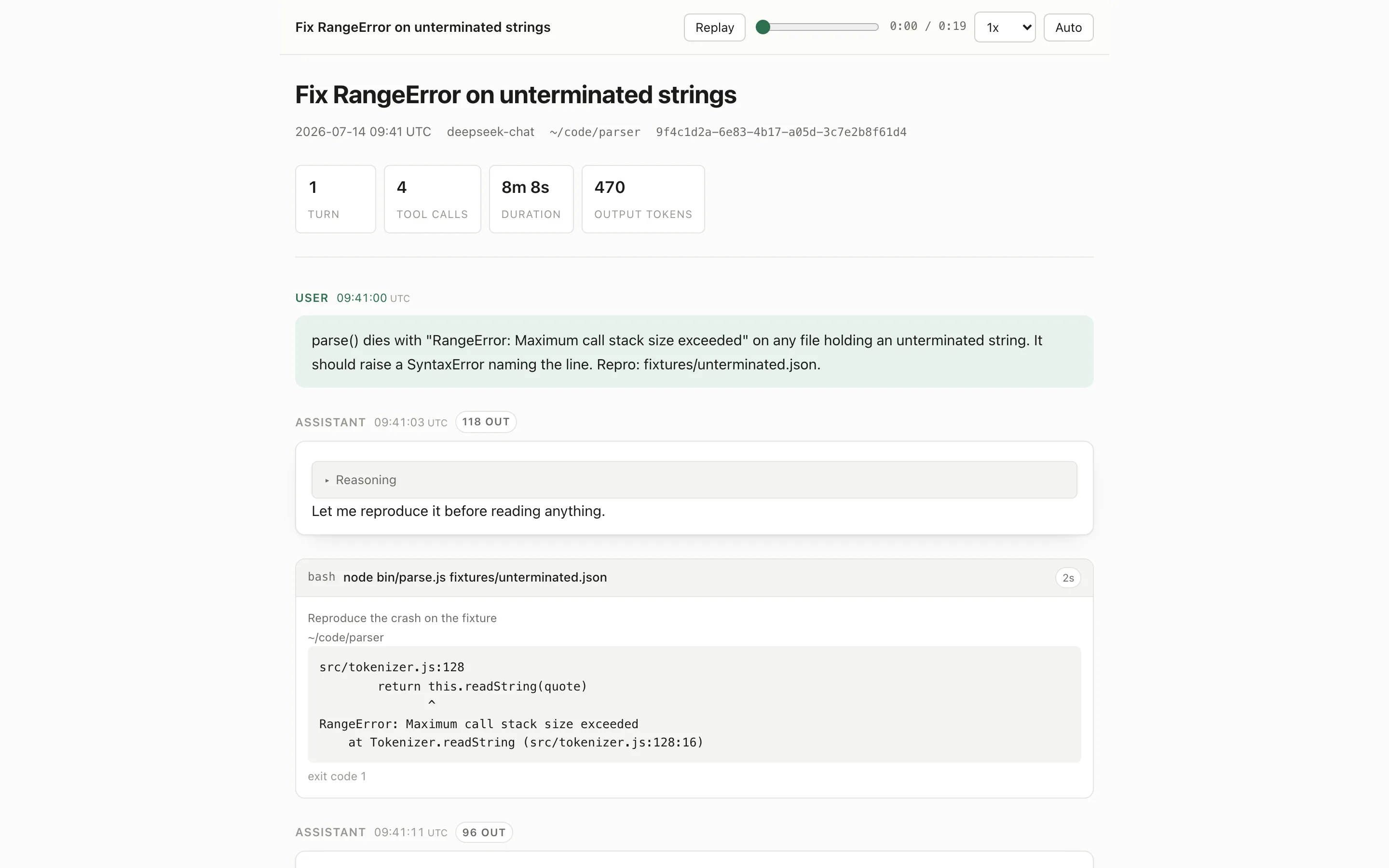
What you get
- One file, no dependencies. CSS, JavaScript, and images are inlined. Double-click it, mail it, drop it on any static host — it works offline and needs nothing installed.
- Real playback. Every session event carries a millisecond timestamp, including individual stream chunks, so the replay reproduces the rhythm the output actually had. Pauses longer than
gapCeilingMsare compressed so playback never stalls on thinking time, and a substantial one (over 4x the ceiling) is labelled in the transcript with its real duration. - Readable first, playable second. The page opens as a complete transcript: searchable and
Ctrl+F-able. Playback is a button, not a gate. (The transcript is drawn by the page's own script from an embedded JSON island; a reader that does not run JavaScript still gets the title, timestamps and headline stats, but not the conversation.) - Faithful tool cards. Each card is produced by the tool's own presenter — terminal output with exit codes, inline diffs, search hits, file reads, web results — resolved in the same registry scope the session actually ran under.
- Subagents inline. A delegated session appears as a collapsible block in the parent timeline, with its own tool calls.
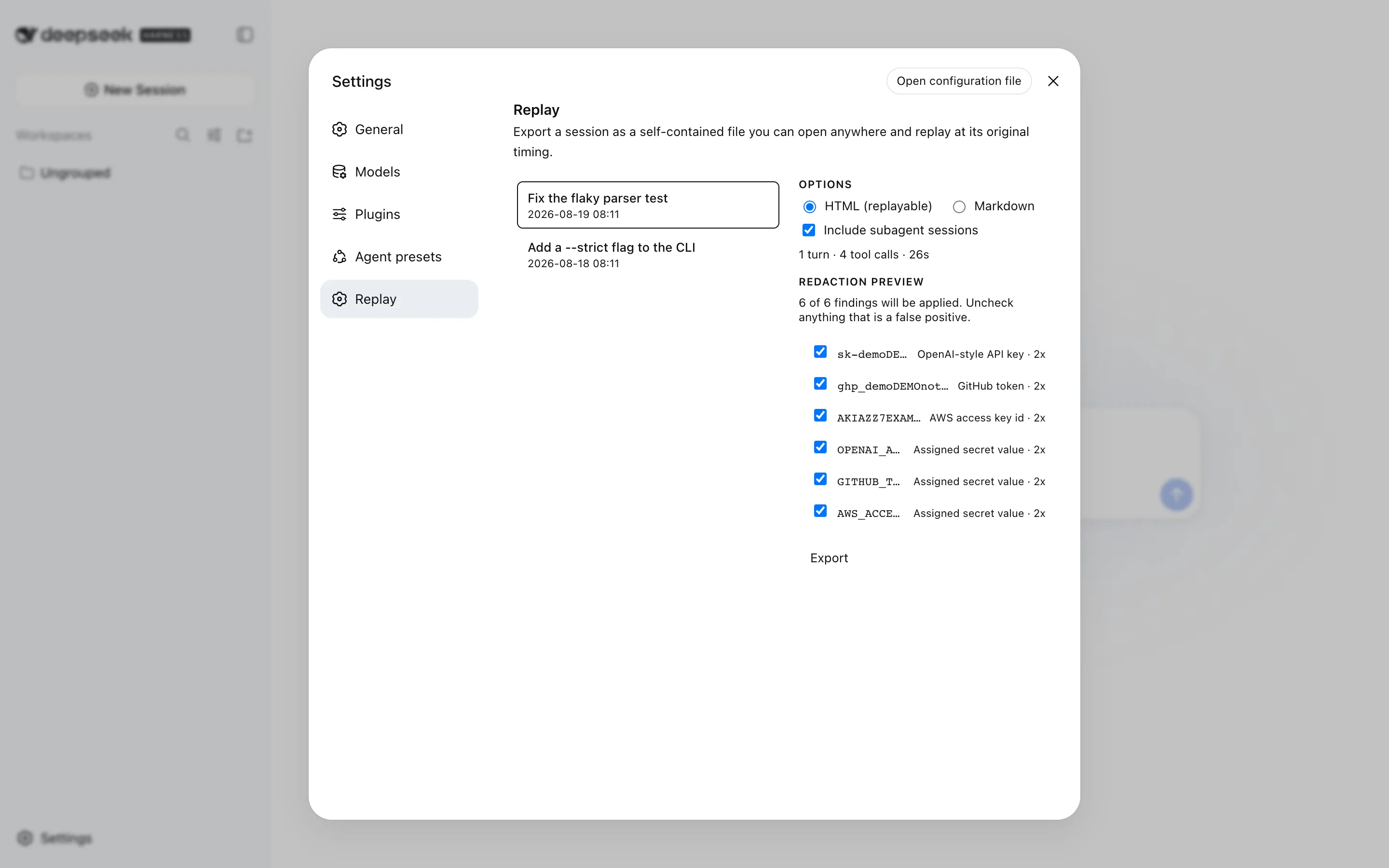
- Redaction with a preview. Credentials and home paths are masked by default; the preview lists every match so you can uncheck a false positive before anything is written.
- Light, dark, and system themes, responsive down to phone width, honouring
prefers-reduced-motion.
Install
dsh plugin --profile web add @zoytown/dsh-replay
Then restart dsh web. A Replay entry appears in the Settings dialog's left-hand navigation.
To remove it:
dsh plugin --profile web remove @zoytown/dsh-replay
Use
From the Settings page. Open Settings → Replay, pick a session, review what redaction would mask, choose HTML or Markdown, and export. The written path is shown with a copy button.
From the composer. /share exports the current session:
/share            → HTML
/share markdown   → Markdown
From the model. A session_export tool lets an agent write a transcript when you ask it to ("export what we just did"). It writes a local file and returns the path — it never uploads or shares anything, it cannot choose the destination, and redaction is always applied on this route regardless of redaction.enabled, because no human reviewed the preview.
Files land in $DSH_HOME/replay/ (by default ~/.dsh/replay/), named <session-title>-<UTC timestamp>.<ext>.
Configuration
Every documented knob is a cordis.yml field. A few internal limits (the 20,000-character result cap, the 3-level subagent depth, the 4x gap-marker threshold) are fixed; they are listed under Known limitations.
- id: dsh-replay
  name: '@zoytown/dsh-replay'
  config:
    gapCeilingMs: 1200        # longest pause replayed verbatim
    includeSubagents: true    # inline delegated sessions by default
    redaction:
      enabled: true
      rules: []               # extra regular-expression sources
| Field | Default | Meaning |
|---|---|---|
gapCeilingMs | 1200 | Pauses longer than this are clamped during playback. Pauses over 4x this value additionally get a N later marker in the transcript, so a long gap is never silently swallowed. |
includeSubagents | true | Inline subagent sessions as collapsible blocks. |
redaction.enabled | true | Scan human-triggered exports. The session_export tool always redacts regardless of this flag. |
redaction.rules | [] | Extra regular-expression sources appended to the built-in rules. An invalid pattern fails the plugin load rather than silently not running. |
dshHome | $DSH_HOME | Override the home the replay/ directory lives under. |
What redaction masks by default
Home directory paths (shortened to ~), and values matching OpenAI-style keys, GitHub tokens, AWS access key ids, Slack tokens, Google API keys, Bearer tokens, JWTs, PEM private-key blocks, and assignments to names containing PASSWORD / SECRET / TOKEN / API_KEY / ACCESS_KEY / PRIVATE_KEY.
Rules lean aggressive on purpose: an over-eager match is one click to undo in the preview, while a missed credential is already shared. Redaction is a safety net, not a guarantee — read the preview before you send a transcript anywhere.
Privacy
This plugin sends nothing anywhere. It reads sessions through ctx.sessionQuery, renders a file, and writes it to your own disk. There is no telemetry, no upload path, and no network access of any kind — the exported page itself makes zero external requests, which you can confirm by opening it with the network disconnected.
It is also strictly read-only with respect to your sessions: it never appends an event and never touches the agent loop.
Requirements
- Node
^22.19 || >=24 - A profile that mounts
@deepseek-ai/dsh-base(which providesctx.sessionQuery). The shippedwebprofile qualifies.
The Settings page, the /share command, and the session_export tool each mount independently: a composition without a settings shell still gets the command, and a headless composition still gets the tool.
Development
pnpm install
pnpm run typecheck
pnpm run build
Mount the local source into a running harness with a --patch overlay. Write a
file anywhere (the path inside it must be absolute):
- insert:
    - id: dsh-replay-dev
      name: '/absolute/path/to/deepseek-harness-replay/src/index.ts'
      config:
        gapCeilingMs: 500
then start the harness with it:
dsh web --patch /absolute/path/to/that-overlay.yml
Inspect the composed configuration tree, including which layer supplied each row:
dsh --profile web --dump-config
FAQ
Does the exported file phone home or need the internet?
No. The page makes zero external requests — no CDN, no font download, no analytics. Styles, scripts, and images are inlined at export time, so it renders identically on a machine with no network and no dsh installed. Open it with Wi-Fi off to confirm.
Can I share the exported file safely?
Read the redaction preview first. The built-in rules mask home paths and common credential formats, but they are pattern matches, not a guarantee: a secret in an unusual format, or sensitive business content, will pass through untouched. Treat the export as you would a screen recording of your terminal.
Does playback show the real timing, or is it simulated?
Real. Every session event, including individual stream chunks, carries a millisecond timestamp in the log, so the replay reproduces the actual output rhythm. The one deliberate deviation: pauses longer than gapCeilingMs (default 1200 ms) are clamped so playback does not stall on a human's thinking time. A pause over 4x the ceiling (4.8 s by default) also prints its real duration as a N later marker; shorter clamped pauses are compressed without a marker, since labelling every one of them would put a line between almost every message.
How is this different from the built-in /export?
/export downloads the raw session log as a ZIP — JSONL, attachments, descendants — for tooling and debugging. /share produces a readable document for a person. They are complementary, and both remain available.
Where do exported files go, and can I change that?
$DSH_HOME/replay/ (by default ~/.dsh/replay/). The directory is fixed and the file name is derived from the session title and a UTC timestamp; no caller — not the Settings page, not the model — can choose a path. You can relocate the whole tree with the dshHome config field.
Can the model export a session on its own?
Only when you ask it to. The session_export tool writes a local file and returns the path; it has no upload path, no destination parameter, and redaction is always applied on that route regardless of your redaction.enabled setting. There is currently no switch to register the Settings page and /share while withholding the tool — the three mount together — but the tool cannot send anything anywhere, so the worst it can do is write a redacted file to your own disk.
Does it work on sessions recorded before I installed the plugin?
Yes. Everything is reconstructed from the durable session log, so any session your harness still stores can be exported, including ones that finished months ago.
Known limitations
- Markdown is a reduction, not a second renderer. It cannot carry playback or interactive cards; terminal output and diffs degrade to fenced blocks, subagents to nested block quotes. Use HTML when fidelity matters.
- A card is only as good as its tool's presenter. A tool that declares none renders as its model-facing result text. That is a graceful fallback, not a bug.
- Images need an attachment store. In a composition without one, image blocks render as labelled placeholders rather than pictures.
- Subagent nesting is capped at 3 levels to bound recursion; deeper delegation appears as tool calls without an inlined transcript.
- Very large sessions produce large files. The model-facing result text of each tool call is capped at 20,000 characters, and a longer one is trimmed with a note saying how much was dropped — but a tool's own card payload (terminal output, file reads, diffs) is embedded in full and only truncated on screen, so a session with heavy file reads can still run to several megabytes.
- No syntax highlighting in code and diff blocks yet — they are monospaced and diff-coloured, but not tokenized.
- Three limits are fixed, not configurable: the model-facing result text is capped at 20,000 characters per call, subagent nesting is inlined 3 levels deep, and a pause earns a visible duration marker only above 4x
gapCeilingMs.
Explicitly not supported
- No uploading, hosting, or link sharing. The plugin writes a local file and stops there. There is no cloud, no account, and no share URL.
- No telemetry. Nothing is reported anywhere, with or without configuration.
- No editing or re-running a session. This is a read-only view of history; it never appends an event and never touches the agent loop.
- No partial-turn selection. An export covers the whole session (optionally minus subagents), not a chosen turn range.
- No PDF output. Use your browser's print-to-PDF on the HTML; the stylesheet has a print mode that hides the playback bar and avoids splitting cards across pages.
Verified against DeepSeek Harness 0.1.0-rc.7 on 2026-08-19. The harness is a developer preview with documented breaking changes; if a card renders generically after a harness upgrade, that is the first thing to check.
License
MIT
Related plugins
dsh-web-ui (dsh-chat-recovery)
zhu1090093659/dsh-web-ui
dsh-synapse
liangmianya/dsh-synapse
billion-context
ranxianglei/billion-context
dsh-chat-import
nwflower/dsh-chat-import