context-recap
856tangbin/context-recap
内置会话复盘技能,并在右侧栏看板聚合所有未归档会话的卡片。
安装
dsh plugin --profile web add github:856tangbin/context-recapREADME
context-recap
English | 简体中文
Overview
context-recap is a lightweight skill for DSH (DeepSeek Harness). At the end of every substantive response, it records a structured recap card—covering the objective, progress, and next steps—to .context-recap/<session-id>.md in your workspace.
These cards serve as the data source for the task board and remain invisible during chat: no sidebar pop-ups, no inline recap blocks, and no confirmation receipts in the response body. Whenever you want to check your progress, simply open the Board tab in the right sidebar.
Each card includes YAML frontmatter so recaps can be aggregated automatically. Running scripts/board.mjs merges all cards from unarchived sessions into .context-recap/BOARD.md, sorted by Blocked → In Progress → Done → Missing. Both cards and boards live locally on disk, consuming zero model context tokens.
Preview
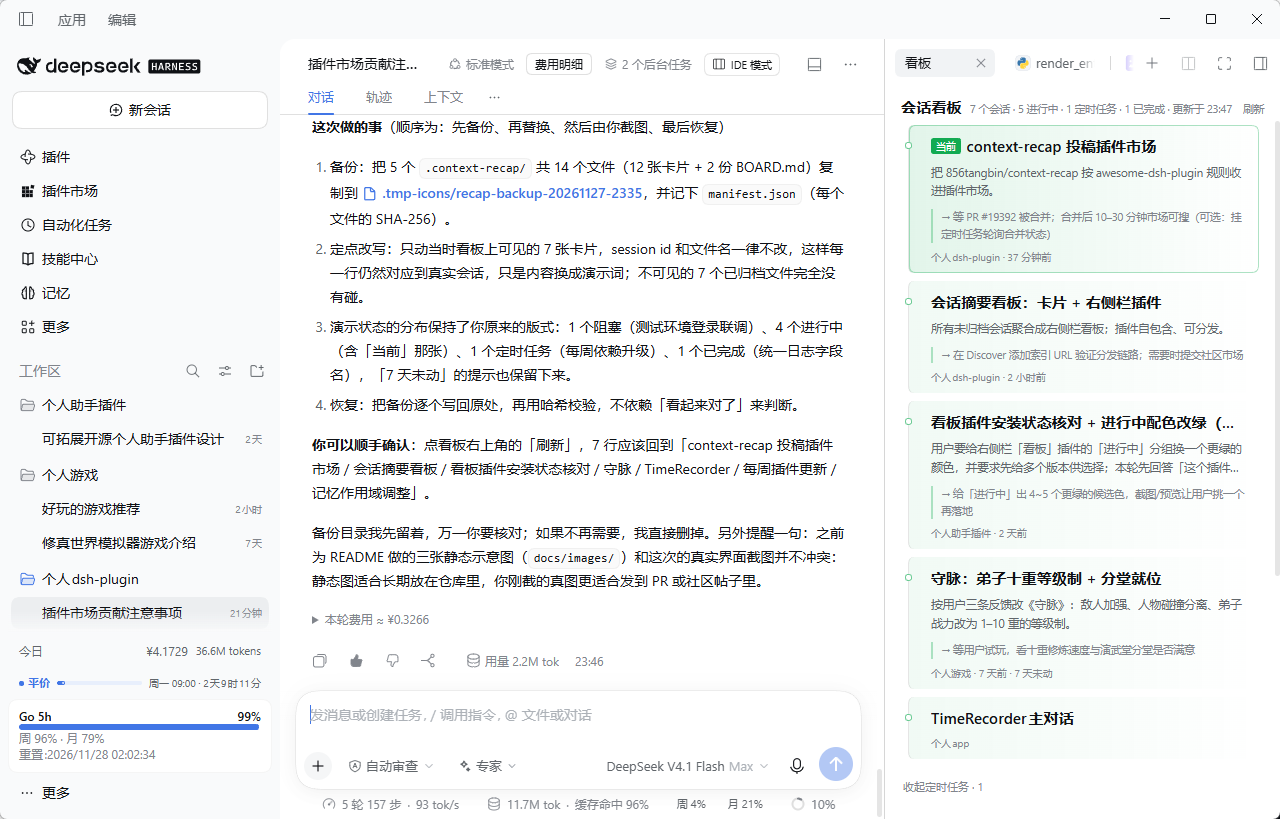
The Board tab next to a session: one card per unarchived session, grouped by status, with the session you are viewing highlighted.
How It Works
At the end of every substantive response, the skill performs two actions:
- Retrieve the Session ID: Reads
DSH_SESSION_ID(e.g.,session-85a54419-3338-…) once per session and caches it. Falls back to_unknown.mdif unavailable. - Write the Recap Card: Saves
.context-recap/<session-id>.mdunder the workspace root with YAML frontmatter followed by three concise sections (10 lines or fewer). If the card already exists, only modified fields and sections are updated incrementally. Because paths are isolated by session ID, parallel agents in the same workspace never overwrite each other.
Zero UI Noise: It never calls sidebar_open or appends recap text to the chat—writing the card automatically updates the board.
Card Format
---
session: session-85a54419-3338-4ce4-a218-49af2136486f
title: Add a global board to context-recap
status: doing
updated: 2026-11-19 12:30
next: Reinstall the skill and verify
blocked_on:
---

## Objective
What needs to be achieved and the criteria for completion.

## Progress
- Done: Key outcomes with metrics, file paths, or error logs.
- Open / Blocked: Remaining issues or current blockers.

## Next step
One or two concrete actions.
| Field | Required | Description |
|---|---|---|
session | Yes | Session ID matching the filename. |
title | Yes | One-line summary (≤ 30 characters). |
status | Yes | doing (in progress), blocked (stuck), or done (finished, session unarchived). |
updated | Yes | Local timestamp (YYYY-MM-DD HH:mm), used for board sorting. |
next | No | One-line description of the next action. |
blocked_on | No | Description of the blocker when status: blocked. |
Writing Constraints:
- Keep the body to 10 lines or fewer (excluding frontmatter). Add a single
## Whyline only if the motivation isn't self-evident. (Note: Chinese is used by default in this project's prompt template.) - Stick strictly to facts—include concrete metrics, paths, and verbatim error messages; avoid subjective adjectives.
- Define verifiable objectives (e.g., "Make X output Y") rather than vague goals (e.g., "Improve X").
- Update existing cards incrementally; write once without reading the file back to verify.
Board
Cards reside inside their respective workspaces; the board aggregates them into a unified view.
CLI Snapshot (board.mjs)
Run the aggregation script on demand:
node "$env:USERPROFILE\.dsh\skills\context-recap\scripts\board.mjs"
The script executes four steps locally without any LLM calls:
- Reads
~/.dsh/storages/workspace.jsonto collect all unarchived sessions (excludingarchivedSessionIds). - Scans
<workspace.path>\.context-recap\<session-id>.mdacross workspaces for recap cards. - Groups and sorts items:
⛔ Blocked → ▶ In Progress (by updated time; tagged "Idle for N days" after 3 days) → ⏸ Done (unarchived) → ❓ Missing Card. - Writes
<cwd>\.context-recap\BOARD.mdand prints the output. The script never opens the sidebar itself; the agent callssidebar_openwhen a visible board is wanted.
CLI Options:
| Option | Description |
|---|---|
--all | Expand collapsed sessions (by default, sessions older than 14 days without a card, empty sessions, and 1-message sessions are collapsed into a summary line). |
--json | Output raw JSON for scripting without writing a file. |
--no-write | Print the board to stdout without writing BOARD.md. |
--days N / --missing-days N | Customize thresholds for inactivity tagging and collapsing. |
--home PATH / --out PATH | Override the default ~/.dsh directory or BOARD.md output path. |
Note: For sessions missing a card, the board falls back to the session log's modification time (mtime) for activity tracking and prompts you to generate a card rather than fabricating a summary.
Right-Sidebar Persistent Board (Built-in Plugin)
This repository doubles as a DSH plugin bundle (located at the repository root) that provides a live right-sidebar board:
- Install: Open DSH Plugins → Add plugin, enter
https://github.com/856tangbin/context-recap(or select a local clone), and refresh the page. Alternatively, useplugin_manager→install_bundle. - Usage: The Board tab opens automatically when you enter a session; if another file tab is open, the board is brought to the front. Double-click any card to jump to that session, or click Refresh in the top-right corner to force a reread.
- Data Source: Same source as
board.mjs—reads.context-recap/<session-id>.mdfrom every workspace and uses the DSH workspace registry (useWorkspaces()→sessionIdsandarchivedSessionIds) to decide what is unarchived. It does not readworkspace.jsondirectly, never writes files, and never calls an LLM. - Grouping & Collapsing: Blocked → In Progress → Scheduled → Done. Cardless sessions are hidden; Done and Scheduled are collapsed by default, expand automatically when you view a session in that group, and can be toggled from the button above each group.
- Distribution via Index:
market/index.jsonis a format-1 plugin index. Host it at any HTTPS URL and others can add it via Plugins → Discover → Add index source (seemarket/README.md). - CLI vs. Plugin: The CLI script generates a static
BOARD.mdsnapshot (ideal for Git commits or external tools); the plugin offers a live view that reads cards on open or session switch (15-second cache; the Refresh button bypasses it).
Trigger Conditions
- Recap Card: Updated automatically after every substantive response with no pop-ups or inline text. Silently skipped for greetings, simple confirmations, intermediate turns of an ongoing task, or when explicitly omitted by the user.
- Board: The sidebar plugin reads cards when opened or when you switch sessions (15-second cache). The
BOARD.mdsnapshot script is only triggered on demand when you ask for a global overview (e.g., "What am I working on?", "Show all sessions", or "Open the board"). It does not run as a background daemon or on every turn.
Installation
Option 0: Plugin Only (Recommended & Simplest)
Install the repository directly as a plugin bundle via the DSH Plugins page (Add plugin → repository URL or local path) or plugin_manager:
git clone https://github.com/856tangbin/context-recap.git
# In DSH Plugins page, click "Add plugin" and enter:
# https://github.com/856tangbin/context-recap (or select the local folder)
The bundle includes the embedded skill (skill/SKILL.md) and closing rule prompt injection, leaving ~/.dsh/AGENTS.md untouched. (Note: The embedded skill does not bundle scripts/board.mjs; run the script from your local clone if you need BOARD.md snapshots.)
Option 1: Install Script (File Skill + Global Instruction)
# Windows
git clone https://github.com/856tangbin/context-recap.git
cd context-recap
powershell -NoProfile -ExecutionPolicy Bypass -File install.ps1 -GlobalInstruction
# macOS / Linux
git clone https://github.com/856tangbin/context-recap.git
cd context-recap
sh install.sh --global-instruction
The script copies SKILL.md, references/, and scripts/ to ~/.dsh/skills/context-recap/ and safely merges the global instruction block into ~/.dsh/AGENTS.md (idempotent and safe to re-run).
Option 2: Manual Installation
- Copy
SKILL.md,references/, andscripts/into~/.dsh/skills/context-recap/. - Append the contents of
AGENTS.md.templateto~/.dsh/AGENTS.md.
Verification
- Start a new session and complete a substantive task.
- Verify that
.context-recap/<session-id>.mdis created with valid frontmatter, while the chat response remains clean with no sidebar pop-up. - Ask the assistant for a global overview to verify
.context-recap/BOARD.mdgeneration, or refresh DSH—if the plugin is installed, the Board tab opens automatically in the right sidebar.
Architecture & Wiring
The workflow is powered by three interchangeable components:
| Component | Location | Responsibility |
|---|---|---|
| Plugin Bundle (Recommended) | Repository root (via Add plugin or install_bundle) | Renders the right-sidebar Board tab; registers the embedded skill and system prompt rule via the Host entry. |
| File Skill | ~/.dsh/skills/context-recap/SKILL.md | Defines execution steps, card schema, board commands, and operational boundaries. |
| Global Instruction | Marked block in ~/.dsh/AGENTS.md | Enforces automatic per-turn execution as a default behavior. |
When the plugin is installed, index.js registers the embedded skill via ctx.skills.register and injects the closing rule via ctx.systemPrompt.section. If an existing <!-- context-recap:begin --> block is detected in ~/.dsh/AGENTS.md, the plugin skips prompt injection to avoid duplicate tokens. A local file skill always takes precedence over the embedded skill.
Why a Prompt Rule is Required: DSH only injects a skill's name and description into the system prompt by default, leaving activation up to the model. In testing, context-recap was present in the skill catalog yet remained uninvoked across consecutive turns. Injecting the mandatory rule via the plugin or ~/.dsh/AGENTS.md guarantees consistent execution.
The global instruction block is bounded by <!-- context-recap:begin --> and <!-- context-recap:end -->. Re-running the install script updates this block in place; deleting it disables the global instruction trigger.
Dependencies & Fallbacks
-
Sidebar Tool: Card creation never triggers
sidebar_open. It is only invoked when generating an on-demandBOARD.mdsnapshot (requires DSH's built-in sidebar capability and the "Allow model to open files in sidebar" setting). -
Node.js:
board.mjsrequiresnodein yourPATH. If unavailable, run it using DSH's bundled Electron runtime:$env:ELECTRON_RUN_AS_NODE='1'; & $env:DSH_NODE_EXECUTABLE <path-to-board.mjs> -
Workspace Metadata:
board.mjsreads~/.dsh/storages/workspace.json(supports bothtables.workspacesandglobal.workspacesschemas). If the file is missing or unreadable, the script exits with an error message (找不到 …); card creation is unaffected. Use--home PATHto point at the correct DSH data directory. -
Read-Only Workspaces: If the workspace rejects file writes, the model briefly notes this in the response without retrying in a loop.
-
Missing Session ID: If shell access is unavailable and
DSH_SESSION_IDcannot be read, cards fall back to.context-recap/_unknown.md.
Scope & Constraints
- Working Artifact Only: Never formally
presentcards as final deliverables or build extra directory trees around them. - Generated Board: Never manually edit
.context-recap/BOARD.md; re-runboard.mjsafter updating cards. - Archiving vs. Deleting: Archiving a session hides its card from the board without deleting the file from disk.
- Git Ignore: When creating
.context-recap/inside a Git repository for the first time, the model suggests adding.context-recap/to.gitignoreonce. - Project-Scoped Usage: Copy
AGENTS.md.templatetoAGENTS.mdin a specific project root to enablecontext-recapsolely for that project. (The.templatesuffix prevents DSH from auto-injecting the file if this repository itself is cloned into a workspace.)
Overhead & Cost
- Per Substantive Turn: Zero extra chat tokens, one incremental file write, no sidebar pop-up, and one cached shell call per session to read
DSH_SESSION_ID. - Board: The sidebar tab reads local files only when opened—zero network requests and zero LLM calls.
BOARD.mdis generated strictly on demand. - Context Savings: All card and board data remains on disk and never enters the model's prompt context.
Repository Layout
package.json                Plugin manifest (bundle patch, client entry, exports, file whitelist)
index.js                    Host entry: registers embedded skill and system prompt rule
client.js                   Client entry: right-sidebar "Board" UI tab
cordis.patch.yml            Cordis profile patch for mounting the plugin
locale/{zh,en}.json         Plugin name, description, and detail entry (panel UI strings live in client.js)
icon.svg                    Plugin icon
skill/SKILL.md              Embedded skill definition bundled with the plugin
docs/                       Detailed architecture notes (DETAIL.md)
docs/images/                Screenshot used by this README
SKILL.md                    Standalone file skill definition
AGENTS.md.template          Global/project instruction snippet
references/recap-format.md  Card templates, examples, and legacy card compatibility notes
scripts/board.mjs           CLI aggregator: unarchived sessions → cards → BOARD.md
install.ps1                 Windows installation script
install.sh                  macOS / Linux installation script
README.md                   English documentation (default)
README.zh-CN.md             Simplified Chinese documentation
Maintenance Notes
- Encoding:
SKILL.md,AGENTS.md.template,references/*.md, andscripts/*.mjsmust use UTF-8 without BOM. - PowerShell Encoding:
install.ps1contains Chinese characters and must be saved as UTF-8 with BOM. Windows PowerShell 5.1 interprets BOM-less UTF-8 as ANSI, causing paired GBK bytes to swallow trailing quotes and newlines. - Line Endings:
install.shmust maintain LF line endings (enforced via.gitattributes). - Execution Policy: Install scripts are unsigned; execute them on Windows with
powershell -NoProfile -ExecutionPolicy Bypass -File. - Backups: Keep any backup folders outside
skills/, as DSH registers every subdirectory insideskills/as an active skill.
Changelog
v0.1.0: Initial release combining a skill and global instruction; wrote recaps to workspace files and opened them in the sidebar.v0.2.0: Consolidated repository into a single skill directory; standardized recap path to.context-recap/<DSH_SESSION_ID>.md.v0.3.0: Switched to inline blockquotes at the end of responses; removed sidebar triggers, file writes, and external dependencies.v0.4.0: Restored file-based recaps (.context-recap/<session-id>.md) opened via DSH's built-insidebar_opentool, keeping chat bodies clean; added shell, sidebar, and read-only fallbacks.v0.5.0: Added YAML frontmatter (title,status,updated,next,blocked_on) and incremental updates; introducedscripts/board.mjsto aggregate unarchived sessions intoBOARD.md; updated installers to bundlescripts/.v0.6.0: Made the board the sole UI surface—disabled automatic sidebar pop-ups and inline recaps; condensed card bodies to ≤ 10 lines; collapsed empty/single-message sessions by default (--allto expand); shipped the persistent sidebar board plugin.v0.6.1: Finalized board UI and interactions—dot-and-rail layout, status gradient rows, active session spinners, double-click navigation, current-session highlight, collapsible "Done" section, and hiding cardless sessions.v0.6.2: Switched In Progress to emerald#12aa52; made the Done section follow the current session (collapsed while viewing an in-progress session, expanded for a done session) and removed persistence/cross-instance sync; dropped the inline status label on done rows.v0.6.3: Added the Scheduled group (light cyan#66b3c0, collapsed by default, auto-expanded when viewing a scheduled session); redesigned the plugin icon (dot-and-rail timeline); fixed the Done section incorrectly expanding when opening a scheduled session.v0.7.0: Made the plugin self-contained—registeredskill/SKILL.mdviactx.skills.registerand injected the closing rule viactx.systemPrompt.section(auto-skipped ifAGENTS.mdblock exists), making file installation optional.v0.8.0: Promoted the repository root to a plugin bundle via rootpackage.json, allowing direct installation via repository URL without subdirectory paths.
License
MIT