A
dsh-kbar
adengou/dsh-kbar
DSH 命令面板:一个快捷键搜索会话、斜杠命令、技能、模型与已装插件,并执行已注册的快捷键命令。它的 HTTP 路由没有 DSH 的访问检查,浏览器里打开的网页可以调用它们。
安装
dsh plugin --profile web add github:adengou/dsh-kbarREADME
dsh-kbar


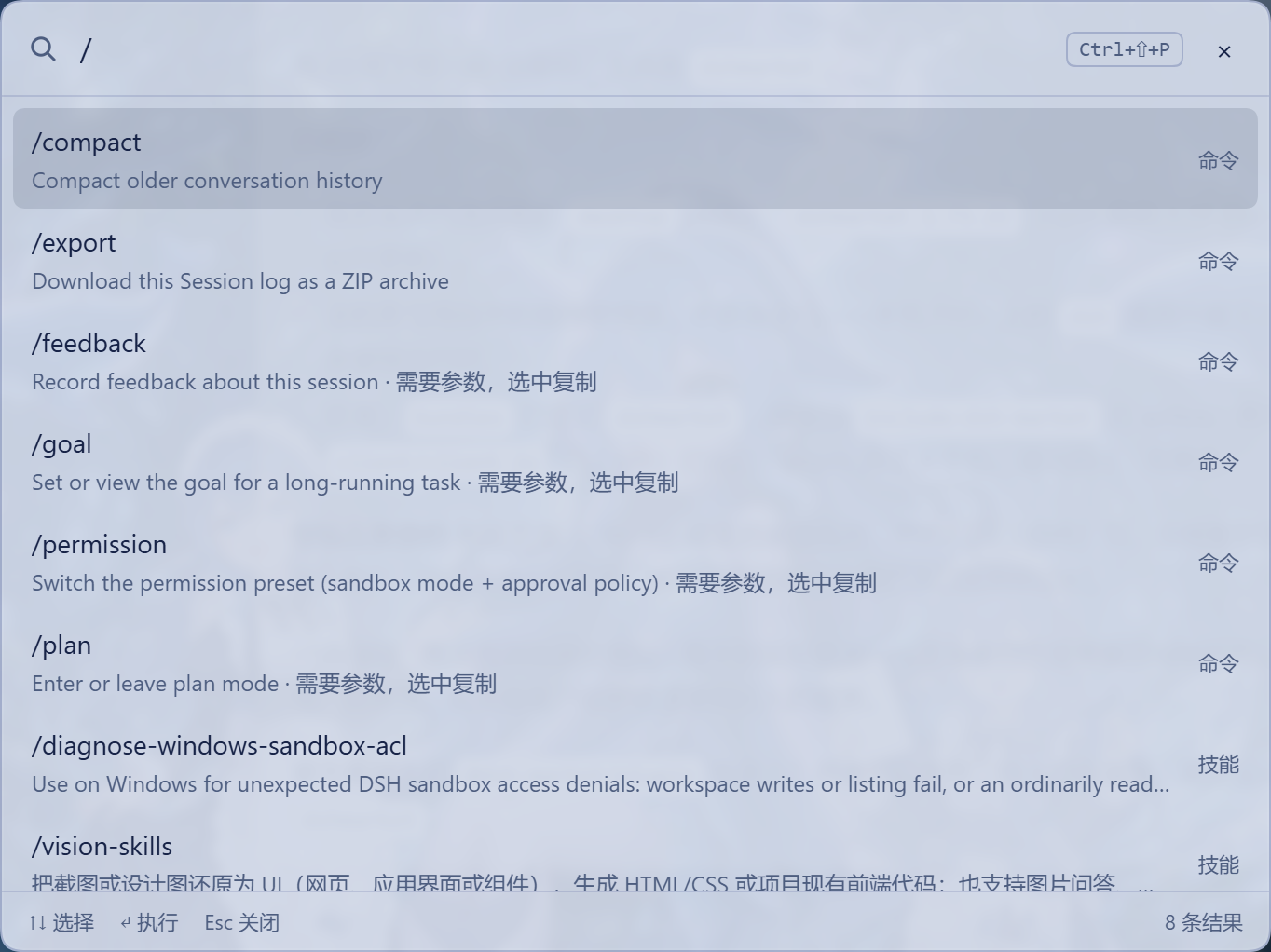
DSH 的命令面板。按 Ctrl+Shift+P(macOS Cmd+Shift+P)打开,输入关键字,回车执行。
English
A command palette for DeepSeek Harness. Press Ctrl+Shift+P (Cmd+Shift+P on macOS), type a keyword, press Enter.
- Searches sessions, slash commands, skills, models and installed bundles.
- Runs registered DSH shortcut commands.
- Also reachable from the sidebar footer.
dsh plugin --profile web add dsh-kbar
DSH Desktop: Settings → Plugins. Ctrl+K remains DSH's own session search.
能做什么
| 输入 | 结果 | 回车后 |
|---|---|---|
| 会话标题里的词 | 匹配的会话 | 打开该会话 |
flash、pro | 当前会话可用的模型 | 切换模型 |
| 插件名的一部分 | 已安装的插件 | 打开插件详情页 |
| 技能名的一部分 | 当前工作区的技能 | 复制 /技能名 |
新建、插件 | 内置动作 | 新建会话 / 打开插件页 |
| 命令名的一部分 | DSH 快捷键命令 | 执行该命令 |
/compact、/export 等 | 当前会话的斜杠命令 | 直接执行;需要参数的命令复制 /name |
↑/↓ 选择,Enter 执行,Esc 关闭;右上角 × 也能关。
除了快捷键,侧边栏底部也有「打开命令面板」入口,点一下就开。
Ctrl+K 是 DSH 自带的会话搜索,所以这里用 Ctrl+Shift+P。想换键位:设置 → 快捷键。
安装
# npm
dsh plugin --profile web add dsh-kbar

# GitHub
dsh plugin --profile web add "git+https://github.com/adengou/dsh-kbar.git"

# Gitee
dsh plugin --profile web add "git+https://gitee.com/adengou/dsh-kbar.git"
DSH 桌面版在 设置 → 插件 里安装。
常见问题
- 按
Ctrl+Shift+P没反应:确认插件已启用;桌面端先按一次Ctrl+F5;再到 设置 → 快捷键 看kbar.open是否被改键或冲突。 - 侧边栏没有入口:刷新或重启应用;侧边栏收起时显示为放大镜图标。
- 搜不到插件或技能:插件和技能目录在面板打开后要一两秒加载;技能按当前工作区返回。
- 和
Ctrl+K重复吗:会话搜索确实和官方重叠,但面板还能搜模型、插件、技能、动作和快捷键命令;只想搜会话就直接按Ctrl+K。 - 面板能拖动吗:不能,固定居中。拖动版本有 BUG,已移除。
许可
MIT License,版权归 adengou。完整文本见 LICENSE。