dsh-cost-chip
bonexy226/dsh-cost-chip
DeepSeek Harness (dsh) 插件:/cost 查看每个会话花费 + 可拖拽的悬浮费用胶囊。
安装
dsh plugin --profile web add github:bonexy226/dsh-cost-chipREADME
dsh-cost-chip
dsh profile 插件:注册 /cost 斜杠命令,显示当前会话的模型、累计 token 消耗、
当前计费时段(🔴 高峰 / 🟢 空闲)与估算费用。
行为
在 Web UI(或任何组合了 @deepseek-ai/dsh-commands 的交互界面)中输入 /cost,直接返回类似:
Session token usage & estimated cost

  model:   deepseek-official · deepseek-v4-pro
  period:  🟢 空闲时段 · 北京时间 02:38 · 现行价:原价(分时价自 2026-08-17T00:00:00+08:00 起生效)
  prices:  deepseek-v4-pro
    原价:   input 3 / cache-read 0.025 / output 6 (cache-write = input 3) ¥/1M
    高峰价: input 9 / cache-read 0.3 / output 27 (cache-write = input 9) ¥/1M
    空闲价: input 4.5 / cache-read 0.15 / output 13.5 (cache-write = input 4.5) ¥/1M

  input (uncached)            6,000,000 tok
  cache read                  4,000,000 tok
  cache write                         0 tok
  output                        600,000 tok
  ------------------------------------------------
  total                      10,600,000 tok  ¥45.1500

  cost by tier:
    原价              1,100,000 tok  ¥3.6000
    高峰价             2,200,000 tok  ¥23.4000
    空闲价             7,300,000 tok  ¥18.1500
要点:
- 模型:来自接收命令的 agent 的
options.provider/options.model。 - 时段徽章:🔴 高峰时段 / 🟢 空闲时段,按北京时间实时计算。
- 分时计费:会话日志的每个事件都带 Unix
time,因此每笔用量按它发生时刻 的档位计费(原价 / 高峰价 / 空闲价),而不是全部按"现在"计价;跨档位的会话会分行展示。 - 生效日期:
peakEffectiveAt(默认2026-08-17T00:00:00+08:00)之前一律原价; 之后按发生时刻的高峰/空闲档计价。 - 数据来源:优先直接折叠
session.events(与dsh-token-meter的tokenUsage投影完全相同的(turn, step)去重规则);日志无用量时回退到投影快照(聚合值,按当前档位计价)。 - 命令不接受参数;执行不进模型历史、不消耗 token。
cache-write默认按该档位的 input 价格计费(DeepSeek 惯例),可在每行显式覆盖。
内置价目表(人民币 / 百万 tokens)
| 模型 | 档位 | 输入(缓存命中) | 输入(未命中) | 输出 |
|---|---|---|---|---|
| deepseek-v4-flash | 原价 | 0.02 | 1.00 | 2.00 |
| deepseek-v4-flash | 高峰价 | 0.10 | 3.00 | 9.00 |
| deepseek-v4-flash | 空闲价 | 0.05 | 1.50 | 4.50 |
| deepseek-v4-pro | 原价 | 0.025 | 3.00 | 6.00 |
| deepseek-v4-pro | 高峰价 | 0.30 | 9.00 | 27.00 |
| deepseek-v4-pro | 空闲价 | 0.15 | 4.50 | 13.50 |
| deepseek-chat | 仅原价 | 0.5 | 2 | 3 |
| deepseek-reasoner | 仅原价 | 1 | 4 | 16 |
高峰时段:北京时间 9:00–12:00、14:00–18:00(半开区间),其余为空闲。
cache-write = 输入(未命中)价格。
配置(全部可选)
在 profile 的 cordis.patch.yml 中按需覆盖:
- id: command-cost
  config:
    currencySymbol: '¥'               # 默认 ¥
    exchangeRate: 0.14                # 可选,填了额外显示 ≈ USD 行
    timeZone: 'Asia/Shanghai'         # 计费时段所用时区(北京时间)
    peakRanges: [[9, 12], [14, 18]]   # 高峰时段(小时,半开区间 [start, end))
    peakEffectiveAt: '2026-08-17T00:00:00+08:00'   # 分时价生效时刻(ISO 8601)
    perMTok:                          # 覆盖 fallback 行(原价档)
      input: 2
      cacheRead: 0.5
      output: 3
    models:                           # 按 model id 或 provider 名精确匹配
      deepseek-v4-pro:
        input: 3
        cacheRead: 0.025
        output: 6
        peak: { input: 9, cacheRead: 0.3, output: 27 }
        offPeak: { input: 4.5, cacheRead: 0.15, output: 13.5 }
价格行解析顺序:models[model] → models[provider] → perMTok(fallback)。
某行缺 peak/offPeak 时该模型永远按原价计(如 deepseek-chat / reasoner)。
Web UI 面板(悬浮费用胶囊)
本包同时是一个 dsh.client 双面插件:host 启动时会扫描启用的插件行,把
exports["./client"] 指向的 client.js(手写 bundle,无需构建工具链)写入
客户端启动图。浏览器加载后,通过 React Portal 直接挂到 document.body,
渲染一个悬浮费用胶囊(默认停靠在左下角设置按钮上方,可拖到页面任意位置):
deepseek-official · deepseek-v4-pro
🟢 空闲时段   34.5M tok   ¥2.5111   ↻
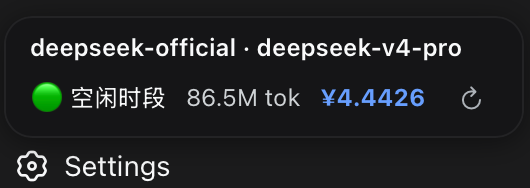
- ↻ 刷新按钮 + 每 5 秒自动刷新 +
tokenUsage投影一变化立即刷新; - 自由拖拽:按住胶囊拖到页面任意位置(自动钳制在视口内),位置记忆在浏览器本地,刷新后保持;双击胶囊复位到左下角。
- 主题自适应:胶囊颜色取自网页主题的 CSS 变量(
--dsw-alias-*),跟随系统/应用深浅色主题自动切换,无需配置。 - 数据来自 host 的
/cost-panel/data?session=<id>JSON 路由(价格与配置只在 host,单一数据源),悬停面板可看完整价目表; - 首次启用需重启
dsh web(客户端启动图在 host 启动时写入);之后 改client.js只需刷新浏览器页面(/plugins路由实时读盘、no-cache), 改index.js(价格、逻辑、路由)才需要重启。
仓库结构
.
├── index.js              # host 插件:/cost 命令 + /cost-panel/data 路由 + 分时计费
├── client.js             # 客户端 bundle(dsh.client,手写无构建):悬浮费用胶囊
├── cordis.patch.yml      # 挂载行示例(复制到 profile 的 patch 或 --patch 引用)
├── scripts/verify.mjs    # 离线验证(真实 cordis/loader/commands + 真实 React SSR)
├── package.json          # 根即包:dsh.client 声明、exports、files、scripts
├── README.md(中文主文档)/ README.en.md(英文版)
└── LICENSE
安装
-
把本仓库安装为 profile 依赖(两种方式任选):
# 方式 A:官方路径(pnpm 转发,保持 package.json/lockfile 一致)
dsh plugin --profile web add "file:/absolute/path/to/ds-plugins"

# 方式 B:手动复制(不改 package.json;再次运行 dsh plugin add 其他包时可能被 pnpm 清理,需重拷)
mkdir -p "$DSH_HOME/profiles/web/node_modules"
cp index.js client.js package.json "$DSH_HOME/profiles/web/node_modules/dsh-cost-chip/"
⚠️ 方式 A 安装的是当时文件的副本;之后改动源码需重新同步 (重跑
dsh plugin --profile web install或直接cp index.js client.js到$DSH_HOME/profiles/web/node_modules/dsh-cost-chip/)。 -
在 profile 的
cordis.patch.yml($DSH_HOME/profiles/web/cordis.patch.yml)中加入:- insert: - id: command-cost name: dsh-cost-chip(本仓库的
cordis.patch.yml就是这份示例,含全部可配置项的注释。) -
重启该 profile(
dsh web重启后生效;插件行在启动时读入,web profile 未启用插件 HMR)。 -
验证:
dsh --profile web --dump-config应能看到command-cost行; 进入会话后输入/cost。
零依赖说明
本插件不 import 任何第三方模块:apply(ctx, config) 使用的 ctx.commands、
ctx.tokenMeter、ctx.get('sessionProjections') 都由 Cordis 在加载时注入,
因此它可以在只包含本包本身的 profile node_modules 中解析运行。
隐私说明
/cost-panel/data HTTP 路由会对任何被询问的 session id 应答。dsh 的 web
服务器默认只绑定 127.0.0.1,因此该路由仅本机可达;若部署把绑定改为
0.0.0.0,能访问该端口的任何人都能读取可猜测 session id 的 token/费用汇总。
请勿把端口暴露给不可信网络。
开发验证
scripts/verify.mjs 用真实的 cordis + loader + dsh-commands + React 18
(含 react-dom/server 的 SSR 断言)从 dsh 安装目录启动,模拟 profile 目录布局
解析本插件,覆盖:时段判定纯函数(边界 11:59/12:00、时区换算)、三档分时折叠、
去重、投影回退、参数拒绝、配置热更新、数据路由 JSON、客户端 bundle 加载与渲染等
场景。dsh 安装目录解析顺序:$DSH_INSTALL 环境变量 → PATH 上的 dsh →
本机 npx 缓存兜底。
npm run check    # 语法检查
npm run verify   # 全量离线验证