dsh-codex-model-picker
caidows/dsh-codex-model-picker
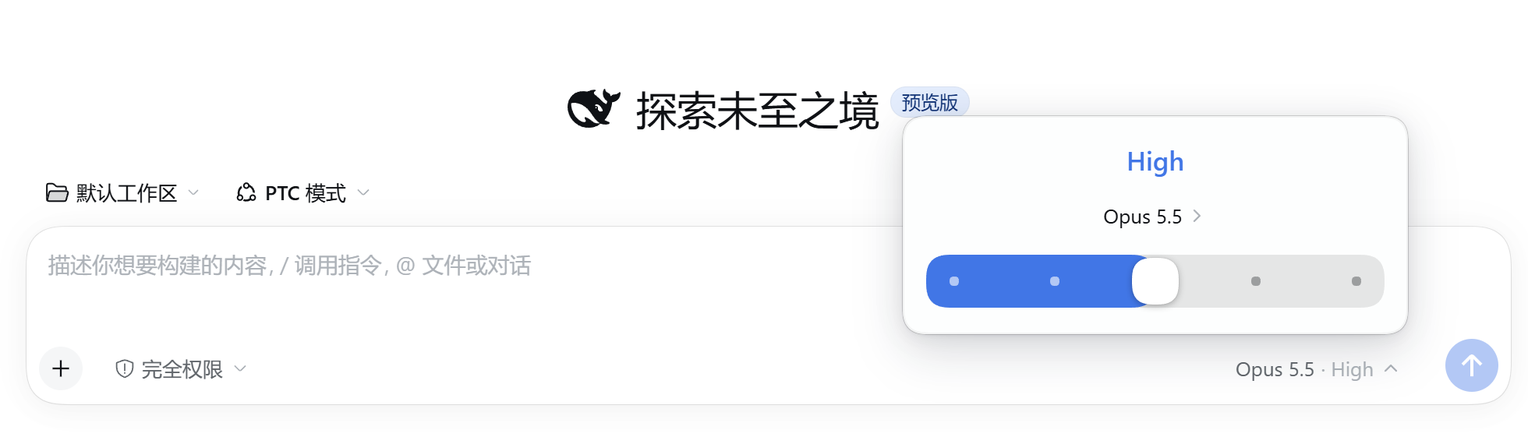
Codex 风格的输入框模型选择器:卡片显示当前模型,底部用可拖动的滑杆设置推理强度,每个档位都对应模型真实声明的推理等级(提供商支持时有 Off 档)。滑杆只停在整档上,拖动过程中推理强度文字即时更新;模型与档位的切换仍走会话的模型目录,与输入框其他部分保持同步。
安装
dsh plugin --profile web add github:caidows/dsh-codex-model-pickerREADME
dsh-codex-model-picker
A Codex-style model picker for the DeepSeek Harness composer.
It replaces the composer's model menu with a small card — the reasoning effort on top, the current model below it, and a draggable effort slider at the bottom — the way Codex's model switcher works.

Screenshot
Features
- Codex-style card anchored above the composer model button, flipping below when there is no room.
- Draggable effort slider with one stop per effort the model actually advertises (
off,minimal,low,medium,high,xhigh,maxwhen advertised). The thumb snaps to whole stops, animates between them, and the effort label updates while you drag, not only after you release. - No provider-default stop. Levels come from the adapter's advertised
reasoning.efforts. A model without a stored effort showsmediumwhen available, otherwise its advertised default (or the middle level), never a synthetic "default" entry. Offstop when the model advertises it; committing it sendsreasoningEffort: "off", which providers like Codex map to "no reasoning".- Model list with provider grouping, the current selection, badges, loading and error states, and keyboard navigation.
- Full keyboard support: arrows move one stop,
Home/Endjump to the ends,Escapecloses and returns focus. - Theme-aware: every color, radius and shadow comes from DSH theme tokens, light and dark.
- Chinese and English UI.
Requirements
- DeepSeek Harness
0.2.2-rc.1or newer (the client slot API it shadows was stabilized in this line). - A web profile (
dsh webor the desktop app).
Install
dsh plugin --profile web add github:caidows/dsh-codex-model-picker
Then reload the page. The plugin registers a client slot occupant at priority -1 on conversation.input.model, shadowing the shipped picker; disabling or removing the plugin restores the stock picker with no state left behind.
To install from a checkout, point dsh plugin add at the package directory instead.
How it works
cordis.patch.yml inserts one row, codex-model-picker, which loads the client bundle in client.js. The bundle renders into the composer's model slot and reads the same per-session model directory (ctx.modelDirectories.directoryFor(sessionId)) the shipped picker uses, so model switches and effort switches go through session.selectModel and stay in sync with the rest of the UI.
view.js and style.css are the sources; client.js is generated:
node build.mjs
License
MIT