dsh-delete-archived-session
cnily03/dsh-delete-archived-session
从侧边栏行悬浮按钮与「更多」菜单两步确认永久删除已归档会话(第一次点击进入待确认状态,再点一次删除);删除会停止会话正在运行的任务,并移除其日志目录、投影缓存记录与工作区记账。
安装
dsh plugin --profile web add github:cnily03/dsh-delete-archived-sessionREADME
Delete Archived Session in DSH
English | 简体中文
A DeepSeek Harness (dsh) plugin that permanently deletes archived sessions with a two-step confirm, from the sidebar row hover strip and the "⋯" more-menu. It stops the session's running work and removes its log and projection-cache record from disk.
Screenshots
| Hover the delete button | Armed, click again to confirm |
|---|---|
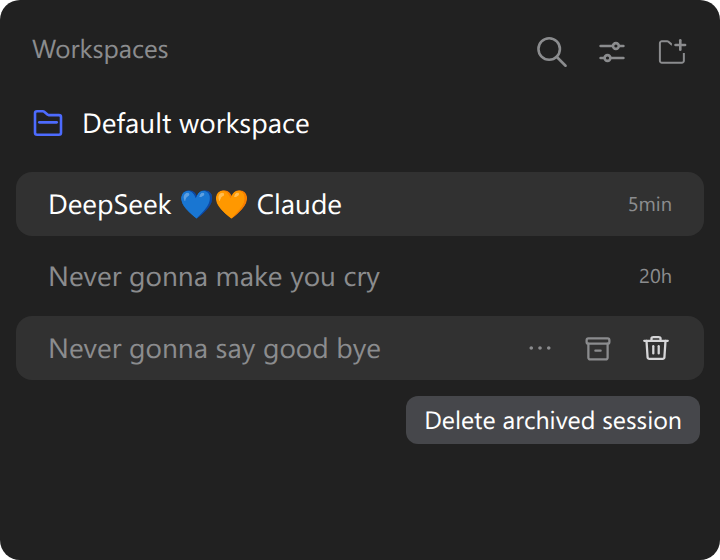 | 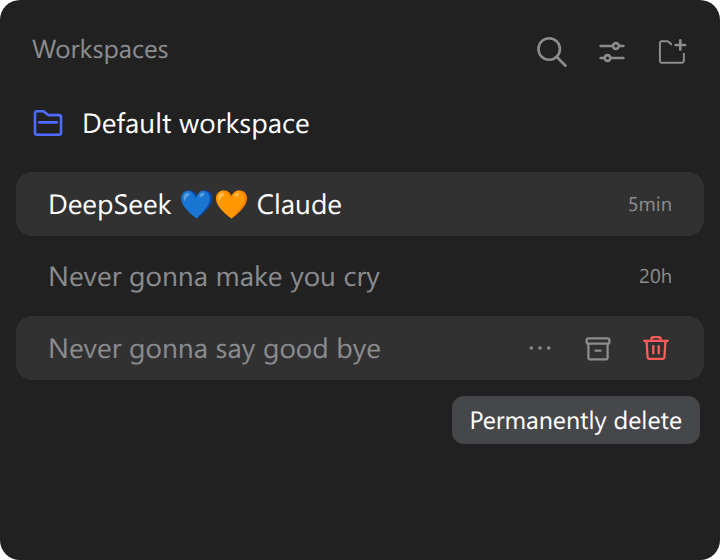 |
Install
Use --profile web for a dsh web server or --profile desktop for the desktop app, then restart the Harness.
# npm
dsh plugin --profile web add dsh-delete-archived-session
# GitHub (latest)
dsh plugin --profile web add github:Cnily03/dsh-delete-archived-session
The desktop app can also install it from its built-in plugin market.
Usage
The control renders only while the row's session is archived, in two places:
- Hover strip — a trash icon after the archive and pin cells.
- "⋯" more-menu — a "Delete archived session" row that dismisses the menu on click.
Both reuse the shipped IconTrashOutlineRegular, Tooltip and MenuItemButton, so they match the native controls.
Deleting takes two deliberate clicks:
- The first click arms the control — it turns red, the label becomes Permanently delete, and it stays armed for 3 seconds.
- A click while armed deletes the session. After the arm lapses, a click simply re-arms.
Deleting stops the session's running work, removes its log directory and projection-cache record from disk, and clears the workspace accounting so the row disappears.
Archiving vs. deleting
A session must be archived before it can be deleted. Archiving alone does not stop the agent or remove any file; deletion is what stops the work and clears the files.
Develop
pnpm install
pnpm build        # tsup -> dist/
pnpm typecheck    # tsc --noEmit
pnpm lint         # biome lint
pnpm format       # biome check --write
| Path | Purpose |
|---|---|
src/index.ts | Host half: delete route, stop/idle/flush/remove, cleanup, startup sweep. |
src/client.ts | Client half: the two-step control, arm timer and overlay notice. |
src/locale.ts | Namespace, route and message dictionaries. |
cordis.patch.yml | Bundle patch that inserts the Host row. |
License
Copyright (c) Cnily03. All rights reserved.
Licensed under the MIT License.