dsh-plugin-local-infer
cybtachyon/dsh-plugin-local-infer
一个 DeepSeek Harness 插件,用于管理本地推理引擎。
安装
dsh plugin --profile web add github:cybtachyon/dsh-plugin-local-inferREADME
dsh-plugin-local-infer
For those who want more performance out of their specific hardware than what Unsloth gives out of the box.



A DeepSeek Harness plugin that manages local inference engines:
- llama.cpp
- NInfer
- Hyper-Qwen (vLLM)
- Infernix
- Strata
- ...with more coming soon.
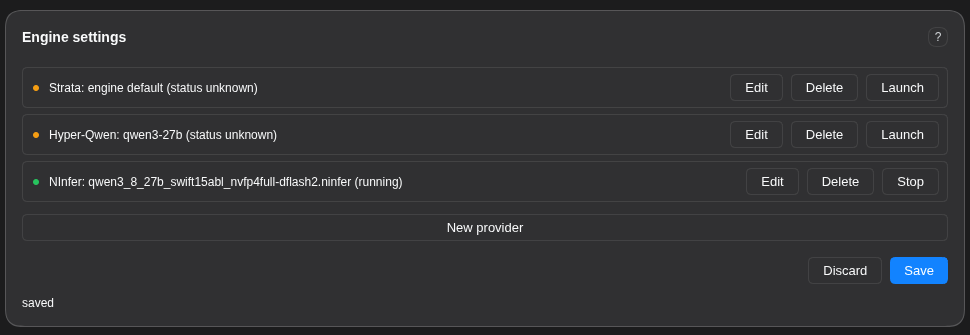
Pick a model and an engine, tune the parameters, watch a live VRAM Est. meter, see hardware warnings the moment a value (or a parameter itself) is unsafe for the detected hardware, then the plugin manages build, deploy, and health-check for each engine and automatically register it as a DSH model once it is confirmed working. No hand-editing of finicky yaml or launchers.
Install
Command line:
# Latest NPM package.
dsh plugin --profile web add dsh-plugin-local-infer
# From source.
dsh plugin --profile web add https://github.com/cybtachyon/dsh-plugin-local-infer
Web UI: click Plugins → Add Plugin → paste dsh-plugin-local-infer.
Or add from the DSH Plugin Marketplace.
Using the plugin
The Engine settings card mounts on the Plugins page (older hosts: the Settings page).
- Pick an engine and model, then tune the parameters. Each field renders by its type: checkboxes, dropdowns, sliders, text, directory pickers, and a chat-template combo (known templates plus free text).
- Watch the VRAM Est. meter. It prices weights, KV cache, overhead, and workspace against your card as you adjust values, and shows the verdict (
fits/tight/over) and the largest context that fits. - Read the warnings. Red banners and inline field warnings fire when a parameter value, or the presence of a parameter, is unsafe for your detected hardware.
- Satisfy the system dependencies. The panel lists each missing host dependency (docker, CUDA toolkit, ffmpeg, hf CLI, ...) with its purpose, a copy/paste install string for your OS, and an optional one-click Run (sudo). The Get button stays disabled until every dependency reports satisfied.
- Get. With the dependencies satisfied,
Getsyncs the engine's source: it clones the engine's git repo (or the Engine Fork you provided) into the Engine Directory override, defaulting to the model directory under the engine name. An existing checkout with local changes aborts with an alert in Logs; a clean one fetches the listed fork (added as its own remote) and rebases onto the upstream branch. It then runs the system dependencies and the engine's build steps. Every line streams into the Logs section as it lands.Launchstays disabled while a Get runs and re-enables when the build finishes, errors, or falls silent for 2 minutes. - Launch / Stop.
Launchdeploys the engine (builds the checkout, or pulls the image in docker mode), downloads the model, starts it, and polls its health endpoint.Stopshuts it down. - Register / Remove.
Registerpublishes the confirmed-working engine to DSH as a model (optionally as the agent default model) through the settings service, so the change is revision-tracked and undoable.Removepulls the entry back.
All values persist to ~/.dsh/local-infer/config.json; the browser never sees a value it did not store.
Supported Platforms
Operating systems
| OS | State | Notes |
|---|---|---|
Linux (Debian/Ubuntu, apt) | Supported | Install blocks mirror the working NInfer launcher: the CUDA keyring sequence plus the compile toolchain. |
Linux (Arch, pacman) | Supported | pacman blocks plus the /opt/cuda export lines. |
Linux (Fedora, dnf) | Untested | Command set present, flagged untested on a live host. |
macOS (brew) | Partial | CPU/docker path (llama.cpp). No NVIDIA Container Toolkit on macOS, so the CUDA engines' docker path is unavailable. |
| Windows (WSL2) | Untested | WSL2 is detected and the dflash2 pin-memory rule fires; the command set is flagged untested. |
| Windows | Partial | Code paths are only partially written; further development needed. |
Engines
| Engine | Docker | Local build | State |
|---|---|---|---|
| NInfer | Yes | Yes (cmake + CUDA) | The reference engine. Measured VRAM models for the Qwen 27B/35B artifacts. |
| Hyper-Qwen (vLLM) | Yes (compose) | No | .env-driven docker-compose profiles. |
| vLLM | No | No | Work-in-progress. |
| llama.cpp | Yes | Yes | Specified, not verified until the binary is available. |
| Infernix | No | Yes (cmake + CUDA) | C++/CUDA fork of NInfer tuned for Qwen models on a single RTX 50-series GPU. Local build only. |
| Strata | Yes | No | Placeholder engine; its parameter surface is empty until the flag set lands. |
Runtime requirements: Node ^22.19.0 || >=24.0.0, pnpm 12.11.2 (pinned by mise.toml), and the @deepseek-ai/cordis >= 4.0.1 peer dependency.
Hardware guide
What each common machine gets you in practice. Capability impressions are sourced from r/LocalLLaMA user threads. "Shared" means unified memory (the model and the OS share the pool).
| Hardware | Memory | What you get |
|---|---|---|
| NVIDIA RTX 5090 | 32 GB VRAM | Reliably fits model weights up to 23 GB with 240k+ context and vision. Handles complex coding and vision tasks, but needs special tooling for very long or complex tasks. |
| NVIDIA RTX 4090 | 24 GB VRAM | The community workhorse. 30B-class models fit at Q4 and drive coding agents; 70B needs slow CPU offload. Best speed-per-dollar single card. |
| NVIDIA RTX 3090 | 24 GB VRAM | The used-card value king. Same 24 GB as a 4090 but an older generation: 32B at Q4 with modest context, no FP8. A single card is limiting; the common advice is to pair two. |
| NVIDIA RTX PRO 6000 | 96 GB VRAM | Near-frontier dense models (70B–80B) fit fully in memory with long context, and 32B models can even be fine-tuned (LoRA, full FT). The prosumer ceiling. |
| NVIDIA RTX PRO 5500 | 84 GB VRAM | The rack-oriented 84 GB tier: 70B-class models with headroom, close to the PRO 6000 at a lower price point. |
| NVIDIA Tesla V100 | 32 GB VRAM | Cheap used HBM2 server card. 30B-class at Q4/Q8 at respectable speed (bandwidth is what matters for inference); no FP8, power-hungry. A budget homelab pick. |
| NVIDIA Tesla V100 | 16 GB VRAM | The budget entry. 13B–14B at Q8, or 30B with offload. NVLink pairs double the capacity. Slow by modern standards, surprisingly solid for inference. |
| NVIDIA RTX 5090 Laptop | 24 GB VRAM | The mobile 4090. 32B at Q4 just fits; realistically ~17B at Q4 once you subtract context. |
| NVIDIA RTX 4090 Laptop | 16 GB VRAM | The GPU is overkill for LLMs and the VRAM is underkill: 8B–14B at Q4/Q5 with small context. |
| NVIDIA GB10 (DGX Spark) | 128 GB shared | The desktop AI dev box. A 35B MoE runs at ~100 tok/s; 120B+ MoE fits but is slow. Capacity over speed. |
| NVIDIA GB10 (DGX Spark) | 64 GB shared | Half the pool: 32B–35B MoE with context; 70B is tight. |
| NVIDIA RTX N1X | 128 GB shared | The next-generation GB10-class laptop: DGX Spark-class capacity in a laptop. Very new, little real-world data. |
| NVIDIA RTX N1X | 64 GB shared | The 64 GB tier: 32B-class with context. |
| Apple M4 Ultra | 256 GB shared | The capacity king. 200B+ MoE and 70B at 128K context fit; expect ~5 tok/s on 70B. Slow per token, unmatched capacity. |
| Apple M4 Ultra | 128 GB shared | 70B–120B-class fits with room; ~5 tok/s. Great for capacity, slow for speed. |
| AMD Radeon AI PRO R9700 | 32 GB VRAM | AMD's 32 GB Vulkan card. 32B at Q8 around $1,300, good value; the radv driver is not a conformant Vulkan implementation. |
| AMD Ryzen AI Max+ PRO 495 | 160 GB shared | The UMA monster. 120B+ MoE fits and coding agents run well (Qwen3-Coder-class models are tuned for UMA); $7k+ systems, slower than a discrete GPU. |
| 2x NVIDIA RTX 3090 | 48 GB VRAM | The community's "minimum for a usable local LLM": 70B at Q4/Q5. |
| 2x NVIDIA RTX 4090 | 48 GB VRAM | 70B at Q4 with context; exllama2 quantizations run fast. |
| 2x NVIDIA RTX 5090 | 64 GB VRAM | 120B MoE (GPT-OSS-120B) with 128k context at ~10 tok/s with offload. |
| 2x NVIDIA Tesla V100 (NVLink) | 64 GB VRAM | The budget 64 GB: 70B at lower quant with NVLink bandwidth; older arch, no FP8. |