dsh-deepseek-peak-indicator
dda-digital/dsh-deepseek-peak-indicator
在输入框模型选择器左侧显示 DeepSeek API 当前是高峰(红)还是低谷(绿),点击展开倒计时、24 小时轨迹与统计卡片的实时面板。
安装
dsh plugin --profile web add github:dda-digital/dsh-deepseek-peak-indicatorREADME
dsh-deepseek-peak-indicator
A DeepSeek Harness web plugin that shows a small green/red status dot in the composer bar, immediately left of the model-select menu, indicating whether the DeepSeek API is currently in official peak time (red) or off-peak (green).

Screenshots
| Light | Dark |
|---|---|
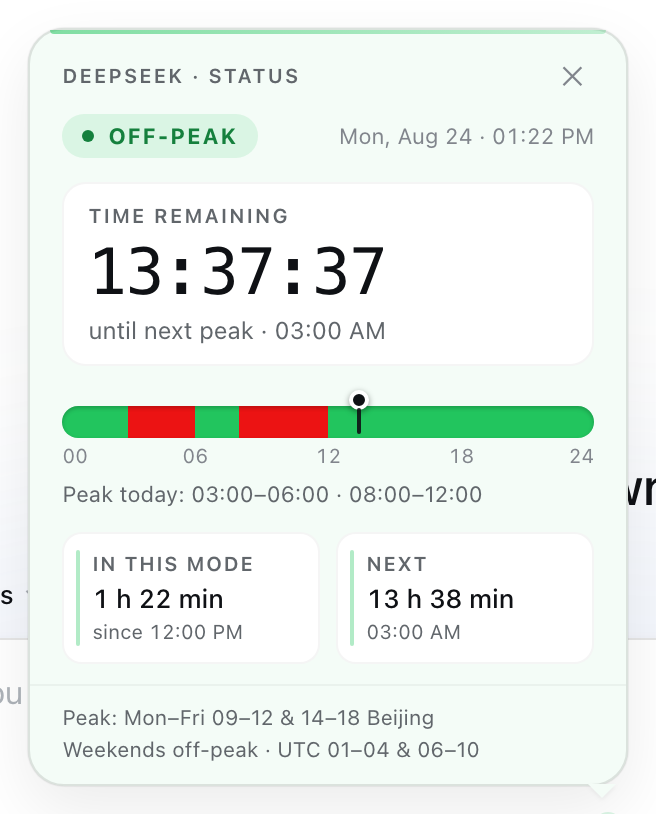 | 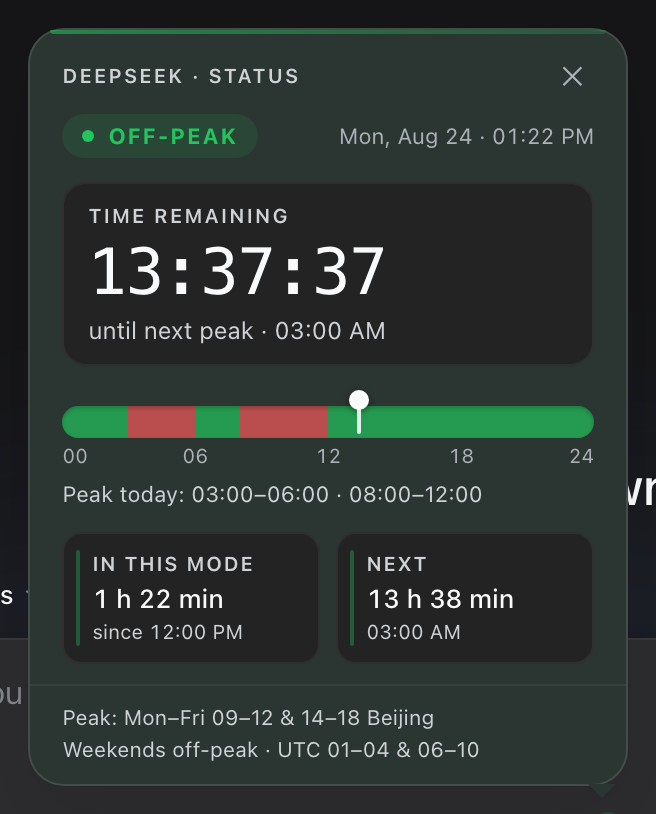 |
What it does
| Dot | Meaning |
|---|---|
| 🟢 green | DeepSeek API off-peak — standard rates, usually faster |
| 🔴 red | DeepSeek API peak time — official peak window (rates doubled, higher load) |
Hovering the dot shows the current tier, when the next transition happens (in your local time), and the official schedule. Clicking the dot opens a polished dashboard panel:
- a mode pill (
● PEAK/● OFF-PEAK) with a mode-tinted hairline accent, - a countdown card — "Time remaining" with a live 32px tabular countdown (ticking every second; amber pulse in the final minute) and a caption for the next transition,
- a 24-hour day track — a seamless red/green gradient of peak/off-peak hours in your local time, with a "now" marker (ring + line) aligned to exact hour ticks and a summary line,
- stat tiles — "In this mode" (elapsed + since) and "Next" (relative + absolute time),
- a compact two-line schedule footnote.
The panel closes on outside click, Escape, or the close button; Tab cycles the panel's controls while open. It flips to the new mode automatically at a window boundary. Motion (panel entrance, pill pop, marker glide) respects prefers-reduced-motion, and the styles use the host theme's tokens so the panel matches light and dark themes.
The tier follows the official DeepSeek schedule — Models & Pricing — plus the peak/off-peak billing notice effective 00:00 Beijing time on 2026-08-23:
Weekdays (Monday to Friday, Beijing Time): the existing peak/off-peak tiered pricing remains in effect. Weekends (Saturday and Sunday, Beijing Time): the peak/off-peak time divisions no longer apply — all calls are charged uniformly at the off-peak rate.
So in Beijing time: peak = 09:00–12:00 and 14:00–18:00, Mon–Fri (01:00–04:00 and 06:00–10:00 UTC); weekends are off-peak all day. The day-of-week check is evaluated on the Beijing wall clock, exactly as the billing rule states. The indicator is computed from the local clock, so it works offline and flips exactly at the boundary (refreshed every 30s; per-second while the panel is open).
Install
# npm (recommended)
dsh plugin --profile web add dsh-deepseek-peak-indicator

# GitHub
dsh plugin --profile web add git+https://github.com/DDA-DIGITAL/dsh-deepseek-peak-indicator.git

# local checkout (development)
dsh plugin --profile web add link:/path/to/dsh-deepseek-peak-indicator
Then restart the web profile (dsh --profile web) so the loader picks up the new bundle. After that, the client half hot-reloads on changes (the built-in HMR poller watches plugin client bundles).
Development
No build step — the browser half (lib/client.js) is the shipped artifact.
npm test    # schedule + formatting unit tests (also runnable with TZ=UTC / TZ=Asia/Shanghai)
npm run check   # syntax-check the bundles
Edit lib/client.js → the running GUI hot-reloads the change (no restart). The panel is a React component registered into the conversation.input.right UI slot; styling lives in one scoped stylesheet (dpk-* classes) injected by the client half.
How it works
cordis.patch.yml— thedsh.bundle.patchlayer: inserts the plugin row{ id: deepseek-peak-indicator, name: 'dsh-deepseek-peak-indicator' }into the profile's plugin tree.lib/index.js— node half: emptyapply, so the row is a valid loader entry (the browser does all the work).lib/client.js— browser half (declared viadsh.client+exports["./client"], served at/plugins/dsh-deepseek-peak-indicator/client.js): registers a React occupant into theconversation.input.rightUI slot. ConversationRoot renders that slot's entries immediately before theconversation.input.modelseat, which places the dot exactly left of the model menu.
No server half, no network calls, no dependencies beyond the shell's static react module.
Compatibility
Targets the current DeepSeek Harness web client slots API (conversation.input.right). If a future DSH release reshapes the composer slots, this plugin may need a compatibility bump.
License
MIT — see LICENSE.