dsh-user-experience
dietcokewithsugar/dsh-user-experience
帮你发现项目中可能存在的用户体验问题:自动走查 React/TypeScript 源码,定位问题并给出具体优化建议。
安装
dsh plugin --profile web add github:dietcokewithsugar/dsh-user-experienceREADME
dsh-user-experience

A UX walkthrough plugin for DeepSeek Harness (DSH): AI simulates target users to uncover UX problems during development—before they reach production—and provides concrete optimization suggestions.
Scope: React + TypeScript / React + JavaScript / Vue 3, CSS/layout analysis, and optional browser evidence when the current Harness session can open the application.
🎉 Listed in awesome-dsh-plugin.
Existing automated checks (axe, Lighthouse) can only verify absolute rules — contrast ratio, missing alt text. But UX issues are inherently relative: a confirmation dialog before deleting protects an occasional user but wastes the time of an operator who processes hundreds of records a day. Without knowing who it's for, a "UX issue" cannot be defined.
This plugin makes target user personas the basis of every finding. If the project has no personas yet, the plugin infers a short draft from the README and routes—there is no setup command. By having AI walk through the product as those users, it surfaces experience problems during development and gives concrete, locatable, reviewable optimization suggestions—not post-launch user feedback.
It is a pipeline, not a CLI. Speak in plain language, or just edit a front-end file. There is no /ux command to learn. The report card leads with plain language (which page, what happened, how bad), and folds file paths and rule IDs into a "technical details" block you can copy straight to an AI in one click. Verdicts need no IDs either: click a button, or just say "the second one isn't a problem" or "ignore everything below level three".
Install in Harness
In DeepSeek Harness, enter:
Install the UX plugin in DeepSeek Harness:
dsh plugin --profile web add dsh-user-experience@0.4.2
Or run the command directly:
dsh plugin --profile web add dsh-user-experience@0.4.2
Name an exact version rather than @latest: pnpm 11 holds back releases published in the last 24 hours, so @latest can resolve to nothing on a fresh profile. Check the npm version list for newer releases.
After a successful install, refresh the page. A restart is not required — restart or reload the web profile only if the market says it could not hot-load the plugin. Before installing, please read the security note.
Upgrading from a github: install
dsh plugin add github:DietCokewithSugar/dsh-user-experience no longer works. This repository stopped committing lib/, so a Git checkout carries no build artifacts, and pnpm blocks the build step by default. The market reports:
安装失败: dsh-user-experience — nothing installable: the plugin(s) need a build step
(blocked by default, see allowBuilds) or ship no prebuilt artifacts
and the exported log names the Git spec:
[warn]  install: github:DietCokewithSugar/dsh-user-experience: removed uninstallable pieces
        (no dsh manifest or missing build artifacts): dsh-user-experience
[error] install: github:DietCokewithSugar/dsh-user-experience: nothing installable survived validation
Install by package name instead — note there is no github: prefix:
dsh plugin --profile web add dsh-user-experience@0.4.2
If the market still resolves the Git ref, the profile is reusing its old entry. Clean it out:
- Delete the
"dsh-user-experience": "github:DietCokewithSugar/…"line from the profile'spackage.json. - Delete that profile's
node_modulesandpnpm-lock.yaml. The lockfile pins the old Git resolution, so removing the dependency line alone is not enough. - Run the install command again.
On Windows, this locates the profile manifest:
Get-ChildItem -Path $env:APPDATA,$env:LOCALAPPDATA,$env:USERPROFILE -Recurse -Filter package.json -Depth 6 -ErrorAction SilentlyContinue | Where-Object { (Get-Content $_.FullName -Raw -ErrorAction SilentlyContinue) -match 'dsh-user-experience' } | Select-Object FullName
Screenshots
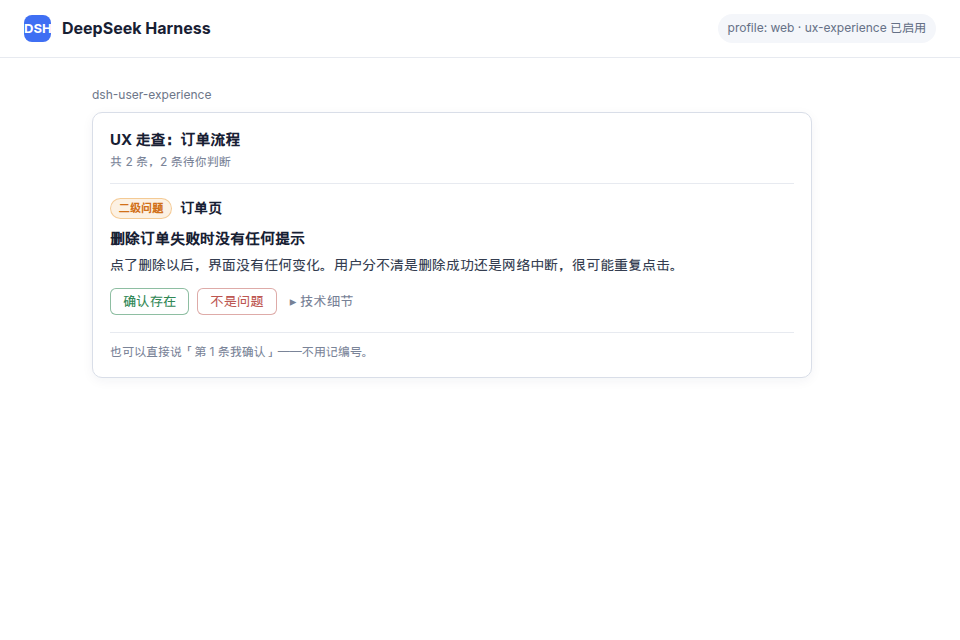
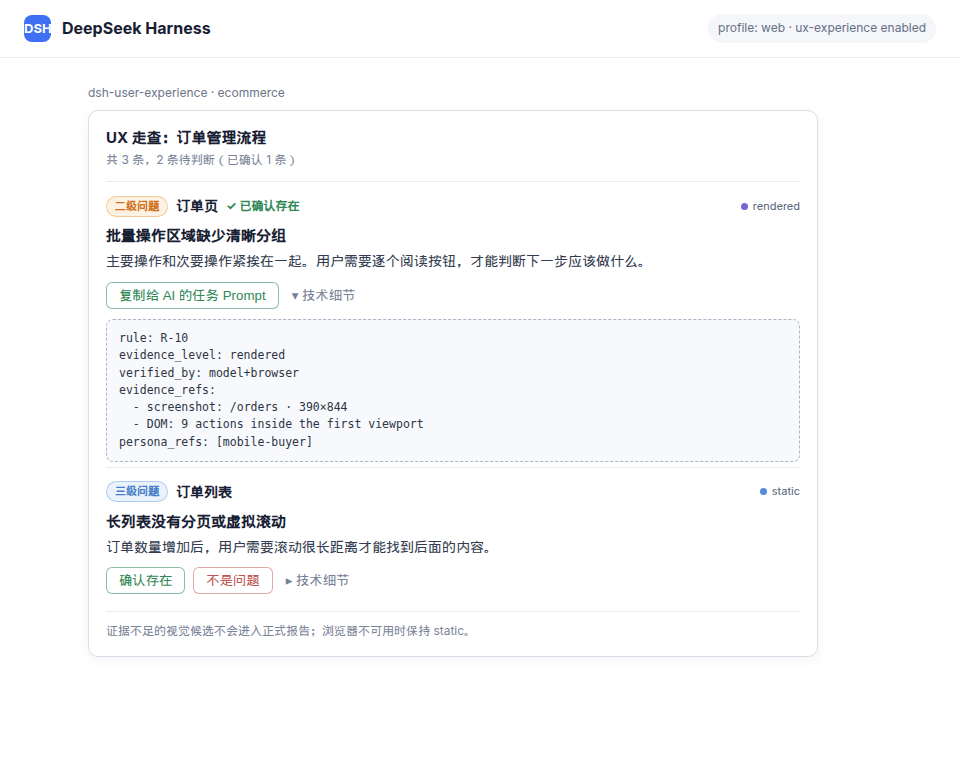
The walkthrough report explains the observed behavior and user impact in plain language:
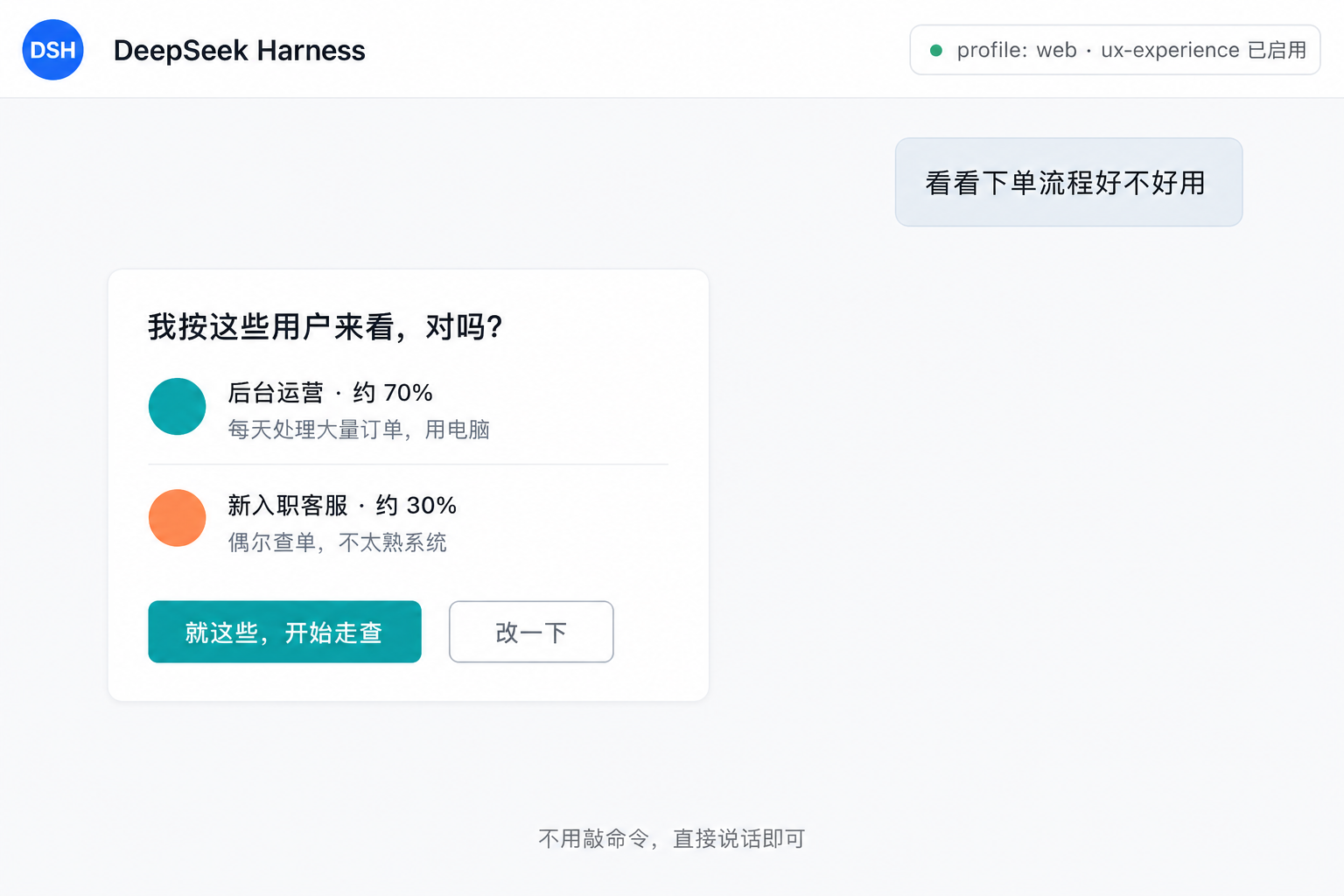
Speak in plain language to start a walkthrough. If personas are missing, the plugin drafts 1–3 users and asks once before continuing:
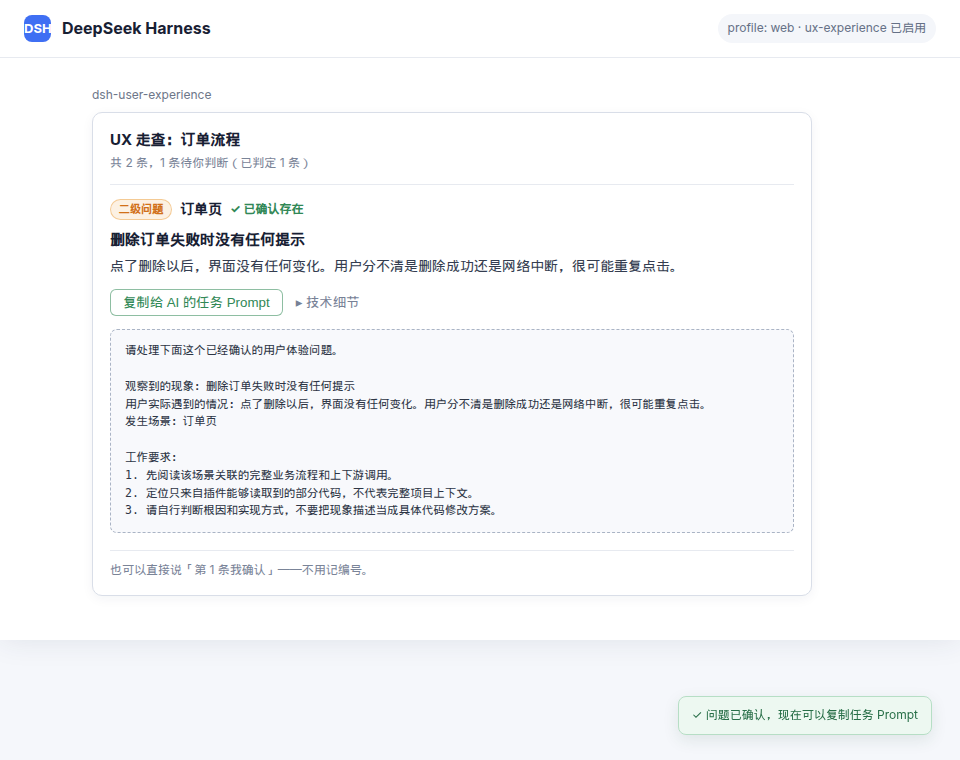
Once you confirm that a finding is real, the card provides a task Prompt you can copy to another AI. It describes the observed phenomenon rather than prescribing code changes, tells the AI to inspect the complete project context, and explicitly allows copy changes:
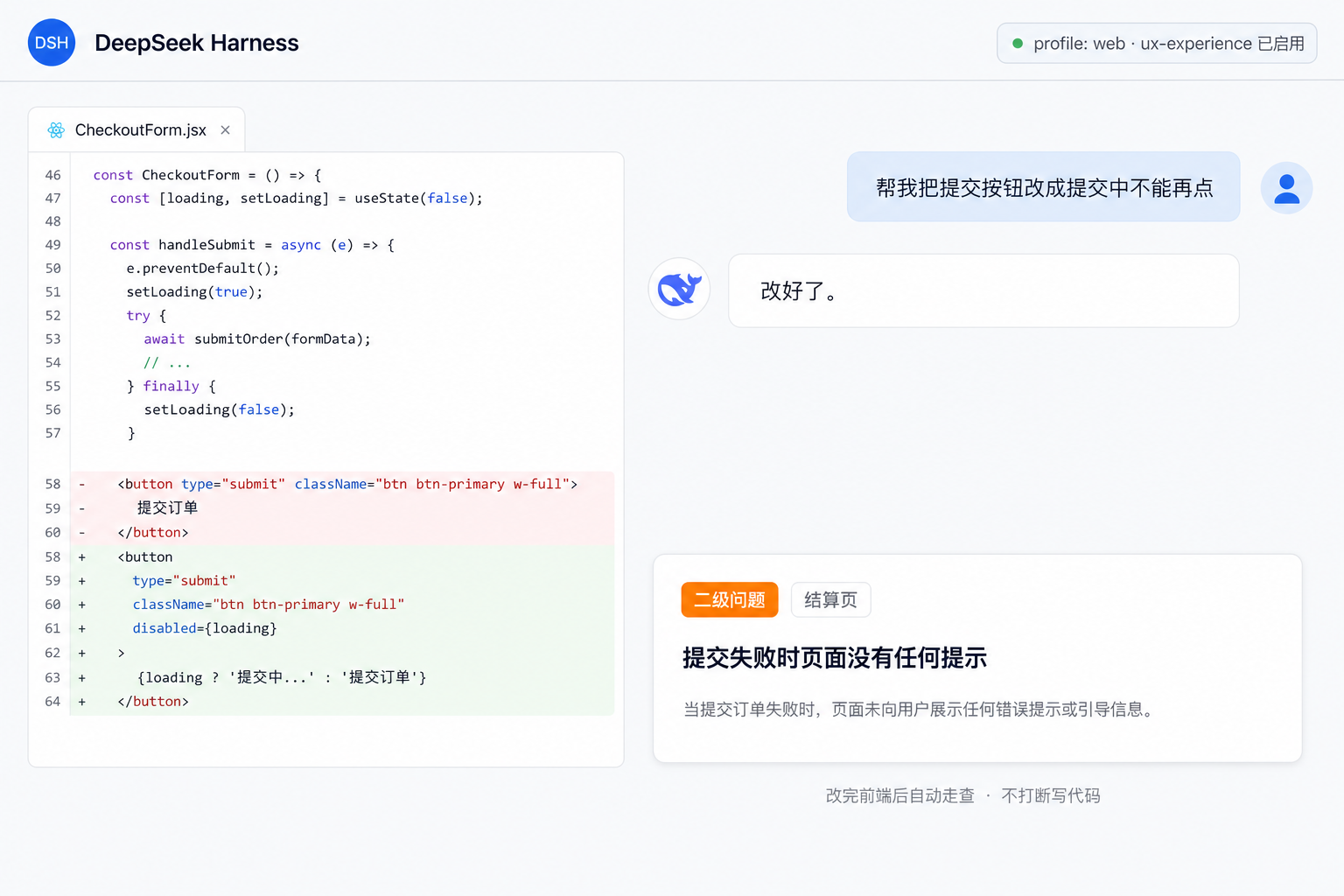
After you edit front-end code, the walkthrough runs itself—no persona questions, no interruption. It speaks up only for level-one / level-two issues:
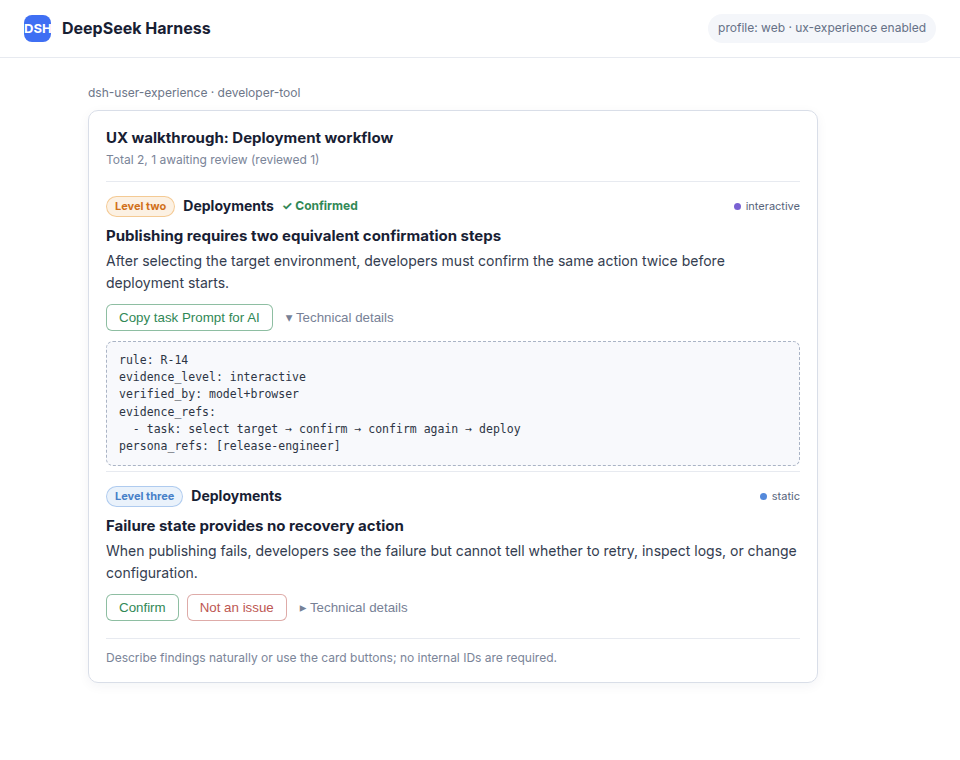
Multi-level evidence appears in the technical details so every visual or interaction conclusion can be reviewed:
The report card and confirmation workflow can use the developer’s language (English interface below):
Supported inputs and evidence
| Supported | Parsing engine |
|---|---|
| React + TypeScript (.ts / .tsx) | TypeScript compiler API (TSX) |
| React + JavaScript (.js / .jsx) | Same engine; .js may contain JSX, always parsed as TSX |
| Vue 3 (.vue SFC) | @vue/compiler-sfc block splitting + @vue/compiler-dom template AST; <script> / <script setup> blocks reuse the TypeScript engine, with line numbers remapped to the whole .vue file |
| CSS / SCSS / Sass / Less / PostCSS | Conservative spacing, compact-layout, and decorative-content candidates; visual conclusions still require a rendered page |
| Rendered page (optional) | When browser/screenshot tools and a runnable app are available, the agent inspects relevant routes and viewports |
| Persona task simulation (optional) | When the task can be executed in a browser, the agent records the steps and evaluates flow redundancy |
Explicitly unsupported (reported as-is, no low-quality guesses): Svelte, Vue 2 (SFC syntax is incompatible with @vue/compiler-sfc), mini-programs (.wxml), etc. See the current implementation specification for evidence, product-type, and language behavior.
- Every finding is marked
static,rendered, orinteractive. Browser capability is optional: without it the walkthrough continues with static evidence and never pretends to have seen the page - Layout-density, visual-language, and primary-action findings require rendered evidence; redundant-flow findings require an interactive persona walkthrough
- No automatic code changes: the plugin gives optimization suggestions; after you confirm a finding, it generates an observation-led task Prompt for a coding AI
- This is still evidence-bounded: CSS can identify inspection leads, but actual whitespace, hierarchy, and visual quality are not asserted without a real rendered route
Features
| Capability | Entry point | Description |
|---|---|---|
| Natural-language walkthrough | just talk | Say “check the checkout flow” or “is this page usable?”. If personas are missing, the model drafts 1–3 from the README, asks “look through these users’ eyes?”, then walks immediately after you confirm |
| Persona context injection | automatic | Injects the active personas and walkthrough protocol into every request for the current project (aligned with the AGENTS.md section-provider pattern) |
| Source and CSS walkthrough | automatic | After scope is clear, walks each persona independently and merges one report; 27 rules based on Nielsen’s heuristics, with model judgment and AST/CSS verification |
| Product-specific focus | automatic | Infers consumer, enterprise, ecommerce, content, finance, healthcare, developer-tool, internal-tool, or other from project docs and the scoped flow, then applies the corresponding UX priorities |
| Multi-level evidence | automatic | static for source/CSS, rendered for real screenshots/DOM/measurements, and interactive for a recorded persona task. Missing browser capability degrades gracefully to static |
| Output language | automatic / config | Uses an explicit outputLanguage override first; in auto, follows the current user's language when supplied by the agent, then the project's primary README. Report cards and AI handoff Prompts support Chinese and English |
| Change-triggered walkthrough | automatic | After you edit a front-end file, the turn wraps up by walking the whole component / page that file belongs to — not the changed lines. Never asks about personas or scope. Missing personas are inferred as drafts. Speaks up only for level-one / level-two issues |
| Report card | automatic | The first screen is plain language only: [Level one] Admin page + one sentence on what happened + what the user runs into. File paths, rule IDs and internal numbering live behind "technical details", which expands to structured YAML you can copy to an AI in one click |
| Finding confirmation loop | card buttons / plain speech | Click Confirmed / Not an issue, or just say "the second one isn't a problem", "those are all right", "ignore everything below level three" — no ID is ever needed; verdicts go to the session log and fully restore on replay |
| AI task Prompt after confirmation | card button | Once a user confirms a finding, copy a ready-to-use Prompt that describes the observed behavior, affected scenario, user impact, and acceptance goal. It does not prescribe code changes, warns that the plugin saw only part of the codebase, and allows UI copy edits |
| Implicit confirmation | automatic | If a finding disappears in a later walkthrough and that location was actually re-scanned, the user fixed it — so the finding was real. Nobody clicks anything, and the signal is harder than a button press |
| Report output | automatic | Markdown sorted by severity (level one–four on screen; P0–P3 demoted to internal identifiers), common issues (hit by ≥2 personas) first |
| Glossary | automatic | R-02 term verdicts persist incrementally to .ux/glossary.yml; later rounds only compare deltas |
Three run modes, picked by context
| Mode | Behavior | When it applies |
|---|---|---|
auto | Runs to completion, reports, never interrupts or asks for confirmation | CI / headless; change-triggered walkthroughs (the agent started it, so the agent digests it) |
review | Reports, then offers one batch confirmation (tick several, submit together) | A user-initiated walkthrough in plain language |
interactive | Confirms one finding at a time | Opt in manually when tuning rules |
Resolution order: mode in .ux/rules.local.yml → plugin config → context detection.
The five-state finding machine
| State | Meaning |
|---|---|
pending | Not judged yet |
confirmed_explicit | The user clicked "Confirmed" |
confirmed_implicit | Gone in a later walkthrough, and that location was genuinely re-scanned |
rejected | The user clicked "Not an issue" |
stale | That location was not scanned this round (or the code was deleted outright) — undecidable |
Both confirmed states count as effective findings in the metrics; stale is excluded from the denominator — "scanned and found nothing" must be distinguished from "never scanned", or deleting code gets misread as fixing it.
High-frequency review order
The walkthrough checks common issues first: (1) feedback and system status; (2) forms and flow recovery; (3) information architecture, navigation, and primary actions; then (4) cognitive load, consistency, edge states, basic usability, and performance. This order improves review efficiency; the final report is still sorted by actual severity.
The 27 rules
| ID | Rule | Verification path |
|---|---|---|
| R-01 | Error message without actionable guidance | model (AST only extracts error-branch copy) |
| R-02 | Inconsistent terminology (conditional: only when the round has no level-one / level-two issues) | model (AST only extracts candidate locations) |
| R-03 | Generic wording for irreversible actions | model |
| R-04 | Irreversible action without a confirmation step | model+ast |
| R-05 | Loading state without empty state | model+ast |
| R-06 | Success state without error state | model+ast |
| R-07 | Submit button not disabled while submitting | model+ast |
| R-08 | No fallback for long/overflow content | model+ast |
| R-09 | Dark/light mode adaptation missing | ast (fast lane, zero tokens) |
| R-10 | Crowded layout or unclear grouping | source/CSS candidate + rendered evidence required |
| R-11 | Long list without pagination, virtualization, folding, or limits | model+ast; static risk can be reported |
| R-12 | Emoji/decorative elements inconsistent with the visual language | source/CSS candidate + rendered evidence required |
| R-13 | Page purpose or primary action is unclear | source candidate + rendered evidence required |
| R-14 | Redundant steps in a critical task | interactive persona walkthrough required |
| R-15 | Navigation categories do not match user tasks | interactive task-finding walkthrough required |
| R-16 | Navigation is too deep or lacks location context | interactive navigation evidence required |
| R-17 | Long-running operation has no progress feedback | model+ast; static evidence |
| R-18 | Form requests too many or excessive required fields | source candidate + rendered evidence required |
| R-19 | Form validation feedback arrives too late | interactive form task required |
| R-20 | Form progress is lost when leaving | interactive leave-and-return task required |
| R-21 | Flow has no exit, cancel, or undo path | interactive task required |
| R-22 | Too many choices without defaults or recommendations | source candidate + rendered evidence required |
| R-23 | Equivalent actions differ across pages | rendered cross-page evidence required |
| R-24 | Similar components behave inconsistently | interactive comparison required |
| R-25 | First-use, offline, or permission states are missing | model+ast; static scoped evidence |
| R-26 | Contrast, font size, or touch targets reduce usability | rendered measurements required |
| R-27 | Response time harms a critical task | interactive timing evidence required |
Severity is derived from a matrix: impact (does it block the persona's critical task; given by the model) × reach (share of target users affected; derived from the sum of share of hit personas, ≥0.5 is wide) → level one / two / three / four (still P0–P3 internally, never on screen).
Repository file conventions
| File | Committed to git | Description |
|---|---|---|
.ux/personas.yml | ✅ committed | Project-level consensus, team-shared; CI mode depends on it |
.ux/glossary.yml | ✅ committed | Glossary and verdicts; high reuse value |
.ux/rules.local.yml | ❌ gitignored | Personal walkthrough preferences, not imposed on the team. Supported keys are mode and autoScan; other keys are tolerated and ignored |
.ux/history.jsonl | ❌ gitignored | Fingerprint ledger: fingerprint, first/last seen, terminal state, and each round's scope. This is long-term metric data, not verdicts |
Recommended addition to the project's .gitignore:
.ux/rules.local.yml
.ux/history.jsonl
Example preference file:
# .ux/rules.local.yml
mode: review        # Pin the run mode; omit to pick by context
autoScan:
  enabled: true     # Change-triggered walkthrough switch
  debounceTurns: 1  # Minimum turns between two automatic walkthroughs
Installation
⚠️ Security note (must read)
The npm tarball ships prebuilt artifacts. There is no
prepare/preinstall/postinstallscript, so pnpm ≥ 10 will not ask you to allowlist a build. Installation does not compile TypeScript on your machine.Activating the plugin still runs its code inside the Harness process. Therefore:
- Only install plugins from sources you trust;
- Pin an exact version so later releases cannot silently change what you load:
dsh plugin --profile <your-profile> add dsh-user-experience@0.4.2Every published version is built from a tagged commit by the release workflow; the same tarball is attached to the corresponding GitHub Release if you want to diff it against the source.
Coexisting with other plugins
Harness, Cordis, and React are host-owned peer dependencies. This package does not install or bundle private copies of @deepseek-ai/dsh-tools, @deepseek-ai/cordis, other DSH service packages, or React into a profile. All plugins therefore resolve the profile's shared service definitions and Symbol identities.
- No
overrides,packageExtensions, or profile dependency rewrites - No Node.js or React version changes
- No install-time lifecycle scripts; the published tarball ships prebuilt artifacts and does not run
pnpm/npm install,add,update, orupgrade - Compatible DSH release candidates are accepted through peer ranges instead of forcing this plugin's development version into the profile
- CI installs a packed copy into a temporary profile and verifies that the profile and plugin resolve identical real paths for Harness, Cordis, and React packages
This prevents this plugin from creating the duplicate-runtime condition. A different plugin that ships DSH packages as direct dependencies can still introduce its own conflicting copy and should adopt the same peer-dependency contract.
After a successful install, the plugin row (id ux-experience) enters the configuration layer. Refresh the page; restart dsh or reload the profile only if the market cannot hot-load it. Available config options (overridden by id in the profile's cordis.patch.yml or the --patch layer):
- id: ux-experience
  config:
    maxScanFiles: 300            # Max files collected per scan
    maxCandidatesPerRule: 5      # Max candidates per rule per file
    maxCandidatesPerFile: 25     # Total candidate cap per file
    maxFindings: 30              # Max findings per report
    excludePatterns: ['test', 'stories']   # Extra dirs to skip (on top of defaults)
    mode: detect                 # detect|auto|review|interactive (default: pick by context)
    autoScan: true               # Change-triggered walkthrough (on by default)
    autoScanEditTools: ['write', 'edit']   # Tool names counted as "file edits"
    autoScanMaxFiles: 20         # Max changed files pulled into one automatic walkthrough
    autoScanDebounceTurns: 1     # Minimum turns between two automatic walkthroughs
    outputLanguage: auto          # auto|zh-CN|en
A user's .ux/rules.local.yml takes precedence over this layer.
Usage
Just talk. There is no slash command to learn:
check the checkout flow from selection to payment
we mostly build this for operators
the second one isn't a problem
If the project has no personas yet, the first walkthrough shows a short card (“look through these users’ eyes?”). After you say “those are fine” or change one line, the walkthrough continues. Later teammates pick up .ux/personas.yml from git and never see that step.
Once the report is up, click the card buttons or keep talking:
the second one isn't a problem
those are all right
ignore everything below level three
the delete one — I confirm it
After confirming a finding, click Copy task Prompt for AI on that card and paste it into your coding agent. The Prompt deliberately describes what users experience without guessing at the implementation from partial source context.
After editing front-end code—including CSS—you need do nothing at all: the static walkthrough runs as the turn wraps up, reports quietly, and speaks up only for level-one / level-two issues. A user-initiated walkthrough can upgrade evidence with browser screenshots and persona task execution when those tools are available.
Development
pnpm install
pnpm run build     # tsdown (host half + client bundle) + tsc (type declarations)
pnpm test          # smoke tests (AST/CSS / evidence levels / localization / persona / modes / ledger / end-to-end)
pnpm run test:singleton  # pack into a temporary profile and verify shared runtime identities
lib/ is a build artifact and is not committed — run pnpm run build before pnpm test. Releases are cut by tagging: bump version in package.json, then push a v<version> tag. The release workflow builds, tests, packs, publishes to npm, and attaches the tarball to a GitHub Release; it fails loudly if the tag and package.json version disagree, or if NPM_TOKEN is missing.
- Compatibility baseline: local build/tests use
@deepseek-ai/dsh-*@0.1.0-rc.6and@deepseek-ai/cordis@4.0.1; runtime framework packages are peers resolved from the profile (>=0.1.0-rc.6 <0.2.0for DSH). - Structure:
src/index.tsis the Host plugin (hidden card-button channel + prompt injection + four model tools + the change-triggered walkthrough);src/client/is the Web client plugin (report card, discovered by the module table via thedsh.clientdeclaration); one bundle row (cordis.patch.yml) mounts both. - Red line: the agent loop is untouched — all capabilities hang on documented extension points (
ctx.commands/ctx.systemPrompt.section()/ctx.tools.register()/SessionEventMap/tools/result/agent/turn-stopping). The automatic walkthrough uses the framework's own/loopshape: a listener callsagent.steer()at the turn's stop boundary and the machine re-reads its inbox for one more step.
License
MIT