dsh-remove-deepseek-logo
dlgrv/dsh-remove-deepseek-logo
移除侧边栏里的 DeepSeek Harness 标志、品牌名、版本号,以及对话页的主视觉小鱼。
安装
dsh plugin --profile web add github:dlgrv/dsh-remove-deepseek-logoREADME
dsh-remove-deepseek-logo


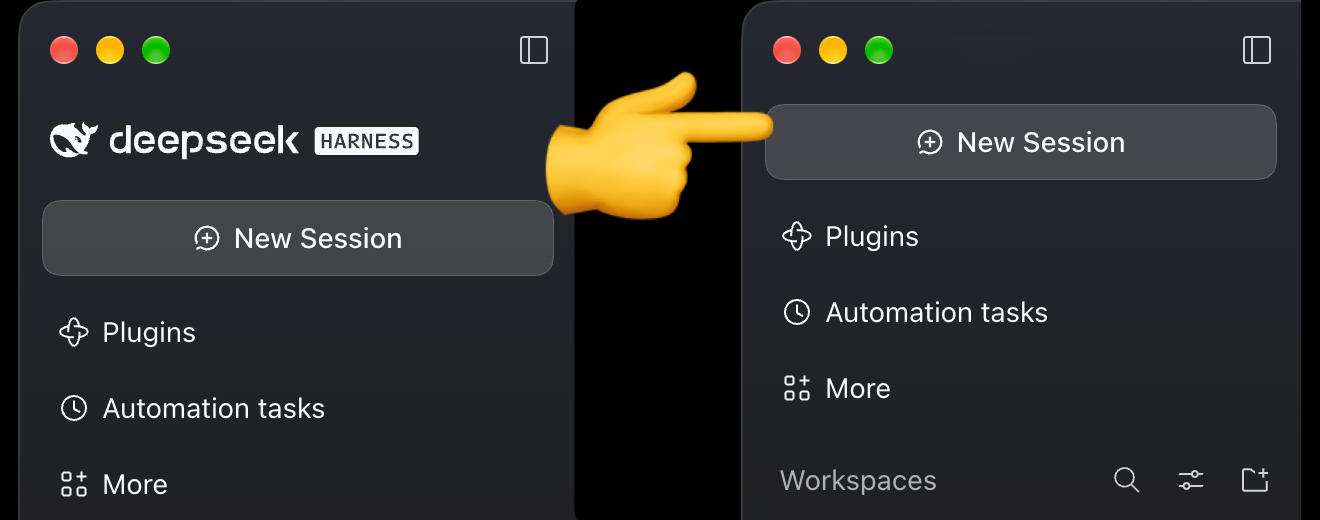
A DeepSeek Harness (DSH) plugin that removes the logo, brand name, version string, and the conversation hero fish from the sidebar. The logo row collapses completely, so the sidebar starts at the New Session button.
Install
npm i dsh-remove-deepseek-logo
or in DSH: Settings → Plugins → Add plugin → dsh-remove-deepseek-logo
or from source: github:dlgrv/dsh-remove-deepseek-logo
Then add dsh-remove-deepseek-logo to dsh.profile.bundles in your profile's
package.json and restart DSH.
How it works
- Registers empty occupants into the
sidebar.brand.mark,sidebar.brand.name, andconversation.hero.brand.markslots, replacing the official branding, its fallback, and the animated hero fish. - Adds a safety-net stylesheet that hides the version string, any fish fallback, and collapses the logo row. Attribute selectors survive CSS-hash changes between DSH versions.
The plugin changes nothing on the host side: no model requests, sessions, or tools are affected.
Compatibility
DSH 0.2.x (tested on 0.2.2-rc.1).
Development
npm test
Uninstall
Toggle the bundle off on the Plugins page and remove the package. The original branding returns after a restart.
License
MIT