dsh-web-search
fangchenghao/dsh-web-search
免密钥的网页搜索:融合八个引擎、经代理梯队抓取正文,另有八个覆盖包、论文与问答的垂直来源。
安装
dsh plugin --profile web add github:fangchenghao/dsh-web-searchREADME
@fffangchenghao/dsh-web-search
Gives DeepSeek Harness a pair of hands for the web: the model can search, then open a page and read it, without you pasting links.






Why this one
- No API key, eight engines. AnySearch, CN Bing, DuckDuckGo HTML, www Bing, DuckDuckGo Lite and 360 Search are scraped directly; Exa joins the primary tier through its keyless MCP endpoint, and Firecrawl's search API is the measured fallback. The plugin works out of the box.
- The ranking is measured, not asserted. Cross-engine reciprocal-rank fusion with authority and freshness boosts, a 20-query offline benchmark, and an 81-configuration parameter sweep — the only search plugin here that publishes both its metric and its confidence intervals. See How the ranking works.
- Fetching admits failure. Binary documents and empty 200 responses are rejected by name (
SEARCH_UNSUPPORTED,SEARCH_EMPTY) instead of being returned as noise; the direct → tunnel → render → extract ladder shares one 25 s budget and stops when there is no time left. The budget is per request — there is a regression test for exactly that. - 501 tests across 34 files, a committed
lib/, declaredengines.dsh/engines.node, and a SECURITY.md that lists every process, host and file the plugin touches. - Bilingual documentation. This README and 中文说明 are maintained side by side.
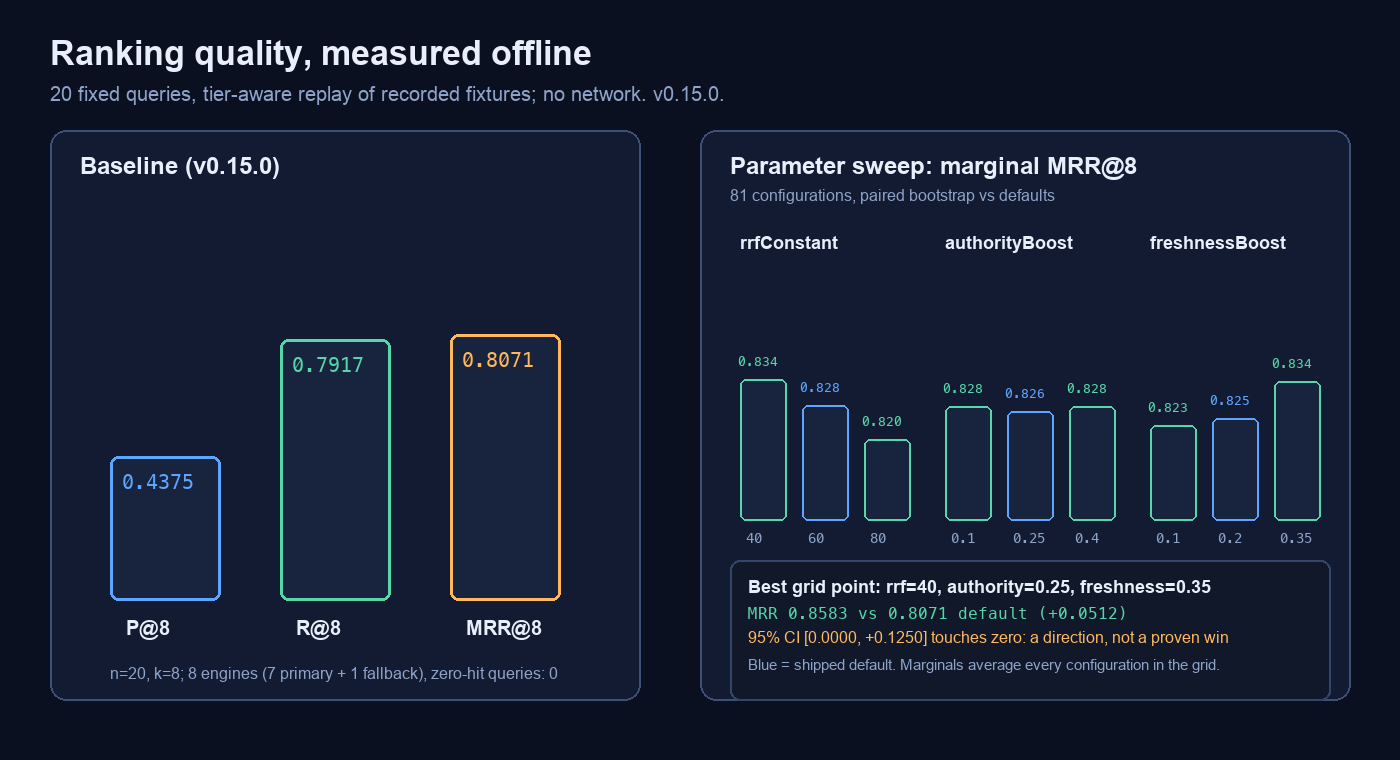
The benchmark is offline and deterministic: 20 recorded queries, precision/recall/MRR@8, per-language and per-query output, so a regression cannot hide in an average. node scripts/bench.mjs reproduces the screenshot.
Where it stands
The web-search corner of the DSH plugin ecosystem is crowded, and most rivals are bigger than this one. An honest snapshot (2026-10-23; check the linked projects for current numbers):
| this plugin | dsh-free-search | modsearch | anysearch-dsh | |
|---|---|---|---|---|
| Key-free engines | 8 | ~30 | 7 channels (+X) | 1 official API |
| Dedicated vertical sources | 34 (8 on by default) | 41 | — | — |
| Model-facing tools | 6 | ~10 | 3 | 5 |
| Test suite | 34 files / 501 cases | none | 29 files | 6 files |
| Ranking benchmark | 20 queries + 81-config sweep | — | — | — |
| Store status | source contract satisfied, awaiting review | unlisted | no entry | blocked (review-required) |
If you need maximum source breadth, use dsh-free-search; if you need a cross-harness search bridge, use modsearch; if you want the official AnySearch path only, use anysearch-dsh. This plugin is the one that treats ranking and failure semantics as the product, and measures them.
The latest version and install command live on npm; no version number is hard-coded here, so the docs cannot drift from the release. What follows starts with what this means for you; the technical detail is collected in the appendix.
In one sentence
With this plugin installed, you can ask something like "how do I configure the version released last week?" and the model can call web_search against public search engines by itself, then work from a ranked list of titles, links and snippets. When a snippet is not enough, it can call web_fetch on one of those links and get the page back as clean Markdown instead of a wall of HTML. When one question needs several separate searches, it can call search_many and get each query's results separately. When the question is about an npm package, a GitHub repository, a paper or a Q&A thread, it can call domain_search instead and ask those dedicated sources directly. And when a page is too long to read in one pass, it can call read_page and continue from where the last chunk stopped.
Three things change for you:
- When a question involves "search for", "latest", "official docs" or "the docs", the model has a real chance to look it up instead of answering "my knowledge has a cutoff date".
- When a question is about a package, a repository or a paper, the model can ask the matching source directly instead of hoping a web search understands.
- You do not need a search API key, and you do not pay for search separately.
Under the hood it is one sentence too: the plugin registers two providers with the harness's web service — bing for search and http-proxy for fetching pages — and adds four more tools: domain_search for packages, repositories, papers, Q&A and reference entries, search_many for several searches in one call, read_page for walking a long page in chunks, and research for turning a few searches into one cited evidence pack. These names come up again below.
The problem it solves
A very ordinary situation
You upgraded a library. A config field was renamed. You ask the model:
"Did
timeoutbecometimeoutMsin v1.2? Check the official docs for me."
Without this plugin, the model does one of three things:
- Answers from the old docs it memorised during training — sometimes right, sometimes confidently wrong;
- Says it cannot access the internet and suggests you check the docs yourself;
- Fails outright: the search backend the harness ships with (
deepseek-official) needs a DeepSeek credential, and without oneweb_searcherrors out.
With this plugin:
- The model calls
web_search. The plugin queries several engines at once, drops duplicate URLs, re-ranks what is left by cross-engine agreement, official-documentation status and freshness, and returns roughly eight candidates (fewer with a time window, which keeps only results inside it); - It notices that one result is on
kubernetes.io, callsweb_fetch, and reads that page; - It answers from the page text and can hand you the link.
Side by side
| Situation | Without it | With it |
|---|---|---|
| A question about something released weeks ago | Memory only; often stale | Searched and read now, with sources |
| You paste a link and say "read this" | A direct request that times out (github.com, for example) is the end of it | Direct first, then the local proxy; with Playwright installed a browser can render it, and AnySearch extraction comes last |
| Where results come from | One backend, depending on credentials | Up to six sources, cross-checked and de-duplicated |
| A question in Chinese | Dictionary and encyclopedia pages creep in | Chinese sources lead, without losing English documentation |
| A question about an npm package, a repository or a paper | A web search at best, often landing on second-hand pages | domain_search queries the matching source for the package, repository or paper entry |
| An engine starts throttling | Every call fails and retries | That engine rests for 5–30 minutes; the others carry on |
What it does not do
It does not make the model smarter, and it does not make judgements for you. It connects two abilities — looking things up and reading pages. What it finds can still be wrong or out of date, and the model can still misread it. That is no different from searching the web yourself.
Concepts, in plain language
Every term used later, in a few lines each, with an analogy. No technical background assumed.
Large language models, and why they "don't know"
A large language model — the kind of program behind ChatGPT or DeepSeek — is trained on an enormous amount of text until it can predict the most likely next word. What it remembers stops at the moment training ended; that moment is called the knowledge cutoff.
It is not connected to the internet. Ask about yesterday and it does not "search and fail to find"; it has no route to that information at all. Analogy: a scholar who has read the whole library but moved to the mountains three years ago and stopped accepting parcels. Ask about three years ago and you get a solid answer. Ask about last week's news and you get inference dressed as fact.
Agents, and why they need tools
An agent is an AI that decides what to do next. A plain chatbot answers one question at a time. An agent thinks "should I look this up?", picks a tool, looks at the result, and then decides what to do after that.
A tool is a fixed capability handed to the agent: search, read a page, run a command. The model cannot browse on its own, but it can ask the harness to run web_search with certain arguments. The harness runs it, puts the result back into the conversation, and the model continues. Analogy: you do not send the chef to the market; you give the chef a phone and let them call the buyer.
web_search versus web_fetch
This is the pair people mix up most. They solve different problems:
web_searchfinds URLs. Give it keywords; it returns a list with titles, links and a line or two of snippet.web_fetchreads a page. Give it one URL; it brings back that page's content, cleaned into readable Markdown.
web_search | web_fetch | |
|---|---|---|
| You give it | A few keywords | One URL (http:// or https://) |
| It gives you | Eight candidates by default: title, link, snippet (fewer with a time window) | The page body, cleaned into Markdown (or plain text) |
| Can it answer the question | Only from snippets, often not enough | Yes — the text is right there |
| When to use it | You don't know where to look, or want several sources | You know which page to read |
| Which provider | bing (this plugin) | http-proxy (this plugin) |
| Typical time | 1.4–3.8 s (near-instant on a cache hit) | Depends on the site; up to 5 s direct, then another route |
In everyday terms:
Search is the librarian handing you a reading list: titles, shelf numbers, a one-line summary — thirty seconds and you have it. But a list is not a book, and the summary can be misleading.
Fetch is taking the book off the shelf and opening it: you get the whole text, but the book may be checked out (the site refuses), behind a members-only desk (a paywall), or the shelf number may be wrong (a 404).
You need both. Search without fetch leaves the model reading blurbs forever. Fetch without search requires a URL — and the model usually does not have one.
What fetch hands back is the article, not the page's furniture: navigation, ads, scripts, footers and forms are stripped, and headings, lists, code and tables survive as Markdown.
Dedicated search (domain_search): sources, not pages
web_search asks "what is on the open web". domain_search asks something narrower: "does this package exist, is this repository maintained, is there a paper on this, has someone answered this?"
It queries 34 public sources directly; eight are on by default: GitHub, npm, PyPI, arXiv, Wikipedia, Hacker News, Stack Exchange and crates.io. The other 26 — GitLab, Codeberg, Docker Hub, Maven, NuGet, RubyGems, Packagist, pub.dev, Hugging Face models and datasets, Open VSX, Terraform modules and providers, WordPress, JetBrains, OpenAlex, Crossref, Europe PMC, UniProt, ClinicalTrials.gov, NVD, CoinGecko, Internet Archive, Wikidata and Nominatim — are opt-in through the sources argument. Each offers a keyless public endpoint and returns structured records — title, link, snippet — rather than a page of search results.
Analogy: web_search is asking passers-by where the hardware shop is and getting directions; domain_search is walking to the counter and quoting a part number. Ask the right shop and the answer is short.
web_search | domain_search | |
|---|---|---|
| Good for | Concepts, news, official sites, tutorials | Packages, repositories, papers, Q&A, reference entries |
| Where results come from | Public search-engine result pages | Each source's own public endpoint |
| How many at once | Eight by default, de-duplicated and ranked | Five per source by default, interleaved by source |
| Needs a key | No | No |
| When one fails | The error names each engine's reason | The dead source goes into failures; the rest answer |
They team up well: use domain_search to find the package or paper, then web_fetch to open its homepage or README and read the detail.
Three more helpers sit beside them: search_many, read_page and research. When one question needs several distinct searches — one per candidate library, say — search_many runs one to five queries in a single call and keeps each query's results apart, so one failed query cannot empty the batch; when a page is too long for one fetch, read_page continues from where the previous chunk stopped; and when snippets are not enough but the model still has to decide which page to trust, research searches up to three queries, opens the leading pages and returns one evidence pack with a citation under every excerpt.
Reading a long page in chunks (read_page): when one pass is not enough
web_fetch has two built-in limits: it fetches one page per call, and anything past fetchMaxLength (20,000 characters by default) is cut off. The missing tail is not "slow to arrive" — it never arrives. The host's fetch request has exactly one field, url (WebFetchRequest = { url }), with no offset and no maxLength, so the host's own tool cannot continue from the middle.
The plugin therefore registers its own read_page tool to fill that gap. It walks the same fetch ladder as web_fetch, but adds an offset:
| Argument | Required | Default | Meaning |
|---|---|---|---|
url | yes | — | Absolute http:// or https:// URL to read |
offset | no | 0 | First character to return, zero-based |
maxLength | no | the configured fetchMaxLength | Characters in this chunk, 1000–200000 |
format | no | the configured fetchFormat | markdown keeps headings, lists, tables and links; text keeps only the words |
Usage is one loop: start at offset=0, read nextOffset from the response, pass it back as offset on the next call, and stop when nextOffset is null. The content of a chunk is only this chunk's text; the "how many characters remain, use this offset next" line is generated separately and is not part of content, so concatenating every chunk's content reproduces the complete body character for character.
Bodies are cached per URL and format inside the plugin (up to eight pages, least recently used evicted), so continuing does not download the whole page again: the first fetch is followed by slices from memory. That one internal fetch also ignores fetchMaxLength; a 2,000,000-character cap bounds the converted body.
Boundary behaviour:
- An
offsetpast the end of the page is an error; anoffsetexactly equal to the length means "already finished" and returns empty content withnextOffset: null; truncateddescribes the source: it is true only when the full body exceeded 2,000,000 characters (or the transport cut it), and it does not mean "there is another chunk" —nextOffsetanswers that;- A fetch failure (network, HTTP status, blocked) comes back as a structured
failuresentry instead of breaking the whole tool call.
Measured on https://docs.python.org/3/library/asyncio-task.html: reading with offset=0 and then each nextOffset, the joined chunks equal the one-shot body character for character (live network, 1.3 s).
DeepSeek messages and sessions
The model has no memory of its own. On every request, the harness resends the whole sequence of messages: the system prompt, what you said earlier, what the model answered, and the results of tools. That sequence is the messages array; one continuous conversation is stored in a session.
A tool round trip looks like this:
- The model says "call
web_searchwith this query" — an assistant message carrying a tool call; - The harness actually searches, then appends the result as a tool result message;
- On the next request the model sees the question, its own request, and the search results together, and answers from that.
Analogy: ordering food. You order, the waiter takes the ticket to the kitchen, and the finished dish comes back as a new plate on the table. The model always sees every plate currently on the table, not just the last one. That also explains a common effect: long search results take up room, because they occupy the model's context — the size of the table.
Providers
The harness has a web service that does not search by itself. It forwards requests to a provider — the thing that actually does the work.
Analogy: the web service is the wall socket; a provider is the plug. Swap the plug and the wall and the appliance stay put. This plugin supplies two plugs:
- the search plug, id
bing, selected bysearchProvider: bing; - the fetch plug, id
http-proxy, selected byfetchProvider: http-proxy.
What does swapping it change? Point it back at the shipped deepseek-official and web_search needs a DeepSeek credential again. Point fetching at another implementation and the timeout and proxy behaviour change with it. The tool name stays the same; the craft behind it changes.
Plugins and bundles
A plugin is code installed into the harness. A bundle is how it ships: an npm package that carries the code plus a cordis.patch.yml telling the harness "insert this row of config when you start".
Where does it live? In the dependency set of the profile you are running. A profile is one self-contained harness configuration — this machine has desktop, web and headless. The plugin code, plus whatever you write in that profile's cordis.patch.yml, decide how it behaves.
Why does a code change need a restart? Because Node.js evaluates a module once per process, and a running harness holds the code it loaded at startup. Analogy: changing a bulb means switching the light off and on again; hot-swapping does not light it. Saving values on the Settings page does not need a restart (with one cache caveat below), but editing src/*.ts always means rebuild and restart.
A few more words you will meet
- Engine: one specific search source — Bing China, 360, DuckDuckGo. It returns a web page, not a documented API.
- Scraping and parsing: downloading that page and pulling titles, links and snippets out of the HTML. When the upstream page changes shape, the extraction can break.
- Proxy / tunnel: routing requests through a local program (Clash, for example) before they leave the machine. Some sites only answer that way.
- Cache: remembering a result for ten minutes. Ask the same thing again and the plugin answers from the note instead of bothering the engines.
- Rate limiting and cooldown: engines dislike bursts of automated requests and answer with a verification page. The plugin lets that engine rest — five minutes by default, up to thirty.
- RRF ranking: reciprocal rank fusion, a way of merging several ranked lists by voting. A result near the top of several lists rises; a result only one engine liked has weaker evidence.
- API key: a token proving you may use a service. Not needed here by default; the AnySearch key is optional and only raises limits.
What it can do
Each line is the plain version first, the technical note second. The technical note is safe to skip.
-
Ask several search engines at once. Four primaries run together (AnySearch, DuckDuckGo HTML, Bing China, Exa). If none of them returns anything, Bing International, 360, DuckDuckGo Lite and Firecrawl step in. Eight sources in total. Technical:
tier: primaryandtier: fallbackinHOSTS; 360 is a fallback because of its verification wall; theviaProxyengines (ddg-html,www.bing,ddg-lite,exa) only join when a proxy is detected; Firecrawl stays direct-first because its keyless endpoint rejects the tunnel's exit IP as a VPN. -
No API key at all. AnySearch answers anonymously; the domestic engines and DuckDuckGo are scraped from public result pages. No sign-up needed. Technical: AnySearch is
POST https://api.anysearch.com/v1/searchwithmax_resultsfixed at 10; scraped engines must echo part of the query in the page or the response is rejected as a throttle page. -
Duplicate URLs are collapsed. If three engines return the same page, it appears once, and it ranks higher for it. Technical: de-duplication normalises
www.and a trailing slash; in the fusion,votescounts the distinct engines that returned a URL. -
Ranking looks beyond position — at official status and freshness. Domains such as
kubernetes.io,developer.mozilla.organdrfc-editor.orgget a boost, as does anything published within 30 days. Technical:score = votes / (rrfConstant + position), then× (1 + authorityBoost)and a freshness factor; defaultsrrfConstant: 60,authorityBoost: 0.25,freshnessBoost: 0.2,freshnessDays: 30. Publication dates are now parsed from each engine's results, so the freshness term scores a real date instead of sitting idle. -
Chinese and English are handled separately, and Chinese rows must talk about the question. English queries lead with global sources, Chinese queries with Chinese sources, so "how to …" is not answered with a dictionary page for the word
how. A scraped Chinese engine can still fall back to single-character dictionary and company pages for a long query; those rows are dropped before fusion unless they share at least two words with the question, and.gov.cn/.edu.cnofficial pages get the authority boost. Technical:lead = cnwhen the query contains CJK characters,lead = globalfor plain ASCII; the other region only appends when the leading one comes up short.src/relevance.tssplits a CJK query into character bigrams (an ASCII word counts double), requires two weight units of overlap with title, snippet or URL, and returns English queries untouched. A whole-phrase engine that misses a long query is asked once more with its core words (src/variants.ts) — but only when its first answer contains no row that survives the relevance gate, so a working short query pays neither the request nor the latency:东数西算 八个国家枢纽节点 定位also asks东数西算,如何配置 postgres 逻辑复制also askspostgres 逻辑复制. Measured on the first query,cn.binganswered with ten dictionary/company rows before this; it now contributes the NDRC and gov.cn articles, and the fused list has eight relevant rows. -
You choose speed or completeness.
autowaits up to 6 s for English and 3.5 s for Chinese;fasttakes whoever answers first;allwaits for everyone, up to 10 s. Technical: the threewaitvalues with soft deadlines of 6000/3500 ms (auto), 3500 ms (fast), 10000 ms (all); the per-engine hard deadline istimeoutMs: 15000. -
Repeating a question does not repeat the work. The same query within ten minutes is answered from the previous run, almost instantly. Technical: TTL + LRU cache,
cacheTtlMs: 600000(ten minutes) andcacheEntries: 100; the key islead|wait|limit|sorted engine ids|time window|normalised query, where the window only appears when it is notoff, so an unfiltered search keeps its old cache behaviour. -
A throttled engine takes a rest. If one engine serves a verification page, it is skipped for a few minutes while the rest keep working. Technical:
baseCooldownMs: 300000, doubling per consecutive failure up tomaxCooldownMs: 1800000; the service's ownRetry-Afterwins; parse failures and cancellations never cool an engine down. -
It can read the page, not just the snippet. Search returns links;
web_fetchreturns readable text, and reroutes when a direct request fails. Technical: a four-rung ladder — direct (5 s cap) → local tunnel → browser render (optional, only when you installed Playwright) → AnySearch extraction (needs a key); the raw body keeps at most 1 MiB (1048576bytes), which is then converted (item 10) and cut tofetchMaxLength. -
A fetched page comes back as readable Markdown, not raw HTML. Navigation, scripts, footers and forms are dropped; headings, paragraphs, lists, code blocks, quotes, links, images and tables stay — tables become Markdown tables. A page longer than the default 20,000 characters ends with one line naming the original length. Technical:
fetchFormat(markdownby default, ortext) andfetchMaxLength(default20000, range 1000–200000). Measured ondocs.python.org/3/library/urllib.parse.html: 119,614 characters of raw HTML became 40,891 characters of body Markdown, and the tool returned 20,080 characters plus one truncation line. The body is chosen from<article>, then<main>/role=main, then the densest text container; relative links become absolute.web_fetchitself cannot resume: the host'sWebFetchRequestcarries onlyurl— no offset, no maxLength, no format — so it always starts at the top; to read the other half, useread_page(next item). -
A page too long for one pass can be read in chunks. When a page exceeds
fetchMaxLength,web_fetchreturns only the first part;read_pagecontinues fromnextOffsetuntil the whole page is read. Technical:read_pageis a tool the plugin registers itself (the host'sWebFetchRequesthas onlyurl, so the host tool cannot continue); argumentsurl(required),offset(default 0),maxLength(default = the configuredfetchMaxLength, 1000–200000),format(markdown/text, default =fetchFormat); it returnsurl,content,offset,nextOffset(nullwhen finished),totalLength,truncated,chunkandfailures. One internal fetch is not cut tofetchMaxLength(a 2,000,000-character cap bounds the whole page), and slices are taken from that body, so continuing never re-downloads the page; the body is cached per URL and format (8 pages, LRU). AnoffsetpasttotalLengthis an error,offset === totalLengthcounts as finished, a non-http(s) URL is an error, and fetch failures come back infailures. It registers asweb_read_pagewhen the name is taken, and is not registered when the host has noctx.tools. Measured ondocs.python.org/3/library/asyncio-task.html: joined chunks equal the one-shot body character for character (live network, 1.3 s). -
When a page is only a shell, a real browser can finish the job. Some pages ship an HTML shell — a title, a loading script, and nothing to read until their JavaScript runs. With Playwright installed, the plugin can open a headless Chromium, let the page finish, and read the result. Technical: Playwright is not bundled and is not a dependency. At runtime the plugin tries
import('playwright'), thenimport('playwright-core'); when neither is installed it skips silently, records the reason in the result'srenderfield, and never throws. The ladder is direct → local tunnel → browser render → AnySearch extraction; the browser runs locally, needs no key and sends the URL to no third party, which is why it sits before extraction.renderJshas three values:auto(default, render only a suspected shell),always(use the browser for every fetch),off(never).renderTimeoutMsdefaults to15000ms (1000–120000). A "suspected shell" is: zero readable characters; a 403/429 that still carries content; fewer than 500 readable characters; or fewer than 1200 with a client-render marker such as__NEXT_DATA__,id="root",__NUXT__orng-version. A 404 or 5xx is never rendered. A render that fails, times out or is aborted returns whatever the earlier rung already fetched, so the whole fetch does not fail. Install withnpm i -g playwright && npx playwright install chromium(or inside the project) and reload the plugin; not installing it changes nothing else. Honest note: the development environment for this project has no Playwright, so there is no measured "rendered body"; what is verified is that shell pages are recognised and that a missing renderer falls back silently — measured onexcalidraw.com: 6862 bytes of HTML, 10 readable characters, anid="root"marker, judged a shell, and skipped because Playwright was absent. -
It works on a restricted network. With a tunnel running and set as the system proxy, nothing needs configuring. With the tunnel off, it falls back to direct requests instead of failing. Technical: proxy sources in order — the
proxysetting, thenDSH_WEB_SEARCH_PROXY/HTTPS_PROXY/ALL_PROXY/HTTP_PROXY, then macOSscutil --proxy; HTTP proxies only (CONNECT), notsocks5://. -
Every setting is editable in the UI. Twenty-six controls in five groups; a save takes effect on the next search, apart from
cachePersistandcacheFile, which decide the cache wiring at mount. Technical: all twenty-six fields carry.volatile(), so the Host commits them in place instead of remounting the plugin;cacheTtlMsandcacheEntriesare re-read per use,fetchFormatandfetchMaxLengthare resolved per request,renderJsandrenderTimeoutMsper fetch;proxyandtimeoutMsare taken at mount, and so is the cache wiring thatcachePersistandcacheFiledecide. -
Failures are explained, not silently empty. When nothing succeeds, the error lists which engines were tried and why each one failed. Technical: failures are classified
SEARCH_THROTTLED,SEARCH_BLOCKED,SEARCH_TIMEOUT,SEARCH_NETWORK,SEARCH_PARSE,SEARCH_ABORTED; they are return values, not exceptions — only caller cancellation throws. -
A captcha page is reported as a failure, not as "no results". From some networks 360 answers with a verification page, yet the HTTP status is still 200. The old code treated that as "zero results" and swallowed it: the engine effectively vanished and its cooldown never fired. Such pages are now recognised as a failure, and 360 has moved to the fallback tier. Technical:
looksLikeBotWallchecks forqcaptcha,访问异常,unusual traffic,verify you are humanand安全验证before parsing; a hit returnsSEARCH_BLOCKED(retryable and subject to cooldown) instead of an empty list.somoved fromtier: primarytotier: fallback, so it is tried only when no primary engine returned anything and no longer slows every search. Measured: querying that engine alone now returns the failureso: bot verification page, not zero results. -
Packages, repositories, papers and Q&A are one hop away. For "is this npm package still maintained?" or "is there a paper on RAG?", the model can call
domain_searchagainst 34 dedicated sources instead of hoping a web search finds them. Technical: 34 keyless sources, eight on by default —github,npm,pypi,arxiv,wikipedia,hn(Hacker News),stackexchange,crates(crates.io); the other 26 are reachable throughsources. Argumentsquery(required),sources(optional array, default = the default eight),limit(optional, default 5, capped at 20). Each source has its own deadline (8000 ms by default), one failure never affects the others, and the failed names come back infailures. Measured withreactat limit 3: github 3, npm 3, pypi 1, arxiv 3, wikipedia 3, hn 3, stackexchange 3, crates 3. Known limits: PyPI has no public search API, so it matches the exact package name taken from the first word of the query; Wikipedia searches one language only (zhfor CJK, otherwiseen). A host withoutctx.toolsdoes not register the tool and the rest of the plugin works as usual. -
You can look only at recently published results. Choose "last 24 hours / 7 days / 30 days / 1 year" in Settings and only results inside that window stay — useful for news and releases. Technical:
timeRangetakesoff(default) /day/week/month/year— 24 hours, 7 days, 30 days, 1 year. Publication dates are parsed from each engine's results (Bing's snippet date andnews_dt, 360's发贴时间, DuckDuckGo's timestamp and snippet, AnySearch'sdate:trailer). DuckDuckGo receives the window asdf=d/w/m/y; Bing's and 360's parameters were measured to have no effect (the page shows the option selected while the results stay the same), so those two and AnySearch filter locally. With a window on, only dated results inside it are kept; only when not one dated result falls inside does the undated list come back, so the answer is never empty for that reason alone. -
Several questions, one call. For "compare these three libraries", the model can hand
search_manyone to five queries and get each query's results back separately; up to three run at once, and one failed query does not take the others down. Technical:queries(1–5, required),limit(default 5, 1–20),withSites(default false; true attaches each result's hostname).SEARCH_MANY_CONCURRENCY = 3. Each query goes through the same engine layer, cache and cooldown tracker asweb_search; a thrown search becomes that query'sfailuresentry, never the batch's. Usesearch_manyfor several questions at once,web_searchfor one,domain_searchfor packages, papers or Q&A. The tool's deadline is 30 s and it is concurrency-safe. It registers asweb_search_manyif the name is taken, and is not registered at all when the host has noctx.tools. -
The cache survives a restart. Ask the same question again after restarting DSH within ten minutes and the previous result is still there; nothing is sent to the engines. Technical:
cachePersist(defaulttrue) andcacheFile(default empty =~/.dsh/cache/dsh-web-search/cache.json). Only the summary —url/title/snippet/publishedAt— is written, never page bodies. 4 MiB default budget, LRU eviction, atomic write (sibling temporary file +rename); a corrupt, foreign or unreadable file loads as an empty cache and never stops the plugin. Two processes writing the same file is last-writer-wins, and a file is never left half-written.cacheTtlMsandcacheEntriesapply immediately, no restart. -
Search quality has a repeatable benchmark. Ranking changes are no longer judged by feel: a fixed set of 20 queries produces the same scores every time. Technical:
bench/holds 20 queries (10 Chinese, 10 English), five in each of docs / release / package / news, each annotated with 1–3 expected domains.node scripts/bench.mjsreplays recorded fixtures offline, never touches the network, and prints precision@8, recall@8, MRR@8 plus each engine's contribution;--recordre-records live (1.5 s between queries) to refresh the fixtures;--jsongives machine-readable output for version comparisons, and past results live inbench/results/. Baseline for 0.15.0 (tier-aware replay, so the recorded fallback engines only count when production would run them): P@80.4375, R@80.7917, MRR@80.8071; Chinese0.4000 / 0.8167 / 0.7976, English0.4750 / 0.7667 / 0.8167. A separate five-query long-Chinese diagnostic (bench/queries-long.json, recorded with--queries ... --fixtures ...) scores0.4500 / 1.0000 / 0.7667, with every query hitting an expected domain; it is kept separate so the 20-query baseline stays comparable. The controlled experiments and known gaps are in the appendix. -
Research, in one call. For "what do the official docs and two other sources actually say about X",
researchruns up to three searches, opens the leading pages through the same fetch ladder, and returns one evidence pack in which every excerpt sits under its URL. A page that will not load is reported by URL and reason instead of aborting the pack. Technical:query(required),queries(up to three extra),maxSources(1–5, default 3); one 45 s budget for the whole call, three page fetches in flight, and a page fetch is not started with less than 2.5 s left. The tool registers asweb_researchif another plugin ownsresearch. Its fetch side uses its ownhttp-proxy-researchprovider so it cannot disturb the hostweb_fetchrenderer cache. The search side is the sameweb_searchpath, cache and cooling included.
What 0.13.0 fixes (a real defect): from some networks 360 (
so) returns a verification page — a 302 to the qcaptcha "unexpected access" page — while the HTTP status is still 200. The old code read that as "zero results" and swallowed it: the engine effectively disappeared and its cooldown never fired. Such pages now fail asSEARCH_BLOCKED, and 360 has been demoted to the fallback tier (tried only when the primary engines are empty), so it no longer slows every search. Measured: querying that engine alone now returns the failureso: bot verification pageinstead of zero results.
Installing and enabling it
What you need
- A DeepSeek Harness profile with the
webservice (tested on 0.2.1-rc.2; the declared range is>=0.2.1-rc.2 <0.3.0, evidence in docs/store-evidence.md); - Node 22.18 or newer (declared as
>=22.18.0; the source uses Node's native TypeScript type stripping and CI runs Node 24); - Ordinary outbound network access. A tunnel is not required — you just get fewer engines without one.
- Optional: to read pages whose body is built by JavaScript, install Playwright yourself (item 12 above); not installing it changes nothing else.
Step 1: build
main points at lib/index.js, and lib/ is committed — DSH STORE scans the fixed Git tree, so the runtime artifacts have to live in the repository — which means a fresh checkout runs as-is. Rebuild only after changing src/:
cd ~/.dsh/plugins/dsh-web-search-bing
npm run build
Step 2: check the bundle patch
The package ships its own cordis.patch.yml, and it is one insert:
- insert:
    - id: web-search-bing
      name: '@fffangchenghao/dsh-web-search'
If you installed the package into a profile with pnpm install or a link:, that row arrives automatically. The copy in this repository also carries an empty config: {}; its job is to keep the row discoverable so Settings renders a card instead of "this deployment does not provide settings for this plugin".
If the bundle is not in the profile yet, add it as a dependency of that profile's package.json and install:
"dependencies": {
  "@fffangchenghao/dsh-web-search": "link:/Users/dp/.dsh/plugins/dsh-web-search-bing"
}
cd ~/.dsh/profiles/desktop
pnpm install
Adjust the path to wherever the checkout lives on your machine. Profiles on this machine use pnpm; use whatever your own setup uses.
Step 3: select the providers in your profile
Open the cordis.patch.yml of the profile you run. On this machine that is:
~/.dsh/profiles/desktop/cordis.patch.yml
On another machine, replace desktop with your profile name (web, headless, and so on). Add:
- id: web
  name: "@deepseek-ai/dsh-web"
  config:
    searchProvider: bing
    fetchProvider: http-proxy
Both ids belong to this plugin. If you want the new search backend but not the new fetch ladder, write fetchProvider: http — the harness's own direct implementation.
Optionally, add a config row:
- id: web-search-bing
  name: '@fffangchenghao/dsh-web-search'
  config:
    limit: 8
    wait: auto
    proxy: ""            # empty means auto-detect
    anysearchApiKey: ""  # empty means anonymous access
    anysearchDomain: ""  # or finance / academic / security / legal / code
    timeRange: off       # off / day / week / month / year
    renderJs: auto       # auto / always / off
    renderTimeoutMs: 15000
    domainLimit: 5       # results per domain_search source
    domainTimeoutMs: 8000
Where the key goes: into the profile's cordis.patch.yml, never into the repository. The bundle's default config is empty so that publishing it cannot carry your credential along.
Step 4: restart completely
After changing code or profile config, quit DSH entirely and open it again (on macOS, quit from the menu or press Cmd+Q; closing the window is not enough). Modules are evaluated once per process, and a running process never sees a file you edited underneath it.
Values saved from the Settings page apply immediately; only cachePersist and cacheFile need the plugin to reload.
Step 5: confirm it works
Any one of these:
- Look at Settings: Settings → "Web search (Bing)" should show five groups of controls, 26 in all. That means the plugin loaded and the Host accepted its schema.
- Look at the log: no warning such as
1 entry did not activate. - Just try it: ask something that obviously needs the network, such as "search for a DSH plugin tutorial and give me the links". Watch whether
web_searchis called and whether the links are real.
If the Settings card appears but search still fails, start with docs/troubleshooting.md.
Using the Settings page
Open Settings → "Web search (Bing)". Twenty-six controls, arranged in five groups. A sticky jump bar at the top scrolls to any group, and a line under the title compares the installed version with the latest one on npm (it stays hidden when the registry cannot be reached, so it never guesses). Each group owns one kind of decision:
| Group | Controls | What it decides |
|---|---|---|
| Engines and transport | 6 | Which engines run, how long to wait, whether to use a proxy, AnySearch credentials and vertical domain |
| Results and ranking | 7 | How many results, how far back to look, how they merge and sort, how much official docs and fresh content count |
| Dedicated search | 3 | Which sources domain_search queries, results per source, deadline per source |
| Fetching | 4 | What web_fetch returns — Markdown or plain text, how many characters, whether a browser may render a shell, and how long that render may take |
| Cache and cooldowns | 6 | How long results are remembered, how many, whether the cache is saved to disk, and how long a throttled engine rests |
Engines and transport (6)
| Control | Key | Default | Plain meaning |
|---|---|---|---|
| Only these engines | hosts | empty (all) | Only these engines may run; comma-separated, e.g. anysearch, cn.bing |
| How long to wait | wait | auto | auto follows the query language; all waits for everyone; fast takes the first answer |
| Wait limit (ms) | timeoutMs | 15000 | Per-engine deadline, at least 500 |
| Proxy (relay) | proxy | empty (detect) | e.g. http://127.0.0.1:7890; empty reads the environment, then the system proxy |
| AnySearch key | anysearchApiKey | empty (anonymous) | Optional. Sent only to api.anysearch.com; raises limits and unlocks page extraction. Several keys may be comma-separated and are rotated, with a throttled or rejected one resting automatically |
| Vertical domain | anysearchDomain | empty (general) | Typical values: finance / academic / security / legal / code; a dotted value such as finance.us_stock selects a sub-domain |
Results and ranking (7)
| Control | Key | Default | Plain meaning |
|---|---|---|---|
| Results per search | limit | 8 | How many results at most, 1–20; a smaller caller budget still wins |
| Date window | timeRange | off | off disables it; day 24 hours, week 7 days, month 30 days, year 1 year. A window keeps only results inside it |
| Result blending | rrfConstant | 60 | Larger flattens the curve; smaller favours each engine's own top results |
| Trusted sites | authorityDomains | empty (built-in list) | Extra domains to boost, on top of the built-in official-docs list |
| Trusted-site boost | authorityBoost | 0.25 | Multiplies an authoritative result by 1 + this, 0–10 |
| Freshness boost | freshnessBoost | 0.2 | Boost for newly published content, 0–10, fading linearly to zero |
| Freshness window (days) | freshnessDays | 30 | Age beyond which the freshness boost is gone |
Dedicated search (3)
| Control | Key | Default | Plain meaning |
|---|---|---|---|
| Sources | domainSources | the default eight | Keep only some of the 34 sources (e.g. github,npm), comma-separated; empty means the default eight. sources on the tool call can name any of the 34 |
| Results per source | domainLimit | 5 | How many results domain_search takes from each source, 1–20 |
| Deadline per source | domainTimeoutMs | 8000 | Per-source deadline in ms, at least 500; raise it to 15000 on a slow network |
Fetching (4)
| Control | Key | Default | Plain meaning |
|---|---|---|---|
| Output format | fetchFormat | markdown | markdown keeps headings, lists, tables, links and code; text keeps only the words. Leave it on markdown for reading; choose text for a smaller, plainer result. Applies immediately |
| Characters kept | fetchMaxLength | 20000 | How much converted text one fetch returns, 1000–200000; the cut is announced with the original length. Raise it to 50000 for long documentation. Applies immediately |
| JavaScript rendering | renderJs | auto | auto uses the browser only when a page looks like an empty shell; always renders every fetch; off never does. Needs Playwright installed separately; without it the page is skipped silently and returned unrendered. Applies immediately |
| Render wait limit (ms) | renderTimeoutMs | 15000 | How long one browser render may take, 1000–120000; raise it to 30000 for heavy pages. Applies immediately |
Cache and cooldowns (6)
| Control | Key | Default | Plain meaning |
|---|---|---|---|
| Cache lifetime | cacheTtlMs | 600000 | Ten minutes; 0 disables the cache. A change applies to the next search |
| Cache size | cacheEntries | 100 | How many queries to remember; the least recently used goes first. A change applies to the next search |
| Save the cache to disk | cachePersist | true | Keep the cache in a file so a restart can still hit it; turn it off to leave no trace on disk or when the disk is read-only. Applies immediately |
| Cache file | cacheFile | empty (default path) | Where the snapshot goes; empty means ~/.dsh/cache/dsh-web-search/cache.json. Read when the plugin mounts |
| Cooldown (ms) | baseCooldownMs | 300000 | First rest after throttling, five minutes |
| Max cooldown (ms) | maxCooldownMs | 1800000 | Ceiling for the doubling backoff, thirty minutes |
My advice
For normal use: leave all twenty-six alone. The defaults are the tuned values.
Only these situations are worth changing:
- Your proxy is not detected: put the local proxy address in
proxy, for examplehttp://127.0.0.1:7890. HTTP proxies only — swapsocks5://for the client's HTTP/mixed port. - You want AnySearch's higher limits or page extraction: fill in
anysearchApiKey, and addanysearchDomainif you want one vertical index. - You only want
domain_searchto hit a few sources: narrowdomainSourcesto a set such asgithub,npm; empty means the default eight. The other 26 (e.g.dockerhub,openalex) are opt-in throughsources. - A fetched page is cut too early, or you want plain text: raise
fetchMaxLengthto50000, or setfetchFormattotext; if that is still not enough and you need the other half, useread_page(item 11 above). - A fetched page is an empty shell: first check whether its body is built by JavaScript. If Playwright is installed, leave
renderJsonautoand reload the plugin, then retry; without it, try another source (a print view, a static mirror, the site's API). RaisingfetchMaxLengthonly helps when text was fetched but cut at the tail — it cannot turn a shell into an article. - Browser rendering is too slow: set
renderJstooff, or lowerrenderTimeoutMs. - You do not want a cache file on disk: turn
cachePersistoff, or pointcacheFilesomewhere else.
Three things to keep in mind:
- A save is immediate and applies to the next search, no restart — except
cachePersistandcacheFile, which decide the cache wiring when the plugin mounts. - Ranking changes can be hidden by the cache: the cache key holds
lead|wait|limit|engine set|time window|query, not the ranking knobs. Ask the same question within ten minutes and you get the old order — and with persistence on, restarting DSH does not clear it. Rephrase it, or wait ten minutes. Changing the window changes the key, so an old entry cannot interfere. web_fetchcannot continue from the middle: it makes one request per URL, so if the tail is missing, raisefetchMaxLengthor useread_pageto continue from the break; fetching a narrower page still costs the least context.
Using the skill from another harness
skills/dsh-web-search/SKILL.md is a plain skill file: it states when to search, when to open pages, when to use research, and how to cite. Copy the folder into any harness that reads SKILL.md files from disk (for example ~/.claude/skills/). The plugin itself is a DSH plugin, so another harness still needs its own search and fetch tools; the file is the part that transfers.
FAQ
Do I need an API key?
No. Search runs entirely over public routes: AnySearch anonymously, Bing and 360 by scraping result pages, DuckDuckGo by scraping HTML. anysearchApiKey is optional; with a key you get higher limits, and web_fetch gains a final rung — server-side extraction — when both direct and tunnel fail.
Will it cost me money?
The plugin is MIT-licensed and free. It calls no paid search API and contains no purchase flow. Two things involve money, and neither is charged by the plugin:
- An AnySearch key you add yourself is metered and billed under AnySearch's terms, on your account;
- The network traffic is yours.
Does it send my searches to anyone?
Yes — to the engines taking part in that search, which is what searching means. Concretely: api.anysearch.com, cn.bing.com, www.so.com, plus DuckDuckGo and Bing International when a proxy is in play. With a key configured, a page that fails to fetch may be sent to api.anysearch.com's extraction endpoint. The plugin has no server of its own and contains no usage-reporting code. With Playwright installed, a rendered page is opened in your local browser and its URL goes to no third party outside that page's own site.
Why can't it fetch a particular site?
Four usual causes:
- The site refuses automated access: a 403 or a verification page. With Playwright installed and content still on the page,
renderJs: autotries the local browser first; otherwise, if direct and tunnel both fail, only an AnySearch key enables server-side extraction. - The content is rendered by JavaScript: what comes back is an empty shell. With Playwright installed it is rendered automatically; without it, you see the shell. If stripping the shell leaves no readable text at all, the fetch fails with
SEARCH_EMPTYand says why — including "no renderer installed" — instead of returning an empty page as a success. - It needs a login or a subscription: fetching carries no session of yours.
- Direct requests time out: 5 seconds direct, then the tunnel; if neither works and no key is configured you get an error, and with a key there is one more rung, server-side extraction. The whole ladder shares a 25-second budget, so later rungs get only what is left. The message names each rung's failure.
- Binary documents: PDFs, images and archives are refused explicitly (
SEARCH_UNSUPPORTED) with the content type, rather than handing you a byte stream as prose. To read a PDF, extract its text with another tool first.
360's captcha belongs to the first cause, but it used to be especially quiet: from some networks the request 302s to the qcaptcha "unexpected access" page while the HTTP status is still 200. The plugin now records that as SEARCH_BLOCKED; querying that engine alone shows so: bot verification page instead of zero results, and 360 has been demoted to the fallback tier.
Why does fetched content differ from what the browser shows?
Because web_fetch is not a browser:
- It keeps the article, not the page: navigation, ads, scripts, footers, forms and hidden nodes are dropped before conversion. Headings, paragraphs, lists, code, quotes, links, images and tables survive.
- It does not run JavaScript by default: a page that renders its body client-side comes back nearly empty. Once you install Playwright and enable rendering, that no longer holds — the browser fills the body in; the switch, deadline and "what counts as a shell" are in item 12 above.
- It cuts the tail: converted text beyond
fetchMaxLength(20000 characters by default) is replaced by one line naming the original length, so a long page stops early. To read the other half, useread_page(next question).
If the text stops too soon, use read_page to continue (see the next question); you can also raise fetchMaxLength (50000 is a reasonable value). If what comes back is an empty shell, follow "What can I do when a fetched page is empty?" below; without a browser, try its print view, a static mirror or the site's API.
What if a page is too long to read in one go?
Use read_page. Fetch it as usual (omit offset or pass 0); the result carries nextOffset; pass it back as offset on the next call until nextOffset is null.
- To read one particular slice, pass its
offsetdirectly, for example starting at character 40000; - For larger chunks, raise
maxLength(it defaults to the configuredfetchMaxLength, up to 200000); - For plain text, pass
format: "text"(the default comes from the configuredfetchFormat).
totalLength is the whole page's length, and chunk.index / chunk.count tell you which chunk you are on. The page is cached, so continuing does not download it again; truncated: true only means the source itself was cut (past the 2,000,000-character safety cap, or by the transport), not that another chunk exists — nextOffset answers that.
If the page is short enough for web_fetch in one pass, you do not need read_page. It walks the same four-rung fetch ladder, so your proxy, rendering and AnySearch extraction settings apply just as they do to web_fetch.
What can I do when a fetched page is empty?
First decide whether it is a shell page — HTML with a title and a loading script, whose body appears only after JavaScript runs. Then, in order:
- If you installed Playwright yourself (
npm i -g playwright && npx playwright install chromium): leaverenderJsonautoand reload the plugin, then retry. The plugin recognises the shell and renders it in headless Chromium;alwaysforces a render on every fetch, andoffdisables rendering. - Without Playwright: nothing is installed automatically; if the fetch ends up with no readable text at all, it fails with
SEARCH_EMPTYand names the reason — including that no renderer is installed — rather than returning an empty shell as a success. Try another source (a print view, a static mirror, the site's API), or raisefetchMaxLength— but that only helps when the text was actually fetched and cut at the tail; it cannot create a body. - If the page needs a login or a subscription: rendering cannot rescue it either; fetching carries no session of yours.
Does the plugin secretly install a browser?
No. package.json does not list Playwright, and the plugin never downloads or installs anything at runtime. Rendering turns on only when you have already installed playwright or playwright-core; otherwise it is skipped silently, the fetch returns the unrendered page, and the reason is recorded in the result. Reload the plugin after installing, because the loader caches the "not installed" verdict for the rest of that mount.
How do you know search quality improved?
From the fixed query set in bench/, not from intuition. There are 20 queries (10 Chinese, 10 English), five in each of docs / release / package / news, each annotated with 1–3 expected domains. node scripts/bench.mjs replays recorded fixtures offline and prints P@8 / R@8 / MRR@8. The 0.15.0 baseline (tier-aware replay) is 0.4375 / 0.7917 / 0.8071; Chinese 0.4000 / 0.8167 / 0.7976, English 0.4750 / 0.7667 / 0.8167. Run it before and after a ranking change and the direction is a number. Twenty queries are not statistical significance; news recall is only 0.467 and the per-query table still prints every miss — the appendix says so.
Why do the results differ from what I get searching by hand?
Because it is not the same operation:
- It scrapes result pages from several engines, not one engine's official API, and their orderings already disagree;
- It de-duplicates by URL, then re-ranks by cross-engine votes, official-docs status and freshness;
- It leads with sources in the query's language, so a Chinese question looks at Chinese sites first;
- It may serve a ten-minute-old cache, and an engine may be sitting out a cooldown;
- It knows nothing about your account, location or browsing history, so there is no personalisation.
Why did turning on the time filter return fewer results?
Because a window removes results whose date falls outside it. With a window on, only dated results inside it are kept; undated results do not count, because nothing proves they are recent — a deliberate trade: better a few results than a page of unknown age posing as "the last 24 hours".
The one exception is the fallback: if not a single dated result falls inside the window, the undated results come back so you are not left empty-handed. So a windowed search returns somewhere between zero and eight results, not a fixed eight.
Will the cache give me the same old answer forever?
No. Each entry expires cacheTtlMs after it was written — ten minutes by default — so a repeated question inside that window gets the old answer, and the next one goes back to the engines. Three things keep it bounded:
cacheTtlMs: 0turns the cache off, andcacheEntries(default 100) caps how many answers are kept, evicting the least recently used;- the disk snapshot stores summaries only (
url,title,snippet,publishedAt), never page text; - expiry is absolute: an entry reloaded from disk keeps its original deadline, and an expired one is dropped at load, so restarting DSH cannot extend an entry's life.
domain_search or web_search — which one?
Depends on whether you want a page or an entry:
- Concepts, news, official sites, tutorials, error messages →
web_search, which reads the open web; - Packages, repositories, papers, Q&A, reference entries →
domain_search, which asks GitHub, npm, PyPI, arXiv, Wikipedia, Hacker News, Stack Exchange and crates.io directly.
They chain: domain_search finds the package or paper entry, then web_fetch opens its homepage or README for the detail.
What is the fastest way to ask several questions?
Use search_many. One call carries one to five queries, runs three at a time, and returns each query's results separately; limit (default 5) caps results per query, and withSites: true adds each result's hostname. A failed query becomes its own failures line instead of ending the batch. Use web_search for a single question, and domain_search when the target is a package, a repository, a paper or a Q&A thread.
I changed a setting, why did nothing happen?
Three cases:
- Changed on the Settings page: saved immediately and read on the next search —
fetchFormatandfetchMaxLengthper request,renderJsandrenderTimeoutMsper fetch; onlycachePersistandcacheFileare read when the plugin mounts. But if you ask the same question again within ten minutes you may hit the cache and see no difference — try rephrasing; with persistence on, a restart does not clear the cache either. - Changed the profile's
cordis.patch.yml: requires a full restart of the harness. - Changed
src/*.ts: requiresnpm run buildand then a restart. Source edits without a build still run the old code inlib/.
Will it slow the model down?
A little, and it is usually worth it:
- A measured search takes 1.4–3.8 s (English waits a bit longer, Chinese is faster); a cache hit is nearly instant.
- The model is waiting for a tool result during that time, not hanging; if the deadline arrives, it gets whatever has already come in.
- The real cost is context: search results and page text both consume the model's input, so longer pages make the turn more expensive and leave less room for everything else. That is why search returns eight results by default and a fetched page is converted and then cut at 20,000 characters (the raw body is capped at 1 MiB first).
Why does the model sometimes not search at all?
Whether to search is the model's decision; the plugin only does its job when called. It may believe it knows the answer, judge that the question needs no network, or already have enough from an earlier turn. You can say "search first, then answer" — that usually triggers it.
Technical notes (appendix)
For people changing code or debugging. Skippable for normal use.
The pipeline of one search
web_search call
  → read config (re-read per call, so Settings edits apply immediately)
  → resolve the proxy (config → environment → system proxy)
  → filter by the hosts allow-list; drop viaProxy engines when no proxy exists
  → skip engines in cooldown (but never end up with none)
  → decide the leading region from the query script (ASCII → global, CJK → cn)
  → look up the cache in memory, then the on-disk snapshot (key: lead|wait|limit|sorted engine ids|time window|normalised query)
  → run the primary tier concurrently, release on the first satisfied condition
  → if nothing came back, run the fallback tier
  → each engine filters locally by timeRange (DuckDuckGo also gets df pushdown)
  → fuse per region, rank with RRF, slice to limit
  → filter once more after the merge (undated rows return only when nothing dated is inside)
  → store in the cache, mark the snapshot dirty, return { sources, failures, proxy }
A tier releases on whichever comes first: every engine settled; every engine of the leading region settled (success or failure); enough sources from enough contributors; the soft deadline. Engines still running are aborted and reported as still running at deadline or aborted once enough results had arrived.
One engine's failure is classified into a SearchError and returned, not thrown — a dead engine must not take the whole search with it.
The ranking formula
score(source) = votes / (rrfConstant + position)
                × (authoritative domain ? 1 + authorityBoost : 1)
                × freshness factor
position: the 1-based slot the source gets after the per-engine lists are walked in a weighted round robin. A weight-2 engine takes two consecutive slots per round (AnySearch is 2, the rest are 1).votes: the number of distinct engines that returned the source. Two engines agreeing doubles the score; one engine's weight never does.- Weight shapes admission, not score. This was a measured correction: an earlier version multiplied the score by weight, and at
rrfConstant = 60a weight of 2 beat every other engine at every rank — a CJK query returned eight AnySearch results and nothing Chinese. Today, weights 2/1/1 over lists of 10/10/4 atlimit: 8split the slots 4/2/2. - Freshness factor:
1 + freshnessBoost × (1 − ageDays / freshnessDays), and exactly 1 outside the window. An unparsable date also counts as 1 — it is not penalised. - Ties break on engine order → rank within that engine → URL string, so identical input always produces an identical order.
Freshness now scores real dates: publishedAt is parsed from each engine's results, so freshnessBoost / freshnessDays are no longer idle. An unparsable or missing date counts as 1 — neither punished nor rewarded. Time-window filtering happens in the engine layer and again after the merge; ranking only scores.
Publication dates and the time window
Each engine writes its date somewhere different; the parsers normalise all of them to ISO 8601 UTC:
| Engine | Where the date comes from |
|---|---|
| Bing | A date at the head of the snippet (2025年9月25日, 2 天之前), or a news_dt timestamp element |
| 360 | Its own 发贴时间:2026年1月22日 stamp |
| DuckDuckGo | A result-timestamp / result__timestamp element, or a date in the snippet |
| AnySearch | The date: 22 hours ago trailer appended to the content |
Details:
- Every absolute date is built with
Date.UTCand anchored at noon UTC, so one date is the same instant in Shanghai, Berlin and Los Angeles and cannot drift into the previous day through the machine's timezone. - Relative stamps (
3 days ago,3 天前,yesterday) are rolling rather than calendar subtraction, which avoids timezone and daylight-saving questions. - The five
timeRangevalues map to 24 hours, 7 days, 30 days and 365 days:day/week/month/year;offdisables filtering. - Pushdown versus local filtering: DuckDuckGo's
df=d/w/m/yis a real parameter — measured to change the result set. Bing's and 360's time parameters were measured to have no effect (the page shows the option selected while the results stay the same), so those two, like AnySearch, filter locally on the parsed date. - What happens to undated results: with a window on, only dated results inside it are kept; only when not one dated result falls inside does the undated list come back, so the answer is never empty for that reason alone. An unparsable date is treated exactly like a missing one, because "could not parse" is not evidence of age.
- A future date is not out of bounds: it is still inside the window, and ranking clamps its age to zero.
- The cache key carries an extra
timeRangesegment when the window is notoff, so switching windows cannot hit an entry from another window; theoffkey is identical to the previous release. - Measured:
latest AI newsreturns 8 results withoff(5 of them dated), and 5 withday, all dated.
Cache and cooldowns
The cache is TTL + LRU. Entries expire after cacheTtlMs (default 600000, ten minutes); beyond cacheEntries (default 100) the least recently used entry is evicted; cacheTtlMs: 0 disables it. Arrays and every object are copied in and out, so a caller cannot mutate the cache. The key's engine set is the one the run would use, before the cooldown filter, so an engine entering or leaving a cooldown cannot invalidate a fresh entry.
Cooldowns exist because scraping public result pages is not a supported interface. SEARCH_THROTTLED (429), SEARCH_BLOCKED (403, other 4xx, a failed echoed-query check), SEARCH_TIMEOUT and SEARCH_NETWORK put an engine to rest. SEARCH_PARSE (upstream markup drift — retrying cannot help) and SEARCH_ABORTED (the caller cancelled) never do. The duration prefers the service's own Retry-After (delta seconds or an HTTP date, read from the final redirect hop); otherwise baseCooldownMs × 2^(consecutive failures − 1), capped at maxCooldownMs. One success clears the streak. If every engine is cooling, the run still uses them, so the engine set is never empty.
The cache on disk
cachePersist (default true) turns the file on; cacheFile defaults to empty, which resolves to ~/.dsh/cache/dsh-web-search/cache.json (a leading ~ expands). The document is { version: 1, savedAt, entries: [{ key, expiresAt, sources }] }, and each entry carries only the summary — url, title, snippet, publishedAt; any other property a source picked up is dropped at the serialisation boundary, and page bodies never reach the file.
- Write: the snapshot goes to a sibling temporary file (
<file>.<pid>.<n>.tmp) and is thenrenamed over the target, which is atomic on one filesystem; a failure before the rename leaves the previous document intact and removes the temporary file. Writes are throttled (2 s) and also flushed on dispose and on process exit. - Read: an absent, unreadable, malformed or foreign-
versionfile, and any individually invalid entry, all collapse to an empty cache; loading never throws and never stops the plugin from mounting. - Bound: the serialised document is trimmed in LRU order until it fits 4 MiB (
DEFAULT_CACHE_FILE_MAX_BYTES), andcacheEntriesstill caps the in-memory map. - Expiry:
expiresAtis absolute, so an entry reloaded from disk keeps its original deadline; expired entries are dropped at load, and a restart cannot extend a cache entry's life. - Two processes: last writer wins. One process may replace another's newer snapshot with an older one, but a half-written file is impossible.
- Live reading:
cacheTtlMsandcacheEntriesare functions read on every use, so a Settings edit applies to the next search;cachePersistandcacheFiledecide the wiring at mount, so changing those two needs a restart.
The four-rung web_fetch ladder
The http-proxy fetch provider has four routes: two transports, an optional browser render, and AnySearch extraction.
| Rung | What it does | Deadline | When it helps |
|---|---|---|---|
| 1. Direct | Requests the target URL itself | 5 s at most (DIRECT_DEADLINE_MS = 5000) | Fastest on an open network, and costs no tunnel round trip |
| 2. Local tunnel | Requests through an HTTP CONNECT proxy | timeoutMs, default 15 s | Hosts like github.com and html.duckduckgo.com that time out directly |
| 3. Browser render (optional) | Launches headless Chromium through Playwright, runs the page, then returns the DOM | renderTimeoutMs, default 15 s; up to 2 s more for networkidle after the DOM | When you installed Playwright yourself and the page is a shell, or a 403/429 that still has content. Runs locally, no key, and the URL goes to no third party |
| 4. AnySearch extraction | POST https://api.anysearch.com/v1/extract; content rendered server-side | Same, default 15 s | Needs a key. Rescues a page that answers 403 to a bare request |
The direct deadline is deliberately shorter than the tunnel's: a blocked host usually fails by timing out, and spending the whole budget on a route that cannot work leaves the route that can with nothing.
Rung 3 does not run every time. renderJs: auto first asks whether the page looks like a shell: zero readable characters; a 403/429 that still carries content; fewer than 500 readable characters; or fewer than 1200 with a client-render marker such as __NEXT_DATA__, id="root", __NUXT__ or ng-version. A 404 or other 5xx is an error page, not a shell, and is never rendered; a non-HTML body (JSON, plain text) is never a shell either. always skips the question and renders every fetch, including a standalone rescue when every transport failed; off disables the rung.
Playwright is neither a dependency nor imported at startup: the fetch provider performs one guarded dynamic import() the first time a render is needed, trying playwright and then playwright-core, and a missing pair is a silent skip with the reason recorded in the render report. Install with npm i -g playwright && npx playwright install chromium (or inside the project) and reload the plugin — the loader caches the "not installed" verdict until that mount ends.
A failed, timed-out or aborted render does not fail the fetch: the earlier rung's page is returned unchanged with the reason in render; only caller cancellation throws. With an AnySearch key configured, a failed render still gets one extraction attempt first, and only a failed extraction falls back to the earlier page.
Honest note: the development environment for this project has no Playwright, so rendered output itself is unmeasured. What is verified is shell detection and the silent fallback — measured on excalidraw.com: 6862 bytes of HTML, 10 readable characters, an id="root" marker, judged a shell, and skipped because Playwright was absent.
Other details: only http(s) URLs are accepted; the raw body keeps at most 1 MiB (1048576 bytes) before conversion, the rest truncated and flagged truncated; a non-2xx response is a result, not a failure, and comes back with its status code and body; the provider throws only when every transport and extraction failed and there is no earlier page to return, and the message names each rung's reason. A rendered DOM goes through the same Markdown conversion and is still capped by fetchMaxLength.
From HTML to Markdown
The conversion is dependency-free (src/markdown.ts): a tolerant tokenizer and tree builder, because real pages are not XML; a pruning pass that drops chrome tags, comments and hidden nodes; a body-selection pass that prefers <article>, then <main> / role=main, then the densest text container; and a renderer for headings, paragraphs, lists, code, quotes, rules, links, images and tables.
markdownkeeps the syntax;textkeeps only the words. Entities are decoded and relative URLs become absolute.- Tables become Markdown tables; a table outside the chosen article root is dropped with the rest of the furniture.
- The character budget applies after conversion:
truncateFetchTextcuts atfetchMaxLength, trims trailing whitespace, avoids splitting a surrogate pair, and appends[truncated at 20000 chars; original length 40891 chars; the rest is not shown]. - Measured on
docs.python.org/3/library/urllib.parse.html: 119,614 characters of HTML → 40,891 characters of Markdown → 20,080 characters returned. fetchFormatandfetchMaxLengthare resolved on every request andrenderJs/renderTimeoutMson every fetch, so a Settings edit applies without a restart; onlyproxyandtimeoutMsare fixed at mount, along with the cache wiring.web_fetchcannot resume: the host'sWebFetchRequesthas exactly one field,url— no offset, no maxLength, no format, so every fetch starts at the top. The plugin's separateread_pagetool fills that gap (see "The read_page pipeline"); without switching tools, the remedies are still raisingfetchMaxLengthor fetching a narrower page.
The domain_search pipeline
domain_search call
  → read config (domainSources / domainLimit / domainTimeoutMs, re-read per call)
  → resolve the proxy (config → environment → system proxy)
  → sources default to the enabled set; limit clamped to 1–20, default domainLimit
  → the default eight sources in parallel GET, each with its own deadline (domainTimeoutMs); 26 more are opt-in
  → interleave by source, slice to limit
  → return { sources, failures, truncated }
All 34 are public, keyless endpoints. The default eight are GitHub repository search, the npm registry, PyPI, arXiv Atom, the Wikipedia API, Hacker News (Algolia), the Stack Exchange API and crates.io; the opt-in 26 cover package registries (Docker Hub, Maven, NuGet, RubyGems, Packagist, pub.dev), code hosts (GitLab, Codeberg, GitHub issues), models and datasets (Hugging Face), editors (Open VSX, JetBrains), infrastructure (Terraform modules and providers, WordPress), and data sources (OpenAlex, Crossref, Europe PMC, UniProt, ClinicalTrials.gov, NVD, CoinGecko, Internet Archive, Wikidata, Nominatim). Each has its own parser; when upstream markup drifts, that source degrades to an empty answer instead of failing the run. A timeout, a 5xx or an unreachable host on one source adds one failures line and leaves the others answering. GitHub and crates.io require a User-Agent, which every request carries.
Two sources need a word of their own:
- PyPI has no public search API, so this is not full-text search: it takes the first word of the query as an exact package name, and a missing package is an empty answer, not a failure.
- Wikipedia searches one language only: a query containing CJK characters uses
zh, everything elseen.
Registration goes through the host's real tool registry, read with ctx.get('tools') rather than inject — an inject entry is a hard dependency, so a deployment without a tool service would fail to mount the plugin and web_search would disappear with it. When the registry is absent the tool is not registered and the rest of the plugin works as usual. If another plugin already owns the name, it registers as web_domain_search.
The search_many pipeline
search_many call
  → queries 1–5 (required), limit default 5 (valid 1–20), withSites default false
  → mapLimit over the queries with SEARCH_MANY_CONCURRENCY = 3
  → each query: the same engine layer, cache and cooldown tracker as web_search
  → a thrown query becomes { sources: [], failures: [message] }; the batch continues
  → results keep input order; withSites adds the lower-cased hostname as `site`
  → return { results, truncated }
Each query sees the configured limit as its ceiling: a caller may ask for fewer results, never for more. The tool's own deadline is 30 s, it declares itself concurrency-safe, and it registers as web_search_many when another plugin owns search_many. Like domain_search, it is read from ctx.get('tools'): a host without a registry does not register it, and the rest of the plugin keeps working.
The read_page pipeline
read_page call
  → read config (fetchMaxLength / fetchFormat / fetch-affecting settings, re-read per call)
  → validate: url http(s) only; offset default 0; maxLength 1000–200000; format markdown/text
  → look up the in-plugin body cache (key: URL + format + fetch-affecting settings; 8 pages, LRU)
  → miss: one fetch through the same ladder as web_fetch, then convert
      (not cut to fetchMaxLength; a 2,000,000-character cap bounds the whole body, marked truncated)
  → slice at offset / maxLength (the cut moves back one code unit when it would split a surrogate pair)
  → return { url, content, offset, nextOffset, totalLength, truncated, chunk, failures }
Arguments: url (required), offset (optional, default 0, zero-based), maxLength (optional, default = the configured fetchMaxLength; an invalid setting falls back to 20000; range 1000–200000), format (optional markdown / text, default = fetchFormat).
Returns: url, content (this chunk's text), offset, nextOffset (the offset to pass next; null when finished), totalLength (whole-body length), truncated (whether the source itself was cut: the 2,000,000-character cap or the transport), chunk (index is 1-based, count is estimated for this call's maxLength), and failures (fetch failures, shaped like domain_search / search_many).
Cache: a successful body is cached per URL, output format and fetch-affecting settings, up to eight pages with least-recently-used eviction; walking a page chunk by chunk therefore fetches it once, and only a format change or a change to proxy, timeout, render settings or the AnySearch key fetches it again. Failures are not cached. content excludes the "characters remain" hint, so concatenating the chunks reproduces the body exactly.
Boundaries: an offset past totalLength throws; offset === totalLength counts as finished and returns empty content with nextOffset: null; a non-http(s) URL throws; network, HTTP or blocked failures come back in failures instead of reaching the host; caller cancellation still throws. Offsets and lengths count JavaScript string code units, and a cut that would split a surrogate pair moves back one code unit, with nextOffset following the adjusted boundary.
Registration and fallback: with no ctx.tools the tool is not registered at all and web_search plus everything else keeps working; when another plugin owns read_page, it registers as web_read_page; a registry rejection is warned about and skipped.
Measured on https://docs.python.org/3/library/asyncio-task.html: starting at offset=0 and following nextOffset, the joined chunks equal the one-shot body character for character (live network, 1.3 s). The corresponding live test is skipped by default; set READ_PAGE_LIVE=1 to run it.
The retrieval benchmark (bench/)
bench/queries.json fixes 20 queries: 10 Chinese, 10 English; five each in docs / release / package / news; 1–3 expected domains per query. bench/fixtures/<id>.json stores each engine's raw list, and evaluation replays it at the fixture's recordedAt, so freshness cannot drift with wall-clock time.
| Command | What it does |
|---|---|
node scripts/bench.mjs | Offline evaluation: reads the fixtures, reruns the current ranker, prints P@8 / R@8 / MRR@8, engine contributions and consensus votes |
node scripts/bench.mjs --record | Re-records the fixtures live, 1.5 s between queries, one retry on failure |
node scripts/bench.mjs --json | Machine-readable output for version comparisons; past results live in bench/results/ |
node scripts/bench.mjs --compare <file> | Compares every metric against an earlier result |
node scripts/bench.mjs --rrf 40 --weight anysearch=1 --authority-boost 0 | Runs a controlled single-knob experiment without editing source |
Metrics: P@8 = matched rows in the top 8 ÷ 8 (fixed denominator; a short list is not excused); R@8 = distinct expected domains found in the top 8 ÷ all expected domains; MRR@8 = the mean reciprocal rank of the first match over 20 queries, with a miss scoring 0. Domain matching is one-way from subdomain to parent: docs.python.org matches expected python.org, but the reverse does not.
0.15.0 baseline (tier-aware replay):
| Scope | P@8 | R@8 | MRR@8 |
|---|---|---|---|
| All 20 queries | 0.4375 | 0.7917 | 0.8071 |
| Chinese (10) | 0.4000 | 0.8167 | 0.7976 |
| English (10) | 0.4750 | 0.7667 | 0.8167 |
Controlled experiments (same fixtures, one knob changed):
| Configuration | P@8 | R@8 | MRR@8 |
|---|---|---|---|
| Default (rrf 60, AnySearch weight 2) | 0.4375 | 0.7917 | 0.8071 |
| AnySearch weight 1 | 0.4625 | 0.7917 | 0.8167 |
| rrf 40 | 0.4313 | 0.7833 | 0.8333 |
| rrf 120 | 0.4375 | 0.7917 | 0.8167 |
| Authority domains off (authority 0) | 0.3438 | 0.7917 | 0.8071 |
Conclusions:
- No single-knob change separates from the default on this corpus.
rrf 40raises MRR from 0.8071 to 0.8333 but lowers P@8 from 0.4375 to 0.4313 and introduces one zero-hit query;rrf 120and weight 1 raise MRR by about 0.01 with no P@8 loss, but the 81-configuration sweep puts every one of those differences inside a paired-bootstrap interval that touches zero. The defaults therefore did not change. - Authority weighting reorders ties rather than finding new rows: turning it off drops P@8 from 0.4375 to 0.3438 while MRR and R@8 stay put. It exists to put
kubernetes.ioabove an SEO page at the same rank, and that is what the numbers show. - AnySearch at weight 2 takes 76% of the top-8 slots (122 of 160 rows); at weight 1, P@8 rises to 0.3875 but MRR falls to 0.7433, so heavier and lighter both cost something. These settings differ by only 1–4 hits on 20 queries, so the defaults stay.
- Known gaps: news recall is only 0.3667 (about 0.367);
zh-linux-612has zero hits (AWS docs and a runoob tutorial outrank kernel.org and LWN); and 20 queries carry no statistical significance. The numbers show direction, not a claim that quality has arrived.
Proxy
Node's global fetch reads neither the macOS system proxy nor HTTPS_PROXY — unless the process started with NODE_USE_ENV_PROXY=1, which cannot be switched on from inside a running process. So when a proxy is needed, the plugin speaks to it directly: send CONNECT, upgrade with TLS for https: targets, write the request by hand, and decode Content-Length, chunked, gzip, deflate and brotli, following up to four redirects. 307/308 keep the method and body; any other 3xx downgrades a POST to a bodyless GET.
Resolution order: the proxy setting → the environment (DSH_WEB_SEARCH_PROXY, HTTPS_PROXY, ALL_PROXY, HTTP_PROXY, either casing) → macOS scutil --proxy, adopted only if a 400 ms TCP probe connects, and cached for 60 seconds. HTTP proxies only; replace socks5:// with the client's HTTP/mixed port. Proxying is scoped to this plugin — the rest of the app keeps its ordinary network path.
Known limitations
- Relevance is capped by upstream result pages and is below a commercial search API. Key-free scraping gets throttled in return: measured, 360 served
访问异常页面with a captcha and another domestic engine ax5secpunish page. Such pages are now classified asSEARCH_BLOCKEDinstead of masquerading as zero results, and 360 is a fallback; cooldowns and multiple engines still only cover for it, not all of it. - Google is unreachable from this network. A tunnelled
www.google.com/searchreturns a JavaScript shell (94 KB, 1–3 links); headless Chrome is redirected togoogle.com.hkwith a reCAPTCHA.gbv=1, a consent cookie and a mobile user agent all failed. Eight public SearXNG instances were unusable too (429/403/not JSON). - It depends on upstream HTML structure. A redesign breaks a parser; that engine records a reason and yields to the next one rather than silently returning nothing.
- Titles, links and snippets only — no page text. That is
web_fetch's job. web_fetchcannot resume a fetched page from an offset: the host'sWebFetchRequestcarries onlyurl, so text beyondfetchMaxLengthneedsread_page, a higher limit or a narrower page.read_pagekeeps at most 2,000,000 characters per page: anything beyond the cap is cut and flaggedtruncated; the plugin caches at most eight bodies, so a ninth page evicts the least recently used one.- Extraction keeps only what looks like the article: a page built entirely by JavaScript comes back nearly empty by default; it is rendered only when you installed Playwright and enabled
renderJs. Content outside the chosen article root — a sidebar table, say — is still dropped with the navigation. - Browser rendering has no measured real-page body: the development environment for this project has no Playwright. What is verified is shell detection, the silent fallback when no renderer exists, and the render/timeout/fallback paths against an injected fake renderer (
render-js.test.ts). Rendered text from a real site is still unmeasured. - The benchmark is only 20 queries: news recall is 0.367 and
zh-linux-612has zero hits; a difference of 1–4 hits cannot separate versions. It shows direction, not statistical significance. search_manyis capped at five queries and three in flight.- Two processes sharing one cache file write last-writer-wins: neither can corrupt the file, but one process's newer snapshot can be replaced by another's older one.
- A time window can only filter results that carry a date: dates are parsed from result pages, so an engine that prints none leaves that row without an age; when nothing dated falls inside the window the undated list comes back. Bing's and 360's time parameters were measured to have no effect; only DuckDuckGo's
df=is a real pushdown. - PyPI matches exact package names only: it has no public search API, so the plugin uses the first word of the query; a typo yields an empty answer.
- Wikipedia searches one language only:
zhfor CJK queries,enotherwise. domain_search,search_manyandread_pageneed a host tool registry: withoutctx.toolsthey are not registered, andweb_searchis unaffected.- Anonymous AnySearch caps at 10 results per call.
- HTTP proxies only — no
socks5://. limitis capped at 20, and so isdomainLimit.
Defaults at a glance
| Item | Value |
|---|---|
Result budget limit | 8 (1–20) |
Time window timeRange | off (no limit; day / week / month / year) |
Results per source domainLimit | 5 (1–20) |
Per-source deadline domainTimeoutMs | 8000 ms |
Cache TTL cacheTtlMs | 600000 ms = 600 s |
Cache entries cacheEntries | 100 |
Cache persisted cachePersist | true |
Cache file cacheFile | empty = ~/.dsh/cache/dsh-web-search/cache.json |
| Persisted cache budget | 4194304 bytes = 4 MiB |
Per-engine timeout timeoutMs | 15000 ms |
web_fetch direct deadline | 5000 ms |
| Raw bytes kept per page | 1048576 (1 MiB) |
Fetch format fetchFormat | markdown (or text) |
Characters kept per fetch fetchMaxLength | 20000 (1000–200000) |
read_page chunk maxLength | the configured fetchMaxLength (20000 by default, 1000–200000) |
read_page starting offset | 0 |
read_page whole-body cap | 2000000 characters |
read_page body cache | 8 pages, least recently used evicted |
JavaScript rendering renderJs | auto (or always / off) |
Render deadline renderTimeoutMs | 15000 ms (1000–120000) |
search_many queries / concurrency | 1–5 / 3 |
search_many limit | 5 (1–20) |
RRF constant rrfConstant | 60 |
Base cooldown baseCooldownMs | 300000 ms = 5 min |
Max cooldown maxCooldownMs | 1800000 ms = 30 min |
Development and tests
node --test test/*.test.ts     # the whole offline suite (one live case is skipped by default)
node --test test/proxy.test.ts # one file
npm run typecheck              # tsc --noEmit
npm run build                  # compile src/ to lib/
npm run check                  # typecheck + tests
The suite runs offline by default and passes in full; the one live paging check is skipped unless READ_PAGE_LIVE=1: parser tests replay captured fixtures from test/fixtures/ (normal and empty responses for the default eight and the 26 opt-in sources), transport tests open no sockets, proxy tests cover parseProxy, proxyFromEnv and the pure response framer, time-window tests pin the date with an injected now, and the newer suites cover Markdown extraction (markdown.test.ts), batch search (search-many.test.ts), chunked reading (read-page.test.ts), the disk snapshot (cache-persist.test.ts), optional JS rendering (render-js.test.ts) and benchmark scoring/replay (bench-metrics.test.ts, bench-replay.test.ts). One live-network test in read-page.test.ts is skipped by default; run it with READ_PAGE_LIVE=1 node --test test/read-page.test.ts.
CI (.github/workflows/ci.yml) runs npm ci, npm run typecheck, npm test and npm run build on Node 24 for Ubuntu and macOS, then checks that the build emitted lib/index.js and lib/index.d.ts and that both apply and Config import.
After editing src/*.ts, build and restart — otherwise you are still running the old code in lib/.
Related documents
- docs/plugin-settings-form.md: the four conditions a plugin config must satisfy to appear in Settings, plus one real debugging session end to end.
- CHANGELOG.md: what changed in each version, with the measurements behind it.
- docs/architecture.md: the module map and the data flow from the
webservice to a source list. - docs/engines.md: each engine's request shape, parser quirks and measured results.
- docs/troubleshooting.md: no results, proxy not detected, provider not selected, cooldown stuck.
- bench/README.md: how the 20-query retrieval benchmark records fixtures, scores them and compares versions.
- README.zh-CN.md: the Chinese guide, section for section.
MIT © 2026 fangchenghao. See LICENSE.