dsh-8g-poster
fyzb2020/dsh-8g-poster
跑在自己 8GB 显卡上的海报工坊。用本地 ComfyUI 出背景(FLUX.2-klein 或 MOSS-Image),往上排标题、正文与参数表,抠产品图、识别占位块、贴真二维码、自检遮挡与出血,导出 2048/4096 PNG 与 A4 300dpi PDF。13 个工具;4MB 网页工作台以本地文件打开、免登录,带图层面板与 Alt+单击穿透选中被压住的元素。
安装
dsh plugin --profile web add github:fyzb2020/dsh-8g-posterREADME
Poster8G · 8G 海报
The poster workshop that runs on your own 8 GB GPU.
Local AI backgrounds · cut-out assembly · QR verification · editable workbench · print-ready output
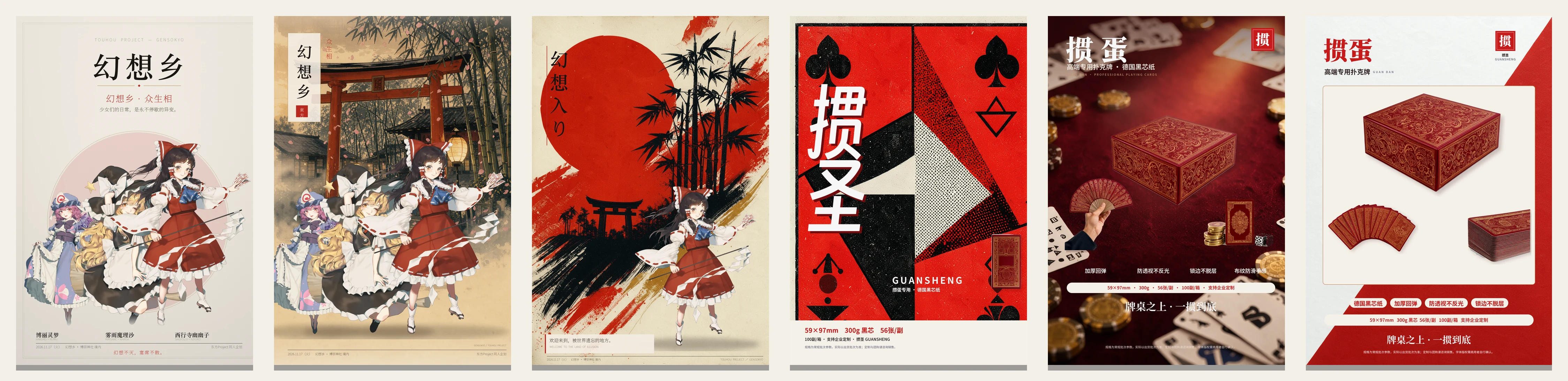
Six posters, one pipeline. The three on the left are 東方Project fan pieces (generated, cut out, laid out, exported to print). The three on the right are one playing-card product launch, rendered as three different treatments: a screen-print art version, a felt-table scene, and a clean white e-commerce layout. The red-lacquer gift box was shot on white, cut to a transparent PNG and composed over an AI-generated background, with the spec strip, the selling points and the compliance line all placed as editable layers — not baked into the picture.
Who this is for
You are comfortable opening a design tool, but you do not want to learn a design suite. You want AI backgrounds, but you do not want to pay per image, and you do not want your client's product photos uploaded to somebody's cloud. Your GPU is a normal one — 8 GB of VRAM, the card that came with the machine.
That is exactly the machine this was built on and tuned for. Every default in here assumes 8 GB: int8 weights,
--lowvram, 1024-class generations, one job at a time. Of the two local engines we wired up, FLUX is the one
we reach for — best texture and lighting per second on a small card. MOSS-Image is there when you need a
model that reads Chinese prompts more literally, or when you want the whole layout generated in one shot.
What you get out the other end is not a picture. It is a print-ready PDF, plus a project file you can re-open and edit next Tuesday.
What it actually does
| Local generation | ComfyUI on localhost, FLUX 3 Klein / MOSS-Image. Text-to-image, multi-reference, inpainting-style edits. No API key, no per-image bill, no upload. |
| Cut-out assembly | GrabCut on white/light backgrounds → transparent PNG with feathered edges and no white fringe. Paste onto any background losslessly, with a real drop shadow. |
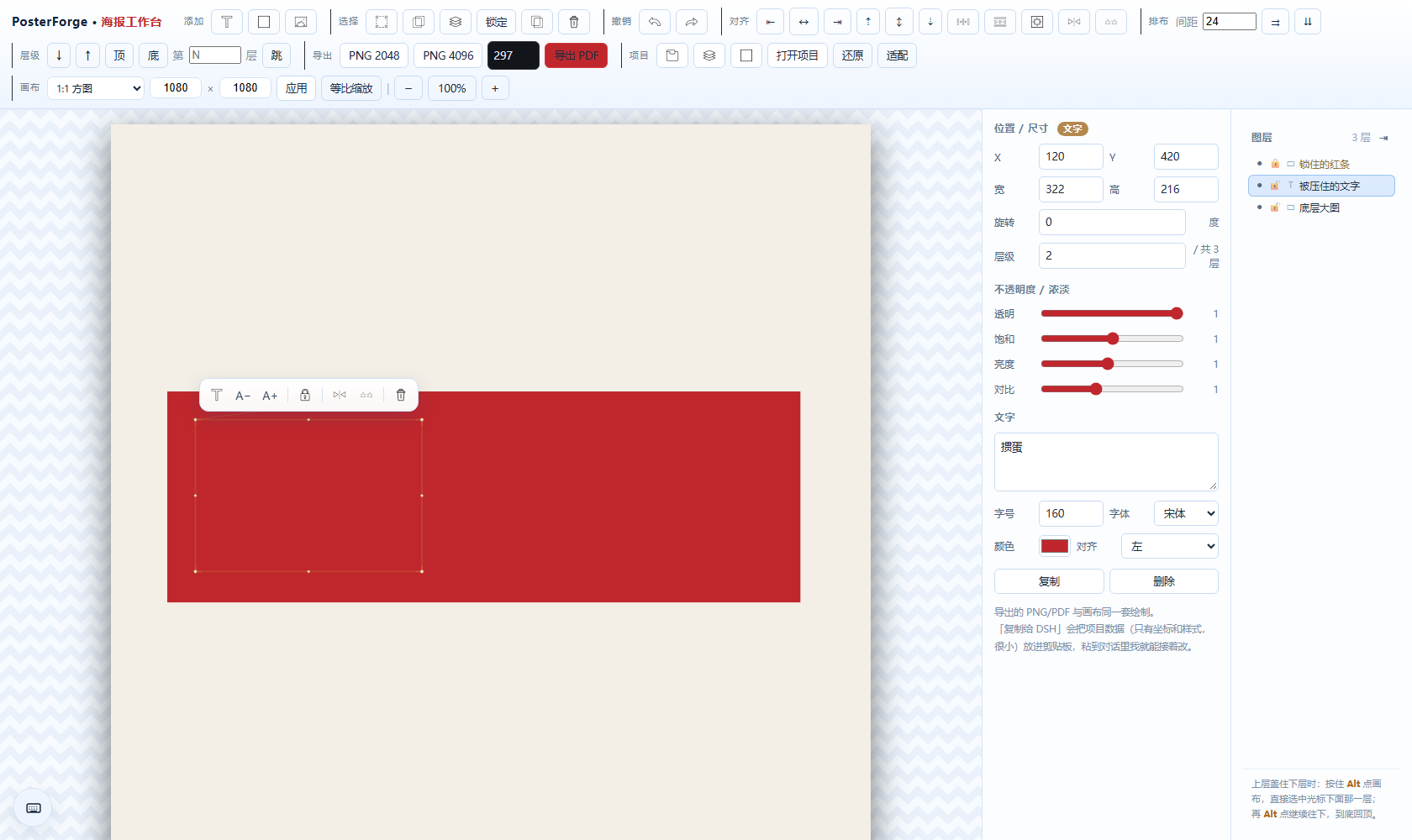
| Editable workbench | One self-contained HTML file, opens offline with a double-click. Drag, scale, rotate, crop, group, lock, flip, align, distribute, opacity, 8 font families, export PNG 2048 / 4096 / PDF. |
| QR that survives print | Generate, recolor, batch; then decode every code in the file before you send it to the printer. A code smaller than 11.5% of the canvas short edge is rejected — that is the size where phone cameras start failing on paper. |
| Composition by job file | A job.json describes canvas, patches, pastes, slots; one command renders the print file and runs pre-flight (overlap, bleed, QR size, font size). |
| Find anything under anything | The layer panel on the right lists every element by name; or hold Alt and click on the canvas to click through the top layer and select what is underneath. Locked layers pass clicks through instead of swallowing them. |
Install
# 1. the plugin
dsh plugin add dsh-8g-poster        # or: npm i -g dsh-8g-poster

# 2. python side (Pillow, numpy, opencv, reportlab, qrcode, zxing-cpp)
python -m pip install -r skill/requirements.txt

# 3. a local ComfyUI on port 8189 with the models below
Full walkthrough, including both model downloads (~10 GB total), ComfyUI flags for 8 GB cards, and how to verify the install: docs/INSTALL.md.
Models
| Engine | Files | ~Size | Where |
|---|---|---|---|
| FLUX 3 Klein (recommended) | flux-2-klein-4b.safetensors, qwen_3_4b.safetensors (or an int8 build), flux2-vae.safetensors | 10.3 GB | Comfy-Org/Flux-2-Klein-4B |
| MOSS-Image (optional) | moss_image_sft_int8_convrot, qwen3.5_9b_w4a8_gptq, flux2-vae, 2 LoRAs | 12.8 GB | Comfy-Org/MOSS-Image |
The plugin expects the community int8 file names by default. If you download the official names, either
rename the files or point the plugin at them with POSTER_UNET / POSTER_CLIP / POSTER_VAE — no code edit.
The 13 tools
poster_guide poster_workspace poster_generate poster_editor poster_open poster_fonts
poster_templates poster_cutout poster_detect_slots poster_compose poster_check poster_versions poster_qr
Two entry points, one implementation: a DSH plugin (lib/index.js) and an MCP stdio server
(server/index.js), both on top of lib/core.js. Tool reference: docs/MANUAL.md.
A typical session
you:  用8G 海报做一张掼蛋扑克牌的海报,产品图我已经抠好了
agent: poster_guide → poster_workspace(status) → 问路线
you:  flux
agent: poster_generate ×3  →  三版无字背景
agent: 排字 → 贴抠好的产品 PNG → poster_check
agent: 把三版发你看看,选一版
you:  第三版,艺术版那个
agent: poster_editor → 工作台项目 JSON → 你双击打开继续改
you:  …改完导出 PDF
Requirements
- Node ≥ 18
- Python ≥ 3.8 with
Pillow numpy opencv-python-headless reportlab qrcode zxing-cpp - ComfyUI reachable at
http://127.0.0.1:8189(configurable viaPOSTER_COMFY) - 8 GB VRAM is enough; 12 GB+ gives you headroom for 1536-class generations
Honest limits
- AI cannot draw Chinese text. Every model we tried turns 「掼蛋」into plausible-looking nonsense. The pipeline is built around this: generate backgrounds without text, keep a blank gold label plate where text belongs, then set real text in the workbench. Anyone selling you "AI generates the whole poster with text" is selling you retouching work.
- The workbench is a layout tool, not Illustrator. No bezier paths, no CMYK conversion. Files export as RGB PDF; ask your printer whether they want RGB or a converted CMYK file.
- Prices and claims in any generated copy are your responsibility. The sample posters ship with a compliance line for exactly this reason.
License
MIT for the code. Bundled 得意黑 (Smiley Sans) is under SIL OFL 1.1 — see assets/fonts/LICENSE.md.
System fonts referenced by the workbench are not redistributed.