geml
geml-spec/geml
面向 DSH 的 Agent-Native 文档处理:可寻址块让智能体只读写一个小节而非整份文件;随附 geml MCP 服务器与写作、代码图技能。
安装
dsh plugin --profile web add github:geml-spec/gemlREADME


GEML — General Expressive Markup Language



English | 中文
GEML is an Agent-Native base document format and protocol, designed for people and AI agents to read and write the same document.
One format, two readers.
In agent-driven development and knowledge work, plain text and Markdown have no deterministic block boundaries: a program and a model trade the whole file in and the whole file back out — at best probing for it with line windows, and restating the original verbatim to rewrite it. Token cost grows with the length of the document, and the operation turns bloated. After a few rounds of rewriting, the copies excerpted elsewhere start to drift.
GEML organizes a document into typed blocks, each with a type and a unique id, so a model locates by #id and edits in place. With built-in write validation and .gemlhistory tracking, an agent reads and writes at very low token cost — leaving the precious context window for the actual work.
For people, it is plain text that reads clean; for agents, it is an addressable, verifiable, traceable, revertible "Doc-as-a-Base".
GEML is minimal. It is plain text — still clean with no renderer in sight; one block syntax for the whole language; addressable, verifiable, referenceable structure, natively.
Instead of a separate mini-syntax for each kind of content, GEML carries every kind in one container: the typed block. Code is a block. So are tables, diagrams, math, callouts, even metadata — and a run of prose can be one too (=== text), whenever you want it addressable. Extending it later is just as plain. The shape is the same every time, which makes the language easy enough to learn that it's hard to get wrong.
=== code {#hello lang=python}
print("hi")
===
geml get doc.geml '#hello' # by name, just this block
Blocks have names so the verbs have somewhere to land — the full syntax is in the format in 1 minute.
Contents: What it solves · Why now · What's different · The format in 1 minute · A gift for programmers · Get hands-on · With an LLM · Maturity & versions · The design · Roadmap · Take part · License
What it solves
| Pain point | Markdown / JSON today | What GEML does |
|---|---|---|
| Context and token cost | No block boundaries — locating means probing with line windows, and a miss means going again | Patch by #id: one hit on the semantically complete block |
| Deterministic reads and writes | No settled block boundaries; locating is probing, rewriting is restating the original verbatim | One block syntax + typed bodies: locating and editing without ambiguity |
| Fragmentation and drift | Content is excerpted into other documents; the source changes, the copy neither follows nor complains — it just quietly goes stale | Single source of truth: embed resolves by reference, so one edit at the source lands everywhere; a broken link goes red in geml check |
| Write safety and validation | A bad write is hard to localize, with no fine-grained rollback | A structure-breaking write is refused and the file left untouched; .gemlhistory reverts a single block |
Why the LLM era needs a brand-new text format
Because both the producer and the consumer of a document have changed.
In traditional software engineering, a document was either a static explanation for people to read, or a serialized data file for programs.
Today, people and AI agents collaborate on the same document at high frequency. When the agent becomes the document's "second reader and co-author", the old balance breaks for good:
- Context is scarce compute: every whole-document read or write burns an agent's limited attention window and reasoning budget;
- Human–machine collaboration needs an isomorphic carrier: people need to read it at a glance, agents need to read and write it precisely, block by block;
- Knowledge must have a single source of truth: scattered prompts and copy-pasted Markdown are destined to decay with every iteration.
Yet none of our existing text infrastructure was designed for this scene:
- Markdown (typeset for people): no stable structural blocks, no machine keys. To change one parameter, an agent must read and write the whole text — wasting context budget across multi-turn loops, and inviting drift in both format and meaning.
- JSON / XML (serialized for machines): full of wrapper syntax and structural noise — blocking natural human reading, while quietly eating expensive tokens in long contexts.
- Scratch memory and scattered files (no single source of truth): context is torn across chat history and Markdown copies everywhere; a copy is drift from the moment it is made, and version skew and hallucinated distortion follow.
The answer: "Doc-as-a-Base"
GEML invents no heavy new runtime. It gives plain-text documents one standard set of operational semantics:
| Old pain | The matching capability (the four laws) | What it buys developers and agents |
|---|---|---|
| Changing one spot means rewriting the whole text | The Law of Addressing | Every block carries an #id; get/set reads and writes that block alone. What is never loaded cannot be broken — the context window stays yours. |
| Copies everywhere, all drifting | The Law of Projection | An embed evaluates dynamically instead of copy-pasting; one definition at the source ends the labor of syncing copies. |
| Bad formats / broken references pollute downstream | The Law of Validation | References and syntax are checked at build time; a bad write is stopped before it lands, with no waiting for human review. |
| One bad edit forces a whole-file rollback | The Law of Rollback | The companion .gemlhistory reverts a single block atomically — no tearing down the page; a lightweight version safety net for agents. |
A document no longer needs just a format — it needs a set of verbs. GEML keeps plain-text readability and adds deterministic block-level operations.
💡 Deep Dive: If you are interested in the dilemma of engineering documents in the LLM era and why we need to redesign a plain-text format from the ground up, read our full article on the blog: "Why Do We Need a New Text Format in the Era of LLMs?"
What's different about GEML
GEML stays small on purpose — the thinking, what it refuses, and what is still open are in how we thought about the design.
The four capabilities were established a chapter ago — addressing, projection, validation, rollback. This chapter is where each format lands against them, and where GEML draws its boundaries.
How other formats compare
Each of the four has mature solutions in its own field; what's unusual is meeting all four in one plain-text format:
| Family | What the state really is | Addressable / referenceable | Projectable / embeddable | Verifiable | History / traceability |
|---|---|---|---|---|---|
| Word / Docs | Opaque state | ❌ No block-level keys; access via platform APIs | ❌ Copy-paste only | ❌ No checking at all | ⚠️ Platform server-side, not in the file |
| Markdown / AsciiDoc | A stream of characters | ⚠️ Heading anchors or dialect ids; no read/write verbs | ⚠️ Dialect embeds (Obsidian ![[…]], include::) — break silently | ❌ Broken links fail silently | ❌ None in-format — external git required |
| JSON / XML | Data serialization | ✔️ (id / schema) | ⚠️ XML only (XInclude, external) | ✔️ Via an external toolchain | ❌ None in-format — external git required |
| GEML | Plain text + block structure | ✔️ A unique #id per block (referenceable natively) | ✔️ === embed: a reference is a lookup (native) | ✔️ A build-time error | ✔️ .gemlhistory next to the file (traceable natively) |
Item by item: vs. CommonMark · vs. XML and JSON · a 7-format capability matrix.
Coexisting with Markdown: GEML is the editing source of truth, Markdown is the delivered artifact. Project one way with geml <file> --to md|html and ship .md or .html as before. Collaboration, not lock-in. (Projection is lossy: block ids and table-bound charts don't survive it.)
Don't take the table's word for it — re-run it. This is what I asked the model:
Based on your own experience editing the READMEs just now, describe the command steps you go through on a document (I saw you using grep and such), and whether you cache documents to save tokens — let's compare, and from that see which parts of GEML would actually earn their place.
What came back: what one edit costs and a real day replayed. Paste the question to your own model and see what it tells you.
PS: I am still trying to work out whether the upstream chain (who calls this) and the downstream chain (what it calls) that codemap produces can pin down functions and call sites — and change project code — the same way. I will post a report when I have one.
The format in 1 minute
Typed blocks
One shape, every type. A block's basic syntax is === type [attributes] … === (where attributes like {#id .class key=val} are optional) — only the type (and how its body is read) changes:
=== code {lang=python}
print("hi")
===

=== note {.intro}
Parsed prose with *emphasis* and a [[#budget]] reference.
===

=== meta
title = "Budget plan"
===
A run of = (three or more) opens a block; an equal-length run closes it; longer fences nest inside shorter ones. A block that carries an #id can also close with the labeled fence === #id — no fence-length counting, which makes long blocks much harder to get wrong (nesting still requires a longer outer fence: a same-length bare === in the body closes the block early, labeled or not). The type decides how the body is read — raw (verbatim: code, diagram, math, table), flow (parsed prose with inline markup: note, text), or data (one key=val per line: meta); embed carries no body at all — its src= names the block it stands for — and every block may carry an attribute object {#id .class key=val}, where a .class is a semantic label, never a styling hook. The full inline grammar (emphasis, links, [[#id]] auto-references, media, footnotes, inline $math$) is in the spec.
Tables — two bodies, one model
Write a table visually:
=== table {#budget caption="Annual cost"}
| Plan  | Months | Rate |
|-------|-------:|-----:|
| Basic |      1 |   30 |
| Pro   |      2 |   30 |
===
…or as data, with computed columns and a summary row:
=== table {#fy25 format=csv header=1 compute="FY [%.1f] = Q1 + Q2 + Q3 + Q4" summary="Segment = 'Total'; FY [%.1f] = sum(FY)"}
Segment,  Q1, Q2, Q3, Q4
Cloud,     8, 10, 12, 14
Platform,  5,  6,  7,  9
Services,  3,  4,  4,  5
===
Both forms describe the same model. The FY column and Total row are computed at build time:
| Segment | Q1 | Q2 | Q3 | Q4 | FY |
|---|---|---|---|---|---|
| Cloud | 8 | 10 | 12 | 14 | 44.0 |
| Platform | 5 | 6 | 7 | 9 | 27.0 |
| Services | 3 | 4 | 4 | 5 | 16.0 |
| Total | 87.0 |
compute runs + - * / ( ) per row over columns; summary adds a foot row from the aggregates sum / avg / min / max / count (with arithmetic over them, e.g. weighted ratios); a trailing [printf] sets numeric display.
Tables can also pull their data from an external CSV via src="regions.csv".
❓ Up for discussion: should computed columns and the summary row stay? Keep, freeze, or drop — say which.
Math
=== math {#gauss caption="Gaussian integral"}
\int_{-\infty}^{\infty} e^{-x^2} dx = \sqrt{\pi}
===
$$\int_{-\infty}^{\infty} e^{-x^2} dx = \sqrt{\pi}$$
Diagrams & charts — host a DSL, or chart a table
GEML never interprets a diagram body; it routes it to a pluggable renderer (an unknown format is a warning, body preserved):
=== diagram {#flow format=mermaid caption="Review flow"}
graph LR
  A[Draft] --> B{Review} -->|ok| C[Publish]
===
graph LR
  A[Draft] --> B{Review} -->|ok| C[Publish]
A diagram can also chart a table — single source of truth, with the column references checked at build time and no data copied:
=== diagram {format=geml-chart data=#fy25 type=bar x=Segment y=FY}
===
Drawn from the #fy25 table above:
xychart-beta
  title "FY by segment"
  x-axis [Cloud, Platform, Services]
  y-axis "FY"
  bar [44, 27, 16]
Data — a value, not just text
Every block type names what it holds: code a region of code, table a grid, math a formula. data holds a data value, and it is where the data formats live — json (the default) and jsonl today, yaml/toml reserved. Being typed means the body is read, not just displayed: a missing comma fails the build, geml get --json returns the value itself, and a chart can read it directly.
=== data {#log format=jsonl}
{"ts":"09:00","p95":41}
{"ts":"09:10","p95":58}
===
A jsonl body holds one record per line, which a program can blind-append at end-of-file. Records can also stay in their own file: src=ops/latency.jsonl#L900-999 names the file and, optionally, a line window — so the log keeps being appended and tailed as before, while the document is its verified, addressable, chartable view of it.
Embeds — a dynamic reference, not a copy
One block can stand for another: in the same document by src=#id, across documents by src=other.geml#id. An embed is a dynamic lookup of the source at render time — change the source once and every embed follows; delete it and geml check fails the build on the spot.
=== embed {src=#fy25}
===
The body stays empty; the target lives in src=.
Markdown can't show you the projection. To see it live: install the browser extension, open the raw link to sample.geml, and scroll to the Transclusion section — a same-document projection (src=#roadmap), cross-document projections, and even chained resolution (an embed pulls a chart, which itself binds to a table in another file) all render in place: nothing is written there, yet edit the source once and the projection follows.
A gift for programmers — geml-code-graph
To really feel how powerful and flexible a single GEML primitive is, let's try it on a code graph — a familiar but demanding case for programmers:
your whole codebase's call graph, written as GEML. geml codemap build lays the call graph out as a tree of GEML documents — every method an #id block, with #calls / #called-by edges both ways. The downstream chain (what a method calls) for troubleshooting, the upstream chain (who calls it) for the blast radius — all visible in a second;
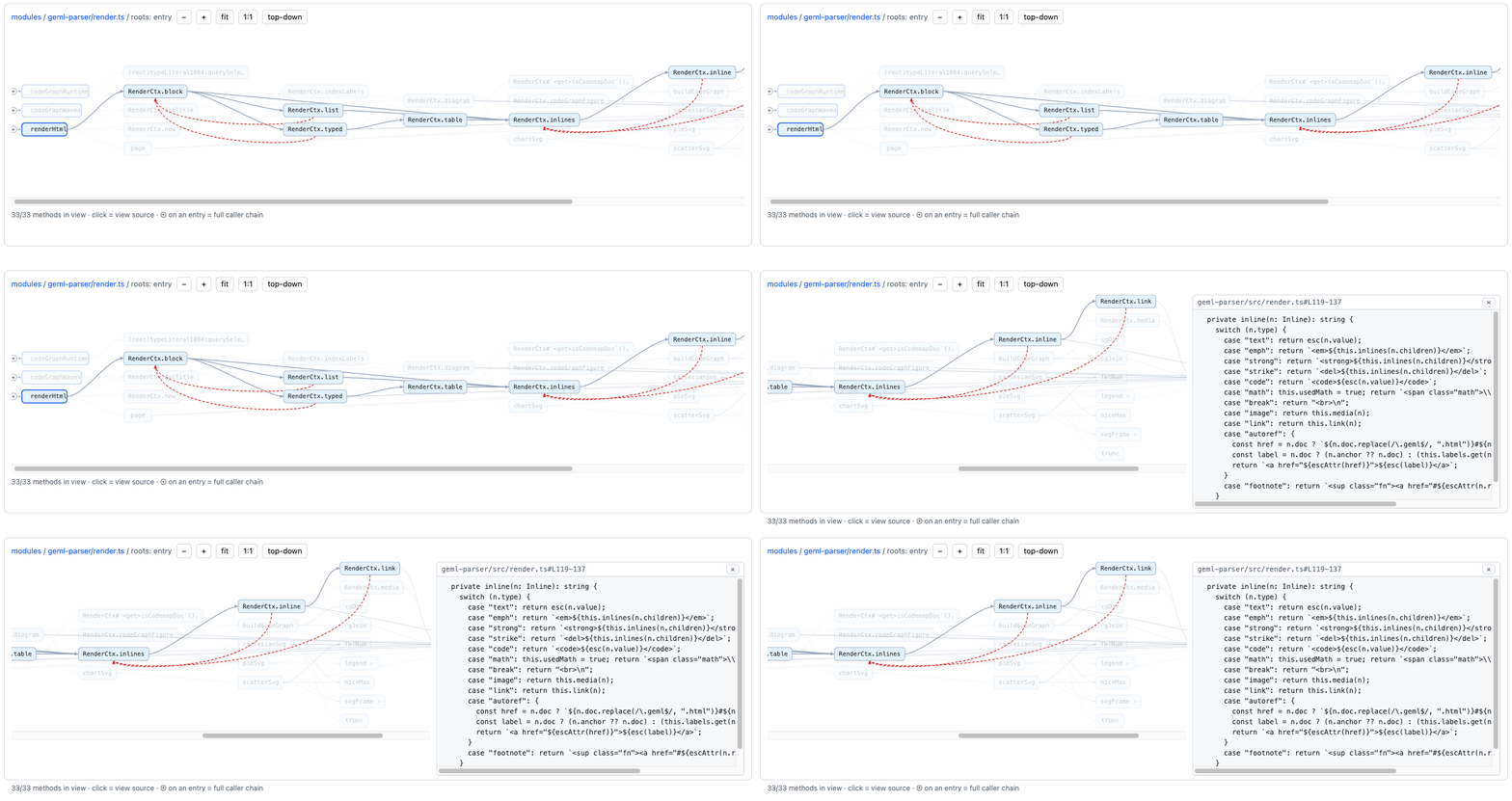
npm i -g @geml/geml
geml codemap build              # --root defaults to . : detect languages -> index -> one merged graph in ./.geml-code-graph/
geml codemap serve              # opens your browser on the graph
[!NOTE] Requirements. Node 22+ for the CLI (
npm i -g @geml/geml). Everything below is optional and used only where noted: Joern for non-TS/JS languages in the code graph, and Chrome for the viewer extension.
[!TIP] TS/JS — zero setup:
buildfetches the scip indexer by itself. Java / C / Python / Go / Kotlin — one extra download, Joern: unzip its release package and pass that folder to build, e.g.--joern ~/joern/joern-cli(--joern C:\joern\joern-clion Windows), or put it on PATH and skip the flag. Mixed front-end + back-end repo — everything merges into one graph.
geml-code-graph is itself a diagram format — one line embeds it in any GEML document (=== diagram {format=geml-code-graph src=.geml-code-graph/index.geml} ===), and an optional per-commit hook (bundled with the Claude skill) rebuilds it as the code moves, so the graph doesn't drift.
Scale is measured, not promised: on Apache Flink's codebase — 13,585 Java source
files, ~81,000 methods, 266,821 call edges — the plain-text data tables still
open and query instantly, and you can grep any method name to trace its call chain.
Reproduce it yourself: clone apache/flink and run geml codemap build --joern … at
its root.
Next — get hands-on now
▶ Try writing GEML in the Playground — edit on the left, rendered live on the right, and the build verdict flips red the moment a reference breaks. No install, nothing to read first.
Then, in the order that suits you:
- See it render in your browser. Install the extension and open a raw
.gemllink (the raw file, not the GitHub blob page — that one is HTML): the GEML spec itself (dogfood — the spec is a GEML document, rendered at scale), the showcase (a computed table, four charts, a Mermaid flow, and math), or playground/sample.geml for the interactive code-graph. - Run it locally.
npm i -g @geml/geml(Node 22+), thengeml checka document, or point it at your own repo withgeml codemap build. - Set up Claude Code — one command.
npx -y @geml/geml skill installputs the authoring skill, the CLI and the MCP server in place, user-global, for every project. It edits no settings and installs no hooks. Details. - Read the grammar. The full spec (EN / 中文) is normative and short enough to read in a sitting.
Using GEML with an LLM
The goal is one thing: your model edits a block at a time, and verifies — never re-reads and re-emits a whole file to change one paragraph. Getting there takes one step, and which step depends on what you use.
Using Claude Code — run this
npx -y @geml/geml skill install
It installs the authoring skill, the geml CLI and the MCP server, user-global,
for every project. No settings.json edits, no hooks; re-run after an upgrade.
(Prefer plugins? claude plugin marketplace add geml-spec/geml, then
/plugin install geml@geml — same skill, MCP server bundled.)
Then say it once in a session, and the project has switched:
This project uses GEML as its base document format; generate other formats from it as needed.
The skill takes it from there. New documents are written as .geml with an id
on every section — that id is what later lets one section be replaced instead
of the file. Documents that already exist are left where they are: adopting the
format is not licence to convert or delete anything. And geml <file> --to md|html produces whatever still has to ship as something else.
Using anything else — paste this, then check the output
A model with no skill to read needs the rules once. Paste the prompt below, and
keep geml check as the gate on whatever it writes back — the CLI is
npm i -g @geml/geml (Node 22+).
Write the document as GEML: every block is
=== type [attributes]…===(the format in 1 minute lists the types). Four rules are the ones models get wrong: the closing fence is a=run of the exact opening length, and a body containing===needs a longer outer fence; headings are ATX#only, with no---frontmatter (metadata is=== meta); every#idis unique and every reference ([[#id]],[text](#id),[^id],data=#id) must resolve; there is no raw HTML. The normative spec isGEML-spec.md.
What it will do with it
geml list   doc.geml                                     # CALL FIRST: every block, its address, kind, lines
geml find   "words" doc.geml                             # search block content -> an address, not a line number
geml get    doc.geml '#hello'                            # read ONE block (a heading id = its whole section)
geml get    doc.geml '#hello' --intro                    # a section cuts three ways: --head | --intro | --body
geml set    doc.geml '#license' --in template.geml#mit   # replace that block, forking another
geml add    doc.geml --after '#intro' --in snippet.geml  # insert a fragment (keeps its own ids)
geml revert doc.geml '#plan' --rev -1                    # roll ONE block back
geml check  doc.geml                                     # validate only: diagnostics + exit code
Any section cuts three ways, on get and set alike: --head is the heading
line, --intro what it says before its first subheading, --body everything
under it — so --body always contains --intro, and equals it when there is no
subheading. A section's opening can be edited without pulling its subsections
into context.
Every mutation is re-parsed before it writes and refused if it would break the
document — which is what makes editing unattended safe. The rest of the verbs
(delete, rename, history, --to md|html|geml conversion, addressing a
block by type or content hash) are in the
parser README.
MCP Server
A standard Model Context Protocol server ships with the package, so your agent
edits one block at a time instead of rewriting whole files. It runs locally on
Windows, macOS, and Linux; --root is the directory holding your .geml files.
Claude Code / any CLI client — one command:
claude mcp add geml -- npx -y @geml/geml@latest mcp --root /absolute/path/to/your/docs
Claude Desktop — add to claude_desktop_config.json:
{
  "mcpServers": {
    "geml": {
      "command": "npx",
      "args": [
        "-y",
        "@geml/geml@latest",
        "mcp",
        "--root",
        "/absolute/path/to/your/docs"
      ]
    }
  }
}
Then just ask for the change you want — "fix the Q3 row in the FY26 table" — and
the agent addresses that one block. You never learn a tool name: each mirrors a
CLI verb (geml set → geml_set), so one vocabulary covers the terminal and the
agent.
Two guarantees make this better than letting a model rewrite the file: a write is
parsed before it reaches disk and refused with its diagnostics if it would
break the document, and every write first records a .gemlhistory revision — so a
bad edit is both prevented and undoable (geml_revert restores one block, the
rest of the file byte-identical). Paths stay confined to --root, which a client
cannot widen.
Point --root at a repository that has a code graph (geml codemap build) and the
same server also answers "who calls this" — four read-only geml_codemap_* tools,
one client entry instead of two. Every tool and option:
docs/mcp-guide.md.
Ecosystem and maturity
GEML is a small, young spec — but a stable one: 1.0 is released and usable for real documents (this repo's own spec is one), with a strict conformance suite, a reference implementation that passes it (versioned independently of the spec), and an open proposal process.
Both specs are bilingual:
| Document | English | 中文 |
|---|---|---|
| Core spec | GEML-spec.md | GEML-spec_CN.md |
| History extension | GEML-history-spec.md | GEML-history-spec_CN.md |
Versions and compatibility
- Self-hosting —
GEML-spec.gemlis the specification written in GEML, required to parse clean on every test run. - A conformance suite is what holds separate implementations compatible.
- A reference implementation of the parser. 1,200+ unit tests today, plus the conformance corpus, round-trip serialization and end-to-end CLI runs, with coverage CI-gated at ≥95% lines / statements / functions / branches.
- Forward compatibility is in the grammar. A processor must degrade gracefully on constructs it does not recognize (spec §8.2), which is why adding a block type or a diagram format is not a breaking change. The type registry is open: an unregistered type name should contain a hyphen (
acme-invoice), leaving hyphen-free names to future versions of the spec (§8.5). - Claiming conformance. An implementation may call itself conformant to GEML 1.0 once it reproduces the conformance suite case for case (§8.5). No permission needed, and no sign-off from this repo.
- On the wire. Extension
.geml(version sidecar.gemlhistory), media typetext/geml, ortext/vnd.gemlwhere a registered type is required —text/gemlis not registered with IANA yet. - A fragment identifier on a
.gemlURL names the block bearing that id (§0.6) — which is not what#tagmeans on an HTML page.
How we thought about the design
What the design follows
It is plain text meant for people to read. Fully readable with no renderer — which is why there is no raw-HTML escape hatch, and why a style may never change what a document says.
One primitive, a few models. Every kind of content is the same typed block; extending the format means registering a type, not inventing syntax. The type says what it becomes: meta is key–value shared across the document, code is a region of code at a location, data is a data value, table is a grid waiting to be worked, diagram is a hosted external DSL, embed is a view onto a source of content
A reference is a window, not a navigation. An HTML link navigates: the target is not in the document you are holding, so people copy it in anyway. What is being designed out is not dead links; it is the incentive to copy. Cost: rendering may need to read several files, and must degrade gracefully when it can't.
Prefer subtraction. Where a rule breeds edge cases, the feature goes rather than the edge cases getting specified: no underscore emphasis, no setext headings, no indented code blocks, no raw HTML. The ambiguity is deleted at the source instead of enumerated in test cases. Cost: some things you can write in Markdown you cannot write here.
No broken windows. Markdown's ethos is never to fail — render something. GEML's is the opposite: verified at build time rather than tolerated at render time. A dangling #id is an error with a non-zero exit. Stable ids, geml check and the diagnostic catalogue all follow from that one decision. Cost: a document that "looks fine" can fail your build.
A sidecar travels with the document without getting into it. The .geml file is the source of content and stays deliberately small. Anything else is not pushed into it but points back at it — a version history in .gemlhistory, say — and deleting that leaves the document perfectly valid. Cost: a convention, explicit or implied, and two files that travel together.
The command line is built for an agent. The fewest verbs that cover everything, kept orthogonal, with pipeable input and output and options that stay consistent across them.
What it therefore refuses
| Refused | Why |
|---|---|
| A diagram language of its own | External DSLs are hosted (Mermaid, Graphviz, D2, …); the format defines only the hosting protocol |
| A raw-HTML escape hatch | Semantics stay portable, tied to no backend or renderer |
Setext headings / --- frontmatter | ATX # only, so nothing collides with a thematic break |
| A full spreadsheet engine | Per-row formulas and summary aggregates are enough; no cell addressing, lookups, or macros |
Roadmap
- The GEML
1.0spec (core + history extension), in English and Chinese, with a conformance suite - Reference implementation
@geml/geml: parser, CLI, block-level.gemlhistorytracking - Official MCP server (
geml mcp) for Claude Code, Cursor, Codex and other MCP hosts - codemap — a whole codebase's call graph, written as GEML
- Ecosystem integrations: VS Code highlighting and reference checking, tree-sitter, Obsidian, the browser viewer, a GitHub Action, LangChain / LlamaIndex, the Claude Code plugin, the DeepSeek Harness plugin
- The VS Code extension on the Marketplace
- Parsers in other languages (Rust / Python) — the spec and the conformance suite are public, so community implementations are welcome; we are glad to help line them up
Take part
GEML is 1.0, but "stable" means the rules already there won't shift under you,
not that the design is settled. There is exactly one implementation so far, and
one set of opinions behind the spec. Your thinking can still change the spec itself.
If you want a hand in it:
Come argue about these:
- Should the format keep computed columns and summary rows?
- If styling is supported, how should it be designed?
- Is the GEML history file a made-up need?
--viewreads through an embed. Flag, or its own verb?
| Gap | Where it stands | What it takes |
|---|---|---|
| Skill installation for more agent tools | Gemini CLI, Qwen Code and AGENTS.md are installed by detection already; the MCP server works with any client | Add the rest the same way: Cursor, GitHub Copilot, Cline — their rule-file conventions move fast, so check the current docs before writing one in |
| How well the primer holds on other models | Only exercised on Claude | Have GPT / Gemini / a local model each write a batch of GEML from the primer, count how many pass geml check first time, and report the rules they keep getting wrong — those are the ones the primer should name |
| Deeper Obsidian integration | Renders, but not in the community store yet | Editing at the CodeMirror layer and seamless two-way rendering, plus the store submission itself. Wants someone who knows the Obsidian API. |
| The viewer on other browsers | Chrome works | Firefox / Safari ports. |
| Packaging the RAG integrations | LangChain / LlamaIndex are reference implementations | Publishing to PyPI; and wiring up other frameworks (Haystack, DSPy, …). |
- Write a second implementation of the spec — a new GEML parser in whatever language you like (how to write a parser)
- Finding the places where the spec is ambiguous is itself the contribution, whether or not that parser ever ships.
Or propose something new:
- A GEP: the proposal, the spec edit and the conformance cases land together (process)
Or put it to use:
| Scenario | Where | State |
|---|---|---|
| From the command line — validate, convert, edit by block, version history, all in one command | @geml/geml (source geml-parser/) | Available |
Read it in the browser — open any raw .geml link and it renders in place: computed tables, charts, Mermaid, math, with diagnostics as a banner | Chrome Web Store · source | Available |
| Let an agent edit by block — an MCP server; the agent changes one block instead of rewriting the file, and every write is validated before it reaches disk | docs/mcp-guide.md | Available |
| Turn a codebase into a document — the whole call graph as a tree of GEML documents, browsable | geml codemap build (design) | Available |
| Write it in your editor — syntax highlighting + build-time reference checking | integrations/vscode/ | Built — install from source; not on the Marketplace yet |
| Render it in Obsidian — the reference parser + the viewer's renderer, the same code path as the web | integrations/obsidian/ | Built, not in the community store |
Feed a RAG / agent framework — block-level loaders (one chunk per block, carrying block_id) + agent editing tools | integrations/langchain+llamaindex/ | Reference implementation |
| Try it without installing anything — edit on the left, live render on the right | Playground | Available |
Three files to read first: GOVERNANCE.md for how decisions get
made, CONTRIBUTING.md for how to send work, and
CODE_OF_CONDUCT.md for the one rule about people —
disagree with the design as sharply as you like, not with the person.
Repository layout
spec/                  Core spec + .gemlhistory extension as .md (EN / 中文), the
                       CC-BY spec license, and proposals/ (GEPs)
spec/in_geml_format/   The dogfood: those same specs written in GEML, with their
                       .gemlhistory sidecars
geml-parser/           Reference parser, renderer, CLI + codemap toolkit (TypeScript, Node 22)
integrations/          Everywhere GEML plugs in: geml-viewer (browser extension),
                       geml-check-action (CI), vscode, obsidian, tree-sitter (brief)
playground/            In-browser playground (+ a live geml-code-graph of this repo)
docs/                  Guides, design notes, comparisons/ (COMPARISON + vs-CommonMark +
                       vs-XML-and-JSON), assets (logos, used by the Pages site below),
                       and an example .geml to render
.claude/skills/        Claude skills: GEML authoring, and the code graph
.github/               CI + geml-check workflows, MCP registry publish, and issue
                       templates (bug, GEP, new implementation)
site/                  The geml-spec.github.io/geml Pages site: a project homepage
                       (index.md) plus a Jekyll blog (blog/, posts in _posts/) —
                       the long-form "why a new format" article (EN / 中文) lives
                       there as its first post. `cd site && bundle exec jekyll
                       serve` builds it locally; .github/workflows/pages.yml
                       builds and deploys it (grafting in playground/ as static
                       output) on push to main.
License & governance
Code is MIT (LICENSE): everything in this repository —
geml-parser/, all of integrations/, playground/, .claude/skills/, the GEPs
in spec/proposals/ — except the specification documents.
The specification documents are CC-BY-4.0 (LICENSE-spec.md,
which lists them exactly): spec/GEML-spec*, spec/GEML-history-spec*, spec/in_geml_format/*, and
docs/comparisons/COMPARISON*. A spec is not software, so anyone may build a conformant
implementation without permission — and call it conformant to GEML 1.0 once it
passes the conformance suite.
Using the name. You need no permission to implement GEML, to name an
implementation after the format (geml-rs, pygeml, a geml package on your
language's registry), or to state that your tool reads and writes GEML. Two
requests, neither of them a legal restriction: call an implementation conformant to
GEML 1.0 only once it passes the conformance suite, and don't imply that this
project wrote, endorses, or maintains it. Attribution for the specification text
itself is what CC-BY-4.0 already asks for.