dsh-time-pin
henryhe520/dsh-time-pin
为单个对话钉住 as_of 时间点与前后两侧的带日期证据窗口——\[as_of − before, as_of + after],支持过去、未来与公元前。在受限模式下,窗口变化时只告知一次当前窗口,web_search 结果按发布日期过滤到窗口内、无日期来源一律排除,首条回复必须确认窗口(缺失时纠正一次)。另对长时间静默的后台任务给出确定性 \[TIME FACT] 播报,并提供只读的 time_pin_status 工具;默认模式不注入、不过滤。
安装
dsh plugin --profile web add github:henryhe520/dsh-time-pinREADME
dsh-time-pin · 时间锚定 · Time Anchor
English | 中文
npm dsh-time-pin ·
GitHub HenryHe520/dsh-time-pin
Pin the agent's "now" to a point in time and give the conversation a dated evidence window around it — a range before and after the pin, past, future, or BC — instead of letting it answer from today's knowledge.
Time Anchor adds a session-scoped time frame to every DSH conversation: an
as-of time point plus a retrieval range split into a side before and a
side after it, together forming the evidence window
[as_of − before, as_of + after]. In restricted mode the agent is told, once
per window change, which window it may reason from and which evidence rules
apply; web_search results are filtered to dated sources inside that window,
and the first reply must echo the active window. A second capability narrates
long-running silent background jobs with deterministic [TIME FACT] facts
(enabled by default and independent of the time window; turn it off in
Configure). In the default time-window mode the plugin injects nothing and
filters nothing.
Honest disclaimer: this is evidence isolation, not model amnesia. The model may still know about events after
as_of; Time Anchor constrains what may be used as evidence and makes the model state its window, but it cannot erase training knowledge and does not claim zero leakage. Trust the cited sources, not the model's confidence.

Contents
- What it does
- Screenshots
- Install
- Quick start
- The
/pincommand - Behavior
- Configuration
- Silent jobs
- Model-facing tool
- Privacy and safety
- Compatibility
- How it works
- Compared with neighboring plugins
- Uninstall and upgrade
- Known limitations
- Development
- License
What it does
| Capability | What it gives you |
|---|---|
| Pinned time window | A chat-header control (and /pin command) that pins as_of and a retrieval range on both sides, per conversation. Default, past, future, and BC years are all valid. |
| Evidence discipline | In restricted mode the agent is told which window is authoritative, must cite dates, must treat undated and out-of-window material as unusable, and must say so when the window has no usable evidence. |
| Filtered web evidence | web_search sources are dropped when they are undated or fall outside [as_of − before, as_of + after]; the model receives a note explaining what was excluded. |
| Anchor echo | After entering or changing a restricted window, the model's first reply must open with a one-line confirmation of the active window. A missing echo gets one nudge; anchoring never blocks the turn. |
| Silent-job narration | Background jobs that produce no output for 90 seconds (then every 3 minutes) produce deterministic [TIME FACT] facts the model can report — no guessing about "still running?". |
Screenshots
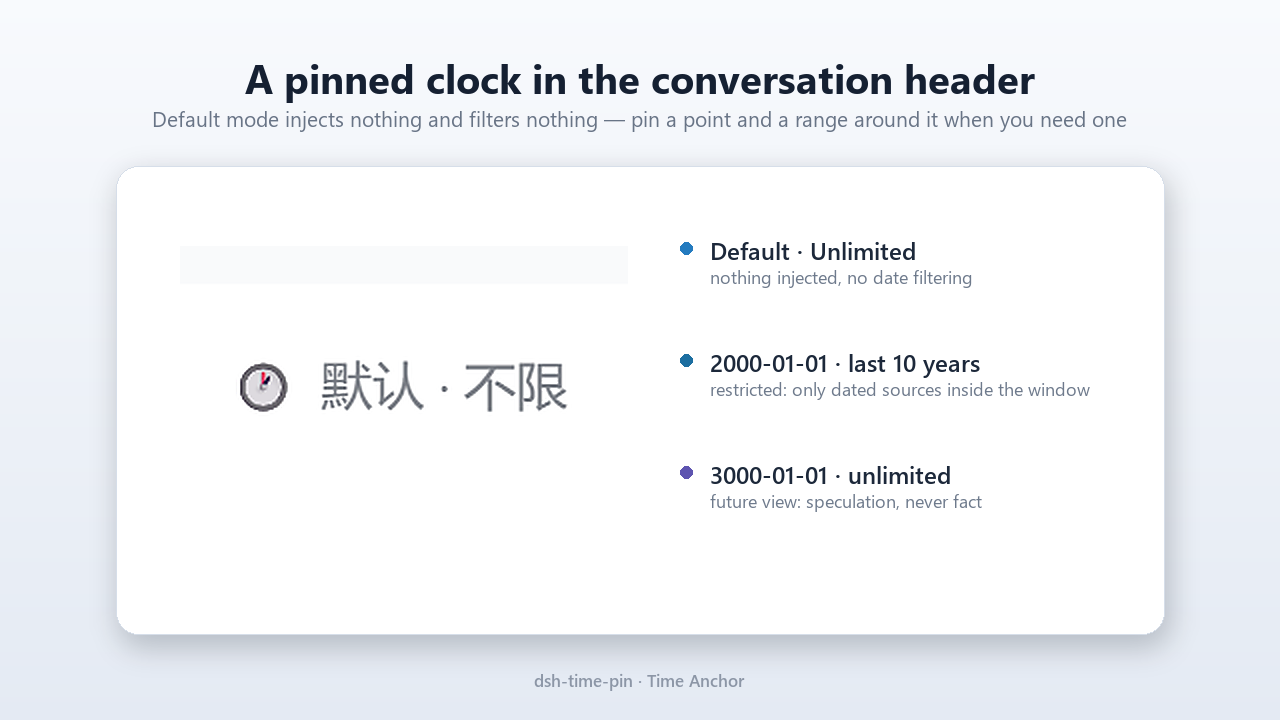
Default mode injects nothing and filters nothing — the header control always shows the current state.
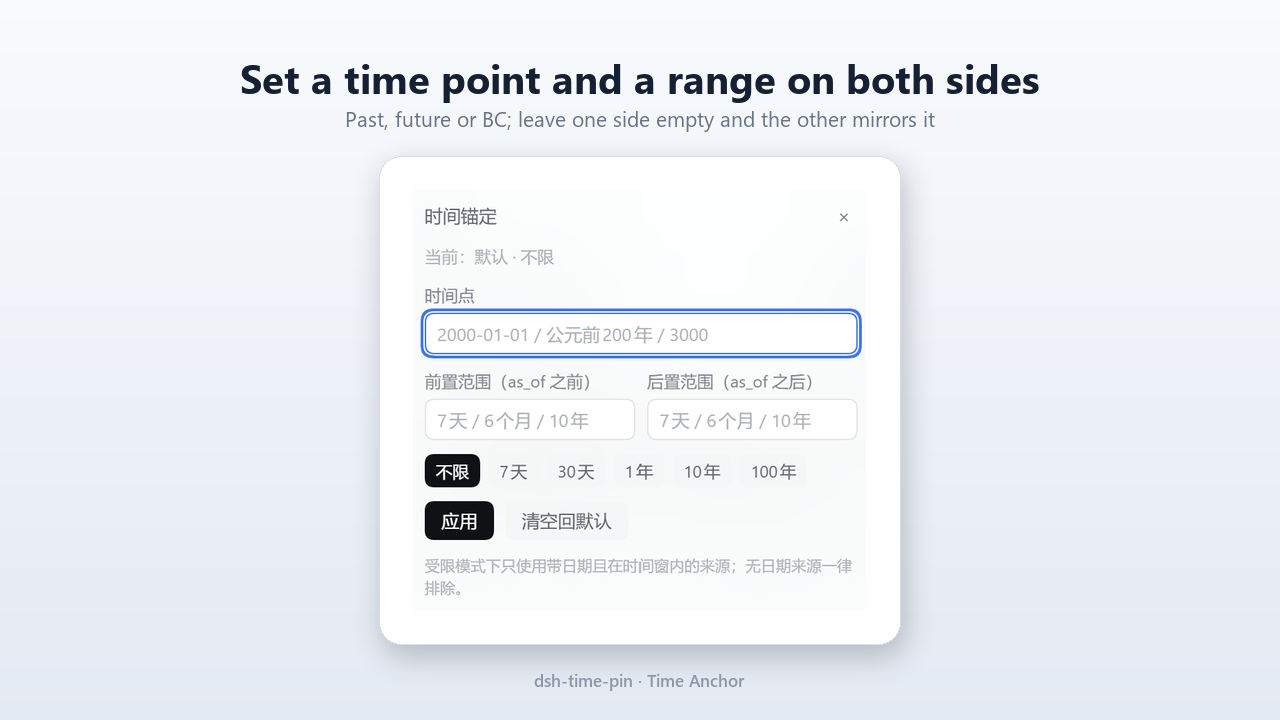
Pin a time point and a range before/after it; the panel submits the same /pin command a user could type.
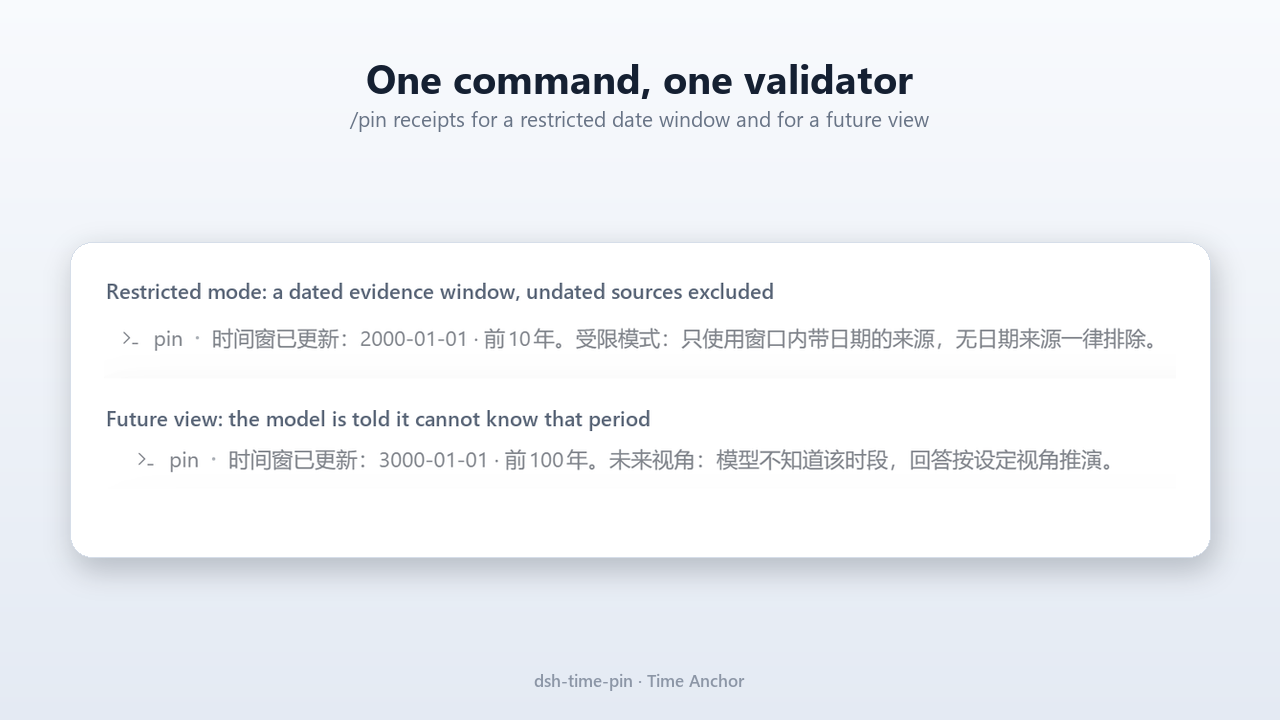
/pin receipts: restricted past window (dated evidence only) and future view (speculation, never fact).
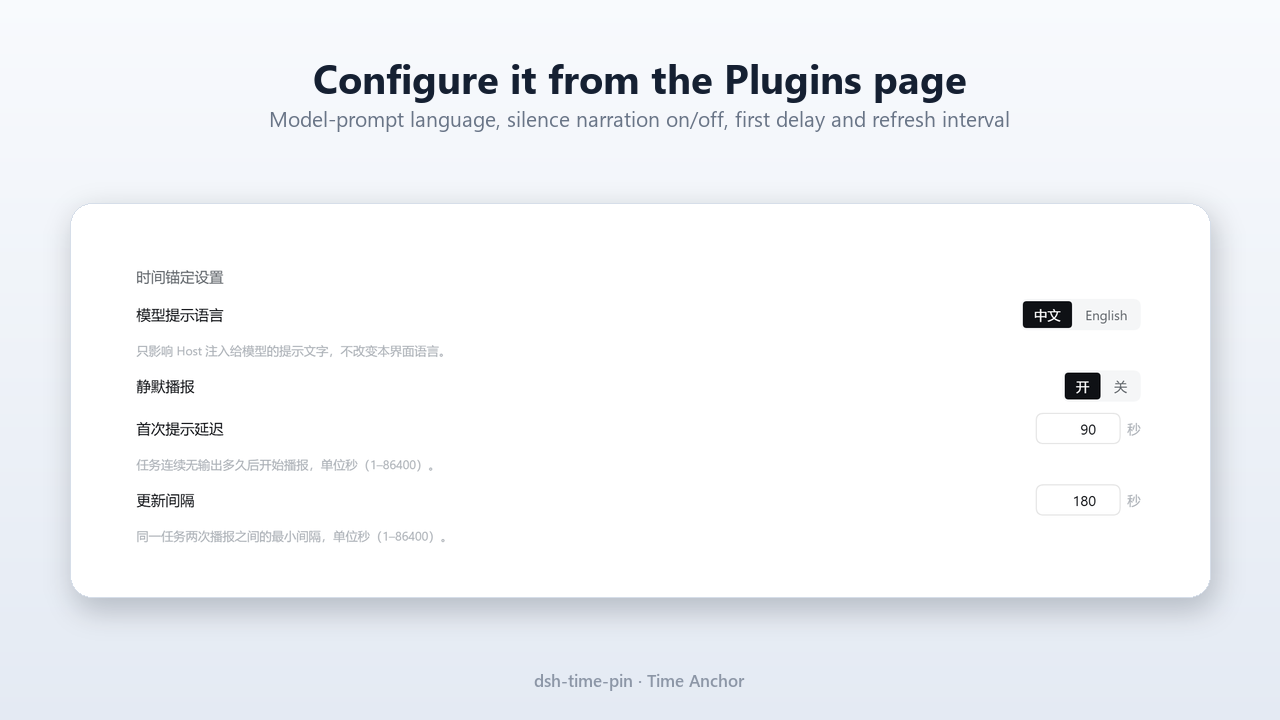
Plugins → Installed → dsh-time-pin → Configure.
Install
Requirements: DSH 0.2.1-rc.x (built and verified against 0.2.1-rc.5), Node.js
>= 20, and a Web/Desktop DSH profile for the chat-header control. The Host half
(commands, injection, evidence filtering, narration) works in any interactive
profile.
From a local path
git clone <this repository> dsh-time-pin
dsh plugin --profile desktop add /absolute/path/to/dsh-time-pin
From a Git URL
dsh plugin --profile desktop add https://github.com/<owner>/dsh-time-pin
From npm
Published as dsh-time-pin on npm (latest = 0.1.0):
dsh plugin --profile desktop add dsh-time-pin
The same forms work in the Web UI: Settings → Plugins → Add plugin, then paste the package name, Git URL, or absolute local path. After installing, the plugin's Configure page is available from Plugins → Installed → dsh-time-pin (see Configuration).
One restart on install/upgrade. The Host half of the plugin (and therefore its Configure control) becomes active after one DSH restart, because Host modules are not hot-reloaded. After that first restart, settings edits apply live and the chat-header chip and
/pinwork immediately in every new conversation; reload the page if the chip does not appear.
The plugin is not enabled globally — it is installed into one profile. Use
--profile <name>with the profile you actually chat in (for examplewebordesktop).
Quick start
-
Install the plugin, reload the conversation view. The chat header shows the Time Anchor chip:
🕐 Default · Unlimitedin an English UI (🕐 默认 · 不限in a Chinese UI) — default mode, no filtering. -
Pin a window, either from the chip's panel or by typing the command:
/pin 2000-01-01 10年One supplied side mirrors to the other, so this pins ten years either side of 2000-01-01: the evidence window is 1990-01-01 … 2010-01-01. The chip becomes
🕰 2000-01-01 · ±10 years(Chinese UI:🕰 2000-01-01 · 前后各10年). With the defaultpromptLocale: zhthe command reply reads "时间窗已更新:2000-01-01 · 前后各10年" and explains restricted-mode rules; setpromptLocale: enfor English replies. -
Ask your question ("2000 年初做互联网,哪里是风口?"). The next model request carries the window block; with
promptLocale: zhthe reply must start with时间窗:2000-01-01 · 前后各10年(Time window: 2000-01-01 · ±10 yearswithen), andweb_searchevidence is filtered to dated sources between 1990-01-01 and 2010-01-01. -
Clear it when you are done:
/pin offThe chip returns to
🕐 Default · Unlimited; the model is told once that the evidence window was cleared.
You can change the model prompt language and the silence-narration thresholds from the plugin's Configure page in the Plugins UI — see Configuration.
Other first things to try:
| Command | Result |
|---|---|
/pin | Show the current mode and window (alias: /pin status). |
/pin 2000 | Pin 1 January 2000; the current range is kept. |
/pin 2000-01-01 前10年 后5年 | Asymmetric range: ten years before and five years after the pin. |
/pin 2000-01-01 前10年 后0 | Lookback-only window: 1990-01-01 through 2000-01-01 (0 needs no unit). |
/pin 7天 | Keep the default (clock-following) time point with ±7 days → Default · ±7 days (默认 · 前后各7天). |
/pin 3000-01-01 | Future view: the model is told it does not know the period and must label speculation. |
/pin 公元前200年 前20年 | BC window; no year 0 exists, so 1 BC is followed by AD 1. |
/pin 不限 | Remove the range entirely (returns to default mode, like /pin off). |
The /pin command
/pin is the single mutation path for the window. It is a human-only session
command: the model can inspect the window with time_pin_status but cannot move
it. The chat-header panel submits exactly the same command line, so there is one
validator and one source of truth.
Grammar
/pin                             # show the current window/mode (status query)
/pin <as-of>                     # pin the time point, keep the current range
/pin <as-of> <range>             # one range side; the other mirrors it
/pin <as-of> <前…> <后…>         # asymmetric range, e.g. /pin 2000-01-01 前10年 后5年
/pin <range>                     # keep the default time point, set the range
/pin off                         # clear the window, back to default mode
A range token may carry a side prefix: 前 / 近 / last / past (before the
as-of) or 后 / next / after (after the as-of). With one side supplied the
other mirrors it; with two sides they are positional (before, after) unless the
prefixes say otherwise; a slash form works too (前10年/后5年). 不限 on both
sides means an unbounded range. A bare 0 sets that side's boundary to the
as-of day (no unit needed), so /pin 2000-01-01 前10年 后0 is the lookback-only
window [1990-01-01, 2000-01-01].
Aliases: status / 状态 / ? / help for a status query; off / 清空 /
默认 / clear / reset to clear. A range-only line keeps the default,
clock-following time point, which is the "recent N days either side of today"
case. /pin 不限 removes the range and, since the line pins no date, returns to
default mode (the same visible result as /pin off); to keep a pinned as-of
with an unbounded range, use /pin <as-of> 不限.
Command result text and model-facing blocks follow the promptLocale config
(zh by default, en available). The window label shown in the chip, the panel
copy, buttons and errors follow the browser UI locale through the Client's
time-pin locale namespace (English UI: Default · Unlimited,
2000-01-01 · ±10 years; Chinese UI: 默认 · 不限, 2000-01-01 · 前后各10年).
The two are independent — a Chinese UI can drive an English prompt and vice
versa.
As-of formats
| Form | Example | Interpreted as |
|---|---|---|
YYYY-MM-DD | 2000-01-01 | that day (day granularity, local time zone) |
YYYY-M-D | 2000-1-1 | same |
YYYY/MM/DD | 2000/01/01 | same (. is also accepted as a separator: 2000.1.1) |
YYYY年M月D日 | 2000年1月1日 | same (日 is optional) |
公元YYYY年 | 公元2000年 | 1 January of that year |
bare YYYY | 2000 | 1 January of that year |
公元前YYYY年 / 前YYYY年 | 公元前200年, 前200年 | BC year, 1 January; optional month/day (公元前200年3月5日) |
BC YYYY / BCE YYYY | BC 200 | same BC form |
Rules: years 1–9999 in either era (future years are allowed); there is no year 0
(公元前0年 is rejected); invalid calendar dates are rejected with an actionable
message (2026-02-30 → "日期不存在:2026 年 2 月只有 28 天"); full-width digits
and punctuation are normalized (3000 works).
Range formats
| Form | Examples | Interpreted as |
|---|---|---|
| Unlimited (default) | 不限, unlimited, all, none, -, — | no boundary on that side |
| Zero (no unit) | 0, 0天, 0年 | that side is not expanded: the window boundary sits on the as-of day |
| Days | 7天, 30 天, 7d, 7 days | as_of ∓ N days |
| Months | 6个月, 6mo, 6 months | as_of ∓ N calendar months (day clamped, e.g. 31 Mar − 1 month = 29 Feb) |
| Years | 10年, 100年, 10y, 10 years | as_of ∓ N calendar years |
Both sides accept the same formats; the panel has one field for each side. If
only one side is given the other mirrors it; if neither is given the range is
unbounded on both sides. 0 is unitless by design and pins that side to the
as-of day, so 前10年 后0 is the classic "only look back" window. Limits: N must
be an integer ≥ 0; at most 3,650,000 days, 120,000 months, or 10,000 years.
-1年, 10光年 and other unknown units are rejected with an inline error.
Behavior
Default mode (no pin, no range)
- The chip shows
🕐 Default · Unlimited(Chinese UI:🕐 默认 · 不限). - Nothing is injected into the model context. No block, no timestamp, no extra tokens.
web_searchresults are not filtered.
Restricted mode (a pin or a bounded range)
Entering or changing a restricted window injects one durable, source-attributed block on the next model request:
- effective
as_ofand the inclusive evidence window[as_of − before, as_of + after](a side with no range is unbounded); - four evidence rules: (1) only dated facts inside the window are usable, undated sources are untrustworthy and excluded; (2) outside-window information is unknown and must not be used to complete a conclusion; (3) key conclusions carry source dates, and an empty window is stated plainly rather than filled in; (4) the reply must start with the window confirmation line;
- when the model was previously told a window state (including default mode), a short "where you are now" summary is prepended;
- a window that reaches past today appends a
[FUTURE VIEW]block (the model must label speculation as speculation and may not present invented events as facts).
The block is injected once per window change, not once per step: the session projection records the window signature it last told the model about, and identical windows produce byte-identical text. Re-sending the same window adds zero messages.
Anchor echo. After entering/changing a restricted window, the first reply must begin with the confirmation line, for example:
时间窗:2000-01-01 · 前后各10年
(English prompt: Time window: 2000-01-01 · ±10 years.) The echo is checked as a
whole, not by prefix: the marker, the exact date and the exact range on both
sides all have to match (date-format variants such as 2000/01/01 or
2000年1月1日 are tolerated, and asymmetric ranges echo as 前10年/后5年 /
last 10 years / next 5 years). If the echo is missing or wrong, the plugin
appends one short correction at the start of the next turn and asks for the echo
again — at most twice per window. After that the UI keeps an "unconfirmed"
marker and the conversation continues; anchoring never blocks a turn.
Evidence filtering. In restricted mode, web_search results are rewritten
before the model sees them:
- a source with a parseable date (
publishedAt, e.g. ISO dates,YYYY/MM/DD,YYYY-MM,YYYY,today,yesterday,N days ago) is kept only when its date is inside[as_of − before, as_of + after], endpoints included (an unbounded side admits everything on that side); - a source with no parseable date is excluded (the product rule is: a credible source states its date);
- the provider's own generated summary (
content) is dropped in restricted mode: it is not a dated source, and it can restate sources that were filtered out (or were never listed when the provider truncated its results). The replacement note states how many sources were excluded and why, plus the active window; when nothing dated remains, the note tells the model to state that the window has no usable dated evidence instead of inventing some; - when nothing was filtered and there is no provider summary to remove, the original tool value is passed through untouched.
Leaving restricted mode injects one short notice that filtering no longer applies, then no further time-pin text is sent.
Future view
A window that reaches past today (a future as_of, or an after-side that crosses
today) is a valid speculative mode, not an error. The model is told it does not
know that period, that every concrete event must be marked as an assumption. The
panel shows a one-time warning: "The model does not know the future. Answers are
in-universe speculation from the pinned viewpoint, not factual predictions."
Configuration
The plugin's settings are global — one set per installed profile, not per
conversation. Change them in the Web UI under Plugins → Installed →
dsh-time-pin → Configure (the same form is also rendered on the bundle's detail
page). Values are written through the Harness settings service and apply
immediately, without a restart (after the plugin has been loaded — see the
one-time restart under Install). The shipped defaults resolve to
zh, silence narration on, 90 s and 180 s.
| Setting | Default | Notes |
|---|---|---|
promptLocale | zh | Language of model-facing blocks and /pin result text: zh or en. Independent of the UI language. |
silence.enabled | true | Master switch for the background-job [TIME FACT] narration. |
silence.firstDelayMs | 90000 (UI: 90 s) | Silence before the first time fact (1 s – 24 h). |
silence.repeatMs | 180000 (UI: 3 min) | Refresh interval while the job stays silent (1 s – 24 h). |
The settings page shows the two delays in seconds (90 and 180 by default) and
writes milliseconds into the config. The bundle row also shows a one-line summary
(e.g. Model prompt zh · silence narration on · 90s / 3min), and a deployment
whose settings are read-only renders the same page without edit controls. The
page needs the Harness config-forms service shipped with the Web/Desktop UI; when
it is absent the chip still works and settings can be edited through a profile
patch.
The config fields are declared volatile, which is what makes the Harness settings service offer a form for them at all; a volatile edit is committed into the running plugin without remounting, so the prompt language and silence thresholds change immediately. (The Configure control itself appears only after the one restart described under Install.)
The shipped defaults live in the config block of the plugin's row in
cordis.patch.yml. A profile's own Cordis patch layer can override that row; an
id-targeted override replaces the whole config object rather than deep-merging
it, so restate every field you keep.
The time window itself is not configuration — it is per-conversation state set
by /pin or the title-bar control.
Silent jobs
When a background job owned by the conversation stops producing output for
silence.firstDelayMs (configurable, 90 seconds by default), the Host appends a
[TIME FACT] message before the next model step: how long the job has been
running, how long it has been silent, and that it is still running. The model
may summarize this for you; it is given deterministic facts so it does not have
to guess. The fact is refreshed every silence.repeatMs (3 minutes by default)
while the job stays silent and stops when the job ends.
Coverage is background jobs only. A foreground long-running tool call blocks the model's step, so there is no mid-tool injection point; the tool's result reaches the model when it finishes.
The narration is deterministic host bookkeeping — it never claims progress that was not observed.
Model-facing tool
time_pin_status (no parameters) returns the current frame so the agent can
inspect what it is bound to: restricted, mode (default / past / future
/ recent), asOfLabel, rangeLabel, windowLowerLabel, windowUpperLabel,
timezone, nowIso, future, and anchorPending. The tool is read-only; the
user owns the window and the model can only suggest widening it.
Privacy and safety
- Zero telemetry. The plugin collects nothing, reports nothing, and phones nothing home.
- No extra network access. The only network use is the host's normal
web_search, which the plugin merely filters. - No code evaluation. No
eval, nonew Function, no dynamic code loading beyond the plugin's own modules. - No plugin-owned storage. Window state lives in the session projection
folded from the conversation's own log; injected text is attached with source
attribution (
time-pin), so it is visible in the transcript like any other message. Settings edited on the Configure page are stored by the Harness settings service in your profile, not in a plugin datastore. Removing the plugin removes the behavior, not your data. - Human control. The model cannot move the window;
/pinis human-only. The plugin never blocks or rewrites model output — it shapes the evidence frame and reports facts.
Compatibility
- DSH
0.2.1-rc.x— built and verified on0.2.1-rc.5; peer ranges>=0.2.1-rc <2for@deepseek-ai/dsh-*packages,@deepseek-ai/cordis>=4.0.0-rc <5,@deepseek-ai/schemastery^3.18.0,zod^4. The 0.1.0 build was also loaded live in a DSH desktop profile: the bundle row and its config schema, the chat-header chip, the Plugins Configure control (plugins.row.configcontributordsh-time-pin#dsh-time-pin) and thetime_pin_statustool registered and answered. - Node.js
>= 20. - The chip/panel needs the Web/Desktop conversation UI
(
@deepseek-ai/dsh-client-ui-conversation, loaded together with the shipped remote-command and locale modules). The Host half works in any interactive profile;/pinneeds an interactive command surface (Web/Desktop chat or the interactivedshCLI). Headless/ACP automation has no command surface, so the window cannot be moved there. - No build step: the package is plain ESM and a hand-written lazy client bundle, so a Git install works without compiling.
How it works
- A session projection folds only standard session events
(
command/run,command/done,request/header,assistant/message,tool/result,turn/start,turn/end) into the window state and the last-output/run-start timestamps. No custom event type is ever written, so resume, replay, and fork restore the window by refolding the log. agent/pre-stepinjects the window block once per changed window signature, the anchor correction when needed, and due silent-job facts.tools/post-executefilters the structuredweb_searchvalue in restricted mode.- The Client half reads the projection through a slot prop: the header chip and
panel (the panel runs the same
/pincommand you would type), plus the Configure page rendered in the Plugins UI, which edits the plugin's globalConfiglive. - The global config fields are volatile: the Harness settings service only serves
forms for schema subtrees that contain a volatile field, and a live edit is
committed into the running Host config (re-read on
loader/volatile-update) without remounting the plugin.
The full design, decisions and trade-offs are in DESIGN.md; the feasibility evidence is in SPIKE.md.
Compared with neighboring plugins
These plugins touch adjacent problems; Time Anchor differs in what it makes user-controllable evidence. None of them is a substitute for the other.
| Plugin | What it does | Overlap | What Time Anchor adds |
|---|---|---|---|
| dsh-plugin-verified-search | A verified_search discipline: mutable facts must be queried with absolute dates; unresolved results are marked instead of reusing old values. | Evidence discipline (~40%). | A user-pinnable as_of and span, a future/BC view, a hard "undated sources are excluded inside the window" rule, and evidence rules that govern the whole reply rather than one search tool. |
| dsh-task-heartbeat | A task_beat tool: the model pings progress; 15 minutes without a beat marks the task stalled. | Silence/stall detection (~30%). | Host-side automatic timing with fixed cadence and deterministic facts; no model beats required, and background-job silence is narrated into the next step. |
| dsh-turn-watchdog | Scans sessions every 60 s; injects a warning when a turn has been idle past a threshold. | Stalled-turn detection (~30%). | Periodic, per-job narration plus "what is still running" facts, instead of a single idle alarm. |
| dsh-env-facts | Injects environment facts as an <env> block starting with As of <ISO>. | Only the "as of" wording. | The as_of is a user-pinned evidence boundary, not the environment capture time; the plugin also filters evidence and anchors the reply. |
Name-alike projects that solve something different: @helibeiqi/dsh-time-travel
and @goodandready/dsh-time-machine are snapshot/rollback tools,
PerryLink/dsh-railway-window is railway construction-gap bookkeeping, and
zhu168/dsh-save-money pauses long tasks in time windows. Time Anchor does not
rewind side effects, schedule tasks, or act as a calendar — its subject is the
evidence frame of a conversation.
Uninstall and upgrade
dsh plugin --profile desktop remove dsh-time-pin
Or remove it from Settings → Plugins. The plugin keeps no storage and writes
no custom event types, so there is nothing to clean up: old sessions keep their
ordinary /pin command records (inert once the plugin is gone), and the
conversation returns to its normal behavior. This path was exercised in the
0.1.0 review session: the profile's package.json and bundle selection return to
their previous state, the Host row, its configuration schema, the
time_pin_status tool and the Plugins-page configuration seats disappear
immediately. The title-bar chip in an already-open page can linger until the
page is refreshed (module-eviction timing, not stored state); a refresh or
restart clears it. Reinstalling restores everything — window state is derived
from the session log, so nothing is lost.
Upgrade note. The DSH plugin marketplace has no in-place upgrade for
ordinary plugins: to update, uninstall the old version and install the new one
(remove then add, or the same two actions in the Plugins page), then restart
DSH once (Host modules are not hot-reloaded). Because the window is derived from
the session log rather than plugin-owned storage, reinstalling keeps every
existing conversation's window intact.
Known limitations
- Not amnesia. The model may still know post-
as_ofevents. Time Anchor constrains evidence and requires an explicit window statement; it cannot erase training knowledge and does not promise zero leakage. web_searchonly. Memory entries and workspace files are not filtered in 0.1.0 (deferred) — prompt-pasted material has no machine date and must not be used as window evidence by the model.- Provider dates matter. Search providers that return no dates make restricted mode degrade to an honest "no dated evidence" answer; the parser accepts several date formats but treats anything unrecognized as undated.
- Background jobs only. Model-facing silence narration covers background jobs. A foreground long-running tool call blocks the model's step, so the model can only describe it after the tool returns.
- Evidence notes are Chinese-only. In 0.1.0 the one-line note appended to a
filtered
web_searchresult ("已排除 N 条无日期来源…") is fixed Chinese text even whenpromptLocaleisen; the window block and time facts are localized. - Day granularity. A window is a date range, not a clock time; times of day are not part of the frame.
- Session-scoped. The window belongs to one conversation. It survives resume, replay and fork (the fork inherits the parent's window, then evolves independently); it is not a global or profile-wide setting.
Development
npm test                    # 144 tests: 132 pass, 12 skipped in a plain checkout
npm run test:client         # 34 client lazy-bundle smoke tests (DOM stub)
npm run preflight           # release checks: files, version/CHANGELOG, npm pack list
node --check lib/index.js   # (and the other modules)
The 12 skipped tests are tests/host-wiring.test.mjs (5) and
tests/host-schema.test.mjs (7). They run (12/12 pass) in an environment where
@deepseek-ai/* resolves, and must be run there before release: the first
activates the Host half against stubbed Cordis services and imports the real
Harness packages; the second parses every projection state and Client view with
the real zod and resolves the Config defaults.
That second file exists because of a real crash: a schema the runtime validates
on a hot read path must be parsed with real values in tests, not merely
constructed. The projection registry validates every published Client view, and
every conversation publishes this projection, so a broken viewSchema breaks
history loading for all sessions at once (see SPIKE.md, "Incident: the 0.1.0
projection-view schema crash").
Package layout:
dsh-time-pin/
  package.json          manifest, dsh.bundle + dsh.client declarations
  cordis.patch.yml      Host row + default config
  lib/index.js          Host entry
  lib/core/             pure window model, text builders, projection fold
  lib/evidence.js       publishedAt parsing + web_search filtering
  lib/silence.js        background-job silence bookkeeping
  lib/tools.js          time_pin_status tool
  lib/client.js         Web Client half (chip + panel + Configure page)
  locale/               meta title/description (zh, en)
  DESIGN.md             shipped design and open items
  SPIKE.md              M0 feasibility findings
  CHANGELOG.md          release notes
  LICENSE               MIT
License
MIT — see LICENSE.