dsh-domain-proxy
heywalter/dsh-domain-proxy
从已配置的 Provider 选择 API 域名或手动添加,让命中的 DSH 后端 Fetch/Undici 请求通过已有本机 HTTP(S) 代理,其他请求沿用原有路线;可选开启内存调用记录,查看实际分发路线、首内容等待、token 速度与用量,不保存提示词、回答或 API Key。
安装
dsh plugin --profile web add github:heywalter/dsh-domain-proxyREADME
DSH Domain Proxy
Domain-based proxy routing and model call observability for DeepSeek Harness.
English · 简体中文 · User guide · Validation




DSH Domain Proxy is a domain-routing and observability plugin for DeepSeek Harness (DSH). It allows you to select API hostnames directly from configured providers and route them through your local HTTP(S) proxy (such as Clash or FlClash), while providing real-time visibility into request dispatch paths and streaming performance metrics—without copying API keys.
Prerequisites:
- Local proxy client: This plugin handles domain-level dispatching; it does not provide proxy servers, VPNs, or subscription profiles. Ensure your local proxy application (Clash, FlClash, etc.) is running with an active HTTP(S) listener.
- Selective routing: Only specified API domains are forwarded to the local proxy. All other traffic keeps its existing network route.

How It Works
The plugin intercepts model API requests at the DSH network layer and routes them based on configured hostnames:
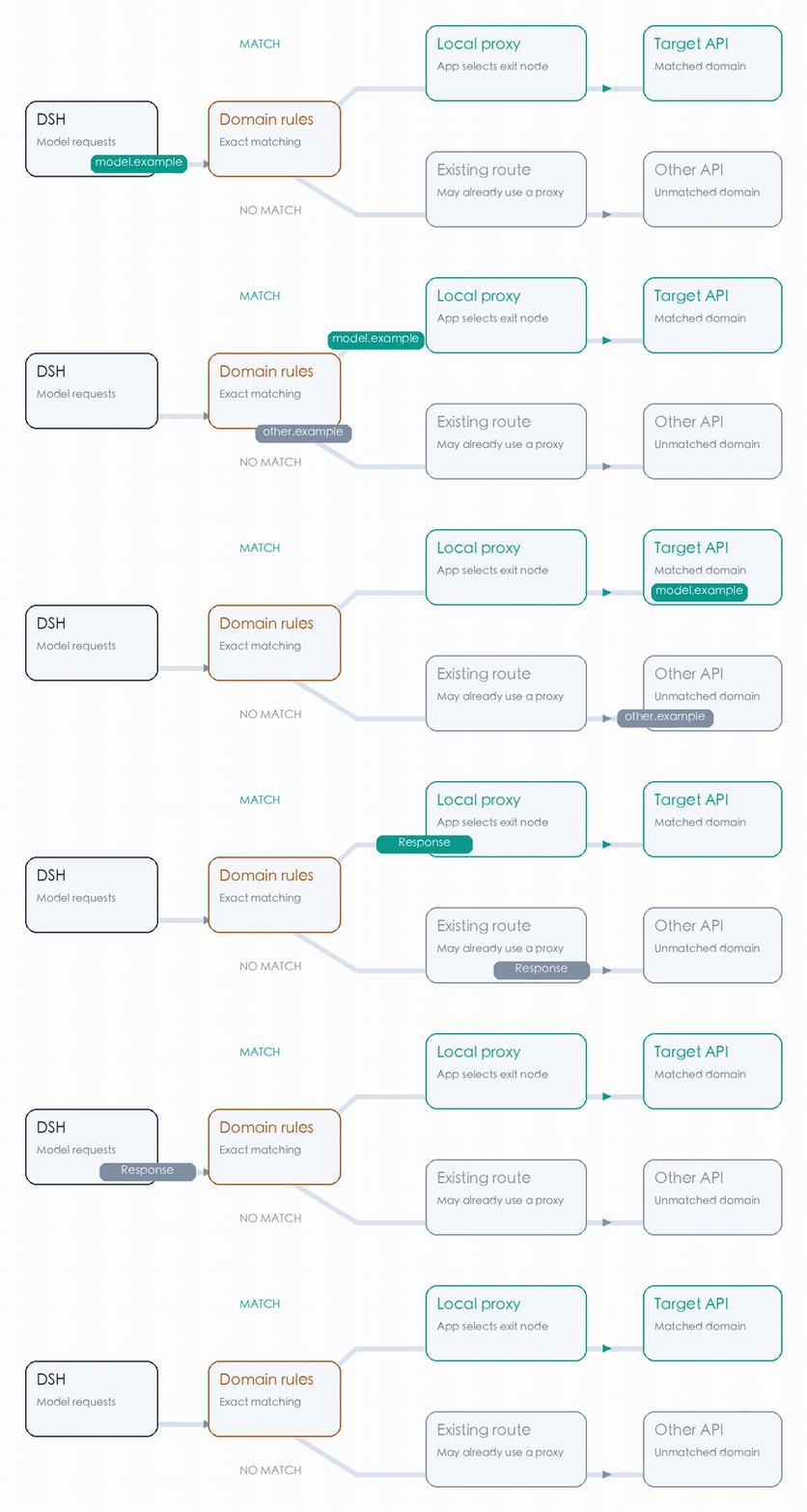
- Matched API domains: Dispatched to your local HTTP proxy (e.g.
http://127.0.0.1:7890), where your proxy app selects the outbound exit node. - Unmatched destinations: Continue using the application's default network route without interference.
Note: If the animated workflow is slow to load, see the static workflow diagram.
Quick Start
Verified on macOS Desktop with DSH 0.2.1-rc.3.
1. Open the Plugin Manager
Ensure DeepSeek Harness Desktop is installed and your local proxy client is running. In Desktop, navigate to: Plugins → Add plugin → Install a third-party plugin.
2. Install the Plugin
Enter dsh-domain-proxy (or pin dsh-domain-proxy@0.1.1), then select Install → Enable now. Restart DSH Desktop completely.
Offline installation: Enter the absolute file path to a downloaded
.tgzpackage to install without network access.
3. Configure and Enable Routing
Open Plugins → dsh-domain-proxy (or visit the same section under Settings):
- Add Domains: Pick a hostname from the Provider domain dropdown (auto-populated from your configured providers), or manually enter target API hostnames.
- Set Proxy Address: Enter your proxy client's local HTTP(S) listening address (e.g.
http://127.0.0.1:7890). - Verify and Enable: Click Check connection to confirm reachability, check Enable domain routing, and click Save settings.
View Configuration Controls Walkthrough

Note: Match the port to your proxy app's actual listening port. The connection check verifies HTTP reachability; it does not validate model API credentials.
Observability & Diagnostics
Enable Record recent calls and save. During normal usage, click Refresh records in either observation view to inspect real-time metrics without generating artificial benchmark traffic.
1. Actual Routes: Verify Rule Matching and Dispatch

Inspect each request's target hostname, matched rule, and dispatched proxy endpoint to verify that routing behaves as expected.
2. Call Performance: Latency, Throughput and Pauses
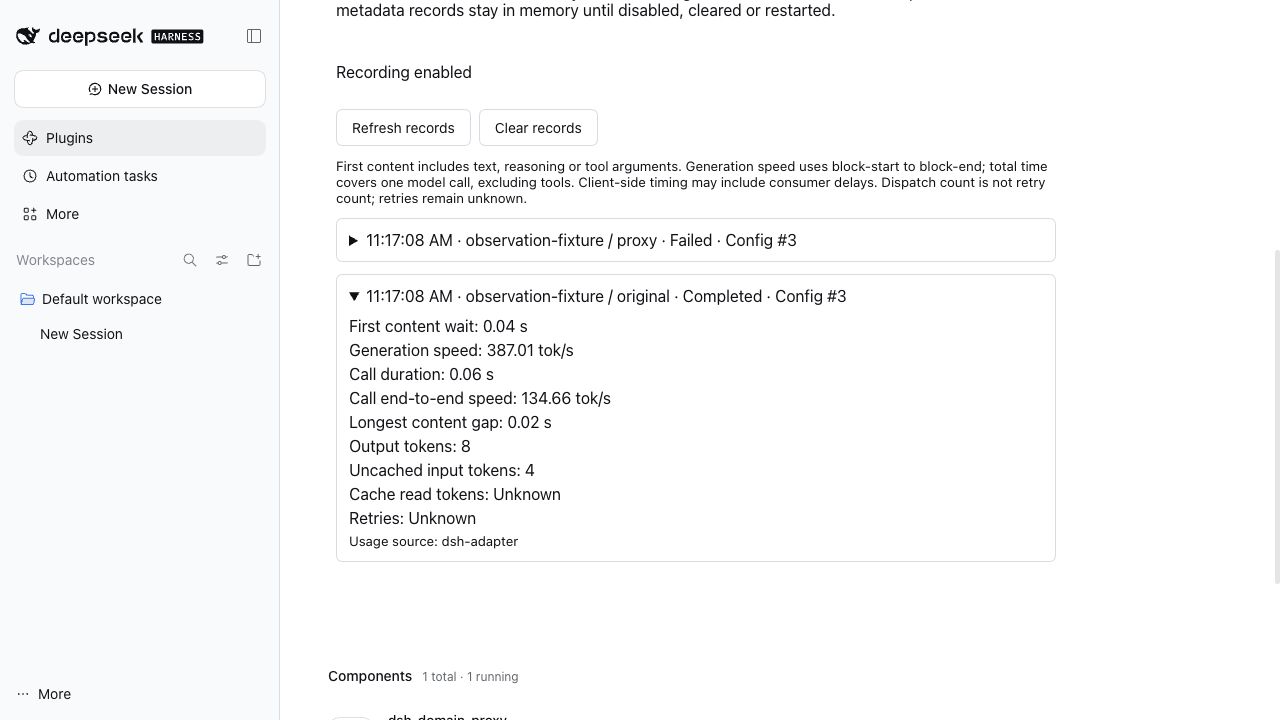
Review per-call execution metrics, including:
- First-content wait (TTFT): Time elapsed until the first valid text, reasoning, or tool token arrives.
- Streaming speed: Generation rate in tokens per second (tok/s).
- Longest pause: Maximum interval between consecutive stream chunks to spot stalling.
For detailed metric definitions, see User Guide: Metrics.
Performance Case Study
Local benchmark comparison on identical models and multi-turn workloads (historical reference):
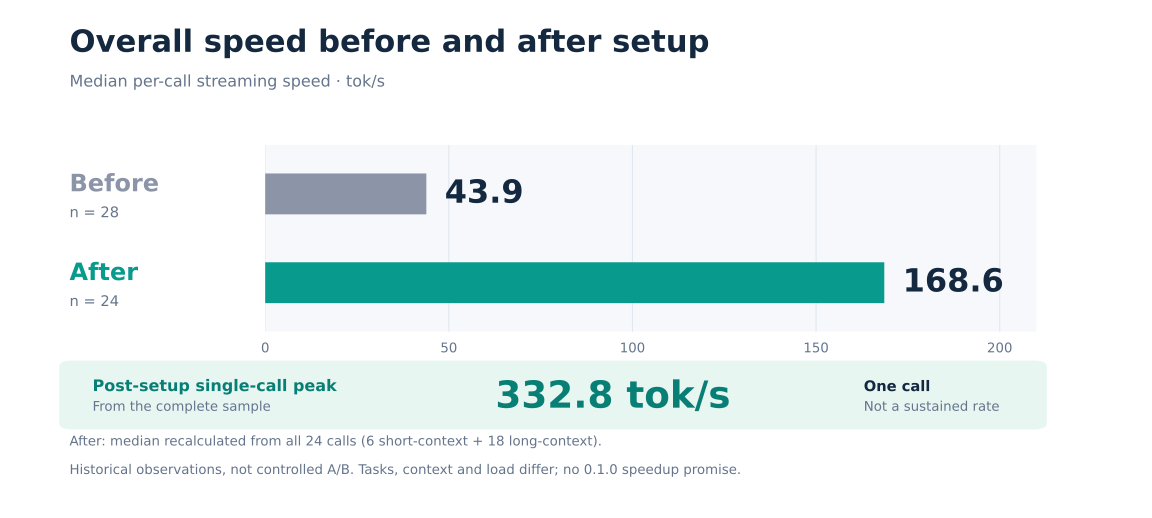
- Default / Unrouted: Median 43.9 tok/s (28 samples)
- Routed via Proxy: Median 168.6 tok/s (24 samples, peak 332.8 tok/s)
Note: These numbers reflect observations from prototype development testing. Real-world performance depends on exit node quality, network conditions, provider load, and context size. See Performance Case Study for full distributions and datasets.
Important Notes
- Domain-level scope: Rules match by hostname. If multiple providers share the same domain (e.g. unified gateways), the same routing rule applies.
- Proxy protocols: Supports local loopback HTTP and HTTPS proxies (e.g.
127.0.0.1). SOCKS, PAC, and authenticated remote proxies are not currently supported. See Proxy Address and Port Guide. - Transport coverage: Intercepts requests handled by DSH's global Fetch/Undici backend stack. Private SDK transports, independent child processes, or direct WebSockets may bypass the hook.
- Privacy & storage: Call recording is opt-in and stores only metadata (up to 100 recent calls in memory). Prompt text, model outputs, and API keys are never recorded or persisted.
Documentation & Community
User Guide · Architecture Design · Validation · Contributing · Security · Changelog
Released under the MIT License. This is an independent community project and is not affiliated with DeepSeek.