dsh-plugin-deepseek-peak-hours
hifengzy/dsh-plugin-deepseek-peak-hours
输入框底部徽标:实时显示 DeepSeek API 当前按峰时还是闲时计费,点击弹出该时段的价目表——输入缓存命中、输入缓存未命中、输出,元/百万 tokens,分 FLASH 与 PRO 两列。位置在输入框下方统计行、内置「上下文已用」右侧,新会话时在输入框上方选项行。时段遵循官方定价页:北京时间周一至周五(法定节假日除外)09:00-12:00、14:00-18:00 为峰时,周末与法定节假日全天闲时;内置 2026、2027 年法定节假日数据。只在下一个时段边界装一个定时器,不做轮询。纯客户端插件,不发网络请求、无依赖。
安装
dsh plugin --profile web add github:hifengzy/dsh-plugin-deepseek-peak-hoursREADME
DeepSeek peak hours · DSH plugin




English · 简体中文
A lightweight DeepSeek Harness (DSH) plugin that shows whether DeepSeek API usage is billing at the peak or off-peak rate right now, next to the composer's context meter. Clicking the badge opens the FLASH / PRO price table for that window.
Peak 09:00 - 12:00 ← click for the price table
What it does
| Where | Appears when | Exact position |
|---|---|---|
conversation.composer.dock | A session with a conversation (composer docked at the bottom) | In the statistics row under the composer card, immediately right of the built-in Context used x% reading |
conversation.hero.options | The New Session home (a blank session) | Right-hand side of the options row above the composer card, beside the workspace and preset controls |
- Reading:
Peak 09:00 - 12:00during a peak window,Off-peak 18:00 - 24:00otherwise. Overnight and whole-day windows read their real range:00:00 - 09:00,18:00 - 24:00,00:00 - 24:00. - Click: a table for the running window — rows
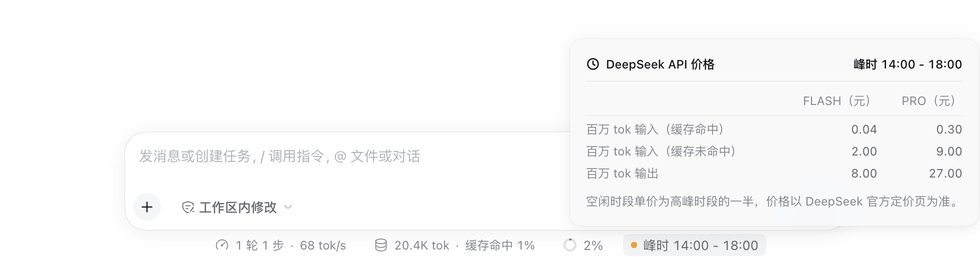
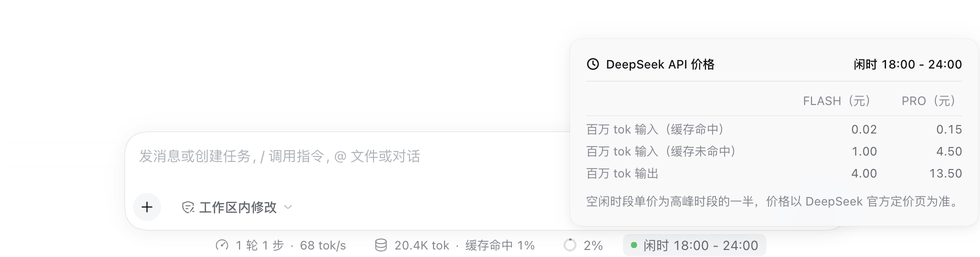
Input, 1M tokens (cache hit)/Input, 1M tokens (cache miss)/Output, 1M tokens, columnsFLASH (CNY)andPRO (CNY), plus the note that off-peak rates are half the peak rates. - State dot: amber for peak, green for off-peak, from DSH's
--dsw-alias-state-warn-primaryand--dsw-alias-state-success-primarytokens.
Screenshots
The interface is shown in Chinese; the same layouts appear in every locale.
New Session — the badge rides the options row right of the workspace and preset chips, matching their 28px chip height. Peak on the left, off-peak on the right.
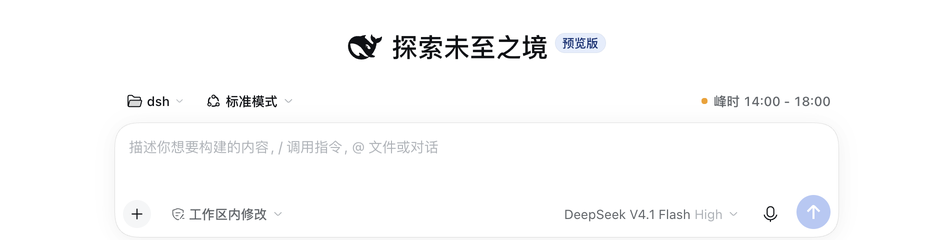
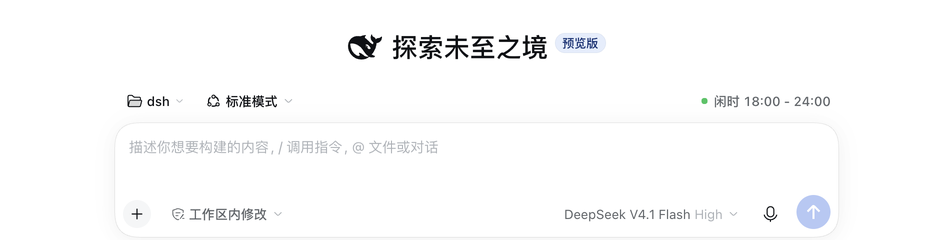
An existing session — the badge is the last reading in the statistics row under the composer, immediately right of the context meter, and keeps that row's 22px height.


Click for prices — the popover lists the FLASH and PRO price of the running window, with the note that off-peak rates are half the peak rates.
Schedule and prices (official, not invented)
The schedule is quoted from DeepSeek's official pricing page:
Off-peak rates are half of the peak rates. Beijing time, Monday to Friday (excluding Chinese statutory holidays) 09:00 - 12:00 and 14:00 - 18:00 are peak hours; all other times, including weekends and Chinese statutory holidays all day, are off-peak.
- Official pricing page: https://api-docs.deepseek.com/zh-cn/quick_start/pricing/
- 2026 holidays: State Council notice 国办发明电〔2025〕7 号 https://www.gov.cn/zhengce/zhengceku/202511/content_7047091.htm
- 2027 holidays: State Council notice 国办发明电〔2026〕10 号 https://www.gov.cn/zhengce/zhengceku/202611/content_7085102.htm
Prices in CNY per million tokens, matching the official page on 2026-11-16:
| FLASH peak | FLASH off-peak | PRO peak | PRO off-peak | |
|---|---|---|---|---|
| Input (cache hit) | 0.04 | 0.02 | 0.30 | 0.15 |
| Input (cache miss) | 2.00 | 1.00 | 9.00 | 4.50 |
| Output | 8.00 | 4.00 | 27.00 | 13.50 |
Background: time-of-day pricing started on 2026-08-17, weekends became off-peak all day on 2026-08-23, and the FLASH series switched to the prices above at 12:00 Beijing time on 2026-09-10. When DeepSeek changes prices, update the plugin (see below).
Install
In DSH open Plugins → Add plugin and enter the npm package name:
dsh-plugin-deepseek-peak-hours
Or point it at this repository's directory for local development. The plugin is active for the whole profile and survives a restart. Refresh the page after installing.
Design and performance
- One timer, no polling: it wakes at the next window boundary only — 00:00, 09:00, 12:00, 14:00 and 18:00 Beijing time, at most five times a day. Coming back to a background tab, or waking a laptop, recomputes from the current clock.
- No network calls: the schedule, the holiday calendar, and the price table all ship in the bundle.
- No dependencies: it uses only the browser module table's
react/react-dom, and never imports@deepseek-ai/dsh-client-ui-primitivesor other DSH Client packages that change without notice. - Row-native geometry: 22px tall in the composer statistics row, exactly like the context meter and the stat pills; 28px with secondary ink in the New Session row, matching the workspace, preset and worktree chips beside it.
- Native styling: every color, radius, shadow and font size comes from
--dsw-*/--dsh-*theme tokens, so light and dark themes both match; the popover copies the built-in statistics dialog (12px padding,--dsw-radius-lg,elevation-prominent, z-index 1100, Escape and outside-click dismissal). - Beijing time only: the billing rule is defined in Beijing time, so the badge always computes in
Asia/Shanghairegardless of the machine's zone (the test suite also passes underTZ=America/New_York). - Clean teardown: styles render as a React element and disappear on unmount; the timer and listeners are released in effect cleanups.
Known limitations
- No badge on a session-less cold start: on a home with no session at all DSH opens no slot under the composer, and no plugin seat exists there. The badge appears as soon as a session is selected or created — the same visibility the built-in context meter has.
- Holiday data covers 2026–2027: a later year falls back to the plain weekday rule (weekends still correct). Append the new State Council ranges to
HOLIDAY_RANGESinclient.jsand publish a release when the notice appears. - Prices are a static snapshot: update
PRICESinclient.jswhen DeepSeek changes its price list; the plugin does not scrape the web.
Development
npm test        # schedule, holidays, boundaries, slots and dictionary wiring
npm run test:tz # the same suite under a non-Beijing machine zone
Files:
client.js            # everything: schedule + badge + price popover (no build step)
index.js             # Host half; registers nothing
cordis.patch.yml     # inserts the deepseek-peak-hours row
locale/{zh,en}.json  # Plugin Manager title and description
icon.svg             # 36×36 plugin icon (clock plus the peak wedge)
assets/icon-180.png  # 180×180 storefront tile
test/                # node --test suites
The schedule lives between /* #region schedule */ markers, and the tests evaluate that block straight out of client.js, so there is exactly one implementation.
