dsh-plugin-mynah
honwee/dsh-plugin-mynah
给 Agent 一张会说话的脸:七个工具驱动自托管的 Mynah 实时数字人——开口说话(排队或打断)、播放动作片段、打断、查看在线会话与频道、健康检查、往知识库加文本。
安装
dsh plugin --profile web add github:honwee/dsh-plugin-mynahREADME
dsh-plugin-mynah
Give your DeepSeek Harness agent a talking face.
This plugin lets a dsh agent drive a Mynah realtime digital human: make it speak to the person watching, interrupt it, see who is connected, list published channels, check health, and feed its knowledge base. Mynah is the open-source, self-hosted digital human stack (WebRTC lip-synced video, admin console, channels, knowledge base, free EdgeTTS by default, runs on a 6 GB GPU or with remote inference).
agent (DeepSeek Harness) ──mynah_speak──▶ Mynah cored ──WebRTC──▶ browser: a face that talks
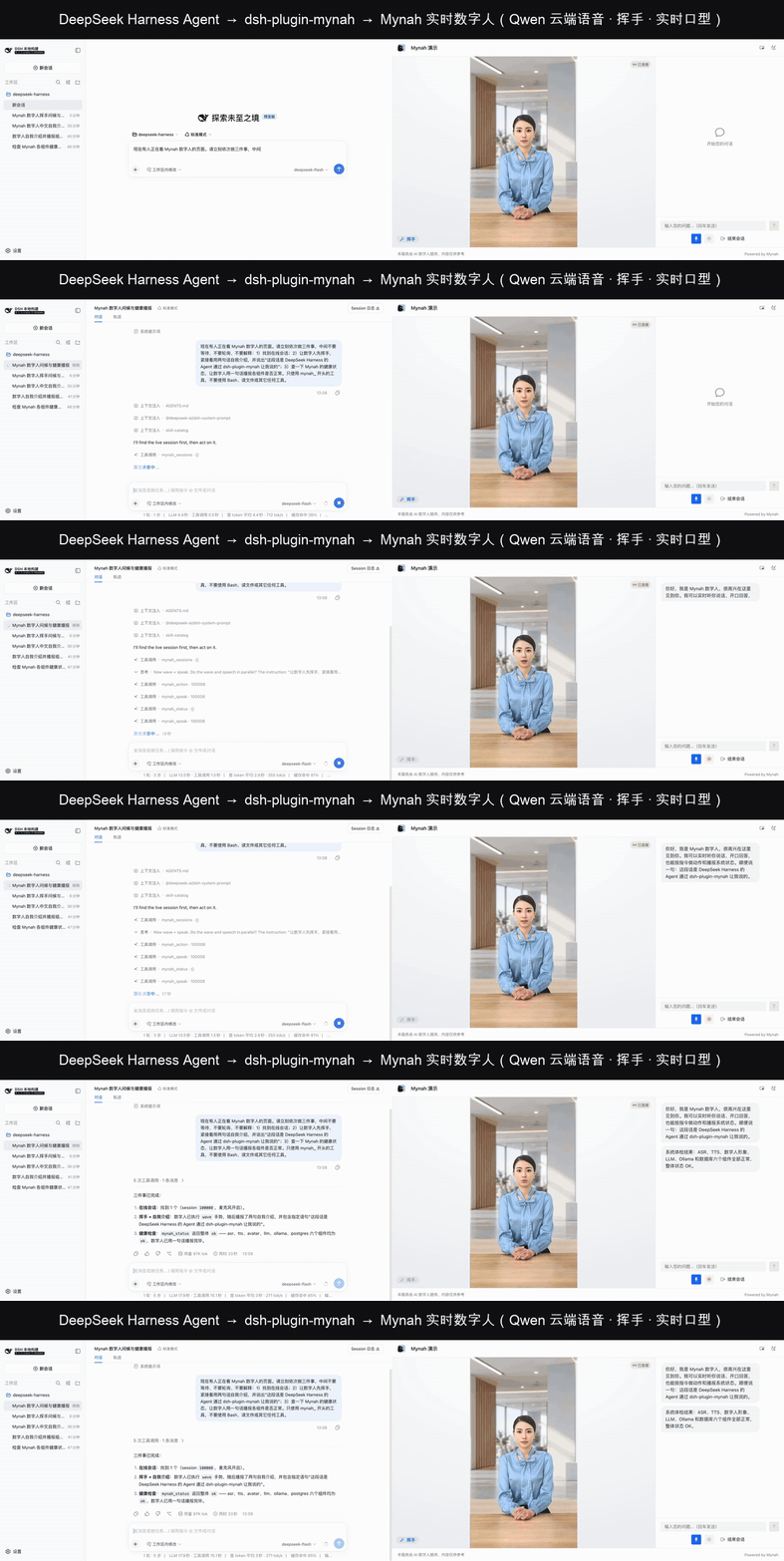
Left: DeepSeek Harness Web UI running the agent with deepseek-flash. Right: a Mynah channel page. One prompt; the agent calls mynah_sessions → mynah_action (wave) → mynah_speak → mynah_status → mynah_speak. The second sentence is queued automatically behind the first. Voice is Qwen realtime in the cloud; request-to-first-lip-synced-frame is about one second on the Mynah side. Full video: docs/agent-demo.mp4.
Tools
| Tool | What it does | Needs admin login |
|---|---|---|
mynah_speak | Avatar says text in a live session. type=echo speaks verbatim (default); type=chat routes through Mynah's own brain. Queues behind the current sentence unless interrupt=true. | no |
mynah_interrupt | Stop the avatar mid-sentence. | no |
mynah_action | Play a gesture such as wave in a live session. | no |
mynah_sessions | List live sessions (ids for mynah_speak). | yes |
mynah_channels | List published channels with visitor URLs. | yes |
mynah_status | Health of core / avatar engines / ASR / TTS / DB. | yes |
mynah_kb_add | Add a text/markdown document to a knowledge base. | yes |
The realtime tools only need the session id, which is the capability a visitor's page already holds. Admin tools log in once with the console account and cache the JWT.
Install
dsh plugin --profile web add dsh-plugin-mynah      # from npm
# or, from a checkout:
dsh plugin --profile web add ./dsh-plugin-mynah
Then tell it where Mynah lives. Either edit the bundle row in your profile's cordis.patch.yml:
- id: mynah
  name: dsh-plugin-mynah
  config:
    baseUrl: https://your-mynah-host:8443      # visitor / realtime endpoint
    adminUrl: https://your-mynah-host:9443     # admin console
    username: admin
    password: ********
or set environment variables (MYNAH_URL, MYNAH_ADMIN_URL, MYNAH_USER, MYNAH_PASSWORD, optional MYNAH_TOKEN, MYNAH_INSECURE_TLS=1). A patch row replaces the whole config block, so restate every key you need.
Verify and run:
dsh --profile web --dump-config | grep -A3 'id: mynah'
dsh --profile web
Try it in 60 seconds
- Open a Mynah channel page (e.g.
https://<your-mynah>:8443/channel/test) and click 开始对话. - In dsh, ask: “Find the live Mynah session and have the digital human greet me by name.”
- The agent calls
mynah_sessions, thenmynah_speak— the avatar on your screen speaks.
Headless, for scripts and CI:
dsh --profile headless "Use mynah_sessions, then make the digital human say: 今天的部署已经完成。"
Development
npm install
npm run build          # tsc against published @deepseek-ai packages
npm run check:local    # build + vitest against a sibling deepseek-harness checkout (see tsconfig.local.json)
tests/cordis-integration.spec.ts boots the real @deepseek-ai/dsh-tools registry, mounts this plugin, and exercises the tools against a fake Mynah on localhost.
Requirements
- DeepSeek Harness ≥ 0.1.2-alpha.5, Node ≥ 22.19
- A reachable Mynah instance (
docker compose up -dfrom the Mynah repo; EdgeTTS default means no API key is needed to hear it talk)
MIT © honwee