dsh-usage-stats (dsh-usage-stats)
inezmitche46-maker/dsh-usage-stats/packages/dsh-usage-stats
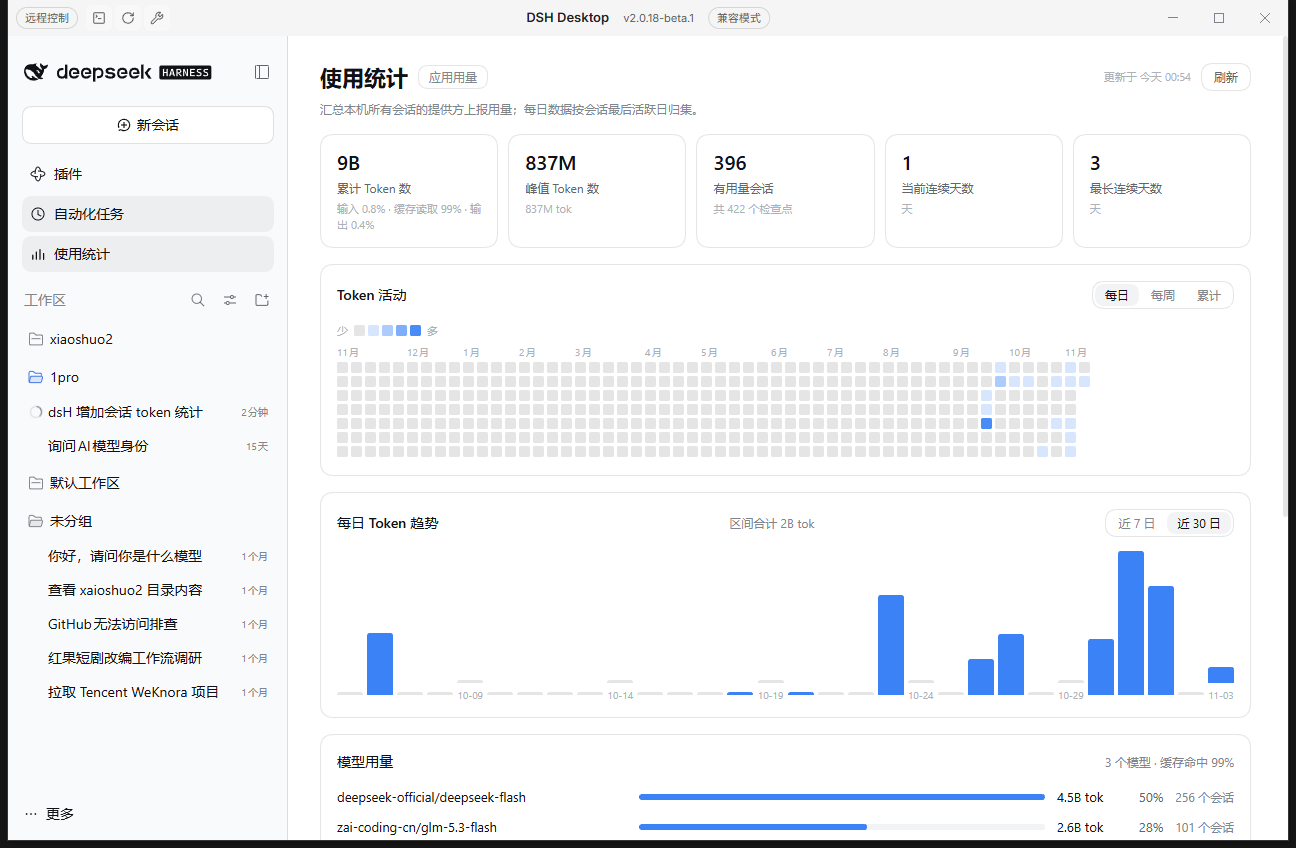
侧边栏里的全量会话 Token 用量仪表盘:累计/峰值 Token、连续使用天数、53 周活动热力图、7/30 天趋势、按模型用量与会话排行;在本地从 profile 的会话投影缓存汇总(旧会话格式的会话也能统计),不联网,只读汇总路由拒绝非本机请求。
安装
dsh plugin --profile web add github:inezmitche46-maker/dsh-usage-stats该插件位于仓库的 packages/dsh-usage-stats 子路径下。
README
DSH Token Usage
Two small, local-first plugins for DeepSeek Harness (DSH) that make token usage visible:
| Plugin | Where it appears | What it shows |
|---|---|---|
dsh-usage-stats | Sidebar → Usage Statistics page | All-session token totals, peak session, usage streaks, 53-week activity heatmap, 7/30-day trend, per-model usage and a session ranking |
dsh-session-token-stats | Composer dock → Token usage pill | The current session's token total; expanding it shows uncached input, cache read, cache write, output and the cache-hit share |
Install
Requires DSH >=0.2.1-rc.1 <0.3.0 (Web / Desktop) and Node >=22.19.
The two plugins are separate bundles — install either one or both:
# all-session usage dashboard (sidebar page)
dsh plugin --profile desktop add "github:inezmitche46-maker/dsh-usage-stats#path:/packages/dsh-usage-stats"

# session token pill in the composer
dsh plugin --profile desktop add "github:inezmitche46-maker/dsh-usage-stats#path:/packages/dsh-session-token-stats"
Use --profile web on a Web profile. To pin a reproducible revision, replace the branch with a commit hash: github:inezmitche46-maker/dsh-usage-stats#<sha>&path:/packages/dsh-usage-stats.
After installing, restart DSH Desktop (or reload the Web page). dsh plugin add records each package in the profile's dsh.profile.bundles, and the package's own cordis.patch.yml inserts its plugin row.
Data and privacy
- Read-only. The dashboard's Host half reads the profile's session projection cache:
<DSH_HOME>/storages/session_projcache/sessions/*.json— thetokenUsage,sessionStats,modelSelectionandsessionListMetadatarows. It never writes session logs or profile files. - No network, no telemetry. Neither plugin makes outbound requests.
- Loopback-only route. The dashboard is served by one read-only route,
GET /usage-stats/summary; requests whose peer is not the local machine get403, responses carrycache-control: no-store, and results are cached in memory for 30 seconds. - The pill is a pure client-side consumer of the
tokenUsagesession projection registered by@deepseek-ai/dsh-token-meter; its Host half registers nothing.
Compatibility
- Tested on DSH
0.2.1-rc.2(DSH Desktop Beta2.0.18-beta.1), Web surface. - Client halves register into the standard slots:
main+sidebar.panellistfor the dashboard,conversation.composer.dockfor the pill. - Host half uses
profileContext.homeandwebServer.register({ kind: 'prefix' })from the published@deepseek-ai/dsh-*packages.
Notes and limitations
- Daily figures attribute a session's whole usage to its last active local day — exact for single-day sessions, approximate for sessions spanning days.
- Only sessions already present in the projection cache are counted; a session with no checkpointed usage is not listed.
- The in-progress turn may lag one checkpoint behind; the page's refresh button re-reads it.
- The pill hides DSH's built-in composer usage pill so the two numbers do not duplicate. Set
HIDE_BUILTIN_USAGE_PILL = falseat the top ofpackages/dsh-session-token-stats/client.jsto keep both.
Uninstall
dsh plugin --profile desktop remove dsh-usage-stats dsh-session-token-stats
Or disable / remove them from Settings → Plugins.
License
MIT