dsh-atlas
jameswatt139240-crypto/dsh-atlas
AT Last, All Sources. One @ . Jump anywhere.
安装
dsh plugin --profile web add github:jameswatt139240-crypto/dsh-atlasREADME
dsh-ATLAS
English · 简体中文
A Side Quest project (工作室:支线任务, Side Quest Labs) — npm scope @sidequest-007/*, repository jameswatt139240-crypto/dsh-ATLAS; the DSH plugin id keeps the ecosystem's unscoped dsh-* form.
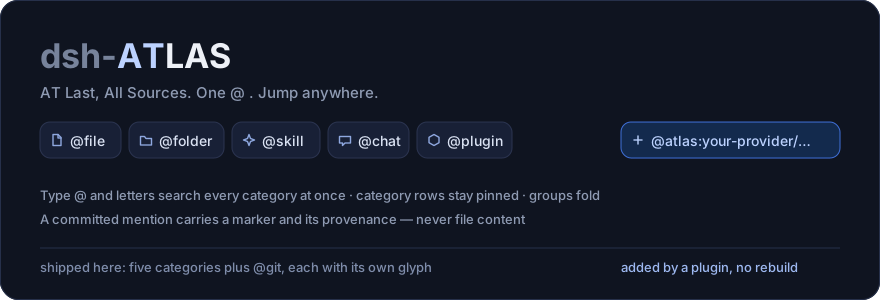
AT Last, All Sources.
One @ . Jump anywhere.
Every reference it draws is a clickable link (the theme's link colour, so blue in dark mode), and a session link jumps straight to that session.
Unified @ mentions for the DeepSeek Harness web GUI: type @ in the composer to reference workspace files and folders, discoverable skills, past chats, installed plugins, and workspace git changes — and any other plugin can add its own category to the same menu. Clicking a session mention switches the composer to that session.
- One
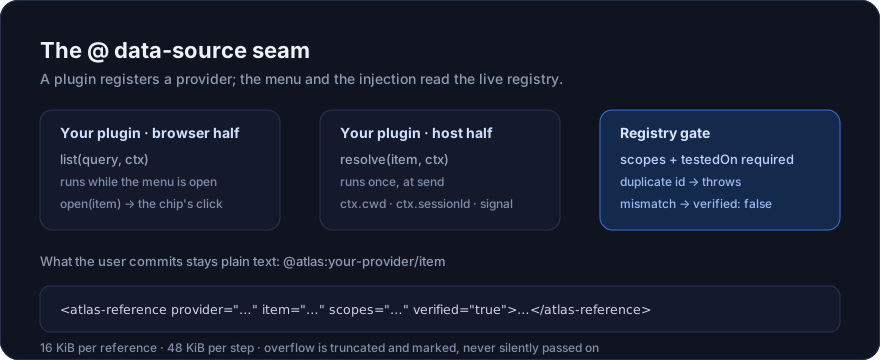
@, every source: five built-in categories plus the bundled@gitprovider — six resource families in this deployment — and every registered provider, in one list; typing letters searches all of them at once. - A platform, not a picker: third-party plugins register their own
@category through thectx.atlasseam. The menu rebuilds from the live registry on every open, so this package never has to change for a provider — see Write your own@source. - Provenance, never content: a committed mention injects a marker (
<workspace-reference>,<skill-reference>,<atlas-reference>, …) and nothing else. The plugin reads directory metadata only; the agent reads the file itself, if and when it needs to. - Governed by construction:
scopesandtestedOnare required, a duplicateidthrows, a version mismatch registers asverified: false, and every provider body is budgeted (16 KiB per reference, 48 KiB per step). @gitships as the worked example, and as a real source: it lists the workspace's changes (path + added/removed lines) like any other category, and it is built exactly the way a third party would build one, in ~200 lines across its two halves.
It extends dsh-at-file (MIT), keeping its workspace path index, file filters, and paste protection, and adding four more categories, a category menu with shortcuts, mixed results, collapsible groups, and three model-facing query tools.
dsh-atlasanddsh-at-fileboth claim the composer's@trigger. Install one of them, not both.
Install
Requires a DSH install (dsh on PATH) with a web profile.
# from GitHub (this repository; lib/ is committed, so no build runs)
dsh plugin --profile web add github:jameswatt139240-crypto/dsh-ATLAS

# a local clone (development)
git clone https://github.com/jameswatt139240-crypto/dsh-ATLAS
dsh plugin --profile web add link:/path/to/dsh-ATLAS

# npm (once published; the scope is the studio's, the plugin id stays `dsh-atlas`)
dsh plugin --profile web add @sidequest-007/dsh-atlas
Restart dsh web after installing or updating so the Host and the browser client load the same version. Then type @ in the composer.
The categories
The menu keeps the category rows — five built in, plus the bundled @git — in its bottom band, the rows nearest the composer, so pressing @ opens on them rather than on whatever else shares the trigger.
| Category | Menu prefix | Shortcut | Candidates from | Written into the draft |
|---|---|---|---|---|
| File | file: | F | The session workspace index | @src/index.ts |
| Folder | folder: | D | Same index | @src/client/ |
| Skill | skill: | S | The ctx.skills registry | @skill:blender-modeling |
| Past chat | chat: | C | The official session-reference resolver | @[title](dsh-session:<id>) |
| Plugin | plugin: | P | The official plugin inventory | @plugin:dsh-atlas |
One shortcut letter is a statement of intent, not a query. Typing it shows the category rows — five built-in plus the bundled @git — and a Tab 补全 → category: hint as the last row, with the highlight already on that hint; Tab or Enter then enters the category: prefix. A registered source can claim a shortcut letter too: the first letter of its id (@git → G), and only while no built-in category or earlier provider answers to that letter (the @<id>: prefix always works). Filtering starts on anything more specific — a first letter that is not a shortcut, or a second character (which is what the fi/fo/sk/ch/pl spellings are). Clicking a category row or the back row enters/returns the same way and keeps the menu open — that is this plugin's own override; the normal pick path closes it.
Registered sources are the sixth row and beyond. @git ships built in (the workspace's changed files, with each file's diff as the referenced content), and any plugin can add its own category the same way — see Write your own @ source. They appear after the built-ins, in registration order, and disappear when the plugin that registered them is disposed. The plugin's group itself is registered with a positive order, so it is the last group in the menu: the bottom band belongs to this plugin, and the stock dsh-client-ui-reference source's file list stays above it.
Interaction
- Typing letters searches every category at once, split into a "recently referenced" section and an "all matches" section, with a category tag on each row; the category rows stay pinned and clickable.
- Folders: the
@folder:category lists directories; picking one writes@path/into the draft (the trailing slash is what marks a directory, and the plugin still reads directory metadata only). Keep typing after the slash to narrow the search inside it. While filtering, the rows are ranked in two tiers: folders whose NAME matches first — the workspace's own, then the ones outside it — and then, in a group of their own (路径匹配), the folders that only their PATH matches. Folding that group is your gesture; it opens by default and shows whatever fits. - A folder you name first scopes the file list:
@e:/work/docs/ @file:lists that folder's own files (one level, through the same directory listing the folder tab uses) under a group header that says which folder they came from and that it is outside the workspace, before the workspace's own matches. The scope is positional — the nearest folder reference typed before the category token — so no connective word is needed, and a draft with no folder reference behaves exactly as before. - Grouping: skills group by management tier (系统 / 用户 / 项目 / 自定义 / 插件) and then by domain (blender, competition, dsh, …); plugins group by npm scope (
@deepseek-ai/…or 其他); past chats group by workspace with the sidebar's relative times and children indented under their parent. Every parent row collapses or expands instantly on click, or on Enter while that group header is the highlighted row. Tab completion, ↑↓, and Esc are the harness's own keymap. Beyond those, the plugin adds exactly three keys of its own: Enter on a highlighted group header folds it, the category and back rows keep the menu open when picked, and PageUp/PageDown page the list by one measured screen — those two move the highlight (or scroll the list when the highlight belongs to another source), so the focused row is always the one you can see. - Long lists scroll instead of hiding rows: a category shows at most
MAX_CANDIDATES(20) rows, and when they do not fit the menu scrolls — PageUp/PageDown walk it a screen at a time, and the plugin re-asserts the focused row's visibility whenever the content changes (a scoped folder's listing arriving late, a group being folded). Rows are therefore never dropped merely to keep the menu short; the tiers above decide what comes first. - Initial view:
@file:lists recently referenced files first (most recent first, persisted per workspace), then alphabetical order. - Cost and staleness: each file reference in the dock shows its approximate token cost (
≈1.2k tokens, highlighted above 8 000); a reference whose path no longer resolves is marked Missing. Cost comes from the file size (~4 bytes per token) and the plugin reads entry metadata only — never file content. - Typo tolerance: a lightly mistyped filename (
veiw→view.ts,clinet→client/…) still matches. Exact ranking wins: the fuzzy pass only runs when the exact ranking found nothing, and queries shorter than three characters or containing/stay exact. - Line ranges: type
@src/a.ts:12-40to reference lines 12–40 of that file (a single line is@src/a.ts:7; a reversed40-12is normalized to12-40). Directories take no range. The Host validates syntax and path kind only and never opens the file, so whether the lines exist is the agent's business when it reads. - Reference dock: every reference in the draft appears above the composer; file, folder and provider rows open on click, and each row's × removes its token.
- Every draft reference the plugin can open is a link: the test is the PLUGIN's own — the token decodes into a reference and the Host has confirmed the target exists — not whether the framework happened to decorate it. A hand-typed
@AGENTS.mdbehaves exactly like one the editor recognised: the whole token is blue, a click anywhere inside it opens the reference, and the pointer turns into a hand. The colour is painted with the CSS Custom Highlight API (a Lexical text span expects exactly one text child, so wrapping any part of a token would break typing inside it) in the very colour the framework uses for its own references. A token whose target is gone is not left as ordinary text either: it is painted the dock's own Missing way — dimmed and struck through — because it is a reference that cannot open. When that verdict is drawn matters: only a finished token is judged (one followed by whitespace, or by another line, i.e. after Enter), because a token still being typed is every prefix of a path at once and@Nis always "missing" — striking it through mid-word would judge a word the user has not written yet. A token that CAN open turns blue the moment its name is complete, exactly as the framework's own decoration does. A token whose verdict has not arrived, whose provider declared noopen, or whose name cannot be placed claims nothing and stays ordinary text. On a browser without the highlight API nothing is painted at all — there only the part the framework itself coloured acts as a link, because nothing else is drawn as one. - A reference another source inserted as a chip is clickable too: the sidebar's file tree writes one into the draft as an atomic chip, which this client build draws in the framework's chip blue and leaves inert. Clicking one opens the file it names, and the chip then carries the plugin's link language. That source labels a chip with the file's basename (the full relative path lives only in the draft text), so a bare name is placed in two steps: first the plugin's own index, where a unique basename settles it; then, when the index itself is ambiguous (
index.tsexists twice in this workspace), the draft — one token with that basename decides, two leave the chip inert. Only a name the index does not know at all is handed to the click's own existence check, which marks the chip stale rather than opening something wrong. - References in sent messages are clickable: a chip in a message bubble opens on click (files in the right Sidebar, the Host opener when there is none; skills through the skill source; provider items through the
opentheir own provider declared). Only a chip that really opens is drawn as a link — the framework's own--dsw-alias-linkblue with a hover underline — and a build that wires the chips itself renders<button>, which this plugin leaves alone. The plugin also implements the framework'sopenReferencehook, so a client that activates a reference token in the composer asks its owning source to open it. The installed client activates nothing yet, so the plugin supplies that click itself, through the very action the chips run. - A session reference is a link: identity here is decided by VALUE, because the id is not in the path. The wire form
@[label](dsh-session:…)on its own names its session (the payload is decoded and must round-trip canonically), a label with spaces is still ONE token, and a hand-typed bare@<session-id-or-title>is promoted only on exactly ONE match from the session list — an ambiguous or unknown name stays inert, so@AGENTS.mdstays the file reference it is. Clicking switches the current session through the same action a sidebar row performs. Boundary: a message already SENT can only be opened when its chip still carries the wire payload; once the Host folds it to a bare label the id is gone, which is why this plugin filed that upstream. - Icons: every row this plugin emits carries its own glyph — the same modern line set the reference dock uses, including per-file-type and per-language marks (TypeScript, Rust, PDF, image, archive, …) and a branch glyph for
@git. The framework's menu row can only draw three glyphs of its own, so the plugin reserves the slot (which is what indents every name by the same amount) and draws the glyph itself, monochrome, in a fixed layer above the list: nothing is inserted into a row the framework owns, and the framework's own glyph is hidden only in the slots this layer actually covers.
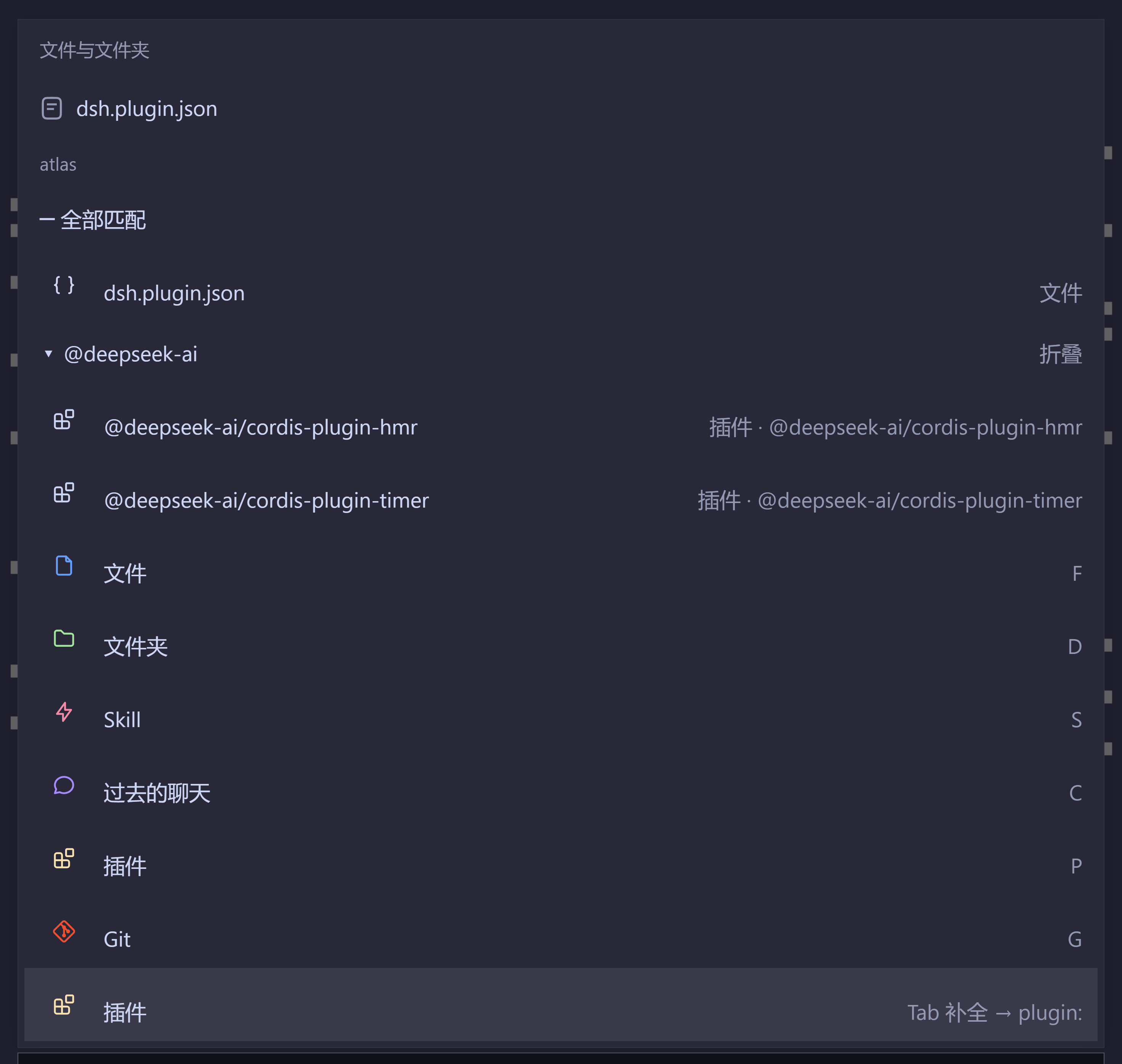
The menu (scrolled to its bottom band): a mixed, tagged result list — file rows with their directory, a collapsed plugin group — above the five category rows plus @git, each with the plugin's own glyph. The band is the last group, nearest the composer, and the menu is registered with a positive order so the stock reference source stays above it.
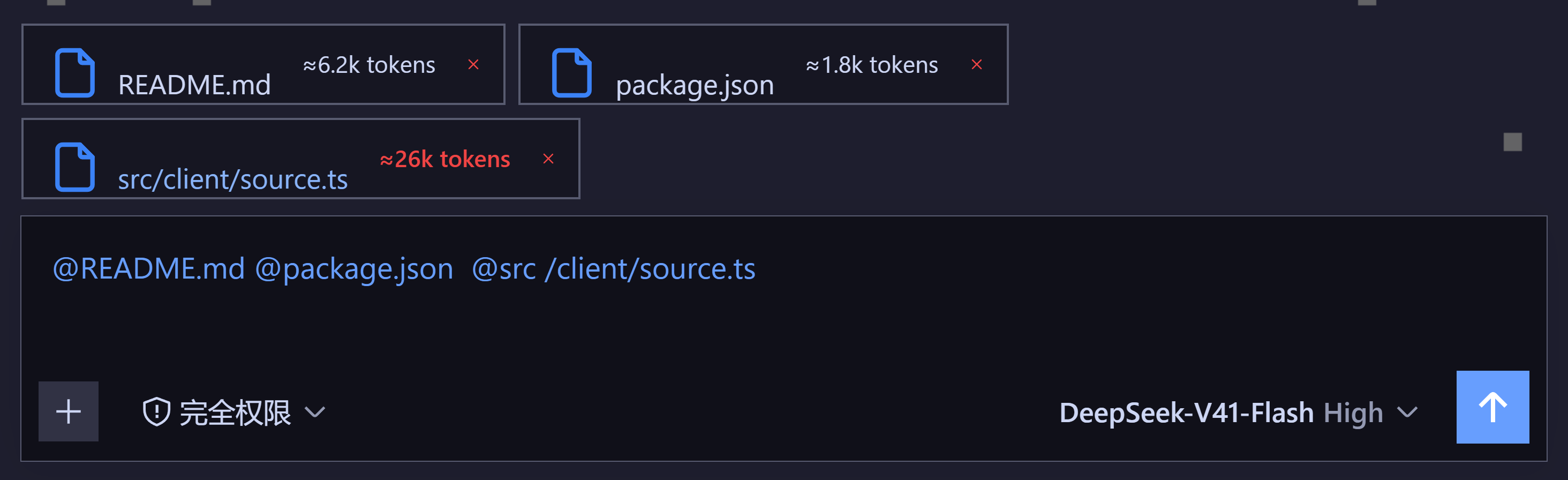
The reference dock above the composer: one row per mention in the draft, each with its own glyph, its approximate token cost (≈26k tokens in red is past the 8 000 highlight) and its remove button — and every token in the draft painted as a link.
Injected references
Before each agent step, the plugin validates every reference in the draft and appends one message carrying only the reference — never file content. The agent reads referenced content on demand with the tools available to the session.
Review @docs/spec.pdf
Use @skill:blender-modeling
Recall @[Payment rates](dsh-session:xxx)
With @plugin:dsh-atlas
Take the diff of @atlas:git/src/extract.ts
| Category | Injected marker | Message source |
|---|---|---|
| File / Folder | <workspace-reference path="docs/spec.pdf" kind="file" /> (adds lines="12-40" for a range) | at-file-mention |
| Skill | <skill-reference name="blender-modeling" /> | atlas-skill |
| Plugin | <plugin-reference name="dsh-atlas" /> | atlas-plugin |
| Past chat | The official session-reference read-only snapshot (replayable, budgeted) | session-reference |
A registered @ source | <atlas-reference provider="git" item="src/a.ts" scopes="process:git" verified="true">…</atlas-reference> | atlas-provider |
- A referenced directory injects that directory only; its contents are never expanded here.
- Absolute paths and paths escaping the workspace are ignored.
- A referenced path must still exist; unknown or out-of-workspace tokens produce no marker.
- Skill bodies are not injected by default (see
injectSkillBody); the agent loads them through its skill tool. - Past-chat snapshots are budgeted by the official implementation (64 KB per source, at most 3 references, self-reference refused).
- An
@atlas:reference is the one marker that carries a body. That body is the provider's own answer, never a file this plugin opened: it is bounded to 16 KiB per reference and 48 KiB per step, and an over-long body is cut and markedtruncated="true".
Write your own @ source
The menu is the seam's only consumer. It rebuilds its category list from the live registry on every open, so a plugin adds a @ category by registering one — nothing in this package enumerates providers, and no rebuild of it is needed.
// Host half — what a committed reference turns into. `ctx.get('atlas')` is the seam.
import type { AtlasProvider, AtlasSeam } from '@sidequest-007/dsh-atlas'

const provider: AtlasProvider = {
  id: 'diag',                  // becomes @atlas:diag/… in the draft
  display: 'Diagnostics',
  scopes: ['process:lsp'],     // what you reach for (required)
  testedOn: ['0.1.5-rc.1'],    // DSH builds you actually ran (required)
  async resolve(item, context) {
    // context.cwd is the answered session's workspace; context.sessionId names it.
    return await diagnosticsFor(context.cwd, item.id, context.signal)
  },
}

const atlas = ctx.get('atlas') as AtlasSeam
atlas.register(provider)       // returns a disposer
// Browser half — candidates for the open menu, from your own client bundle.
const provider: AtlasProvider = {
  id: 'diag',
  display: 'Diagnostics',
  scopes: ['process:lsp'],
  testedOn: ['0.1.5-rc.1'],
  async list(query, context) {
    return await askYourHost(query, context.sessionId, context.signal)  // must stay cheap
  },
  open(item, context) {
    // Optional: what a click on `@atlas:diag/…` in an ALREADY SENT message does.
    // Only you know what your item means (a file path? a URL? a record id?), so
    // the menu never interprets it — without `open`, the chip stays inert.
    openInYourViewer(item)
  },
}
A provider may register either half or both; id ties them together. What the user commits is plain text (@atlas:diag/src/a.ts:12), so provider content never enters the draft, and only the Host half decides what the model sees.
| Rule | Why |
|---|---|
| Registration is authorization | A plugin that never registers is invisible: nothing is scanned, guessed or discovered |
list runs while the menu is open | It decides how the menu feels; cache it yourself if it is not free |
resolve runs once, at send | It may be expensive, and it receives the session's cwd and an AbortSignal |
open is optional and menu-half only | The click happens in the browser; without it the chip is inert, and never drawn as clickable |
scopes and testedOn are required | register() refuses a declaration without them |
testedOn is compared for equality | A mismatch registers as verified: false; an unknown running version is never verified |
id is unique | A duplicate throws and names the first registrant — no silent overwrite |
| The seam bounds every body | 16 KiB per reference, 48 KiB per step; the overflow is marked, not passed on |
| An empty body injects nothing | A provider saying "nothing to add" costs no tokens |
The verdict is re-read every time the registry is read, so a provider that registers before the browser has learned the running version does not stay unverified.
What ATLAS will not carry
A source passes all three, or the answer is no:
| Refuse | Why |
|---|---|
| What the model can already get | @file and @session are built in; a second route to the same data is noise |
| What cannot be narrowed | A whole logcat or a full database dump poisons the context; a reference is a selection |
What is expensive to resolve | Lazy loading is the contract, not a preference |
The test: narrowable · previewable · useful the moment it lands.
@git is the worked example, and it is built the way a third party would build one. See src/git.ts (Host: reads the change list and produces one diff, never opening a file) and src/client/git-provider.ts (browser: asks the Host over atlas/gitChanges, filters per keystroke, caps the list).
Model-facing tools
Beyond the markers injected at send time, the model can query these categories on demand:
| Tool | Purpose |
|---|---|
past_chats | List past sessions by title or workspace — follow-up to an @past chat reference |
read_past_chat | Read one referenced session's current user/assistant surface |
plugin_info | List installed plugins and whether each is enabled, filtered by module name |
Settings
Managed in Settings → Workspace file mentions:
| Setting | Default | Meaning |
|---|---|---|
| Enable @ file mentions | on | Master switch; turning it off hides the @ menu and dock and stops injecting markers |
| Enable @Skill mentions | on | Show skills in the menu |
| Enable @past chats mentions | on | Show past sessions in the menu |
| Enable @plugin mentions | on | Show installed plugins in the menu |
| Candidate limit | 50 | Maximum candidates returned per request (1–200) |
| Ignore @ mentions in pasted text | on | @tokens pasted from other applications stay plain text |
| File filters | — | Global and per-workspace rules; each rule is Exact or Regex, with its own case setting |
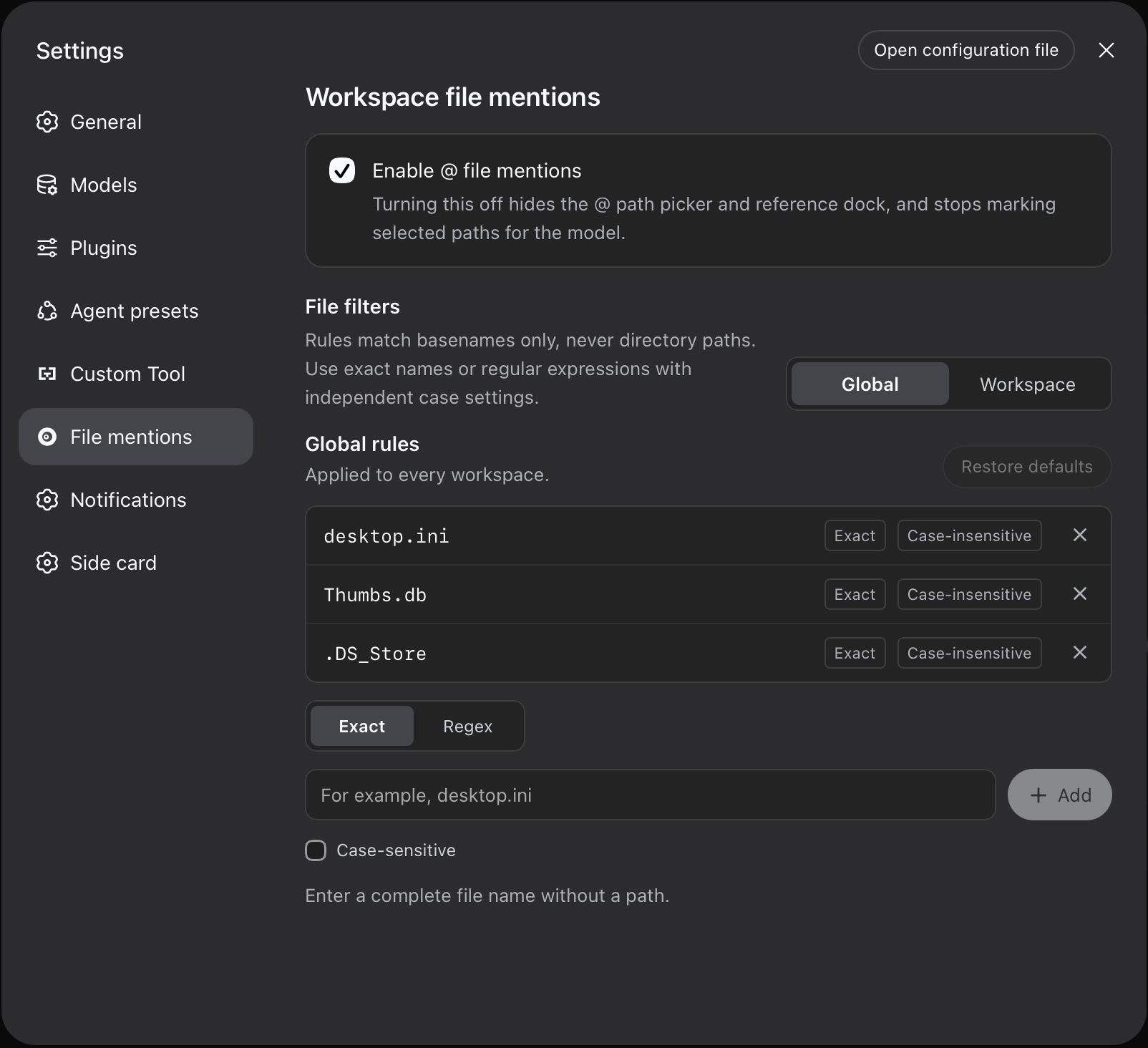
File filters match basenames only (never directory paths). Workspace rules apply alongside global rules; editing rules clears the index cache, so the next @ uses them.
Configuration
These parameters live in the profile's cordis.patch.yml (usually ~/.dsh/profiles/web/cordis.patch.yml):
- id: dsh-atlas
  config:
    maxIndexedFiles: 2000   # workspace index entry cap
    ignoreDirs: []          # replaces the built-in ignore list; [] indexes every directory
    injectSkillBody: false  # also inject the skill body when a skill is referenced
Omitting ignoreDirs keeps the built-in list (version-control directories, IDE metadata, dependency directories, caches, and build output).
Design constraints
- Paths only, never content: the Host validates and injects paths, categories, and provenance markers. It never opens a referenced file and never lists a referenced directory.
- Paste protection: external text cannot forge a reference — only
source.kind === 'user'messages are scanned, and pasted content is marked as plain text by default. - Workspace confinement: references stay inside the session workspace; absolute paths and
..escapes are refused. - Model-visible means logged: every injected marker carries its source and is persisted with the session log.
- The display slot stays out of matching: the display slot beside the
@menu is fully decoupled from candidate computation. It never blocks or slows a search, and it reads no session data.
Development
Prerequisite: the dev dependencies are link: entries into a DSH source checkout, expected at ../deepseek-harness beside this repository. Without it pnpm install cannot resolve them, so a plain clone is not buildable on its own (the published packages — e.g. @deepseek-ai/dsh-client-ui-conversation@0.1.6-alpha.1 — are on npm, but this setup is pinned to the checkout on purpose: it is how the plugin is tested against the same source the Harness is built from).
git clone https://github.com/jameswatt139240-crypto/dsh-ATLAS
git clone <dsh source checkout> ../deepseek-harness   # or repoint the links in package.json
cd dsh-ATLAS
pnpm install
pnpm run check           # typecheck + tests + ad-free build + publish-surface gate
pnpm run build           # build only (no ad panel; lib/ is committed)
pnpm run build:ads       # build the ad-bearing variant (not for the first release)
pnpm run verify:publish  # publish-surface gate on its own
lib/ is committed, so profile installs run without a build. See CONTRIBUTING.md for the ladder a change has to pass.
Publishing
-
The default build carries no ad.
pnpm run buildreplaces the ad panel and its banner images with stubs, so neither ad code nor image bytes reachlib/client.js(~726 KB ad-free vs ~978 KB with ads). Usepnpm run build:adsfor a later ad-bearing release. -
The publish-surface gate runs automatically before
npm publish(prepublishOnly) and refuses: the internal plan directory (kept out of git and out of the tarball), AI-assistant files (AGENTS.md,CLAUDE.md,.agents/,.claude/,.cursor/,skills/), TypeScript sources and tests, sourcemaps (they inline sources and local paths), a bundle that still inlines an ad banner, a bundle that leaks a local machine path, and any of the four places that must agree on the package name (package.json,dsh.plugin.json,cordis.patch.yml, the client bundle id, plus the invariant companion). SetDSH_ATLAS_ALLOW_ADS=1for a deliberate ad release. -
Releasing: the tag is the decision.
pnpm run check # full ladder, needs ../deepseek-harness git tag -a v1.0.0 -m "dsh-ATLAS 1.0.0" git push origin main --tags # the release workflow publishes.github/workflows/publish-surface.ymlruns the self-contained gate on every push: it needs no registry and no DSH checkout, because it packs the committedlib/and inspects the tarball..github/workflows/release.ymlpublishes on av*tag with trusted publishing (OIDC) — noNPM_TOKEN, no OTP: GitHub mints a short-lived identity (permissions: id-token: write) and npm verifies it against the trusted publisher configured for this package. That configuration is one-time, lives athttps://www.npmjs.com/package/@sidequest-007/dsh-atlas/access→ Trusted Publisher (userjameswatt139240-crypto, repositorydsh-ATLAS, workflow filenamerelease.yml, "publish directly" allowed), and could only be added after the first version existed — npm attaches a trusted publisher to a package, so 1.0.0 itself was published interactively. The job also skips itself when the tagged version is already on npm, and runsnpm publish --ignore-scripts(the full ladder needs the DSH source checkout, which CI does not have). To publish by hand instead, runnpm publish --registry https://registry.npmjs.org(a mirror such asregistry.npmmirror.comcannot accept a publish).
Compatibility
The plugin satisfies both generations of the Harness Typert codec validation (the installed build checks codec.schema.parse; the source checkout checks codec.create()), and opens referenced paths through ctx.remote.session.openWorkspacePath.
License
MIT (see LICENSE) — use it, modify it, ship it, sell it; keep the copyright notice with the copies you distribute. It is an OSI-approved license, so plugin markets that require one are fine with it.
This project is a derivative work of dsh-at-file (MIT). Its original copyright notice and license text are preserved in LICENSE-ORIGINAL, and NOTICE maps which files came from it.