dsh-code-review
jkin8010/dsh-code-review
DSH 代码评审中心:基于 open-code-review,支持当前改动、提交、分支对比、项目架构、代码模块与信息流业务工作流评审,提供实时进度、GitHub 风格提交热力图、已修复标识、自动修复校验、深浅色主题与一键修复会话。需要 git 和 open-code-review 命令行(1.13 及以上,npm i -g @alibaba-group/open-code-review);被评审的代码会发给该命令行所配置的模型,委托给会话时则发给当前会话模型;开过修复会话的报告再次打开时会重跑一次评审来校验修复。
安装
dsh plugin --profile web add github:jkin8010/dsh-code-reviewREADME
dsh-code-review
English | 简体中文
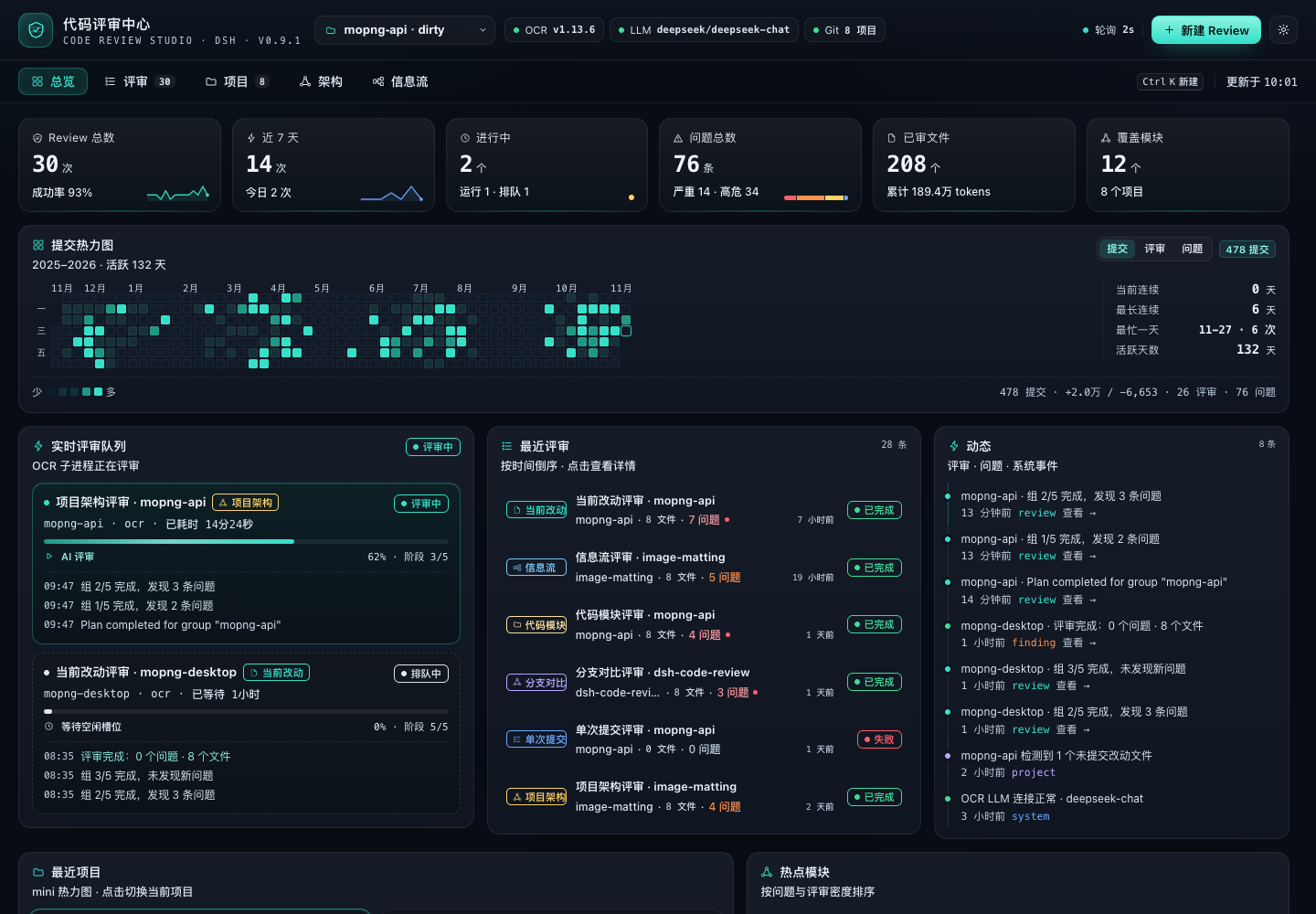
A DeepSeek Harness code review plugin built on alibaba/open-code-review. Four review types (current changes / project architecture / code modules / business data-flow workflows), live progress and activity, a GitHub-style commit heatmap, review details and per-project/module stats — all on one screen.
Features
- Four review types
- Current changes: staged + unstaged + untracked (
ocr review) - Single commit / branch comparison:
ocr review --commit,--from/--to - Project architecture: multi-language import dependency graph, Tarjan cycle detection, layering / god modules / missing tests (local analysis +
ocr scan) - Code module: whole-file review of a specified directory or file (
ocr scan --path) - Business data-flow workflow: entry → service → data/external dependencies, checking validation, authorization, transactions, idempotency, timeouts and swallowed exceptions
- Current changes: staged + unstaged + untracked (
- Automatic engine selection
ocr: the LLM bundled with OCR (OCR_LLM_*/~/.opencodereview/config.json)delegate: OCR selects files and resolves rules, while the review itself runs on the current DSH session model (no extra API key)structural: offline structural analysis with zero LLM dependency; falls back automatically when no model is available and says so
- Live and traceable: a six-stage state machine per review, stage progress, activity stream, cancel and retry, plus automatic "interrupted" marking after a Host restart
- GitHub-style heatmap: 53 weeks × 7 days, three metrics (commits / reviews / findings), hover for that day's commits, additions and deletions, reviews and findings, plus streaks and the busiest day
- Details and stats: findings grouped by severity, file:line, side-by-side original vs. suggested code, copy suggestion; recently reviewed projects, hotspot modules, severity/category distribution, coverage
- Project page / architecture dependency graph / data-flow swimlane diagram / new-review dialog / settings drawer
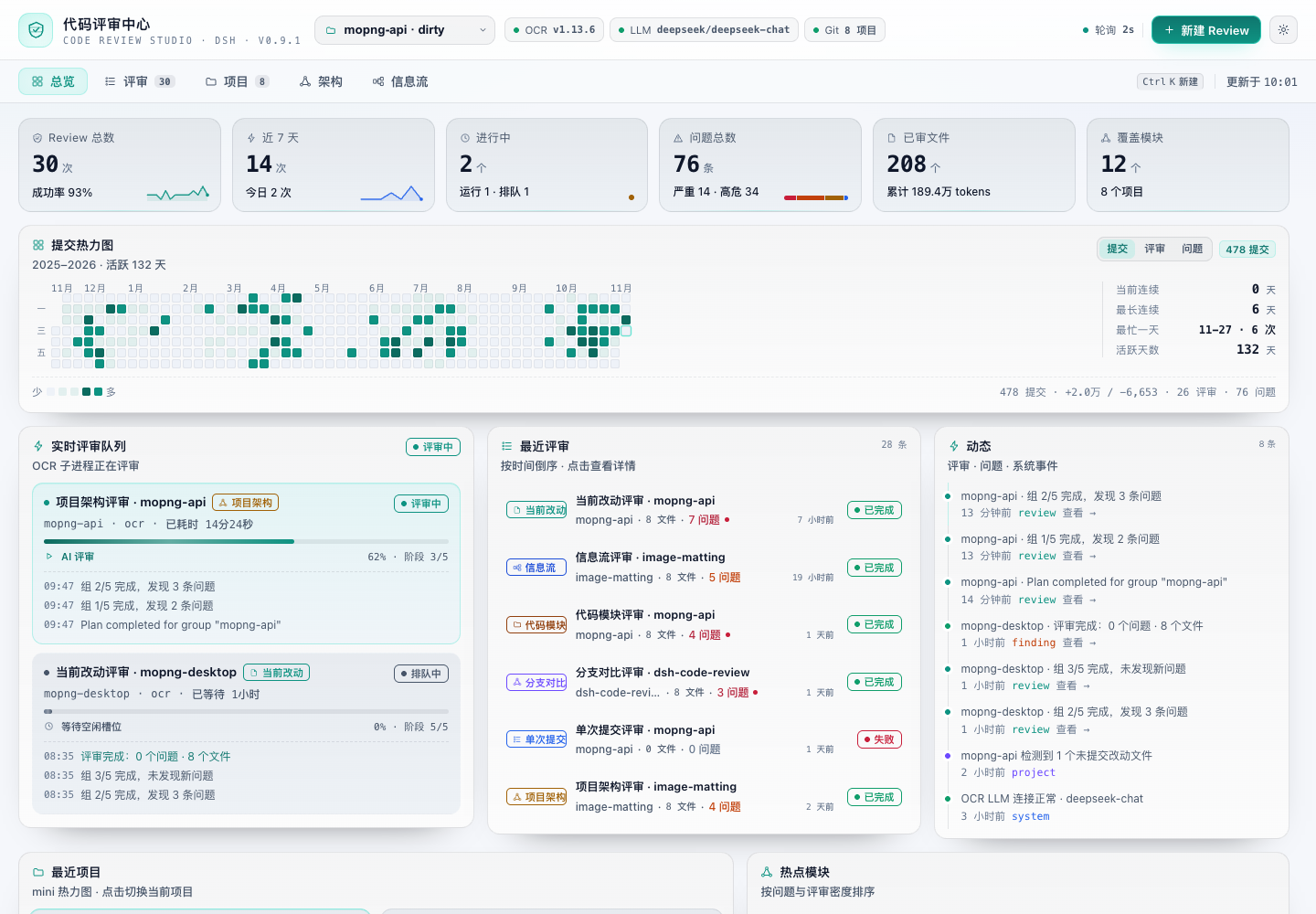
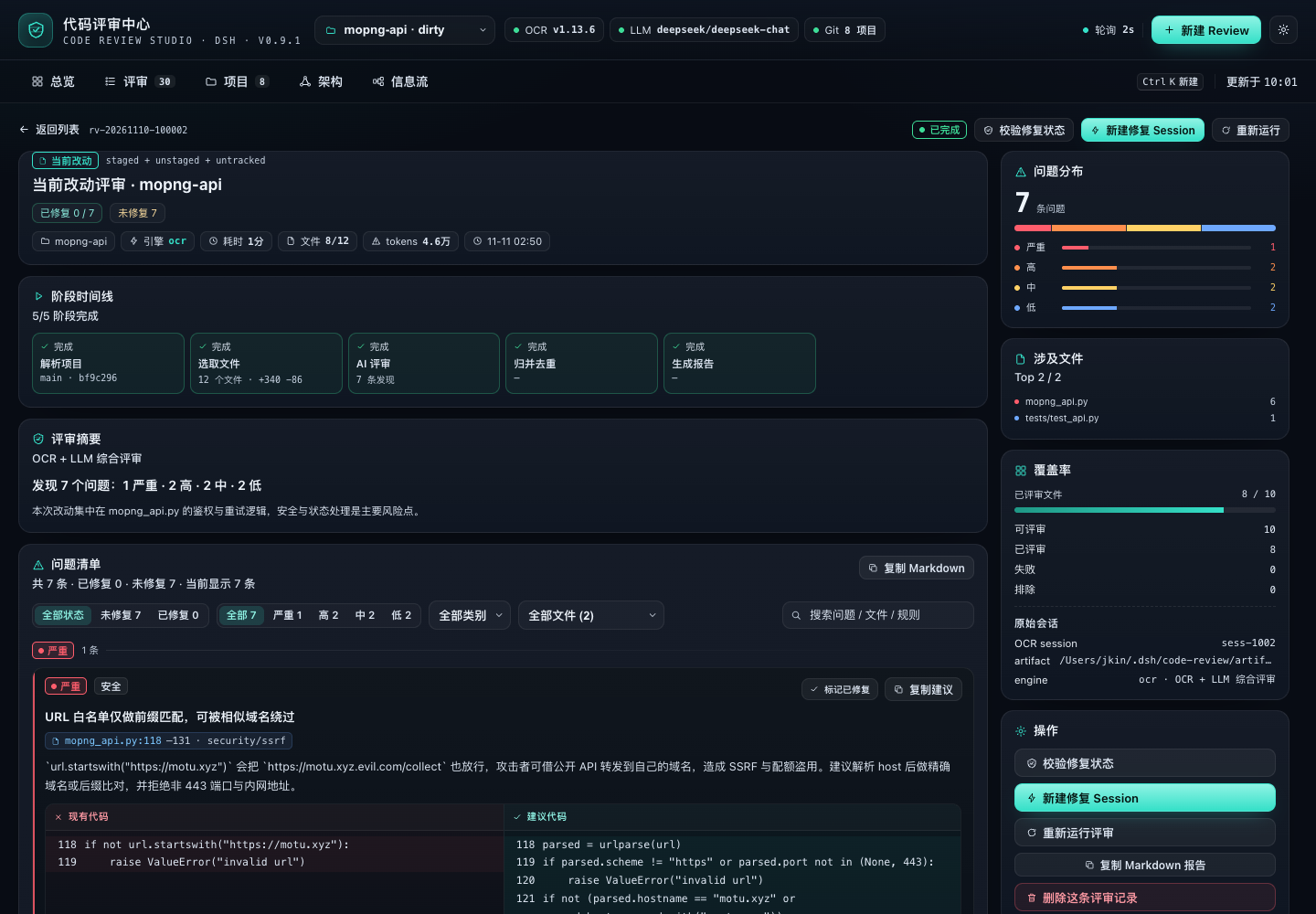
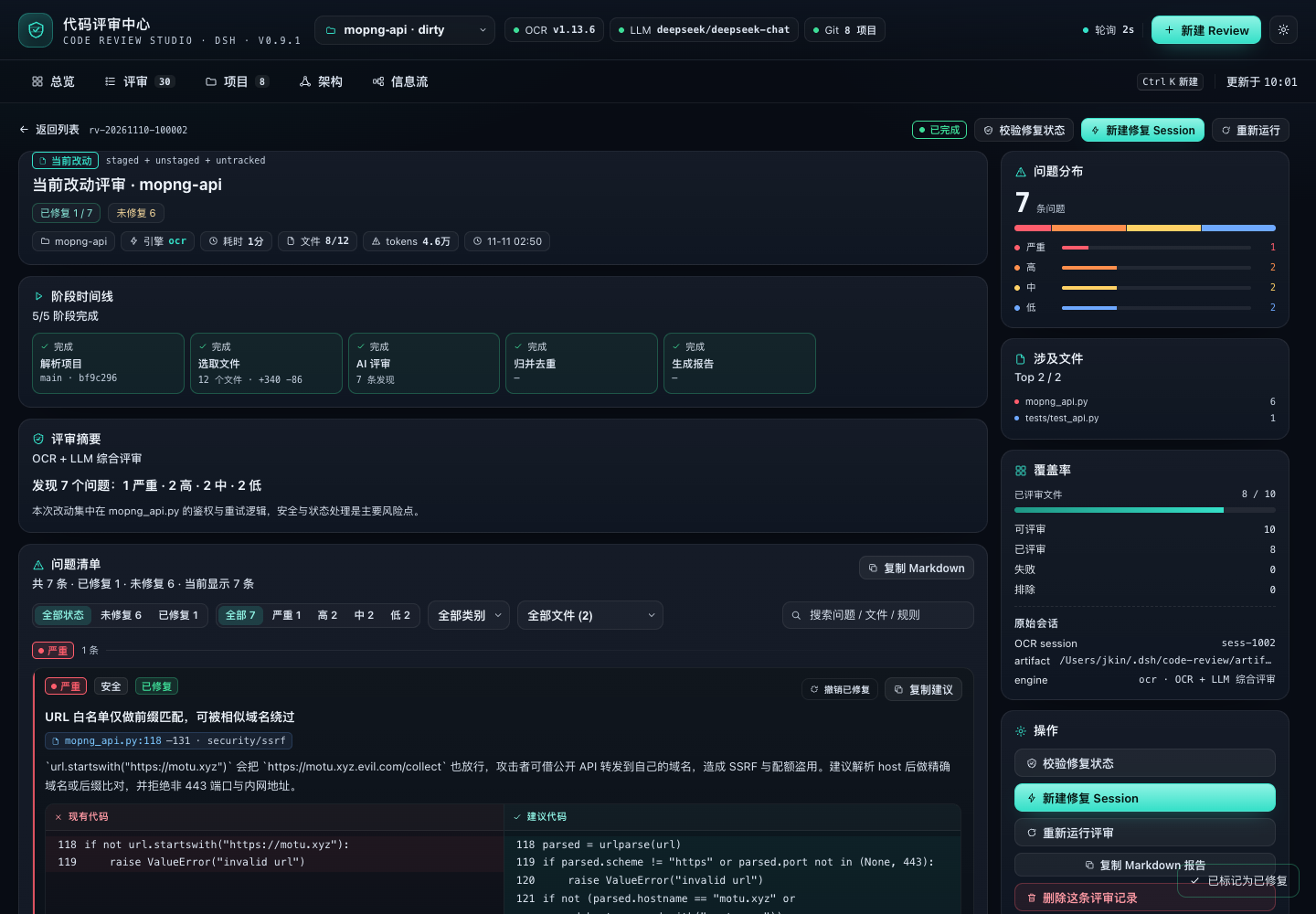
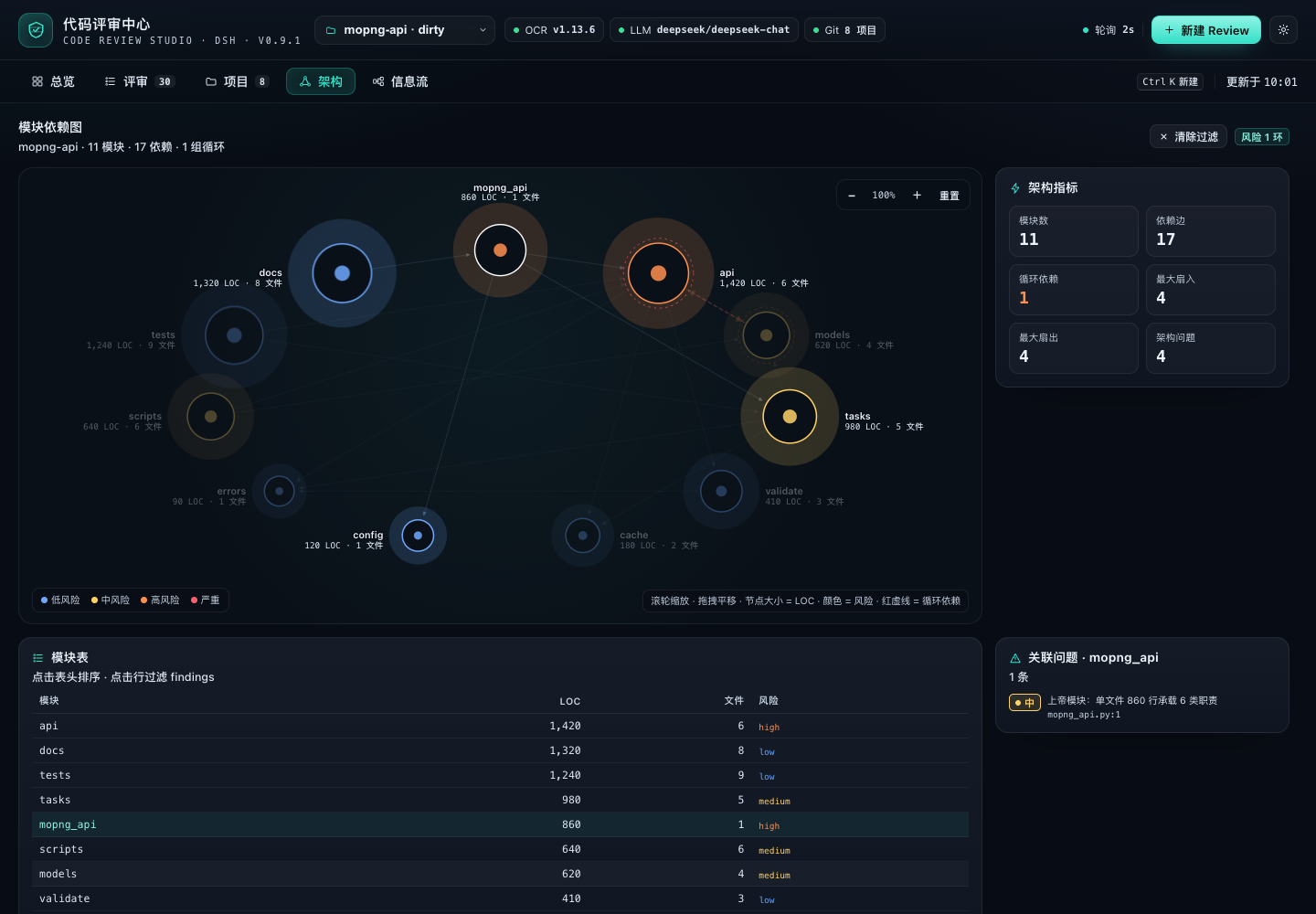
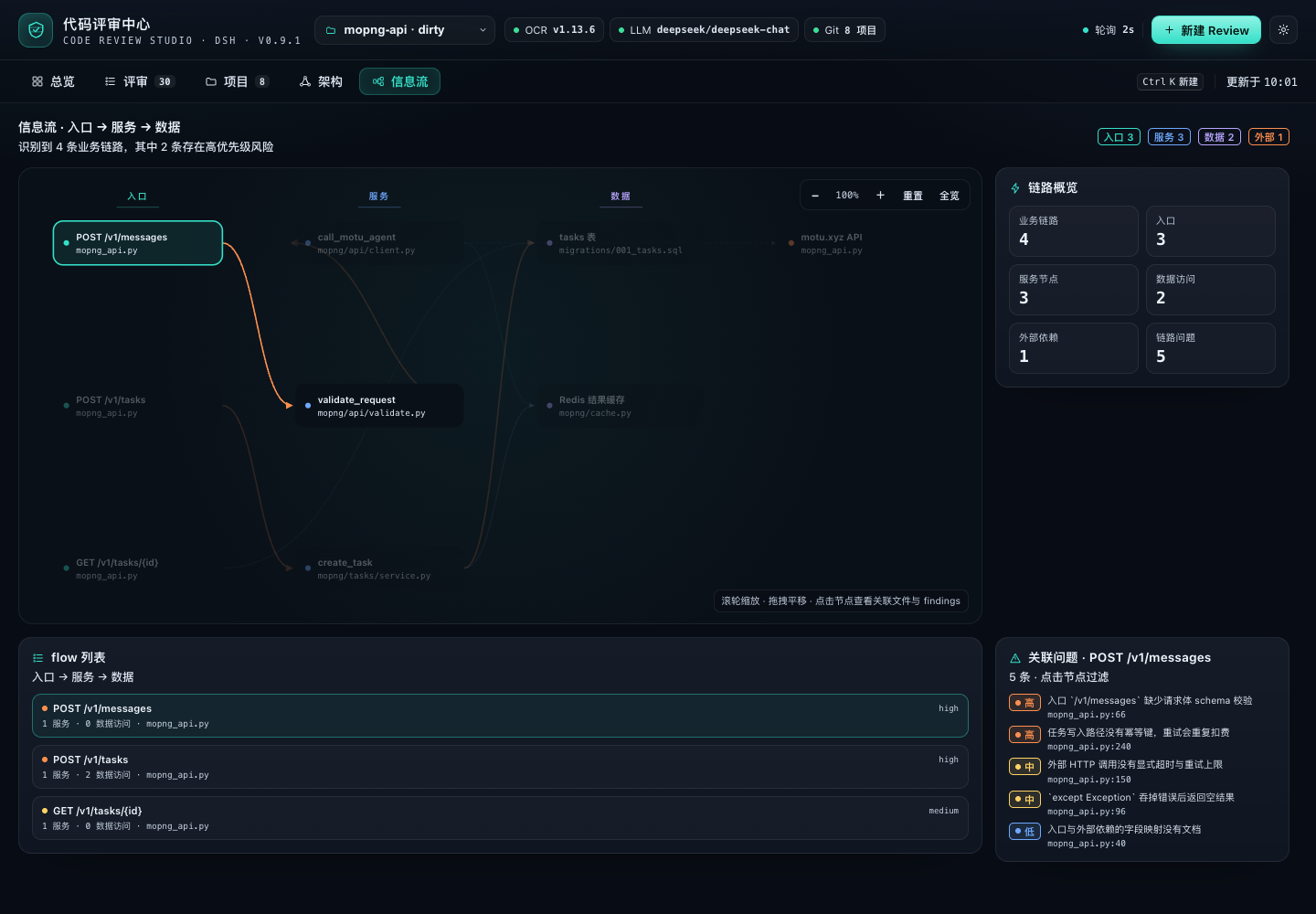
The screenshots are rendered by the preview harness; the project list uses public repository names from @jkin8010, and the review data is demo data.
Installation
Requires DeepSeek Harness (with the Web UI), the ocr CLI ≥ 1.13, git, and Node 22+.
One-click install (paste the prompt below into DSH)
Please install the DSH plugin https://github.com/jkin8010/dsh-code-review: use plugin_manager's install_bundle to install this Git repository directly. When it finishes, check whether the plugin is enabled, run ocr --version, check the LLM engine status, and tell me whether DSH needs a restart.
The repository root
package.jsonis the DSH bundle declaration, so the plugin can be installed straight from the Git URL (the plugin code itself lives inplugins/dsh-code-review/). Ifplugin_managerreturnsrestart-required, restart DSH to apply it; if it reports the change as applied, just refresh the page.
Manual installation
# 1) Install the open-code-review CLI (optional; without it the plugin uses offline structural analysis)
npm i -g @alibaba-group/open-code-review

# 2) Install it in DSH (Plugins in the Web sidebar, or via the agent tool); these two targets are equivalent:
#    - Git URL:          https://github.com/jkin8010/dsh-code-review
#    - local clone root: /absolute/path/dsh-code-review
plugin_manager → action: install_bundle, target: https://github.com/jkin8010/dsh-code-review
This plugin is a profile bundle; with HMR enabled it hot-loads, otherwise it takes effect after restarting DSH. The plugin itself has no third-party dependencies, so no extra
pnpm installis needed.
Configuring an LLM for OCR (optional)
By default ocr needs an LLM to do AI review; when none is configured the plugin automatically uses delegate (the current DSH model) or structural (offline analysis).
ocr config provider    # pick a provider and enter the API key
ocr config model
ocr llm test           # verify connectivity
Or supply one through the plugin config / environment variables (the token only exists in the Host process and is never sent back to the frontend):
- id: qise-code-review
  name: '@jkin8010/dsh-code-review'
  config:
    projectRoots: [/Users/you/workspace]       # auto-discovers the immediate subdirectories that have a .git
    extraProjects: [/Users/you/current/repo]    # extra projects (may be non-Git)
    engine: auto                                # auto | ocr | structural
    ocr:
      llmUrl: ''
      llmTokenFile: ~/.config/ocr/token
      model: ''
      effort: medium                            # low | medium | high
      concurrency: 8
      timeoutMin: 15
See plugins/dsh-code-review/README.md for the full set of configuration options.
Usage
Review directly from a project conversation (recommended)
The plugin registers the model tool code_review (active after install/restart). In any project session you can simply say:
- "Review the architecture of the current project with the code review center"
- "Review the current changes, only high and above"
- "Review the
plugins/dsh-code-review/hostmodule" - "Review this project's message pipeline from a data-flow perspective"
- "Show me the details of the most recent review"
Copy the line below to kick off a full review in one go:
Review the current project with the code review center: start with the project architecture, then review the plugins/dsh-code-review/host module, and finally review the message pipeline from a data-flow perspective; anything below high can be skipped.
The Agent calls code_review → start (waiting for the review to finish by default) → and returns the issue summary and findings in the conversation; the full grouping, code suggestions and coverage remain available in the "Code Review Center" in the sidebar.
Tool arguments (the Agent fills them in automatically, but you can also ask for them directly):
| Argument | Description |
|---|---|
action | start / status / detail / list |
project_path | Omitted = the current session working directory (the current project) |
type | workspace / commit / range / architecture / module / flow; when omitted, supplying paths means a module review, otherwise a project architecture review |
scope | paths (module) / commit / from+to |
options | effort, background, exclude, max_tokens_budget |
wait | Defaults to true and waits for completion; false returns a job id immediately |
job_id / severity / limit | Used when querying details |
If you would rather not wait, say "run it in the background and tell me when it's done"; the Agent will use
wait:falseand fetch the result later withstatus/detail.
Slash command /code-review
Besides having the Agent call the tool, you can also use slash commands right in the input box (mirroring the ocr CLI review types):
/code-review workflow @test/                 # add test/ as a project and run the data-flow review
/code-review workflow --fix @test/           # same as above, then open a fix session automatically
/code-review architecture @/Users/me/proj    # project architecture
/code-review module src/server,src/db --fix  # code module + fix session
/code-review changes --effort high           # current changes
/code-review commit abc123
/code-review range main feature/login
/code-review fix                             # open a fix session for the most recent review
/code-review list / status [jobId]
@pathor--project path: works even when the project is not in the list yet — the command adds it as a project first, then runs the review; relative paths resolve against the current session directory--fix: opens a fix session in the project directory and sends it the findings once the review finishes--async: returns immediately after starting;--effort/--background/--exclude/--budgetmap to the review options- With no subcommand, or with
help, it prints the full usage
Using it in the page
- Open "Code Review Center" in the left sidebar and pick a project at the top (
projectRootsauto-discovery +extraProjects). - Click "New Review" and choose a type:
- Current changes / single commit / branch comparison: fill in the commit or from/to
- Project architecture / code module / data flow: for a module review fill in the directory path; the data-flow review can be left empty for auto-discovery
- After submitting, watch the stage progress and activity in the overview's "Live review queue", then click through to the details for the findings.
- The overview heatmap and "recent projects / hotspot modules" track the review rhythm; the project page lets you switch the current project.
- One-click fix: on the review details page click "New fix session" — the plugin creates a session in that project's Workspace
and fills this review's findings (severity first, file name:line number, suggested code) into the composer as a fix prompt draft;
press Enter to send (edit first if needed).
/code-review --fixsends it automatically through the Host. - The project list automatically includes: Git repositories under
projectRoots(default/Users/jkin/workspace, 2 levels deep), DSH workspaces, and projects that have already been reviewed (even if they are not underprojectRoots). - Fixed markers: the review details page can mark/unmark "fixed" and filter by fix status; old findings that a new review no longer reports are marked fixed automatically.
- Automatic fix verification: once a fix session was started from a report, opening the report again re-runs the same review type/scope automatically; findings that no longer appear are marked fixed (a manual "Verify fixes" button is also available).
- Any project: the last entry of the project dropdown ("+ Add project path…"), the "Add project" action on the project page, and the project dropdown in New Review can all add one;
both the built-in folder browser and manually typing an absolute path are supported (the browser lists directories directly and can go up a level, with no system dialog),
and additions are persisted in
<stateDir>/projects.json.
Repository structure
package.json                    # DSH bundle root manifest: dsh.bundle → plugins/dsh-code-review/cordis.patch.yml
plugins/dsh-code-review/        # plugin implementation (Host/Client/install package)
  index.js                     # Host: /api/code-review RPC, lifecycle, dependency wiring
  client.js                    # full-page Web UI (React.createElement, no build step)
  host/                        # git / ocr / analyzers / job state machine / snapshot / persistence / delegated review
  locale/                      # sidebar and settings copy
  cordis.patch.yml             # bundle default config
  screenshots/                 # UI screenshots
tests/code-review/             # self-tests (real git/ocr + fake Cordis/LLM) and the screenshot harness
docs/CODE-REVIEW-CONTRACT.md    # field/API contract between the plugin and the front/back end
docs/CODE-REVIEW-DELIVERY.md    # delivery and acceptance records, plus known limitations
docs/RELEASE-HISTORY.md        # archived notes for releases whose tags were cleaned up
Verification
node tests/code-review/engine-selftest.mjs     # four review types + snapshots + persistence
node tests/code-review/delegate-selftest.mjs   # OCR file selection + DSH model review
node tests/code-review/host-selftest.mjs       # real git/ocr/analyze + the full RPC chain
node tests/code-review/git-ocr.test.mjs        # real repository + real ocr --preview (33 cases)
node tests/code-review/analyze.test.mjs        # architecture/module/data-flow/diff (8 cases)
node tests/code-review/preview/shoot.mjs       # real client.js rendering + screenshots + DOM assertions
Design notes
- The Host owns all I/O:
git/ocrsubprocesses / persistence; the frontend only polls a single authenticated RPC snapshot (every 2s), and the Host caches projects, the heatmap and OCR health so polling never re-hits the upstream. - Six-stage review state machine:
resolve → plan → structure → ai → merge → report; if the AI stage fails or is unconfigured, it degrades to offline structural analysis and never fabricates conclusions. - Review history is written atomically to
~/.dsh/code-review/(index + details + daily stats + activity) and restored automatically on restart. - Cancellation:
SIGTERM → 2s → SIGKILL; retrying creates a new job; failure classes are actionable.
Known limitations
- Offline analysis is heuristic (not AST), so call chains in dynamic languages are only linked one level deep; the data-flow graph is capped at 40 nodes.
- Current-change/commit/branch reviews need a Git repository; non-Git directories can still get architecture/module/data-flow reviews.
- The heatmap window is
today-(days-1)in local time, so crossing a timezone boundary can be off by one day. languageonly recognizes the built-in extension table; full inspect is capped at 4000 files, and LOC skips binaries and files larger than 2MB.
License
Apache-2.0. The ocr engine comes from alibaba/open-code-review (Apache-2.0).