dsh-connectors
joblessjoe/dsh-connectors
类似 Claude 的连接器:在侧边栏的「Connectors」页面添加任意 MCP 服务器(Streamable HTTP,可回退到 SSE,或本地 stdio 命令),通过 OAuth 2.1 + PKCE、服务发现和动态客户端注册登录一次(回调会回到你当前使用的 dsh 地址,因此无界面服务器也可用),或使用 Bearer 令牌;令牌保存在 dsh 凭据存储中并自动刷新,断开的连接会退避重连,可单独关闭某个工具,并可粘贴 Claude Desktop、Cursor 或 VS Code 的 mcpServers 配置导入。工具名为 mcp__<id>__<tool>。
安装
dsh plugin --profile web add github:joblessjoe/dsh-connectorsREADME
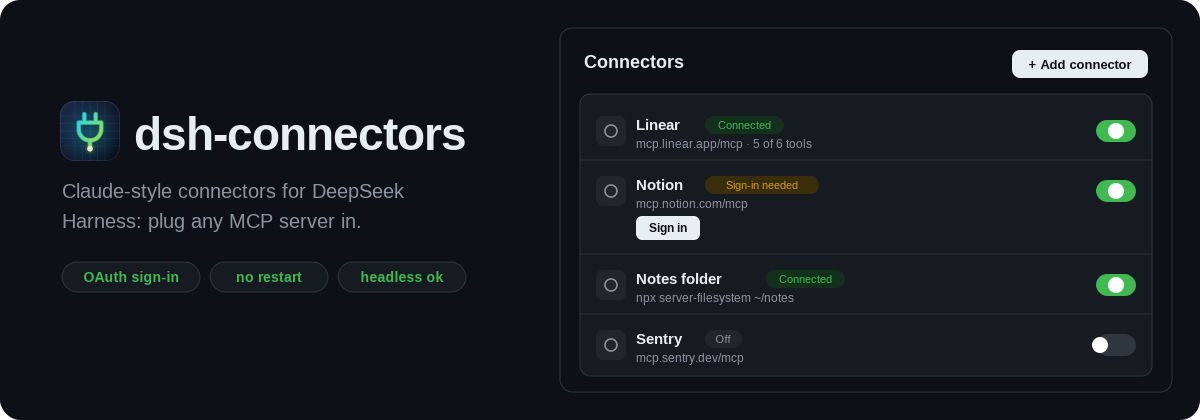





A DeepSeek Harness (dsh) plugin that brings Claude-style connectors to your agents: add any MCP server from a page in the sidebar, sign in once, and its tools show up in every chat. Hosted servers with an OAuth login, servers that want a token, and local programs all work the same way. No YAML, no restart per server.
npx @deepseek-ai/dsh plugin --profile web add dsh-connectors
Reload the browser tab. Connectors appears in the sidebar, right below Projects. Full details under Install.


Add a connector: paste the URL, pick how it signs in. A new OAuth connector opens its sign-in page right away.
What it does
- Any MCP server. Remote (Streamable HTTP, with automatic fallback to the older SSE transport) or a local command over stdio (
npx,uvx,docker, anything). - Real sign-in. OAuth 2.1 with PKCE, server discovery (RFC 9728 / RFC 8414) and dynamic client registration, done by the official MCP SDK. Works with hosted connectors like Linear, Notion, Sentry or your own FastMCP server behind GitHub login.
- Sign-in finishes by itself, anywhere. The provider sends you back to the dsh address you're using, so it works on a headless server too. No setup. See Signing in.
- Stays signed in. Tokens live in dsh's own credential store, survive restarts and refresh on their own.
- Heals itself. Dropped connections reconnect with backoff. A tool call during a hiccup waits a few seconds for the server instead of failing.
- You decide what agents see. Turn a whole connector off, or switch single tools off (say,
delete_issue). - Import. Paste an
mcpServersblock from Claude Desktop, Cursor, VS Code or a server's README. Tokens in anAuthorizationheader move to the credential store. - Fits in. Built from dsh's own buttons, switches, tags and dialogs, so it follows your theme in light and dark mode.
Tools appear as mcp__<id>__<tool>, the same names dsh's built-in MCP client uses.
Where it shows up
- Sidebar → Connectors, just below Projects. It is a normal dsh panel, so the shell's More menu can hide or show it.
- Settings → Connectors: the same page, for people who look there first.
Nothing in dsh is patched. Both entries are registered by the plugin through dsh's slot system.
Signing in
- Click Sign in on a connector. The provider's login page opens in a new tab.
- Log in and accept. The provider sends you back to dsh at
<your dsh address>/plugins/dsh-connectors/callback, the tab closes, and the connector turns Connected. That's it, on any device, whether dsh runs on your laptop or a server.
No setup and no fixed address: the plugin uses whatever address your browser opened dsh at (http://localhost:3080, https://dsh.example.com, a LAN IP). If you open dsh at a new address, the next sign-in registers it by itself.
How dsh-connectors identifies itself, best first:
- Your own OAuth client, if you enter a client id under Advanced (for servers that require pre-registration).
- Self-registration (DCR) for your dsh address: the no-paste flow above. Most servers today.
- The published identity (Client ID Metadata Document, the method newer MCP servers prefer):
https://joblessjoe.github.io/dsh-connectors/client-metadata.json. It can only name fixed return addresses, so it returns to127.0.0.1: automatic when dsh runs on your computer, the paste box when it runs on a server.
Fallback: a few providers only accept localhost return addresses. For those, click Try the paste method: the tab then ends on an error page at http://127.0.0.1:47391/callback?code=…; copy that address into the box and click Finish.
Install
Into your dsh web profile (web below is the profile name; use the one that backs your web GUI). From a source checkout, use pnpm dsh instead of npx @deepseek-ai/dsh:
npx @deepseek-ai/dsh plugin --profile web add dsh-connectors
This installs the package and adds it to dsh.profile.bundles. If Connectors doesn't show up after a browser reload, restart dsh once. After that, adding, editing and removing connectors never needs a restart.
Requires dsh 0.2.2-rc.1 or newer and Node 20+.
Configuration
Everything is done on the Connectors page. Two optional settings for the plugin entry in cordis.patch.yml:
| Key | Default | What it does |
|---|---|---|
file | $DSH_HOME/connectors.json | Where the connector list (no secrets) is saved |
callbackPort | 47391 | Port of the paste-method fallback listener |
Security
- Secrets never touch the connector list. Tokens, client secrets and OAuth grants go to dsh's credential store (
dsh-connectors/<id>records). The list file is written with mode600anyway. - Secrets never reach the browser. The page only learns whether a token is saved.
- The sign-in return route (
/plugins/dsh-connectors/callback) has to accept a cross-site redirect from the provider, so it sits outside dsh's/apifence. It only completes a sign-in that dsh itself started: a one-time randomstateplus the PKCE verifier, unused sign-ins expire after 15 minutes. If your dsh sits behind a login proxy, your browser's proxy session covers it. - The fallback listener only runs while a paste-method sign-in waits, binds to
127.0.0.1and stops afterwards. - The management route sits behind dsh's own login and trust checks, like every other
/apiroute. - Local commands run as your user, like any MCP server you'd add by hand. Only add commands you trust.
Building from source
git clone https://github.com/JoblessJoe/dsh-connectors.git
cd dsh-connectors
npm install
npm test        # builds lib/, then runs end-to-end tests against a real MCP server (stdio + HTTP)
node scripts/build.mjs alone emits lib/index.js (host) and lib/client.js (web).
Credits
Ideas from two earlier dsh MCP plugins: the settings-page approach of dsh-mcp-oauth-client and the credential-store and output-cap ideas of dsh-mcp-oauth. Both MIT.
License
MIT
中文简介 · DeepSeek Harness (dsh) 插件:像 Claude 一样的「连接器」。在侧边栏的 Connectors 页面添加任意 MCP 服务器(远程 OAuth 登录、令牌或本地命令),工具立即出现在所有对话中,无需 YAML、无需重启。支持 OAuth 2.1 + PKCE、令牌自动刷新、断线自动重连、按工具开关、从 Claude Desktop 配置导入;dsh 运行在服务器上时同样可以登录。
安装:npx @deepseek-ai/dsh plugin --profile web add dsh-connectors