dsh-strata
jsdvjx/dsh-strata
滚动条槽位里的会话缩略图:按事件类型着色的等比色块、用户与失败锚点、滚到顶自动补载历史、悬停线索墙铺开全部发言,附近/中/全三档地图尺度切换。
安装
dsh plugin --profile web add github:jsdvjx/dsh-strataREADME
dsh-strata



Read the strata of a run.
English | 中文
A real minimap of the session trajectory for the DeepSeek Harness Web GUI — it takes the transcript's scrollbar seat and turns it into a scaled, colored picture of the whole loaded conversation, with your own messages emphasised and clickable anchors beside it.
Not a tick rail. Every other conversation navigator draws one evenly-spaced dot per prompt, which throws away the only thing a long agent session has too much of: volume. Here a band's height is the row's real rendered height, so the map is a proportional compression of the scroll extent — a 300-line answer looks like 300 lines, forty tool calls look like forty tool calls, and the viewport lens maps 1:1 onto the scrollbar. What you get is the shape of the run at a glance: where you spoke, how much work each prompt cost, and where it went wrong.
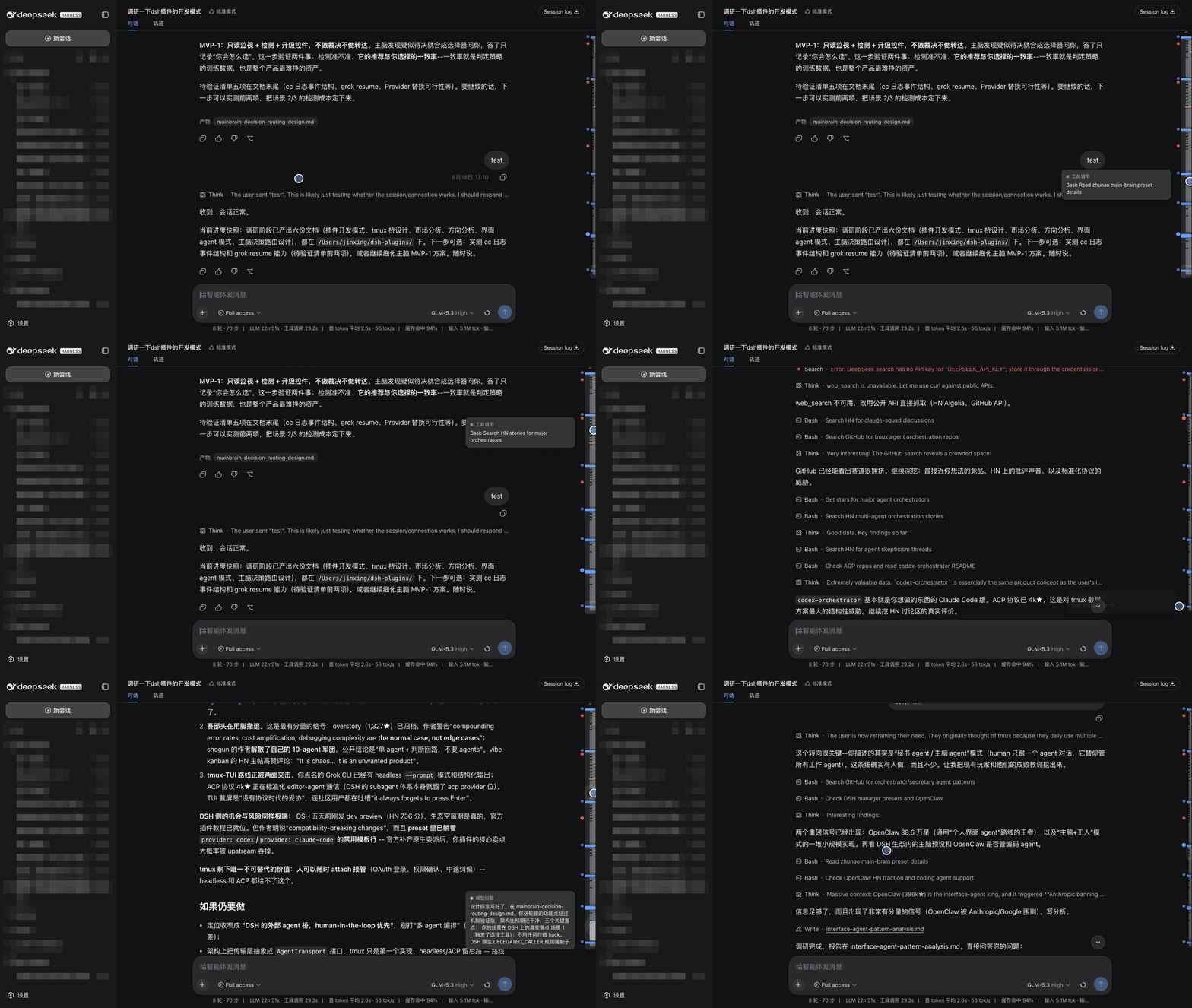
What the map shows
| Band | Meaning |
|---|---|
| Full-width blue | your message (and steering) — always the widest, brightest, never thinner than 5px |
| Grey block | a model reply; block height is how much it wrote |
| Thin grey tick | one tool call |
| Green | a slash command |
| Amber | a model retry, or a turn cut short by the output cap |
| Red | a failed turn — or any tool/command row that reported an error |
| Horizontal rule | a compaction checkpoint: where the model stopped seeing the history above |
| Rounded outline | the viewport lens (drag it) |
The ragged left edge is the index: every blue bar is a turn you started, and the block of agent work under it is what that turn cost.
It replaces the scrollbar
The rail sits in the transcript's own scrollbar gutter and the native thumb is suppressed while it is up, so there is one scroll control, not two — no layout shifts, because the gutter stays reserved either way. It is a takeover, not a theft: the moment the map stands down (Trajectory tab, no session, a transcript that does not scroll) the native scrollbar comes straight back, and uninstalling restores it permanently.
…and the turn rail beside it
DSH 0.1.2-rc.1 grew a navigator of its own: a fixed-pitch rail of turn marks down the right edge of the transcript — the same strip this map lives in, so the two land on top of each other and the host's rail covers the anchor dots. The map treats it exactly like the scrollbar: while the map is up the host rail is hidden, and the moment the map stands down (Trajectory, no session, a transcript that does not scroll) it is handed straight back. Nothing reflows either way — that rail is absolutely positioned inside a zero-height sticky slot, so hiding it costs no layout.
Want both? Keep the host's rail with
localStorage['dsh-strata.native-turn-rail'] = 'keep'
and reload. On DSH releases without that rail (0.1.1-rc.2 and earlier) there is nothing to hide and nothing changes.
Anchors
Beside the rail is a column of clickable anchor dots — blue for every message you sent, red for every failed tool call or command. Click one to jump there. The dot for wherever you are reading stays enlarged, so the anchors double as a position indicator. Anchors that would collide collapse to keep the column readable; failures never collapse, since they are usually the reason you reached for the map.
The clue wall
Hovering a user anchor dot floats the clue wall over the right half of the screen: every user message in the session — including the ones above the loaded window (read from the session's own export log) — packed like an evidence board: every card takes exactly the size its content needs (a one-word prompt is a small slip, a long one a tall note), flowing into masonry columns so the whole session fits on one board whenever it can. Each card is tied to its anchor dot by a bezier that tracks live as the transcript scrolls; unloaded prompts get a dashed border, tag and dashed string, and the message you came from is spotlighted. Only when the board truly cannot hold everything do ↑/↓ pager buttons appear. Click a card to jump — an unloaded one chain-loads the missing history first. The wall retires when the pointer leaves it (grace period), or instantly on Esc; clicking a dot jumps straight to that message.
Map scale
A small 近 / 中 / 全 switcher sits under the rail while it is awake:
- 近 (initial) restores the view from when the session opened — however much history has been loaded since, the map keeps that scale and slides with your reading position;
- 中 (medium) spans twice the initial view, loading the difference on demand;
- 全 (full) maps everything — pulling in any unloaded history first, with the same rail progress bar the unloaded jump uses.
The choice persists per browser. Zoomed scales are pinned: loading more history shifts the window, never the scale.
Use
- Click an anchor dot to jump to that message or failure.
- Hover the rail — it widens, the band under the cursor lights up, and on one of
your own messages the clue wall opens (an anchor dot's tooltip carries the kind and
n/total). - Click a band to scroll it into reading position; the row flashes when it lands.
- Click empty track or drag to scrub proportionally, like a scrollbar.
- Wheel over the rail or the dots to scroll the transcript.
- Keyboard: the rail is focusable — arrows nudge, PageUp/PageDown page,
Home/End jump to the ends (
role=scrollbarwith a livearia-valuenow). - Double-click to pin the rail open (persisted per browser).
- Older history loads by itself: scroll (or drag the lens) to the top and the transcript's
own load older fires, the map rescaling as history arrives. The faint
⌃above the rail just says there is more above; it retires once everything is loaded.
The map hides itself when there is nothing to navigate: no session, a transcript that does not scroll, or a non-chat view such as Trajectory.
Compatibility
| DSH | Status |
|---|---|
| 0.1.2-rc.1 | Tested — turn folding, the turn navigator, the width handle and the locale switch are all accounted for (see below) |
| 0.1.1-rc.2 | Tested — nothing 0.1.2-specific is required; every seam degrades to the old behaviour |
What 0.1.2 brought, and what the map does about it:
- Turn folding (Compact mode hides a finished turn's process rows in place): folded rows leave the map the moment they fold, and come back the moment they open.
- The turn navigator: hidden while the map is up, handed back when it stands down
(
localStorage['dsh-strata.native-turn-rail'] = 'keep'keeps both). - The content-width handle sits under the dot column at laptop widths: the column owns its 14px, so a gap between two dots is not a resize grip.
- Language switching: labels come through the host's locale service and follow a
switch in Settings → General without a reload; a language pack can translate the
dsh-stratanamespace into a third-party language. A host without the service gets the built-in zh/en table keyed on the document language. - Pager lifecycle: 0.1.2 unmounts the "load older" control while a page is in flight; the load chain waits for it to come back instead of calling the history exhausted, and measures progress by rows landed rather than by scroll height.
Install
dsh plugin --profile web add dsh-strata
Or straight from the repo:
dsh plugin --profile web add "github:jsdvjx/dsh-strata#main"
Then restart dsh web. To remove:
dsh plugin --profile web remove dsh-strata
How it works
Pure browser half; the Node half is empty and no session data crosses the wire for it.
Geometry and semantics both come from anchors the conversation view already publishes —
[data-conversation-scroll] for the scrollport, [data-chat-anchor-key] per flow row
(the outermost one: a tool renderer nests a call:<id> anchor of its own inside the
row, and that belongs to the row rather than being a row), data-chat-flow-kind for
that row's registered Chat Node kind, data-state="error" for a failed tool or command,
hidden on a row for the turn folding DSH 0.1.2 does in Compact mode,
[data-composer-seat] to stay clear of the sticky composer. It
contributes one entry to the frame-wide shell.overlay list slot, so it adds a surface
instead of replacing one, and uninstalling leaves the native UI untouched. Labels are
registered with the host's locale service as the dsh-strata namespace and translated
through its t seat, so they follow the UI language live. The scrollbar
takeover uses the theme's documented seam — rebinding --dsh-scrollbar-thumb to
transparent on the scrollport, the same mechanism ui-sidebar uses — so both the WebKit
and Firefox rendering paths are covered and no stylesheet is overridden.
Rendering is a canvas repainted on a rAF, re-measuring rows only when the transcript's
structure changes — a streaming reply grows one band through its own ResizeObserver
report, a plain scroll moves the lens and nothing else, and the strata are cached as a
base layer so a hover repaints one band, not the session. Colors are read from the theme's own
--dsw-alias-* tokens, so light and dark both come out right, and prefers-reduced-motion
disables the transitions.
Limits
- The map covers the loaded window. DSH pages older history in on demand; until it is
loaded it has no layout to map. The
⌃indicator is the honest signal that more exists; reaching the top pulls it in automatically. - Chat view only. The Trajectory tab renders its own event ledger with different anchors; the map stands down there rather than guessing.
- The rail occupies a ~14px strip of the transcript's right padding, so clicks in that strip go to the map.
- Hiding the host's turn rail is keyed on the stylesheet that rail ships
(the rule declaring
--turn-rail-band). A DSH that stops shipping it under that name gets its rail back, not a broken map.
Development
npm test                      # node --test over the DOM-free internals
node test/replay/replay.mjs   # headless-Chrome replay against a live `dsh web` (see the file header)
The geometry, caches and the history-load state machine are exported as
internals from client.js and tested without a browser; the replay drives
a real session through Chrome's DevTools protocol (scroll consistency, drag,
wall paging, load chains, session switch). The mounted map exposes a read-only
seam for it on its root element (root.__dshStrata: the measured bands, the
observation set, hot-path tallies) — a test hook, not an API. Keep the DSH
tab in the foreground while replaying: a background tab gets no animation
frames, and the map legitimately reads as stood down.
License
MIT