prism-latex
kevoyuan/prism-latex
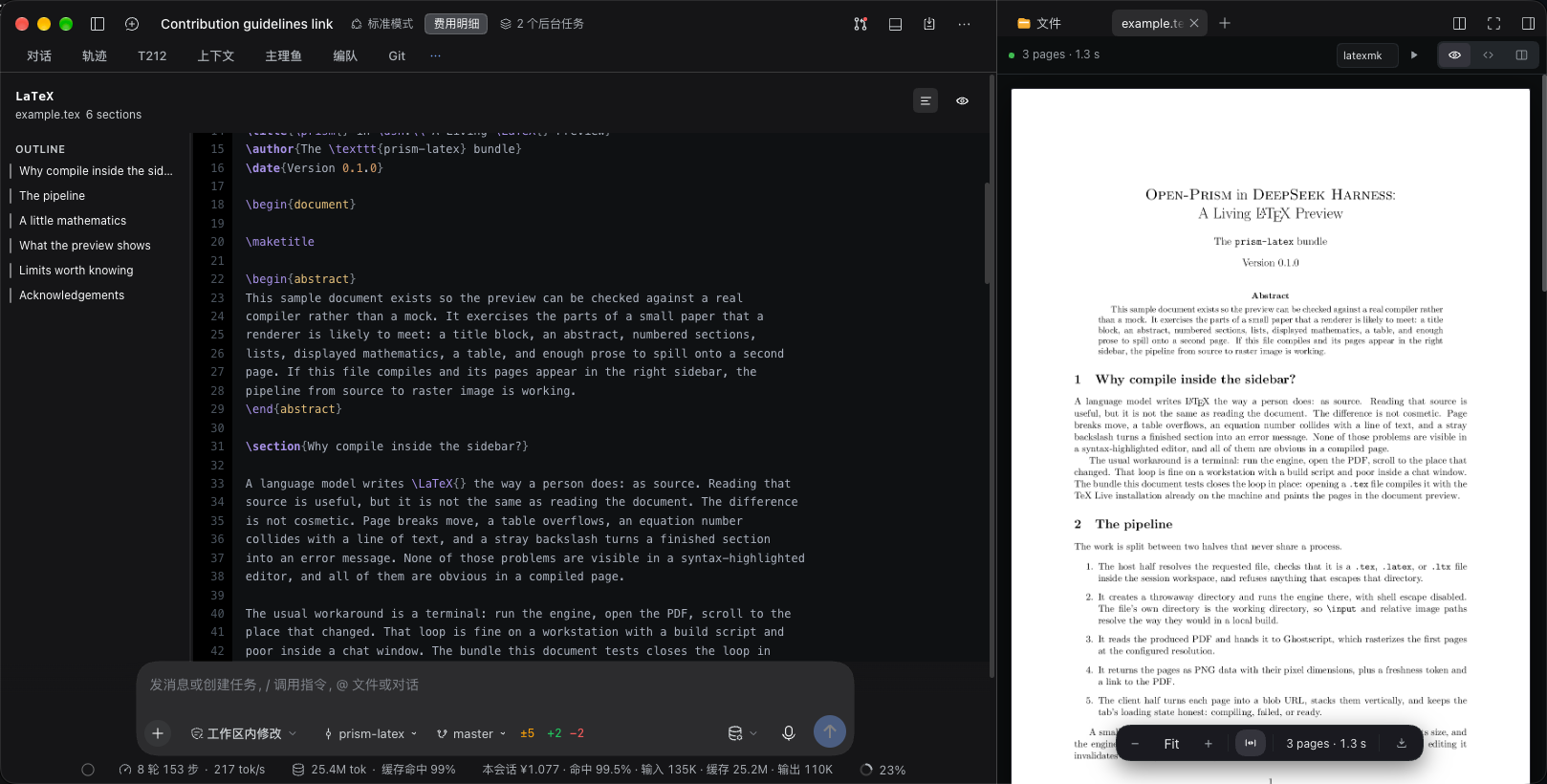
用本机 TeX Live 编译 .tex,在右侧边栏显示页面,并提供带大纲、语法高亮编辑器与可选预览的 LaTeX 视图;双击页面可把编辑器光标移到对应字符。它的 HTTP 路由没有 DSH 的访问检查,浏览器里打开的网页可以调用它们。
安装
dsh plugin --profile web add github:kevoyuan/prism-latexREADME
prism-latex
LaTeX for DeepSeek Harness: the model writes .tex, you read the compiled page beside the source.
This bundle compiles .tex with your own TeX Live and shows the pages inside DSH — in the right
sidebar, and in a LaTeX view with an outline, an editor and a preview. Double-click a spot on a
page and the caret lands on that character.
English · 中文
Quick start
- Install it (below), then quit and reopen DSH.
- Open any
.texfile — a link from the model, the file tree, anything. It opens in the right sidebar and compiles there. - To edit, switch the conversation's view row to LaTeX. It edits whichever file the sidebar is showing.
- Double-click a spot on a rendered page: the caret goes to that character.
Nothing to compile? Open demo/showcase.tex — title, abstract, sections, maths, a table, two pages.
Install
You need the DSH desktop app, a local TeX Live (latexmk or pdflatex; xelatex for CJK), and
Ghostscript for the page images.
Install it from the app: Plugins → Add plugin, enter prism-latex (or a pinned
prism-latex@0.2.2), choose Install, and restart when it asks. That dialog also picks the registry,
so a lagging mirror can be swapped for https://registry.npmjs.org.
A profile you launch with the dsh CLI takes the same package — swap web for the name you boot:
dsh plugin --profile web add prism-latex
desktop takes that command too, but only after the app has created the profile (open it once) and
only while the app is fully quit. With the app open, use Add plugin.
Both routes write the profile's package.json — a dependencies entry and the name in
dsh.profile.bundles. Adding it by hand means merging into those two places; replacing the file
drops every other bundle in the profile.
Working on the plugin itself? Install the checkout instead of the published package: Add plugin
with this directory (it records "prism-latex": "link:/path/to/checkout"), or
dsh plugin --profile web add /path/to/checkout. Client code is served once per launch: quit and
reopen DSH, ⌘R keeps the old bytes.
What you get
| Surface | |
|---|---|
| Right sidebar tab | The reader. Compiles the file you opened; page stack with fit-width and zoom to 300 %, engine picker, Preview / Source / Side by side, PDF download, errors with a clickable line. |
LaTeX view | The writer. Outline rail (drag to resize, hideable), editor with LaTeX highlighting, optional preview behind the eye toggle, the shell's composer underneath. |
Shortcuts
| Keys | Does |
|---|---|
⌘S | Save the file and recompile |
⌘↩ | Compile |
⌘F / ⌘G | Find and replace / go to line |
⌘= ⌘− ⌘0 | Editor type size (10–20 px), remembered |
⌘/Ctrl + wheel | Zoom the rendered pages |
Known limits
- Inverse search works (page → caret). Forward search (caret → page) is not built yet.
- No word-wrap: long lines scroll sideways.
- One entry point on purpose — the
LaTeXview. The left-rail icon and themainpanel were removed.
Development
node --check src/host.js && node --check src/client.js
node scripts/smoke-host.mjs
PRISMLX_REACT_PATH="$DSH_PROFILE_DIR/node_modules/react" node scripts/smoke-client.mjs
node scripts/check-pairing.mjs
The suites run against stand-in DSH contexts: they cover the plugin, not the dock. Anything that
touches tabs, the conversation view or scrolling needs one real relaunch check. CLAUDE.md holds
the rules, POSTMORTEM.md the eight regressions behind them, SPEC.md the design notes, and
docs/architecture.svg the two-halves picture.
Credits and license
The idea — an AI LaTeX editor with a live preview — comes from
assistant-ui/open-prism. This is an independent
implementation for the DSH plugin API, not a fork; borrowed behaviour is named in the code and in
THIRD_PARTY_NOTICES.md.
MIT — LICENSE. Contributing · Changelog