dsh-pet-button
kongbaiming5/dsh-pet-button
仅 macOS arm64,需先安装 dsh-pet(自带的是闭源预编译二进制)。桌宠开关:一键开/关桌面上的 dsh-pet 桌宠,Harness 关闭时还能顺手把它启动起来。
安装
dsh plugin --profile web add github:kongbaiming5/dsh-pet-buttonREADME
桌宠开关 · dsh-pet-button
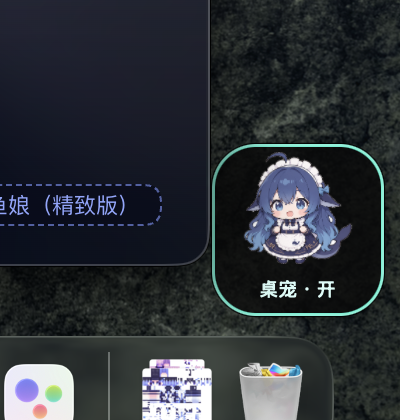
在桌面上放一张小卡片,一键开 / 关你的桌宠。 Harness 关着的时候,它还能顺手把 Harness 拉起来。
A tiny card on your desktop that switches your dsh-pet on and off — and can start Harness for you when it is closed.
它解决什么问题
桌宠很可爱,但它只能从 Harness 里关——想让它消失,得翻设置、找插件、点开关; 想让它在桌面上重新出现,又得先确保 Harness 开着。
这个小部件把它变成桌面上的一个动作:点一下,开;再点一下,关。
前置:dsh-pet(必须先装)
本插件只提供"开关",桌宠本体是 dsh-pet:
dsh plugin --profile web add dsh-pet
那只蓝毛小女仆、106 个透明动画、碎碎念、余额气泡、工作状态联动——全部来自 dsh-pet。 没有它,这张卡片点下去没有可切换的对象。
安装
只通过 GitHub 分发:
dsh plugin --profile web add github:kongbaiming5/dsh-pet-button
首次启用时,插件会把自带的小部件自动装到 ~/Applications,不需要手动拷贝。
(本项目不发布到 npm,也不需要任何账号。)
怎么用
| 操作 | 效果 |
|---|---|
| 左键单击 | 开 / 关桌宠 |
| 按住拖动 | 挪位置,位置会记住 |
| 右键 | 贴在桌面 / 始终置顶 / 回到右下角 / 退出 |
| Harness 没开时 | 卡片显示「启动」,点一下拉起 Harness |
卡片有三种状态:桌宠 · 开(青色描边)、桌宠 · 关(暗色)、启动(Harness 未运行)。
和插件开关的联动
插件市场里的开关直接管它的生死:
| 你在市场里的操作 | 桌面上的结果 |
|---|---|
打开 dsh-pet-button | 卡片出现 |
| 关掉它 | 卡片收起(app 留着,下次还能开) |
| 退出 Harness | 卡片保留,可以继续用它启动 Harness |
| 卸载插件 | 杀掉进程,并删除 ~/Applications/桌宠开关.app、偏好、日志、LaunchAgent —— 不留任何残留 |
判断依据:卸载会把包从 profile 的 dependencies 删掉;关闭只删 bundles;退出 Harness 两者都不动。
为什么拆成"插件 + 独立 app"
DSH 插件跑在 Harness 进程里,画不了桌面上的透明窗口。所以:
dsh-pet-button(插件)
├─ 宿主半侧 lib/index.js     ← 管启停、生命周期、本地接口
└─ assets/桌宠开关.app        ← 真正浮在桌面上的那张卡(macOS 原生 Swift)
插件负责"什么时候让它活着",小部件负责"长什么样、点下去做什么"。
平台
小部件是 macOS arm64 原生二进制。其他平台装插件不会报错,只是不会弹出卡片。
本地接口
GET  /dsh-pet-button/status   → { running, enabled, app }
POST /dsh-pet-button/launch   → 显示小部件
POST /dsh-pet-button/quit     → 隐藏小部件
致谢
- dsh-pet:桌宠本体、角色形象、动画素材与全部"性格"。这个插件只是给它加了一个桌面开关。
- DeepSeek:本项目的需求拆解、DOM 与样式考古、Swift 小部件实现、插件生命周期绑定、以及这份文档,均由 DeepSeek 端到端完成。几个关键结论也出自它——
dsh-app://页面的请求链路、launchctl submit的 KeepAlive 陷阱,以及区分「卸载 / 关闭 / 退出 Harness」三种生命周期状态的办法。这个项目的重大贡献来自 DeepSeek。
English
桌宠开关 / dsh-pet-button — a desktop switch for your dsh-pet pet.
Install (GitHub only, no npm account needed):
dsh plugin --profile web add dsh-pet
dsh plugin --profile web add github:kongbaiming5/dsh-pet-button
- Left click toggles the pet; drag to move (position is remembered).
- Right click: desktop layer / always on top / reset position / quit.
- When Harness is closed the card reads Start — clicking it launches Harness.
- Plugin switch controls the card: on → appears, off → hides, quitting Harness leaves it running so it can still start Harness, and uninstalling removes the app and every local trace.
The widget is a prebuilt macOS arm64 binary, auto-installed to ~/Applications on first enable.
Built end-to-end with DeepSeek.
License
MIT