dsh-browser-use
laoyingfuhuole/dsh-browser-use
面向 DSH 的后台浏览器自动化插件:离屏 Electron 窗口、CDP 输入、快照 ref,不抢焦点。
安装
dsh plugin --profile web add github:laoyingfuhuole/dsh-browser-useREADME
dsh-browser-use
English | 简体中文
Background browser automation for DeepSeek Harness. A clean rewrite: one offscreen Electron window, CDP input, numbered snapshot refs, and no focus stealing.
This is not a fork of another browser plugin. It shares no package id, tool name, client module, settings route, or browser window with dsh-builtin-browser.
What it does
- Starts a real Electron/Chromium window lazily on the first tool call.
- Parks the window offscreen with opacity 0 and
skipTaskbar; tools never callshow(),focus(),moveTop(), orPage.bringToFront(). - Drives the page over the Chrome DevTools Protocol: real mouse events,
Input.insertText,Page.captureScreenshot,Runtime.evaluate. - Draws a page-local cursor (arrow + action bubble, click ripple) and inserts text one character at a time, so actions are visible without depending on the OS pointer.
- Gives the model numbered element refs from
browser_use_snapshot; refs are valid for that snapshot only. - Works while the DSH UI is in the background; no display surface is removed, so CDP input is not dropped.
Tools
| Tool | Purpose |
|---|---|
browser_use_open | Open an http(s) URL and return a snapshot |
browser_use_snapshot | Numbered interactive elements |
browser_use_click | Real mouse click by snapshot ref |
browser_use_type | Focus an element, draw the cursor, insert text character by character |
browser_use_screenshot | Save a JPEG and return its path |
browser_use_eval | Evaluate page JavaScript |
browser_use_wait | Wait for load / selector / text / URL |
browser_use_assert | Check selector, text, URL, or JS truthiness |
browser_use_state | URL, title, readyState, first visible text |
browser_use_back / browser_use_reload | History / reload |
browser_use_close | Stop the host process |
Install
npm install
npm test        # unit + host end-to-end (needs Electron)
As a DSH bundle, install the package into a profile (or link the checkout) and let the bundle patch add the dsh-browser-use row. The plugin uses the profile's Electron if the package dependency has not downloaded one; set ELECTRON_PATH to a bare Electron executable to override.
Requirements: Node >= 22.19, DSH >= 0.1.1-rc.2 < 0.3.0, Electron 44+.
Visual feedback
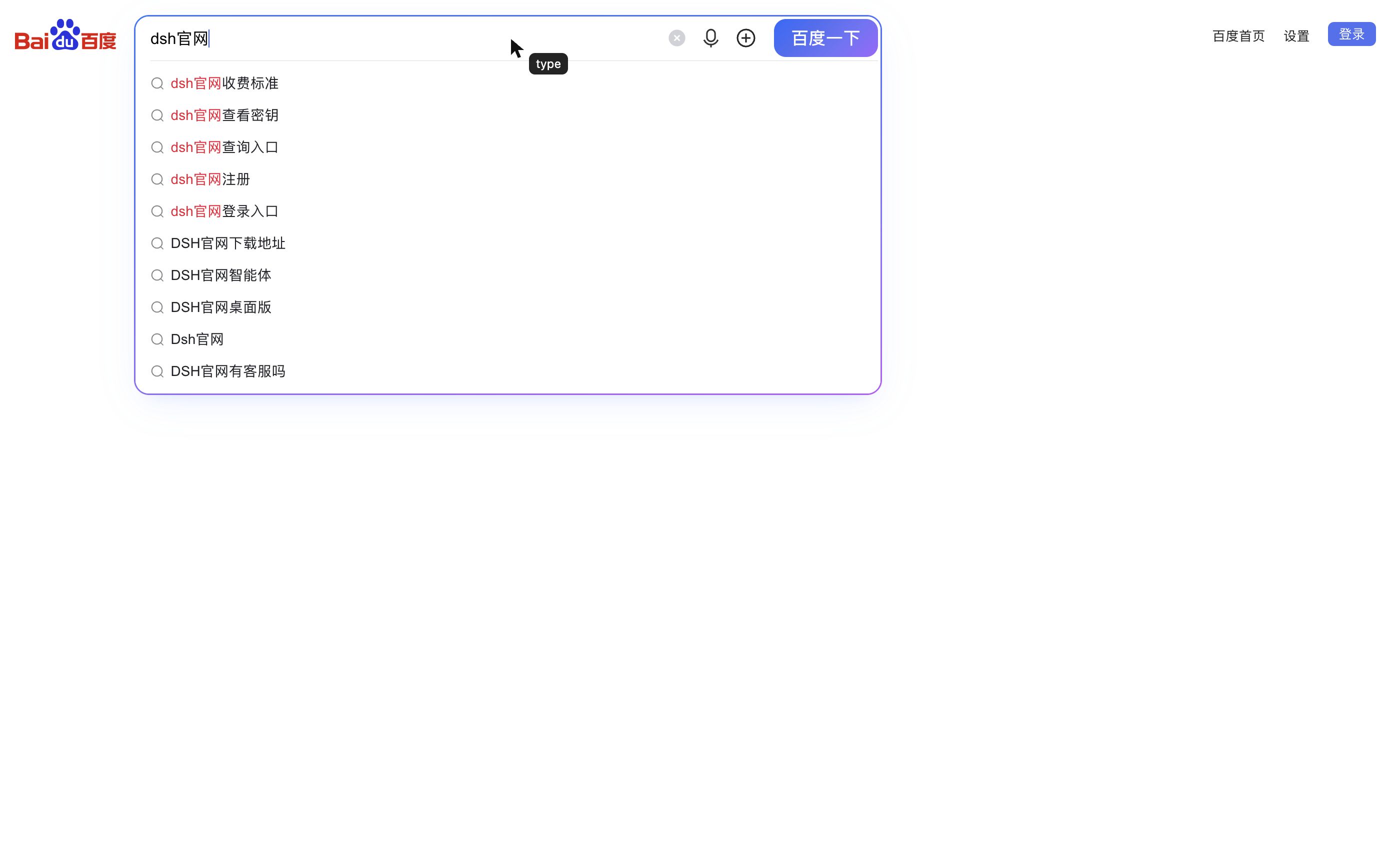
browser_use_type and browser_use_click inject a pointer-events-none overlay into the page: a black arrow, an action bubble (type or click), and a click ripple. The overlay lives in the page, so it appears in browser_use_screenshot and never moves the user's real cursor.
Testing
npm test
Five tests cover the host, the registered tool surface, the bundle metadata, and an end-to-end open → type → click → assert → screenshot path. A manual Baidu smoke test (dsh官网, 11 result headings) is documented in docs/testing.md (中文).
Architecture
DSH host plugin (index.js)
  └─ HostClient (src/client.js)        lazy spawn, authenticated JSON-RPC over loopback TCP
       └─ host/main.cjs                Electron main process
            ├─ BrowserWindow           show:false → showInactive → opacity 0 → park offscreen
            ├─ webContents.debugger    CDP 1.3
            └─ snapshot / click / type / screenshot / eval / wait
The child prints one ready line ({ "port": ... }) on stdout. The parent connects to 127.0.0.1, sends { op: "hello", token } with a random per-spawn token, and only then issues commands. Commands are serialized; a second connection is refused.
Window rules
show: falseat creation.showInactive(), thensetOpacity(0), then park outside the work area.setSkipTaskbar(true),setFocusable(false),setMinimizable(false).- On macOS the Electron Dock icon is shown by default. Click it (or use its menu) to reveal the browser window; the window is never raised by a tool. Set
BROWSER_USE_HIDE_DOCK=1to hide the Dock icon, orBROWSER_USE_KEEP_DOCK=1to force it on. - If the window is minimized by the OS, the host restores it silently, re-parks it, and keeps opacity 0.
- No tool path calls
Page.bringToFront().
Limitations
- One tab;
browser_use_openreplaces the current page. - Same-origin iframes and shadow roots are not yet included in snapshots.
- Screenshot captures the viewport, not a full-page scroll.
- Typing is character-by-character through
Input.insertText; it is visible but deliberately modest (about 18 ms per character). - The cursor is injected into the top document; it is not drawn inside cross-origin iframes.
- The host is macOS-first; Windows/Linux are untested.
- On multi-display setups the clamped offscreen window can appear as a blank tile in Mission Control; it stays transparent and click-through, but there is no native z-order (orderBack) yet.
- Screen sharing/capture sees no page until the window is revealed, because the background window is opacity 0.
- No client settings panel. The bundle row is the only switch.
License
MIT. See LICENSE.
Viewing the browser
The host runs headless by default: the window is transparent, offscreen, unfocused, and never brought forward by a tool. To inspect the current page:
- macOS: click the Electron Dock icon, or use its menu
显示浏览器窗口/隐藏到后台. - The window appears at 1400x900 on the active display; close it to send it back to the background (the page stays alive).
- Shown only while you are using it: switching to another app (including DSH) automatically returns the window to the transparent offscreen state, and the next tool call stays background-only. Click the Dock icon again to re-open it.
BROWSER_USE_HIDE_DOCK=1hides the Dock icon;BROWSER_USE_KEEP_DOCK=1forces it visible.