dsh-conv-calendar
leni-more/dsh-conv-calendar
Web 侧边栏的 GitHub 风格日历网格,按天展示你发出的对话条数,可切换为会话数、Token 总量或输出 Token。只统计你亲手发送的消息,注入的上下文不计入。
安装
dsh plugin --profile web add github:leni-more/dsh-conv-calendarREADME
dsh-conv-calendar
English | 中文
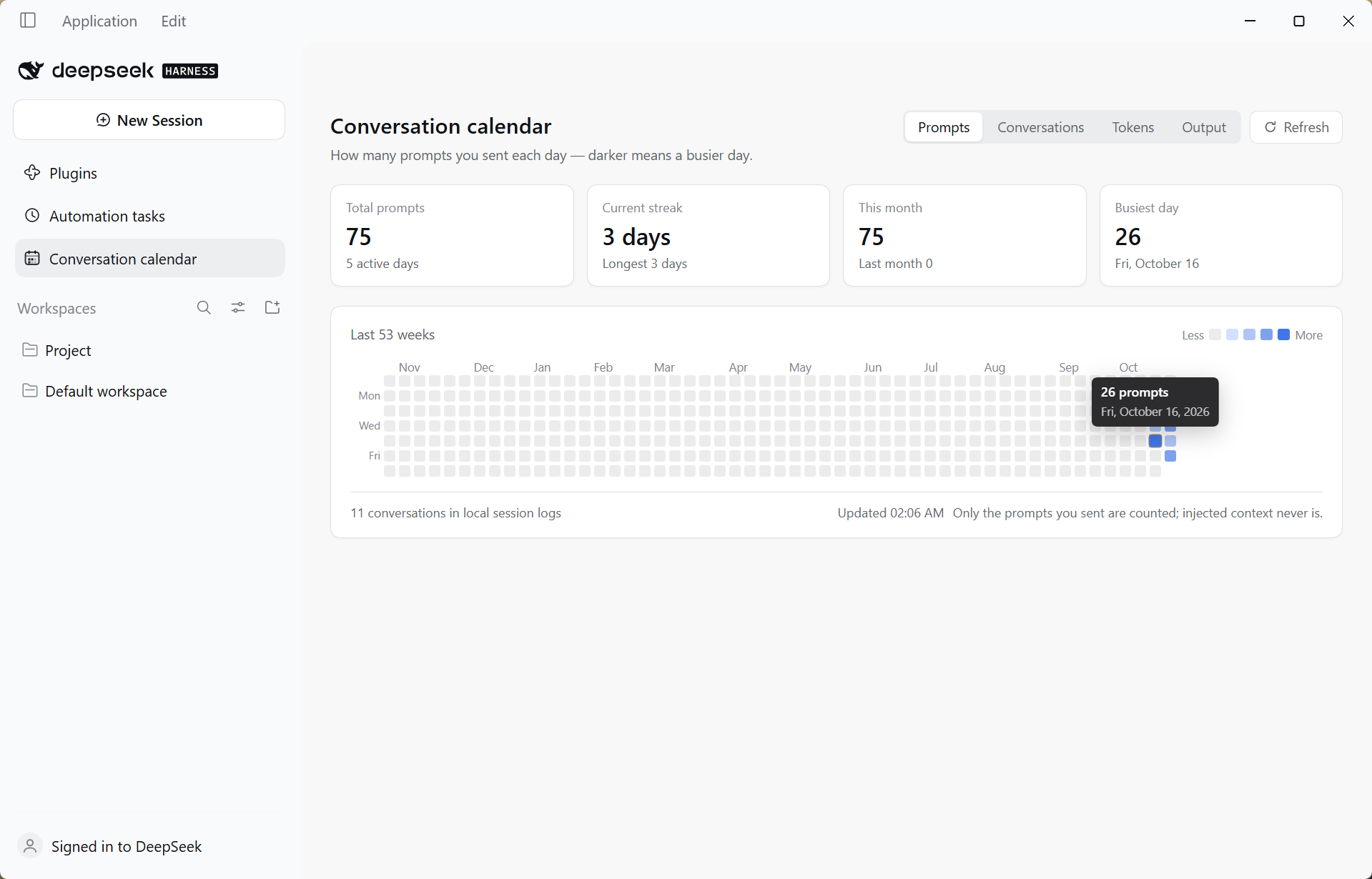
A GitHub-style contribution calendar for DeepSeek Harness — see how many prompts you sent, how many conversations you had, and how many tokens you burned, one square per day.
Features
-
A sidebar entry. Conversation calendar appears in the Web GUI sidebar; clicking it opens a full-page calendar.
-
GitHub-style grid. The last 53 weeks, weeks starting Monday, five shades, one square per local day.
-
Four metrics. Switch between Prompts, Conversations, Tokens and Output:
Metric What one square means Prompts How many messages you sent that day Conversations How many sessions were active that day Tokens Total tokens spent that day (input + output + cache reads) Output Tokens the model produced that day -
Four stat cards. Total (with active days), current streak (with longest), this month (with last month), busiest day — all of them follow the selected metric.
-
Token breakdown. Under Tokens / Output, hovering a square also shows
in · out · cached. -
Theme-aware. Colors come from DSH theme variables, so light and dark mode both look native.
-
Bilingual. Follows the UI language (English / Chinese).
Requirements
- DeepSeek Harness 0.2.1-rc.2 or a compatible build (it relies on the
sidebar.panellistandmainslots, and onctx.sessionQuery). - Node 22.15+ on the Host side (the session logs are zstd-compressed).
Install
# From a local checkout
dsh plugin --profile desktop add link:/absolute/path/to/dsh-conv-calendar

# From npm (Recommend)
dsh plugin --profile desktop add dsh-conv-calendar
Then restart DeepSeek Harness. Plugins are composed from the profile's bundle list at startup, so a restart is required — the entry cannot hot-load into a running Host.
After the restart:
- A Conversation calendar icon appears in the sidebar;
- Opening it shows history already filled in, and today's square darkens as you send new messages.
To uninstall:
dsh plugin --profile desktop remove dsh-conv-calendar
If a plugin ever prevents the app from starting, remove the
"dsh-conv-calendar"line fromdsh.profile.bundlesin$DSH_HOME/profiles/<name>/package.jsoninstead of using the recovery dialog, which also resets unrelated settings.
What gets counted
Prompts
A message counts only when all three hold:
- the session event is
user/message; data.source.kind === 'user'— i.e. you sent it. Injected context (runtime context, skill catalog, time context, tool reminders …) carries its own source and is never counted;- it falls on a given day in the machine's local time zone.
Tokens
Taken from data.usage on assistant/message events:
| Field | Meaning |
|---|---|
inputTokens | Input tokens that missed the cache |
outputTokens | Tokens the model produced |
cacheReadTokens | Input tokens served from the cache |
totalTokens | Sum of the three (provider-reported; summed locally when absent) |
Older log entries may omit cacheReadTokens (treated as 0); replies with no usage at all are skipped.
Cross-session de-duplication
Forking a session copies its ancestor's log. A copied prompt or reply keeps the same message.id, so hashing it lands in the same set and is counted once. That also makes re-reading a log idempotent — re-scanning can never double count.
Active days can differ per metric. A day where the model replied but you sent nothing counts under Tokens but not under Prompts. That is intended.
Where the data comes from
| Source | Used for | Notes |
|---|---|---|
session/event feed | Live counting | Every new message, and every reply carrying usage, is recorded immediately — no waiting for a disk flush |
ctx.sessionQuery (listSessions / readSession) | Backfill | History is read through the Host's own decoder: the logs are appended frame by frame, so a single whole-file zstdDecompressSync only yields the first frame |
A finished session is read once and marked final; it is never re-read. A session that is still live is re-read on every refresh and merged (union of hashes, so it is idempotent). One backfill pass has an 8-second budget — leftovers resume on the next pass.
State file
$DSH_HOME/plugins/dsh-conv-calendar/state.json, written atomically (temp file + rename):
{
  "version": 2,
  "sessions": {
    "session-…": {
      "days": {
        "2026-10-23": {
          "prompts": ["<message-hash>"],
          "replies": { "<reply-hash>": { "input": 10395, "output": 133, "cache": 896, "total": 11424 } }
        }
      },
      "final": true
    }
  }
}
version is the store layout: 1 kept a bare array of prompt hashes per day, 2 adds replies. An incompatible version is dropped and fully re-read — the file is only a cache, so one pass rebuilds it.
Deleting the file clears the statistics; they are rebuilt from the session logs on the next start.
HTTP endpoint
The panel reads one read-only endpoint from the same Host process:
GET /dsh-conv-calendar/api/summary            # current aggregate (kicks off a background backfill if needed)
GET /dsh-conv-calendar/api/summary?refresh=1  # backfill now (the panel's Refresh button)
The response is JSON:
days[]—{ day, messages, sessions, replies, input, output, cache, total }meta—sessions,activeDays,totalMessages,totalReplies,totalInput,totalOutput,totalCache,totalTokens,updatedAthistory— the last backfill report (available,read,cached,failed,partial)historyPending— whether a backfill is currently running
The endpoint uses the Host's connection fence (ctx.connection.requestRejection): a request without the session cookie gets 401, so a loopback-only deployment never exposes the numbers.
How it is built
dsh-conv-calendar/
├─ package.json          # dsh.bundle.patch + dsh.client (platform: web, inject: …)
├─ cordis.patch.yml      # inserts one row into the profile's config tree
├─ lib/
│  ├─ index.js           # Host half: counting, backfill, HTTP endpoint
│  └─ client.js          # Browser half: a hand-written factory bundle (no bundler)
├─ tests/                # offline tests, see below
└─ docs/screenshots/     # README images: en/ for this file, zh-CN/ for the Chinese one
No build step. The browser half is written directly in the platform's factory form: window.__ModuleLoader__.load({ id, factory }) registers a factory, and the module body runs on first use. react is resolved from the Host's shared module table.
Two slot contributions, both declaration-aware:
ctx.slots.inject('sidebar.panellist', () => ctx.slots.register({ name: 'sidebar.panellist', id: PANEL_ID, order: 20, label: () => t('panel.label'), locale: NS }, CalendarGlyph))
ctx.slots.inject('main', () => ctx.slots.register({ name: 'main', key: PANEL_ID, locale: NS }, CalendarPanel))
ctx.slots.inject(name, …) is deliberate rather than a bare ctx.slots.register(...): a slot's declaration may arrive after this plugin, and registering into an undeclared key throws — which the shell surfaces as an entry that "did not activate". inject defers the registration until the declaration exists and re-runs it if the contributing package is replaced.
Two Host-side details worth knowing
- The Loader does not read a function plugin's namespace-level
injectexport. A function plugin (as opposed to a class plugin) must reach the service imperatively, so the Host half usesctx.inject(['webServer'], (inner) => …). - Client bundles must declare their dependencies in
package.json→dsh.client.inject. Without it the module graph treats the bundle as dependency-free, may activate it beforeui-renderer/ui-layout/client-locale, and the whole app refuses to start.
Tests
tests/ holds the offline tests. They need their own dependencies, declared in tests/package.json:
cd tests
npm install
npm test        # runs all five
Run one on its own with node token-fold.mjs, and so on.
| Test | Needs | What it asserts |
|---|---|---|
token-fold.mjs | nothing (Node only) | Folds session logs and compares every day's input/output/cache/total against an independent pass. Uses the real logs under $DSH_HOME/sessions when they exist; otherwise it builds a fixture in a temp directory with the same shape — several zstd frames per file, a forked session repeating its ancestor — and asserts the equivalent totals. Also checks legacy v1 days still read, re-recording is idempotent, and usage without cacheReadTokens normalizes to 0 |
host-contract.mjs | cordis | Mounts the Host half in the real cordis runtime with stubbed webServer / sessionQuery: route registration, injected messages ignored, finished sessions read once, live prompts and reply usage recorded immediately, replies without usage contributing nothing, HEAD/POST handling, route removal on dispose |
panel-render.mjs | react, jsdom | 371 cells, month labels, tooltip, metric switching, refresh going through ?refresh=1 |
panel-states.mjs | react, jsdom | Empty data still draws the grid plus a hint, failure state offers retry, English copy uses correct singular/plural |
panel-token.mjs | react, jsdom | Token and Output metrics, 496k / 16k formatting, the token breakdown in the tooltip, and that the four metrics shade the grid differently |
module-system-emulation.mjs, shell-emulation.mjs and slots-probe.mjs are the diagnostic scripts used to trace the boot failure described above; they are kept as documentation of the investigation and are not part of npm test.
End-to-end verification performed during development: a second Host booted from a temporary profile returned 6 days / 10 sessions / 62 prompts / 253M tokens from real logs, with each day's input/output/cache matching an independent script exactly; the panel rendered that live payload in jsdom, producing four distinct heatmap patterns, with the token tooltip showing the input/output/cache split; a cookie-less request was refused with 401.
Limitations
- Backfill needs
sessionQuery. In a composition without it, only the current run is counted and the footer says so. - Finished sessions are never re-read. That is safe because a finished log cannot change; if you rewrite history by hand, delete
state.json. - Only human messages count. Injected context never does — that is the point.
- The time zone is the machine's, read at startup. After travelling, old dates stay filed under the local date they happened on.