dsh-plugin-moss-tts
litterbit/dsh-plugin-moss-tts
用 MOSS-TTS-Nano-100M 的 C++ CPU 引擎朗读 Harness 回复:完全离线、不需要 API key,一键下载引擎并用发布页的 sha256sums.txt 校验,回复定稿自动朗读、每条回复也能单独朗读,边合成边播放。权重只装一份,与同项目的命令行和网页试听台共用。仅限 Windows x64,因为引擎只提供该平台的版本。
安装
dsh plugin --profile web add github:litterbit/dsh-plugin-moss-ttsREADME
dsh-plugin-moss-tts
简体中文 · Version 0.1.1 · Apache-2.0 · Engine repo
Local text-to-speech for DeepSeek Harness, powered by the MOSS-TTS-Nano-100M C++ CPU engine. Everything is synthesized on this machine; text never leaves it, and the weights are installed once and shared with the CLI and the web playground.
Harness assistant reply ──► auto-read / per-message read button
                                 │
                     POST /moss-tts/stream (same origin, no CORS)
                                 │
        host plugin: engine lifecycle + verified download + paced proxy
                                 │  stdin/stdout JSON
                 moss_tts.exe --stdio (resident, weights loaded once)
                                 │
            browser AudioWorklet ring buffer ──► speakers
Requirements
| Item | Requirement |
|---|---|
| DeepSeek Harness | 0.2.1-rc or newer (client slot contract) |
| OS | Windows x64 (the engine ships for that platform only) |
| Disk | ~170 MB (engine + weights), installed once |
Install
Desktop app: sidebar Plugins → Add plugin → paste
github:litterbit/dsh-plugin-moss-tts#main
CLI profile (a profile the desktop app does not own):
dsh plugin --profile <name> add github:litterbit/dsh-plugin-moss-tts#main
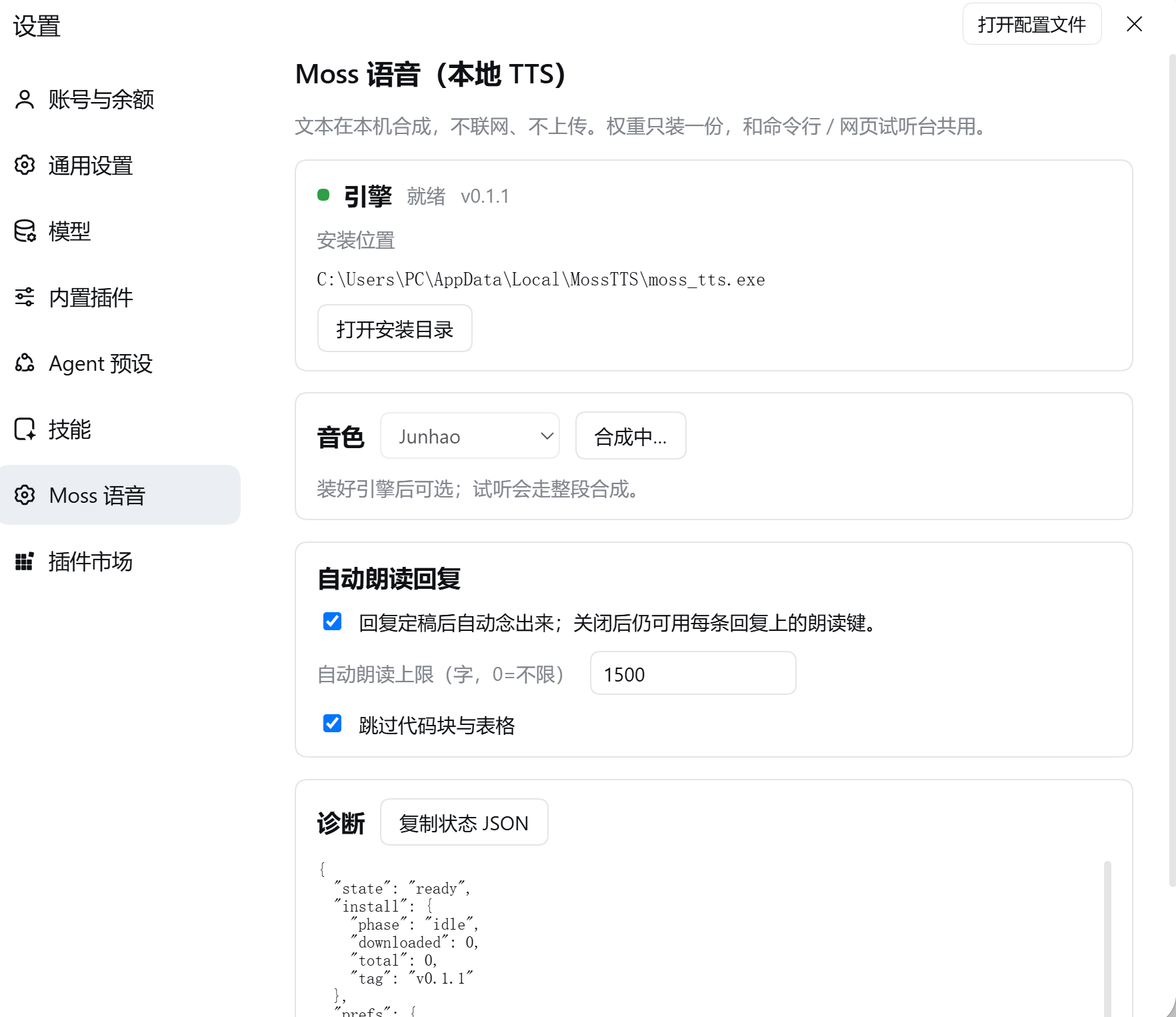
Restart DSH afterwards. You get a "Moss Speech" settings page, a speaker toggle at the left
of the composer, a read button on every assistant reply, and five moss_tts_* tools.
Installing from a local checkout:
dsh plugin --profile <name> add D:\path\to\dsh-plugin-moss-tts(an absolute path is required).
First run: install the engine
Open Settings → Moss Speech → Download engine. The plugin fetches
MossTTS-win-x64-full.zip (~160 MB) from the
engine releases, verifies it against the
release's sha256sums.txt, and extracts it into %LOCALAPPDATA%\MossTTS.
- Already installed via the CLI or the web playground? It is reused; nothing is downloaded twice.
- Downloads resume after an interruption; cancel removes only the partial file.
- Follows your system proxy:
HTTPS_PROXY/HTTP_PROXYfirst, then the Windows Internet settings (ProxyEnable+ProxyServer, via a CONNECT tunnel). A machine whose browser can open GitHub needs no extra configuration; setNO_PROXY=*to force direct connections. - Behind a blocked network, point
engineUrl+engineSha256at a mirror in the plugin config, or setautoDownload: falseand manage the install yourself.
Usage
| Entry point | What it does |
|---|---|
| 🔊 left of the composer | Auto-read. Reads each reply when it settles; while speaking the same button is ⏹ and stops it |
| 🔊 on a reply | Reads that reply only (whole text, ignores the auto-read limit) |
| Settings → Moss Speech | Voice, auto-read limit, skip code blocks, preview, engine state and paths |
moss_tts_say | Agent-initiated speech (plays locally, or save_to writes a WAV) |
moss_tts_voices / moss_tts_stop / moss_tts_clone / moss_tts_engine | Voices / stop / clone a voice / engine status and install |
Markdown is cleaned before speaking: fenced code and tables are skipped, links keep their text, heading and list markers are stripped, and long replies are cut on a sentence boundary at the auto-read limit (default 1500 characters, 0 = unlimited).
Privacy
- Synthesis is fully local: no network, no uploaded text, no telemetry.
- The only outbound traffic is the engine download you trigger from the settings page.
- Cloned voices live under
%LOCALAPPDATA%\MossTTS\userdata\voices\user\.
How it relates to the CLI and the web playground
All three run the same moss_tts.exe, the same weights and the same data directory:
- CLI:
moss_tts.exe --text "hello" --out hello.wav - Web playground: double-click
moss_tts.exe→http://127.0.0.1:8759/ - This plugin: no port; it spawns the resident engine over
--stdio
Engine and plugin version independently: engine.json pins a release, falls back to the latest
one when that tag is gone, and always verifies the release's sha256sums.txt.
Uninstall
In the desktop app, remove it from the sidebar Plugins page. For a CLI-managed profile:
dsh plugin --profile <name> remove dsh-plugin-moss-tts.
The weights are left in place (the CLI and the web playground still use them). Delete
%LOCALAPPDATA%\MossTTS to remove them too.
Troubleshooting
| Symptom | Fix |
|---|---|
| Settings keeps showing "not installed" | Press "Re-check"; verify %LOCALAPPDATA%\MossTTS\moss_tts.exe and models\ exist |
| Download fails / hash mismatch | Usually a proxy rewriting the body. Retry once; if it persists, set engineUrl + engineSha256 in the plugin config |
| "Ready" but silent | The tab is muted, or the output device is wrong; click anywhere in the page once so the browser allows playback |
| Long replies are cut short | The auto-read limit (1500 chars) — raise it in settings, or use the reply's own read button |
| Plugin does not appear | DSH must be restarted; dsh --profile desktop --dump-config should contain a row id: moss-tts |
Development
node tools/build-client.mjs          # regenerate lib/client.js (committed; installs run no build)
node tools/build-client.mjs --check  # what CI uses to catch a stale bundle
node --test tests/*.test.mjs         # no DSH required; engine tests skip without an engine
Host contract (verified against DSH 0.2.1-rc.2 on the development machine): dsh.bundle.patch
inserts one loader row for the host half; dsh.client.platform = "web" plus
exports["./client"] load the browser half; the host registers routes through
ctx.get('webServer').register and the client registers slots through ctx.slots.inject.
Nothing is imported from the host packages — tool definitions are plain objects with standard
JSON Schema.
License
Apache-2.0. Model weights come from MOSS-TTS-Nano-100M (Apache-2.0) and are converted to the engine's container format by the engine repo; this package ships no weights or binaries and downloads them at runtime. See NOTICE.