dsh-plugin-memory
littleblacktong/dsh-plugin-memory
带 LLM Wiki 结构与 SOUL 人格文件的长期 markdown 记忆库:会话启动注入 boot 块(默认提问后才注入、且只注入当前激活会话),含 remember/recall/consolidate/forget 工作流、内嵌 memory 技能、pack/unpack 迁移工具,以及空闲时以第一人称主动追忆(recall nudge)的拟人化能力。同时补上记忆库原先缺的“可观测 + 可维护”:按文件分配 boot 预算(索引路由表不再被截断)、自动戳记 last_access(salience 衰减真正生效)、只读记忆健康看板(体量/新鲜度/与 lint 同源的体检)、声明式索引编译器(页面声明 summary:,一条命令重写索引行),可拖动、可滚轮缩放的记忆图谱(页间链接 + 共享 tag)、结构化检索(tag/type/salience/hot/stale 过滤)、针对「尚无内容关系」页面的补链建议,以及以「最该做的 N 件事」收尾的 `checkup` 体检报告。同时把操作细节移到按需加载的技能,boot 注入体量减少约 23%。设置区块现在还有专属侧栏图标(半脑 + 节点——因为设置 shell 不给插件留图标位)和直达本仓库的反馈入口。要求 DSH session format v4(官方 DeepSeek Harness 0.1.7+):注入消息使用 producer-owned source kind plugin:memory。 v0.11 起设置面板与侧栏 label 跟随 DSH 语言设置(中文「记忆」/英文 "Memory");v0.12 新增跨插件共享发言权、按语境微调的语气段与每周成长回顾;v0.13 用 engines.dsh 声明 DSH 兼容范围(官方 0.2.1-rc.5 系列,旧宿主会被闸门拒绝),新增「立即回顾」按钮(POST /api/memory/control,action growth-now,立即发一次成长回顾且仍尊重发言权)、面板可访问性(aria-label、status/alert role、focus-visible 焦点环)与公开的 PROACTIVE-PROTOCOL.md。v0.14 新增按会话记忆开关:输入框芯片(下拉可选本会话 / 此工作区默认)、/memory on|off|status 命令与设置面板开关共用同一判定——关闭后该会话不注入 boot 块、不发 digest/追忆提醒、不盖 last_access(记忆文件不删);disabledWorkspaces 可让整个项目默认关闭,会话选择持久化 7 天。v0.15 新增「人格基础(快速铸魂)」卡片:我的名字 / 你的称呼 / 基础人格描述,保存写入 SOUL.md 受管区块(其余内容一字不动)并把 BOOTSTRAP 标 complete;对话铸魂的老库会从 SOUL 文本回显,未铸魂时 boot 块会先提醒用户完成铸魂。v0.16 把记忆图谱升级为可交互 3D 球面(Canvas 手绘、零依赖):拖拽旋转、滚轮缩放、拖节点 3D 整理布局、双击空白重置、自动慢转(尊重减少动态效果);悬停或点击节点即时高亮邻居(位移+时长点击阈值),配色随浅色/深色面板自适应。v0.17 新增图谱搜索(排序匹配,镜头飞到命中的节点并点亮邻居)、节点的「在 Finder 中显示 / 复制路径」(等待命令结果,失败自动复制路径兜底)、Windows 兼容(路径变量展开、CRLF 读写保留换行风格、explorer 参数与退出码处理、工作区大小写匹配),README 精简并加入真实截图。v0.18(issue #8)新增 boot 快照模式:session 在本会话固化 boot 块,会话中途写记忆不再让前缀缓存失效(最近动态改走独立的靠后 context 段),默认仍是 live;双击记忆节点改为在 DSH 右侧栏打开该文件(打不开时回退系统文件管理器)。v0.19 兼容 DSH 0.2.2-rc.2:agent 注册表优先 agents.roots()、缺失时回退 agents.list(),所有 agent/created 监听器都做了异常保护——rc.2 下未保护的抛错会让 agent 注册被拒、无法新建会话,因此 rc.2 用户必须升级到 0.19.2 或更新版本(最新 0.19.5)。设置面板、看板与输入框 chip 在老宿主与 rc.2 上均可工作。
安装
dsh plugin --profile web add github:littleblacktong/dsh-plugin-memoryREADME
dsh-plugin-memory
English | 中文





Long-term memory for DeepSeek Harness — a portable markdown memory store with a soul, injected at every session start.
macOS · Windows · Linux · Node ≥ 18 · DSH ^0.2.1-rc.5 / 0.2.2-rc.2 · MIT
⚠️ Using DSH 0.2.2-rc.2 or newer? Upgrade the plugin to 0.19.2+ first. Early 0.19.x reads
ctx.agents.roots(), which rc.2 replaced withlist(); the resulting throw happens inside the serialagent/createdlistener, which rejects agent registration — the visible symptom is sessions can no longer be created while the plugin is enabled. 0.19.2 reads the registry compatibly (never throws) and the change needs a full DSH restart to take effect/memoryand the panel stay offline-safe meanwhile.
Compatibility is two-way. 0.19.2+ reads the agent registry with
agents.roots()first and falls back toagents.list(), so the same build runs on legacy hosts (0.2.1-rc.5 … 0.2.2-rc.1) and on rc.2. Upgrading the plugin never breaks an older DSH install, and rc.2 support does not drop older versions.
What it does
A Cordis plugin that gives DSH agents persistent, cross-session, migratable memory: plain markdown + git (the LLM Wiki pattern), a SOUL.md persona, and a boot block auto-injected through runtime context — a hard guarantee, not a hope that the model decides to call a skill.
Quickstart
# 1. install
dsh plugin --profile <profile> add dsh-plugin-memory
Or install from a plugin index: enable Custom plugin indexes under Plugins → Experimental, open Discover → Add index source, paste
https://raw.githubusercontent.com/LittleBlackTong/dsh-plugin-memory/main/docs/market/index.json
then install Memory from the list. (A JSON index in the official format, served from this repo.)
- Restart the app. In the first session the agent starts the soul-forging conversation itself (or skip it: Settings → Memory → Basic soul, one save).
- Verify:
dsh-memory doctor, or open Settings → Memory for the health dashboard and hot settings.
Features
- Remembering across sessions — boot block = SOUL + MEMORY protocol +
index.md+ recent activity, with a per-file budget so the index tail is not truncated first. - A soul, not just storage — SOUL + BOOTSTRAP forging; a quick-setup card writes a managed block; persona names are read from SOUL, never hard-coded.
- You stay in control — per-session switch (chip /
/memory on|off/ panel) anddisabledWorkspacesdefaults. - A companion — digest nudge, proactive recall, weekly growth recap, context-sensitive tone; shared speech floor with other proactive plugins.
- Portable — plain markdown + git,
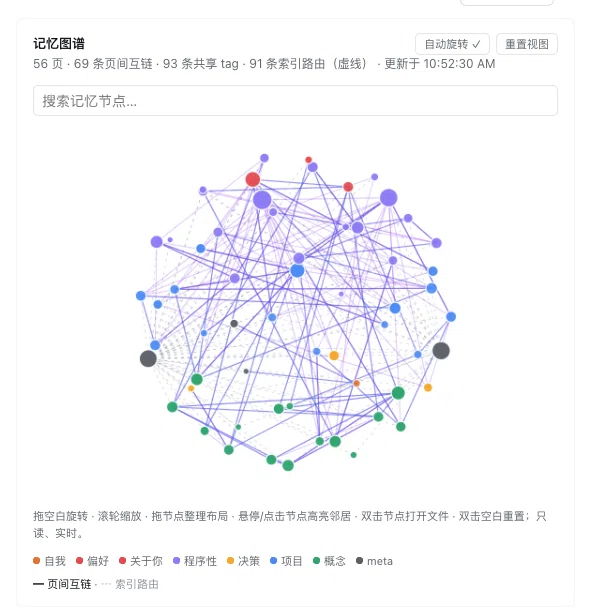
pack/unpack, optional auto-commit. - Memory graph — interactive 3D sphere: rotate / zoom / drag nodes, search-to-focus, hover or click to light up neighbours; select a node → Reveal in Finder or Copy path; double-click a node to open its file in the DSH sidebar (falls back to the OS file manager).
- Timeline — the same store on a time axis: one draggable metro-style line of log events; wheel zoom switches day/week/month/year granularity automatically; event descriptions show on nodes whenever they fit; click for details, double-click to open the page (falls back to
log.md); follows the light/dark DSH theme. - Health tools — dashboard,
checkup,lint,doctor, automaticlast_accessstamping. - Zero build, bilingual panel, hot-editable config.
Screenshots
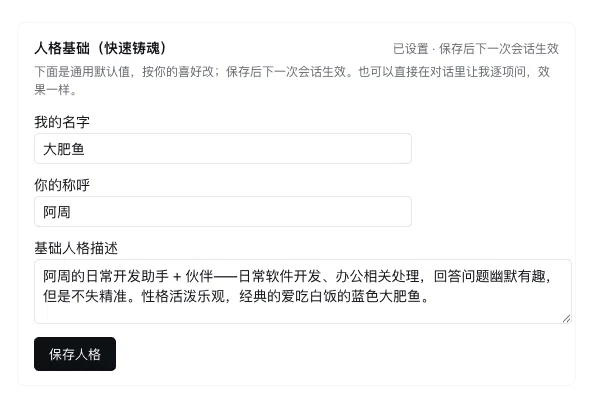
Basic soul (quick forging) — set the agent's name, what it calls you and a baseline persona in one save; the next session uses it, no restart. Chat-forged souls are echoed back from SOUL.md.
Memory graph (3D) — a live projection of the store: rotate / wheel-zoom / drag nodes to arrange, search-to-focus (the camera flies to the hit), hover or click to light up the neighbourhood. Select a node to Reveal in Finder or Copy path; double-click empty space to reset.
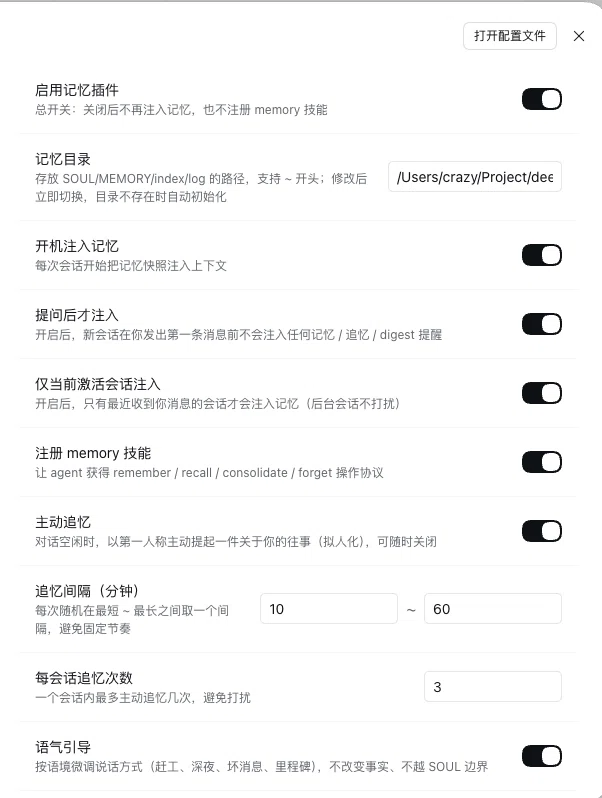
Settings panel — sixteen settings apply immediately (per-session switch, boot gates, recall cadence, tone, disabled workspaces…). The health dashboard and the graph sit right below.
Cross-platform
macOS, Windows and Linux are supported. Path settings expand ~, ~\, %USERPROFILE% and $HOME; CRLF files are parsed as LF and written back with their own newline style; Reveal in Finder maps to open -R (macOS), explorer /select, (Windows, space-safe argv) and xdg-open (Linux); disabledWorkspaces matching is case-insensitive on Windows. Details: docs/CONFIGURATION.md.
Configuration
Seventeen hot keys edit live under Settings → Memory — including bootSnapshot (live by default; session freezes the boot block for the session so mid-session writes can't invalidate the prompt-prefix cache). The full table, boot-budget rules and composition overrides are in docs/CONFIGURATION.md.
CLI
dsh-memory init [dir]        # scaffold the store
dsh-memory search <query>    # full-text search
dsh-memory checkup           # one prioritised health report
dsh-memory doctor            # environment check-up
dsh-memory graph --suggest   # who should link to whom (report only)
dsh-memory pack / unpack     # move the store between machines
Store resolution: $MEMORY_DIR → ./.memory → ~/.memory.
Docs
Configuration · Design notes · Migration · Proactive protocol · Contributing · Security · Changelog
FAQ
Does it burn tokens every request? No — runtime context is deduplicated by projection; an unchanged payload is injected once.
File skill vs plugin? The file skill is a soft guarantee (only its blurb is injected); this plugin is a hard one. They coexist (the file skill ranks higher); remove any hand-written persona to avoid double injection.
Where should the store live? ~/.memory by default; point memoryDir inside a project for isolation.
Development
git clone https://github.com/LittleBlackTong/dsh-plugin-memory.git
cd dsh-plugin-memory
node scripts/memory.mjs --self-test   # smoke test, nothing to install
node --test                          # full suite
Zero build: lib/ is runtime code as-is. CI runs both commands.
Roadmap
- Embedding / BM25 retrieval
- MCP server for non-DSH agents
- Encrypted store option
- TypeScript rewrite
Feedback & community
- Bugs / features / PRs: open an issue — that is where feedback and questions are tracked.
- WeChat group「dsh-plugin-memory 插件沟通」: scan below (QR codes expire every ~7 days; open an issue if it no longer works).