oh-my-knowledge
lizhiyao/oh-my-knowledge
OMK——观察、测量、认知。让 AI 应用中的每一次知识变更都有证据支撑。
安装
dsh plugin --profile web add github:lizhiyao/oh-my-knowledgeREADME
OMK




English | 简体中文
Observe. Measure. Know.
OMK makes every knowledge change in your AI application evidence-backed.
Observe real-world performance, measure version differences, and determine whether the change is effective and the version is ready to ship.
Same model. Same evaluation samples. Only the knowledge artifact changes.
DeepSeek Harness users: install OMK as a native bundle, reuse the current profile for controlled evaluations, and open persisted DSH task trajectories in Studio. Set up the DSH host plugin →
📖 Full documentation: oh-my-knowledge.pages.dev (searchable, English / 简体中文)
What OMK helps you know
| Decision | Command | Evidence you get |
|---|---|---|
| Is this artifact coherent enough to evaluate? | omk doctor | structure, dependencies, safety, and measurability checks |
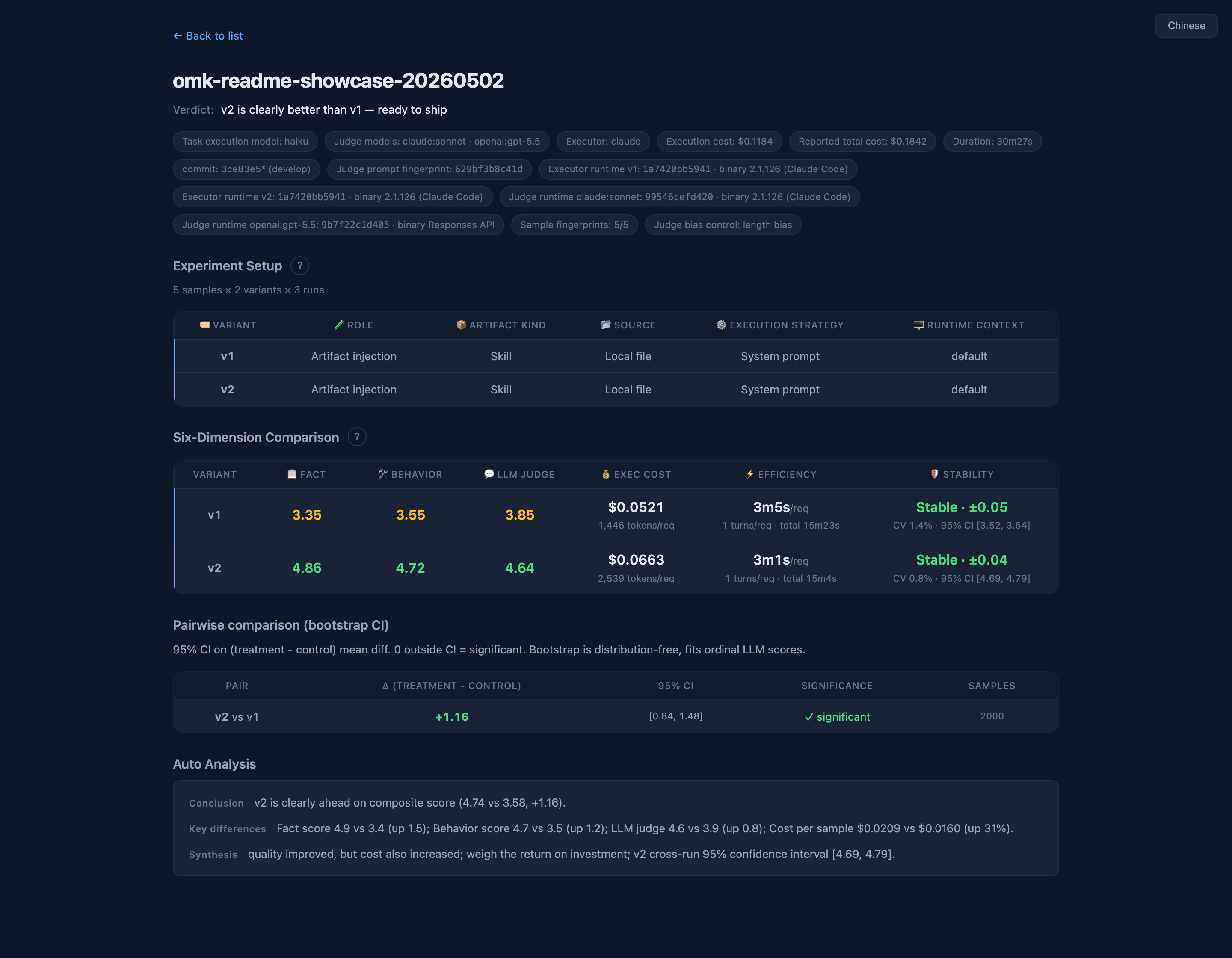
| Is v2 actually better than v1? | omk eval | one-line verdict, confidence interval, failed samples, cost |
| Why did it pass or fail? | omk studio | report view with scores, diagnostics, and examples |
| Should this version become the accepted one? | omk promote / omk evolve | evidence-gated accept or generate a better candidate |
| What happened during one real AI task? | omk observe / Studio Task Trajectory | a trace-backed view of the request, visible Knowledge, tool calls, results, response, and user correction |
| What did real usage expose? | omk observe / omk sample --from-traces | production gaps drafted for review; reviewed drafts can become eval samples |
Quick start
npm i -g oh-my-knowledge
omk init demo && cd demo
omk eval --control code-review-v1 --treatment code-review-v2 --dry-run
omk eval --control code-review-v1 --treatment code-review-v2
Runs out of the box — no edits needed first. omk init scaffolds two skill variants and three sample cases; --dry-run previews calls and cost; omk eval runs the controlled A/B and opens an HTML report with a one-line verdict in about five minutes. Once it runs, swap in your own skills and cases.
Prerequisite: configure one authenticated model runtime (Codex CLI, Claude Code, or an API executor; see Requirements). Inside a Codex task in the ChatGPT desktop app, omk automatically selects codex, reads the model from ~/.codex/config.toml, and uses the same Codex model as the default judge. Claude is not required.
To make Codex the default in regular terminals, add the preference to your shell profile (for example ~/.zshrc):
export OMK_EXECUTOR=codex
# Optional: export OMK_MODEL="your-codex-model"
Without OMK_MODEL, omk reads the model from ~/.codex/config.toml. You can still pass --executor codex --model <codex-model> per command. Pass --judge-models or set OMK_JUDGE_MODELS only when you want a different judge.
The first run has only 3 cases, so the verdict will usually be
UNDERPOWERED(insufficient data) — that's a normal starting point, not an error; grow to ~20+ cases before trusting a ship/no-ship call.
The CLI notifies you when a newer version is available (at most once per 20h); set
OMK_SKIP_UPDATE_CHECK=1to silence it permanently.
Walkthrough: 5-minute quickstart guide (recommended for first-time users; includes demo → own skill → verdict actions). More runnable examples (Skill Map, A/B, offline executor, agent runtime, RAG) live in the repo's example gallery.
Deeper: who omk is for · CLI reference · how it works · eval sample format · executors · artifact layout
Inspect one Codex task
If you only want to see what happened behind one Codex conversation, you do not need to run observe ingest first:
omk studio
Studio opens the local Codex conversation overview at http://127.0.0.1:7799 by default. Select a conversation, then a task, to open Task Trajectory. Its four lanes — Conversation, Actions, Results, and Knowledge — show the request, AI responses, tool calls, tool returns, and observable context, with drill-downs into normalized events and raw logs.
Running tasks are prioritized and update live. While Following, the trajectory advances smoothly as events arrive; after you inspect an earlier point, Studio keeps your position and offers View updates. Old logs without a terminal event are marked End status not recorded instead of remaining live forever.
Task Trajectory only reconstructs facts observable in the log. It does not reveal or infer hidden reasoning. See Observe production traces for the full model.
The OMK loop
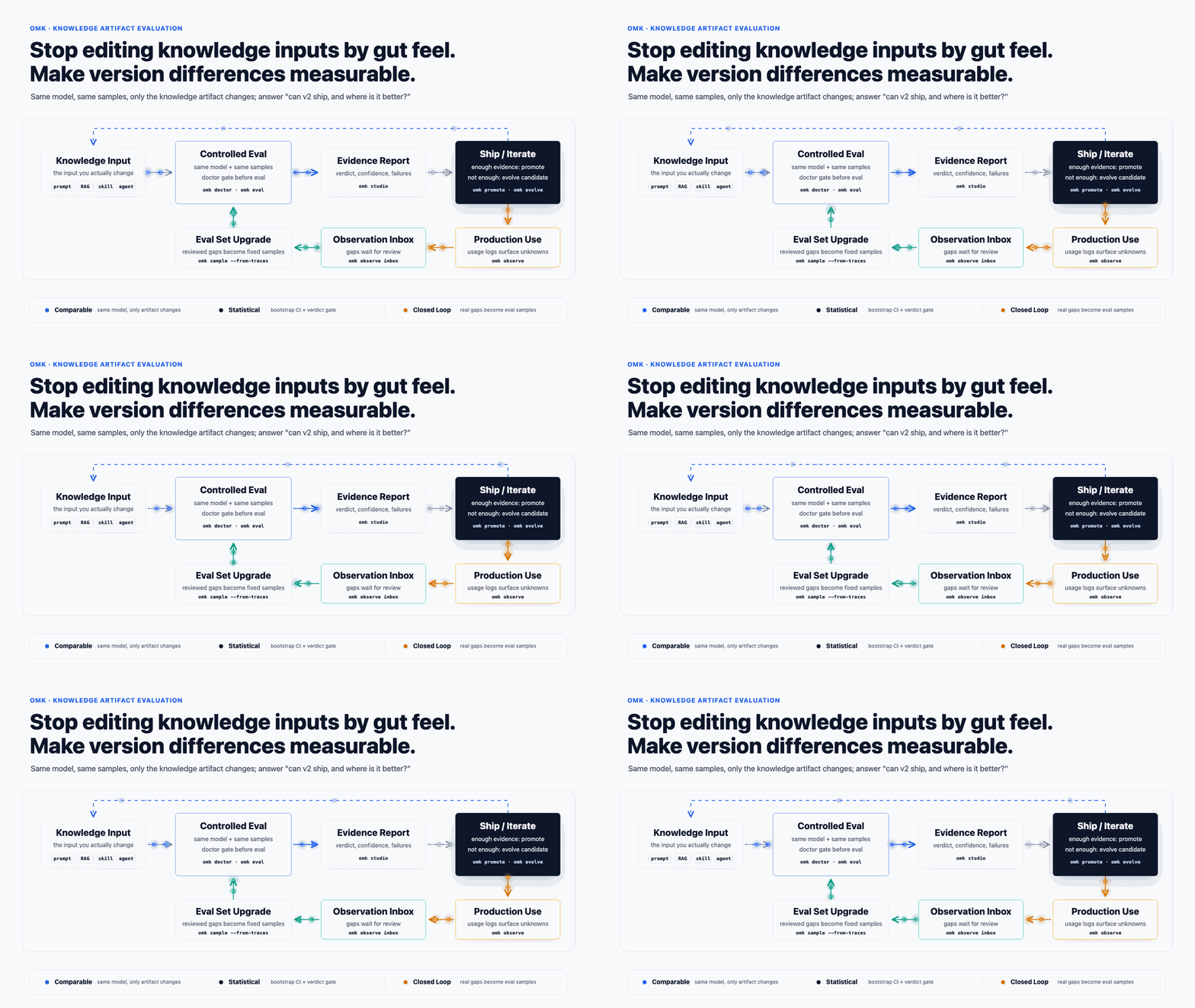
OMK is for authors and maintainers of LLM knowledge artifacts who need a release decision, not for passive end-users of a skill. The main loop is deliberately controlled:
change a prompt / RAG / skill / agent artifact
→ run omk doctor before evaluation
→ run omk eval with the same model and the same samples
→ read the report / Studio evidence
→ promote a proven version or evolve a candidate
→ observe real usage and draft gap-derived samples for review
The first value is the pre-ship doctor → eval decision. The long-term value is the closed loop: observe surfaces production gaps, sample --from-traces drafts regression samples for human review, and reviewed drafts can become fixed eval samples that make the next eval harder to game.
Use inside AI Coding Agents
Install the official omk Agent Skill to let your coding agent run omk workflows from natural language:
omk install omk-agent-skill
By default, omk installs only into detected local targets it explicitly supports: Codex/AGENTS when ~/.codex or ~/.agents exists, and Claude Code when ~/.claude exists. Use --to all to force every target omk currently knows, or --dest for a custom skill root.
Use inside Claude Code
When the omk skill is available in Claude Code, you can invoke it directly:
/omk eval              # evaluate the artifact(s) in the current project
/omk evolve            # auto-iterate to improve a skill
/omk sample            # generate or fill test cases
These slash commands are natural-language entry points — the agent reads the conversation context to figure out which skill to operate on. You can also just say "compare v1 vs v2 for me" or "improve this artifact" and omk picks the right command.
Use inside Codex
Codex does not support Claude Code style /omk ... slash commands. Ask the agent to run the omk CLI directly. Inside a Codex task, omk automatically selects the Codex runtime and locally configured model:
omk eval
omk evolve skills/my-skill.md   # one-shot: doctor → (auto-generate samples if missing) → self-iterate
omk sample skills/my-skill.md
You can also describe the goal in natural language, such as "compare v1 vs v2" or "generate test cases for this skill".
eval, doctor, sample, evolve, and the LLM-enhanced observe review share the same runtime resolution. Once Codex is selected, the default judge reuses the evaluated Codex model instead of falling back to claude:haiku.
omk evolveis a one-shot loop: it runs the doctor gate first, auto-generates eval samples when the target skill has none, then self-iterates. For a brand-new skill, just runomk evolve skills/foo.md.
Why this tool
Knowledge engineering creates a versioning problem: every prompt, RAG recipe, skill, agent, or workflow can change behavior without changing application code. When someone asks "can we ship v2, and why?", a prettier answer or a higher anecdotal success rate is not enough.
omk treats the knowledge artifact as the variable under test: same model, same evaluation samples, only the artifact changes. That makes the comparison explainable, repeatable, and suitable for CI or release review.
Why omk over alternatives
| omk | promptfoo | DeepEval | LangSmith | |
|---|---|---|---|---|
| Bootstrap CI | ✓ default | ✗ | ✗ | ✗ |
| Krippendorff α (judge ↔ human) | ✓ with gold set | ✗ | ✗ | ✗ |
| Length-debias judge prompt | ✓ default | ✗ | ✗ | ✗ |
| Saturation curve | ✓ | ✗ | ✗ | ✗ |
| Three-layer scoring isolation | ✓ | ✗ | partial | ✗ |
| Per-variant skill isolation (construct validity) | ✓ default | ✗ | ✗ | ✗ |
| Native Agent Skill | ✓ | ✗ | ✗ | ✗ |
| Hosted SaaS dashboard | ✗ | ✗ | ✓ | ✓ |
omk's moat is default-on safety net — Bootstrap CI and length-debias aren't advanced flags; they're the default, and judge ↔ human α comes free the moment you add a gold set. Other tools let you opt into confidence intervals; omk makes them unavoidable. Need a hosted SaaS dashboard? Choose LangSmith. Want quick local prompt iteration without statistics? Choose promptfoo. Shipping to production and someone will ask "why should I trust this number?" Choose omk.
RAG-specific evals: see RAGAS (separate niche, complementary to omk). Full comparison with 7 tools across 25+ dimensions: docs/reference/comparison.md.
Features
| Feature | What it does |
|---|---|
| One-line verdict | omk eval six-tier verdict + ship recommendation + exit-code routing; HTML pill shares the same rules |
| Six-dim evaluation | Fact / Behavior / LLM-judge / Cost / Efficiency / Stability shown independently |
| Multi-executor | Claude CLI / Claude SDK / Codex CLI / Codex SDK / DeepSeek Harness / OpenAI / Anthropic API / any custom command |
| 30+ assertion types | substring, regex, JSON Schema, ROUGE/BLEU/Levenshtein similarity, agent tool-call assertions, semantic similarity, custom JS |
| Statistical rigor | Bootstrap CI / length-debias / saturation curve on by default; Krippendorff α auto-computed with a gold set. Details → |
| RAG metrics | faithfulness / answer_relevancy / context_recall — anti-hallucination + answer relevance + context coverage |
| LLM health audit | omk doctor grades 7 builtin dimensions; repeats the audit (--repeat) and merges findings by k/n consensus |
| Production observability | normalize Codex, Claude Code, OpenClaw, and markdown logs into source-neutral Trace IR; measure per-skill outcomes / latency / token use / knowledge-gap signals |
| Knowledge-gap detection | severity-weighted signals quantify risk exposure instead of claiming completeness |
| Construct-validity isolation | --strict-baseline (default ON) cuts three contamination channels so baseline doesn't silently see the skill it's being compared against |
| Git & remote sources | install / eval from a local git ref or a remote git URL (--git-url); directory-skills run in a content-addressed isolated copy so references/ assets are real measured input, not just SKILL.md |
| Evidence-gated management | omk install registers a managed record; omk eval auto-writes evidence bound by content fingerprint, moving a skill installed → measurable; omk list surfaces each managed skill's status (installed / measurable / promoted / stale); omk promote accepts a version once its evidence passes the gate (default PROGRESS only); omk rollback revokes that acceptance, returning the skill to measurable. spec → |
| Sample design science | sample schema with capability / difficulty / construct / provenance metadata (HF Dataset Cards style); studio surfaces coverage breakdown plus rubric_clarity_low / capability_thin flags. docs/specs/sample-design-spec.md |
| Multi-judge ensemble | --judge-models claude:opus,openai-api:gpt-4o cross-vendor scoring + agreement metrics |
| Multi-run variance | --repeat N repeats the eval and computes mean / SD / CI / t-test |
| MCP URL fetching | pull content from private-doc URLs via an MCP server (SSO-protected knowledge bases, etc.) |
| Auto analysis | detects low-discrimination assertions, flat scores, all-pass / all-fail, expensive samples |
| Traceability | reports carry CLI version, Node version, artifact version fingerprint, judge prompt hash |
| EN / ZH switch | one-click language toggle in the HTML report |
Run inside an existing DeepSeek Harness
Install OMK as a DSH bundle to reuse the profile's model, credentials, tools, and sandbox:
dsh plugin --profile web add oh-my-knowledge
dsh --profile web
Inside DSH:
/omk eval eval.yamlruns every sample in an isolated DSH session while OMK owns the report and statistics;/omk observelists recent terminal sessions;/omk observe <session-id>reads a consistent snapshot and returns its Studio Task Trajectory URL.
Observe uses the profile's sessionPersistence directly, so users do not export or locate JSONL / SQLite files. The first version is offline-only and does not live-follow a session that is still being written. See the executor guide and observe guide.
Documentation
The full docs are published at oh-my-knowledge.pages.dev — searchable, with an English / 简体中文 switcher. Key pages:
- How it works — interleaved scheduling, variant resolution, dual-channel scoring, six-dim report
- Eval sample format — sample schema, scoring formulas, 30+ assertion types, custom JS assertions
- CLI reference — all top-level commands with bash examples and flag tables
- Executors & artifact layout — built-in / custom executors; how
variantresolves to an artifact + runtime context - How-to guides — evaluate an agent (project runtime context) and use non-Claude models (GLM / Qwen / DeepSeek / Moonshot / Ollama)
- Observe & inspect task trajectories — browse local Codex conversations, drill into one task, and follow its observable execution live
- Quickstart — first-time five-minute walkthrough
- Example gallery — a set of runnable examples in the repo, arranged simplest-to-richest
- Sample design spec — capability / construct / provenance metadata; industry-gap mapping
- Statistical rigor — why bootstrap CI / α / length-debias / saturation matter
- Comparison with 7 tools — 25+ dimensions across promptfoo / DeepEval / RAGAS / OpenAI Evals / LangSmith / lm-eval-harness / inspect-ai
- Evidence-gated management — managed records, lifecycle states (installed / measurable / promoted / stale), install → eval → measurable → promote → rollback
Environment variables
| Variable | Description |
|---|---|
OMK_EXECUTOR | default executor preference, e.g. codex / codex-sdk / claude |
OMK_MODEL | default evaluated model; Codex reads local config.toml when unset |
OMK_JUDGE_MODELS | default judge list in executor:model[,...] format |
CCV_PROXY_URL | proxy requests through cc-viewer for live eval-traffic visualization |
OMK_REPORT_PORT | report server port (default: 7799) |
Requirements
- Node.js >= 22
- At least one authenticated model runtime:
- Codex: install and authenticate the Codex CLI (
npm i -g @openai/codex); Codex tasks in the ChatGPT desktop app select it automatically - Claude: install and authenticate Claude Code
- API / other executors: configure them as described in Executors
- Codex: install and authenticate the Codex CLI (
- Advanced
claude-sdk/codex-sdkexecutors are optional and are not downloaded by the base OMK install. Install the matching SDK in the same local project or global npm prefix only when you select one; see Executor prerequisites.
Security notice
This tool is designed for local trusted environments (dev machines, CI pipelines). The following features execute local code — make sure inputs come from a trusted source:
| Feature | Risk | Scope |
|---|---|---|
Custom assertions (custom) | dynamically loads and executes user-specified .mjs files | only use assertion files you authored or reviewed |
| eval-samples.json | assertion configs can reference external file paths | don't use sample files from untrusted sources |
Recommendations:
- Do not expose the local report server on the public internet (no auth)
- Don't use third-party eval-samples you haven't vetted
- Custom assertions have a 30-second timeout but no sandbox isolation
See GitHub Releases for release notes. Contributions welcome — see CONTRIBUTING.