L
dsh-local-installer
ljh257110/dsh-local-installer
本地插件安装器:DSH 网页设置页里的本地插件安装入口——文件选择器多选 .tgz 或输入本机完整路径,自动检测所在 profile 并执行官方 `dsh plugin add`,实时回显安装日志,无需终端。
安装
dsh plugin --profile web add github:ljh257110/dsh-local-installerREADME
dsh-local-installer
中文
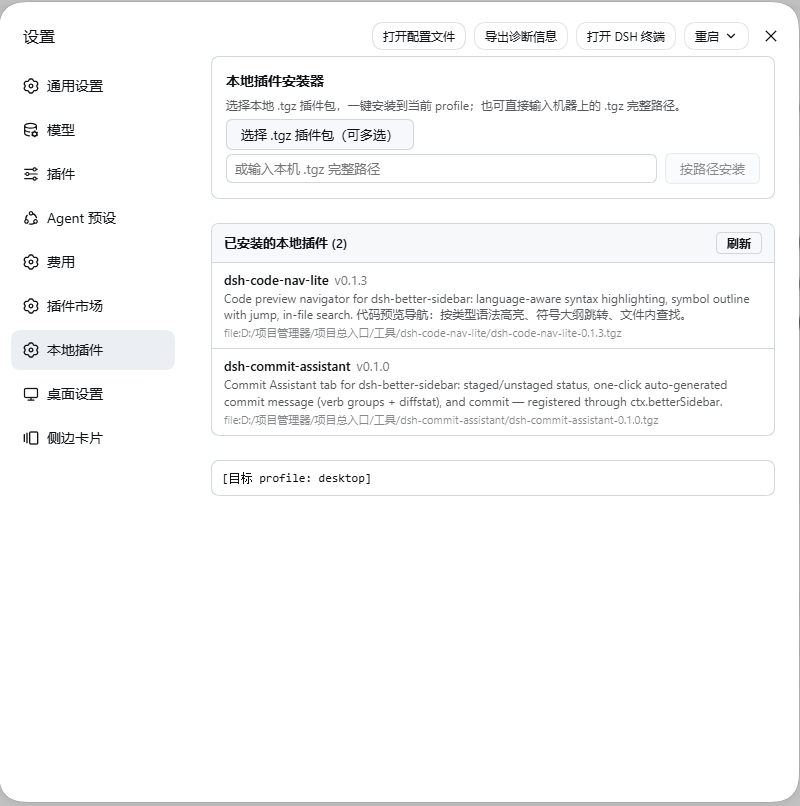
DeepSeek Harness(dsh)插件 —— 本地插件安装器:在 DSH Web 的 设置 → 本地插件 页面里,点按钮选择本地 .tgz 插件包(支持多选),一键安装到当前 profile,无需打开终端。
功能
- 📦 文件选择安装 —— 浏览器文件选择器选取
.tgz(可多选),自动逐个执行dsh plugin --profile <当前> add <包> - 📝 路径安装 —— 直接输入本机
.tgz完整路径安装 - 🖥 实时日志 —— CLI 输出与退出码实时显示在页面日志区
- 🏠 自动识别 profile —— 从自身安装路径解析所在 profile(desktop / web / 自定义),无需配置
- 🌐 中英双语,跟随浏览器语言
- 🔒 同源防护 —— 安装路由拒绝跨站请求;上传内容写临时文件、安装后即删
安装
dsh plugin add dsh-local-installer
装完重启 dsh web 并硬刷新浏览器(Ctrl+Shift+R),在 设置 → 本地插件 使用。
工作原理
- host 半:注册
/local-installer/*HTTP 路由;接收上传的 tgz(base64)写入临时文件,或直接使用传入的本机路径,然后在 DSH 进程内执行dsh plugin --profile <检测值> add <tgz>(300 秒超时,输出回传) - client 半:向 DSH 原生
settings.section插槽注册设置页(零第三方依赖,不依赖 better-sidebar)
已知边界
- 安装发生在运行中的 DSH 进程里:新插件 / 升级需重启 dsh web 才加载(DSH 机制要求,与命令行安装一致)
- 浏览器文件选择器只能拿到文件内容而非原始路径,上传安装走 base64(插件包通常几十 KB,瞬时完成)
开发
node scripts/build.mjs     # 把 src/client-body.js 内联进 lib/client.js
node --check lib/client.js # 语法校验
npm pack                   # 打包
English
DeepSeek Harness (dsh) plugin — local plugin installer: in the DSH web Settings → Local plugins page, pick local .tgz plugin packages (multi-select supported) and install them into the current profile with one click — no terminal needed.
Features
- 📦 File-picker install — select
.tgzpackages in the browser file dialog; each is installed viadsh plugin --profile <detected> add <pkg> - 📝 Install from path — enter a full
.tgzpath on the machine - 🖥 Live log — CLI output and exit codes stream into an on-page log
- 🏠 Auto profile detection — resolves the profile (desktop / web / custom) from the package's own install location; zero configuration
- 🌐 Bilingual (zh/en), follows the browser locale
- 🔒 Same-origin guard — install routes reject cross-site requests; uploads go to a temp file removed right after install
Install
dsh plugin add dsh-local-installer
Restart dsh web and hard-refresh the browser (Ctrl+Shift+R), then open Settings → Local plugins.
How it works
- Host half: registers
/local-installer/*HTTP routes; writes uploaded tgz bytes (base64) to a temp file — or uses a supplied machine path — then runsdsh plugin --profile <detected> add <tgz>inside the DSH process (300 s timeout, output returned) - Client half: registers a page into DSH's native
settings.sectionslot (no third-party dependencies, no better-sidebar required)
Known limits
- Installs happen inside the running DSH process: newly installed/updated plugins require a dsh web restart to load (a DSH mechanism, same as CLI installs)
- The browser file dialog exposes file contents, not original paths — uploads travel as base64 (plugin tarballs are typically tens of KB)
License
MIT