dsh-chat-find
llinsanity/dsh-chat-find
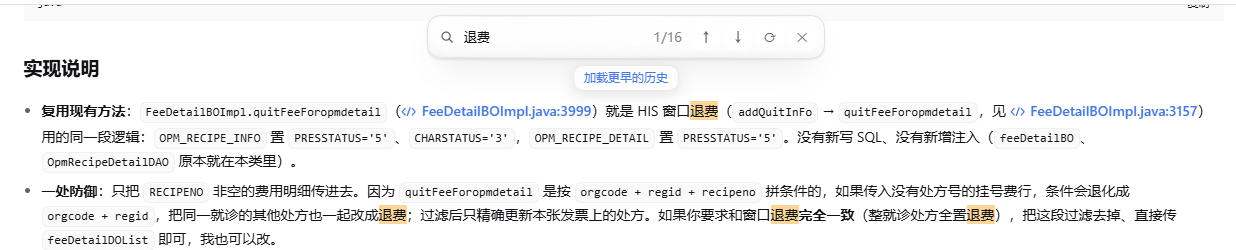
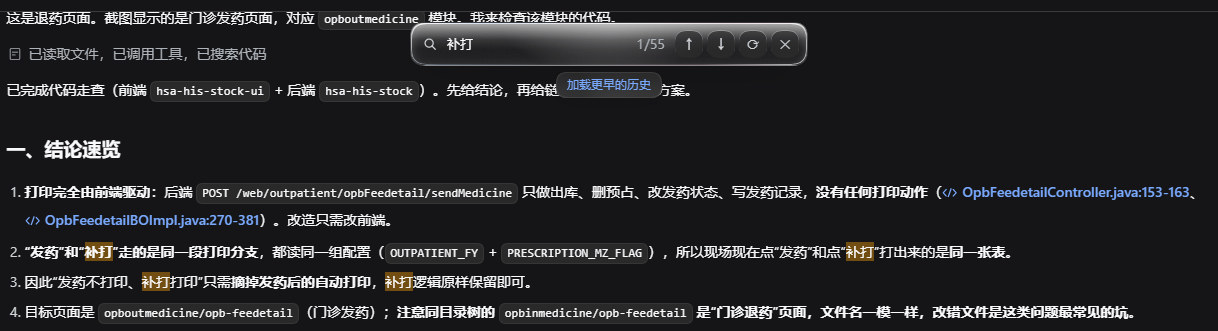
当前对话内的 Ctrl+F 查找条:只匹配你的消息与助手回复,用 CSS Highlight API 高亮(不改写 DOM)、逐条跳转,命中较早内容时可按需加载更早的历史。
安装
dsh plugin --profile web add github:llinsanity/dsh-chat-findREADME
dsh-chat-find
A Ctrl+F find bar for the current conversation in DeepSeek Harness. It matches only your messages and the assistant's replies, highlights every hit, steps between them, and loads earlier history when the match is older than the page the client holds.
一个给 DeepSeek Harness 用的对话内 Ctrl+F 查找条:只匹配你的消息和助手回复, 全部高亮、逐条跳转,命中较早内容时可以就地加载更早的历史。

Install / 安装
The plugin installs straight from GitHub; there is no npm package and no build step. 直接从 GitHub 安装,没有 npm 包,也不需要构建:
dsh plugin --profile desktop add git+https://github.com/LLinsanity/dsh-chat-find
Refresh the page once after installing (Ctrl+R).
已发布到 npm 的版本(如后续发布)也可以用短名字安装:
dsh plugin --profile desktop add dsh-chat-find。
Usage / 用法
| Action | Key |
|---|---|
| Open the find bar | Ctrl+F (Cmd+F on macOS) |
| Next match | Enter or ↓ |
| Previous match | Shift+Enter or ↑ |
| Close | Esc or ✕ |
| Load older history and search again | Load earlier history in the bar's footer |
In the desktop app the chord is registered as the editable command
conversation.find, so it survives the native menu layer and can be rebound in
Settings → Shortcuts.
What it searches / 搜索范围
- Your messages, assistant replies, steering notes, and answers to questions.
- Tool calls, tool output, and command output are skipped on purpose, so a query is not drowned by build logs.
- The bar only shows rows the Chat view has loaded. When the match is older, the footer offers Load earlier history, which uses the Chat view's own paging control and then searches again.
How it differs from a DOM-wide find / 与页面查找的差别
- CSS Custom Highlight API instead of wrapping matches in
<mark>: streaming replies do not invalidate the highlight, and editable areas are never touched. - Message-scoped search: it reads Chat rows by their published
data-chat-flow-kind, not the whole page, so the sidebar, composer, and tool cards never contribute matches. - Older history: unloaded pages are pulled in on demand instead of being silently missing from the result count.
- Themed glass UI: colours come from the running theme tokens
(
--dsw-alias-*), light and dark both work; two CSS variables tune the pane (--cf-blur,--cf-tint).
Liquid glass
The bar is drawn with what a browser can express of the iOS 26 glass vocabulary:
a real backdrop-filter blur and saturation of the content behind it, a
translucent fill from the theme's raised surface, a gradient specular ring, a
faint chromatic edge, a grain layer, and a highlight that follows the pointer.
| Property | Default | Effect |
|---|---|---|
--cf-blur | 26px | Backdrop blur radius. |
--cf-tint | 54% | Opacity of the theme surface behind the blur. |
Refractive edge distortion of the content behind the glass is not possible with
backdrop-filter; the rim highlight and chromatic edge approximate that look.
Known limitations / 已知限制
- Only the loaded page of the conversation is searchable; use Load earlier history first. Loading is capped at 20 pages per press.
- Matches are found inside a single text node: a phrase split by inline markup
(for example a word broken across
codeand plain text) is not matched. - The bar finds rows through the Chat view's
data-chat-flow-kindand[data-conversation-scroll]attributes; a future DSH release that renames them needs a matching update here. - Esc closes the bar, but focus returns to the page body rather than the composer.
- Desktop-only shortcut: in a browser the native Ctrl+F is left alone, which is the better tool there.
Development
node test/wiring.test.cjs        # offline wiring checks (slots, command, locales)
node test/build-preview.cjs      # renders light/dark preview HTML from client.js
client.js is a single lazy factory registered with window.__ModuleLoader__;
index.js is an intentionally empty Host half.
License
MIT