dsh-workbench-layout
lsq-dsh-plugins/dsh-workbench-layout
Rearranges DSH Web into a three-column workbench with file editing, Git views, Markdown preview, and workspace terminals.
Install
dsh plugin --profile web add github:lsq-dsh-plugins/dsh-workbench-layoutREADME
DSH Workbench Layout
简体中文 | English
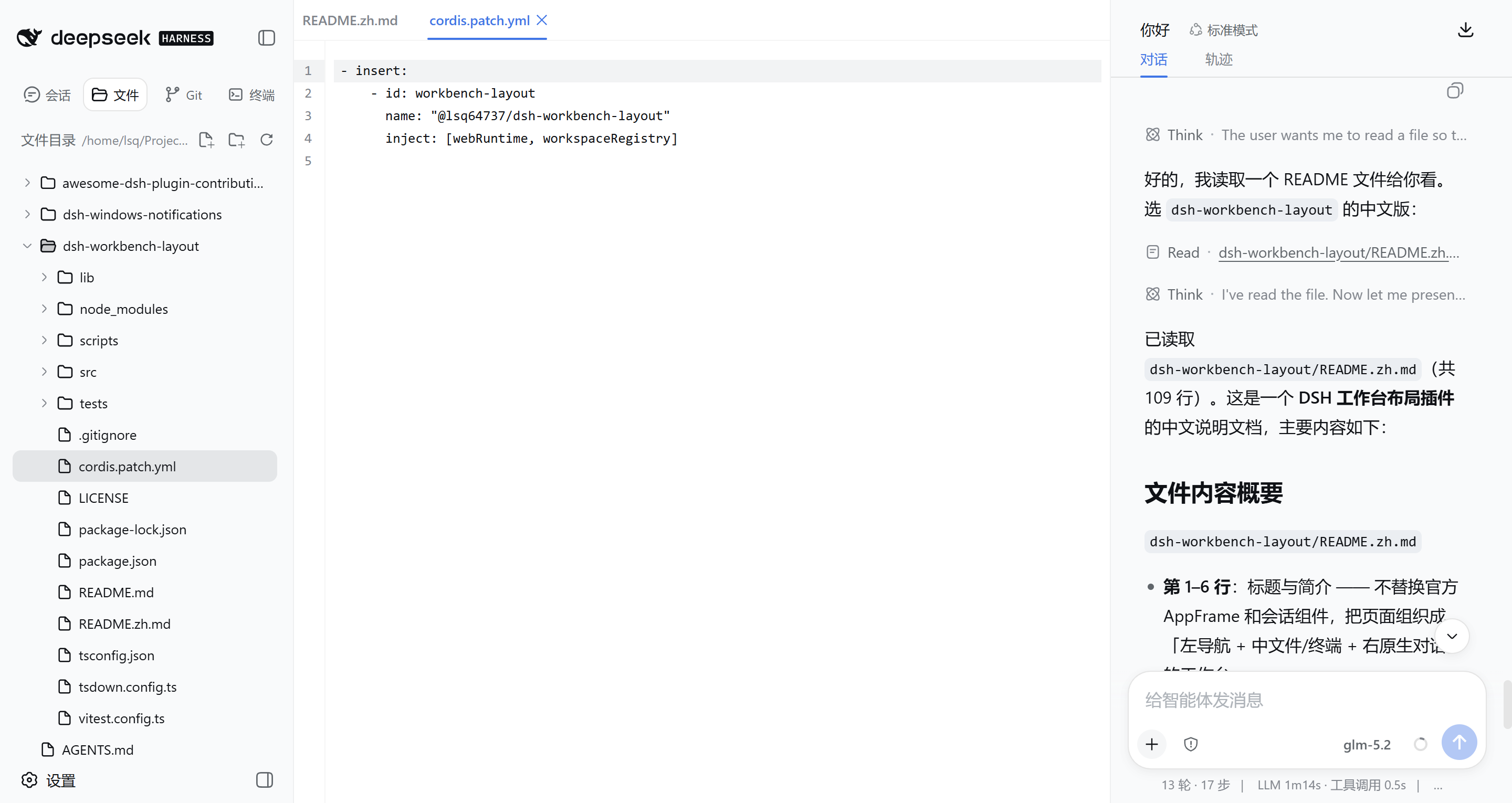
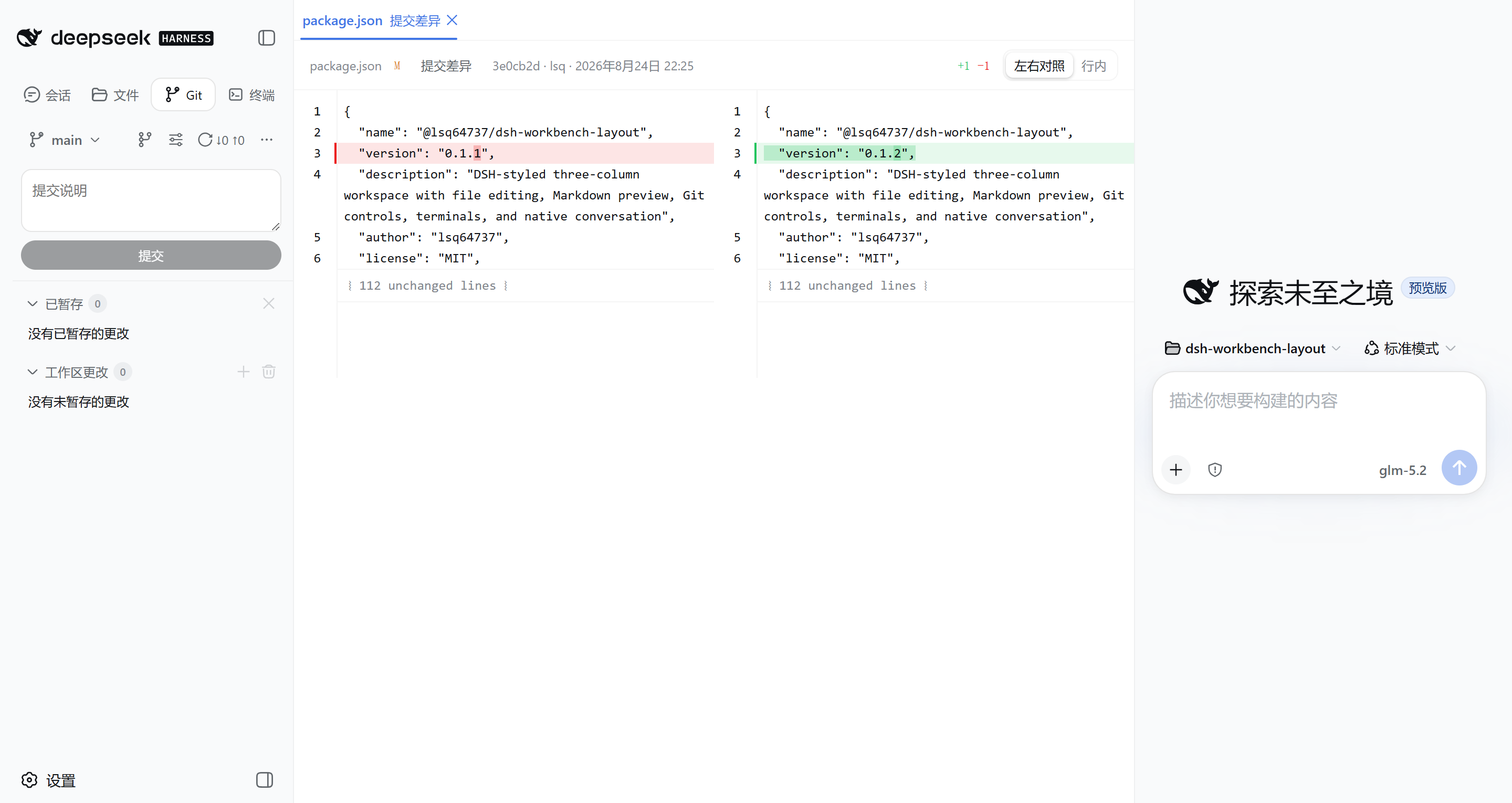
A three-column workspace for DeepSeek Harness Web: navigation on the left, files and terminals in the middle, and the native DSH conversation on the right.
Overview
DSH Workbench Layout rearranges the official DSH AppFrame without replacing its conversation or composer. Files, Git state, editor tabs, and terminals follow the selected Workspace; chat remains owned by the current Session.
| Area | What it provides |
|---|---|
| Left sidebar | Sessions, file explorer, Git changes and Commit Graph, terminal list |
| Middle editor | Multiple file tabs, Markdown preview, per-file Diff, interactive terminals |
| Right column | The original DSH conversation, task status, tools, and composer |
The layout, icons, colors, menus, dialogs, tooltips, and responsive behavior reuse DSH components and design tokens wherever the official client exposes them.
Features
Files and Markdown
- Browse directories lazily and create, rename, or delete files and folders.
- Color file-tree entries and middle-editor tabs from Workspace Git state: untracked, deleted, or conflicted files are red; added files are green; modified and renamed files use the warning color. Untracked state decorates only the file itself; directories aggregate the highest-priority remaining descendant state.
- Compare the editable source buffer with Git
HEADand show additions in green, modifications in blue, and deletion positions in red in a clickable change gutter without tinting code content. Click a marker to open a local Unified Diff with context, paired old/new line numbers,-/+rows, and character-level change emphasis, navigate between changes, or revert only that block; a revert changes the draft and remains undoable. Drag the popup's right edge to resize its width, or focus the edge and use the arrow keys; the viewport-safe width is remembered across changes, files, and page reloads. Pressing outside closes the popup. Staged, unstaged, and unsaved edits are combined, then refreshed while typing, after saves or external changes, and across branch switches. Rendered Markdown Preview stays clean; the markers appear in Source mode. - Open multiple files in one tab strip; use the mouse wheel over overflowing tabs to scroll horizontally.
- Save the active file with
Ctrl/Cmd + S. Writes use DSH version tokens so an externally changed file is not silently overwritten. - While the page is visible, open files are checked in one batch about once a second, with an immediate check when focus returns. Clean tabs update automatically; a dirty draft receives explicit Reload or Keep Current choices after an external change.
- The editor compares CodeMirror's canonical text and preserves the file's existing CRLF, LF, or CR style when saving, preventing line-ending normalization from creating a false yellow dirty marker.
- Open Markdown in rendered Preview mode by default and switch to Source when editing.
- Copy workspace-relative or absolute paths from the file context menu.
- Open file references produced by DSH tools directly in the middle editor.
Git workspace
- View staged and unstaged changes as a list or directory tree.
- Stage, unstage, discard, and commit through explicit actions. Long filenames use the full row at rest, then contract by the exact one- or two-button action width on row hover; direct button hover shows a circular fill.
- Open each working-tree, staged, commit, or comparison Diff as its own editor tab.
- Render text Diffs with CodeMirror MergeView, line numbers, character-level changes, collapsed unchanged regions, always-available Side by side, Unified, and Inline modes, and long-line wrapping.
- Explore local and remote refs as a lane-based Commit Graph with branches, merges, tags, authors, timestamps, and file statistics; older commits load automatically in 40-entry pages while scrolling.
- Expand a commit in place, arrange its files as a list or tree, and open one file at a time.
- Create, switch, rename, and safely delete local branches; create a branch from a selected ref or commit.
- Configure remotes and run Fetch, fast-forward Pull, Push, Publish, and Sync against an upstream or an explicit remote and branch.
- Use commit actions for copying a hash, Cherry-pick, Revert, branch creation, and comparison with the current Workspace.
Terminals
- Run interactive xterm.js terminals backed by
node-ptyin the selected Workspace root. - Keep multiple terminal sessions beside file and Diff tabs.
- Preserve terminal state while switching tabs and resize once the editor column reaches a stable width.
- Use the host's configured shell:
ComSpecon Windows andSHELLon Unix-like systems.
Conversation and layout
- Keep the official DSH conversation and input flow intact in the right column.
- Resize the middle and right columns with the official AppFrame divider behavior. The initial conversation width scales with the viewport, and its drag range grows on large displays while preserving the middle editor's usable width.
- Collapse the middle editor from the sidebar footer; selecting a file, Diff, or terminal opens it again.
- Keep files and Git available for a Workspace even before its Session contains messages.
- Adapt the composer, menus, failure messages, Session Log action, and assistant timing statistics when the conversation becomes narrow.
- Return the conversation to the official center layout and surface colors when the middle editor is collapsed.
Installation
Install the public package into the DSH Web profile:
dsh plugin --profile web add @lsq64737/dsh-workbench-layout
Restart DSH Web if it is already running.
The terminal feature depends on the native node-pty package. If pnpm reports ERR_PNPM_IGNORED_BUILDS, run pnpm approve-builds from the DSH Web profile directory, approve node-pty, and then repeat the installation or restart DSH Web.
Run the same add command to update an existing installation. Remove the plugin with:
dsh plugin --profile web remove @lsq64737/dsh-workbench-layout
Basic use
- Select a DSH Workspace.
- Use the sidebar modes to switch among Sessions, Files, Git, and Terminal.
- Select a file, Diff, commit file, or terminal to open it in the middle column.
- Drag the middle/right divider to choose the amount of space assigned to editing and conversation.
- Use the bottom-right sidebar action to collapse or restore the middle column.
Git features require the selected Workspace root to be a Git repository. Remote operations use credentials already configured for Git on the machine running DSH; the plugin does not request or store remote credentials.
Safety and privacy
- Host APIs resolve an official Workspace id and workspace-relative path; browser-provided absolute paths are not accepted as file targets.
- Traversal outside the Workspace and symbolic-link access are rejected.
- File creation is atomic, saves use version checks, and rename does not intentionally replace an existing entry.
- External refreshes compare versions through the official DSH filesystem in one batch and never replace an unsaved draft automatically.
- Recursive folder deletion and destructive Git actions require confirmation. File and folder deletion is permanent.
- Pull and Sync are fast-forward only. Cherry-pick and Revert require a clean worktree and abort automatically when Git reports a conflict.
- Git commands use fixed arguments without a shell, and terminal credential prompts are disabled for Git operations.
- Logs use Workspace ids and relative paths instead of recording host file paths.
- A terminal grants shell access to the machine running DSH. Only expose DSH Web to users and networks you trust.
Limitations
- Open tabs and unsaved drafts live in the current page and are lost on refresh.
- The file editor reads text files; binary files receive a binary-change notice instead of rendered content.
- Terminal processes end when their tab closes, the page reloads, the connection ends, the Workspace changes, or the plugin stops. The default composition allows up to eight concurrent terminals.
- The plugin reorders the official AppFrame through stable client markers because DSH does not currently expose a dedicated conversation-column placement API. A future AppFrame rewrite may require a plugin update.
- On very narrow windows, the official AppFrame concession temporarily closes the middle editor and restores it when enough width is available.
Development
Requirements: Node.js 24 or newer and a compatible DSH development workspace.
npm ci
npm run typecheck
npm test
npm run build
npm run test:bundle
License
Related plugins
dsh-web (dsh-task-board)
zhu1090093659/dsh-web
dsh-web (dsh-web-all)
zhu1090093659/dsh-web
dsh-web-ui (dsh-task-board)
zhu1090093659/dsh-web-ui
dsh-web-ui (dsh-web-ui-all)
zhu1090093659/dsh-web-ui