dsh-mail
lucagiftzek/dsh-mail
DSH 的邮件客户端:接入 IMAP、POP3、SMTP 与 OAuth2 账号,提供侧栏阅读标签页、API 发信、定时与 CSV 批量发信(含退订处理),以及 mail_* agent 工具。阅读标签页需配合 dsh-better-sidebar,未装时 agent 工具仍可用。
安装
dsh plugin --profile web add github:lucagiftzek/dsh-mailREADME
dsh-mail

Mail in the DSH sidebar and mail tools for your agents: IMAP, POP3, SMTP and OAuth2 accounts.
dsh plugin --profile web add dsh-better-sidebar   # the tab host, skip if installed
dsh plugin --profile web add @lucagiftzek/dsh-mail
# or from GitHub: dsh plugin --profile web add github:lucagiftzek/dsh-mail
# restart dsh web, then add an account in Settings, Mail
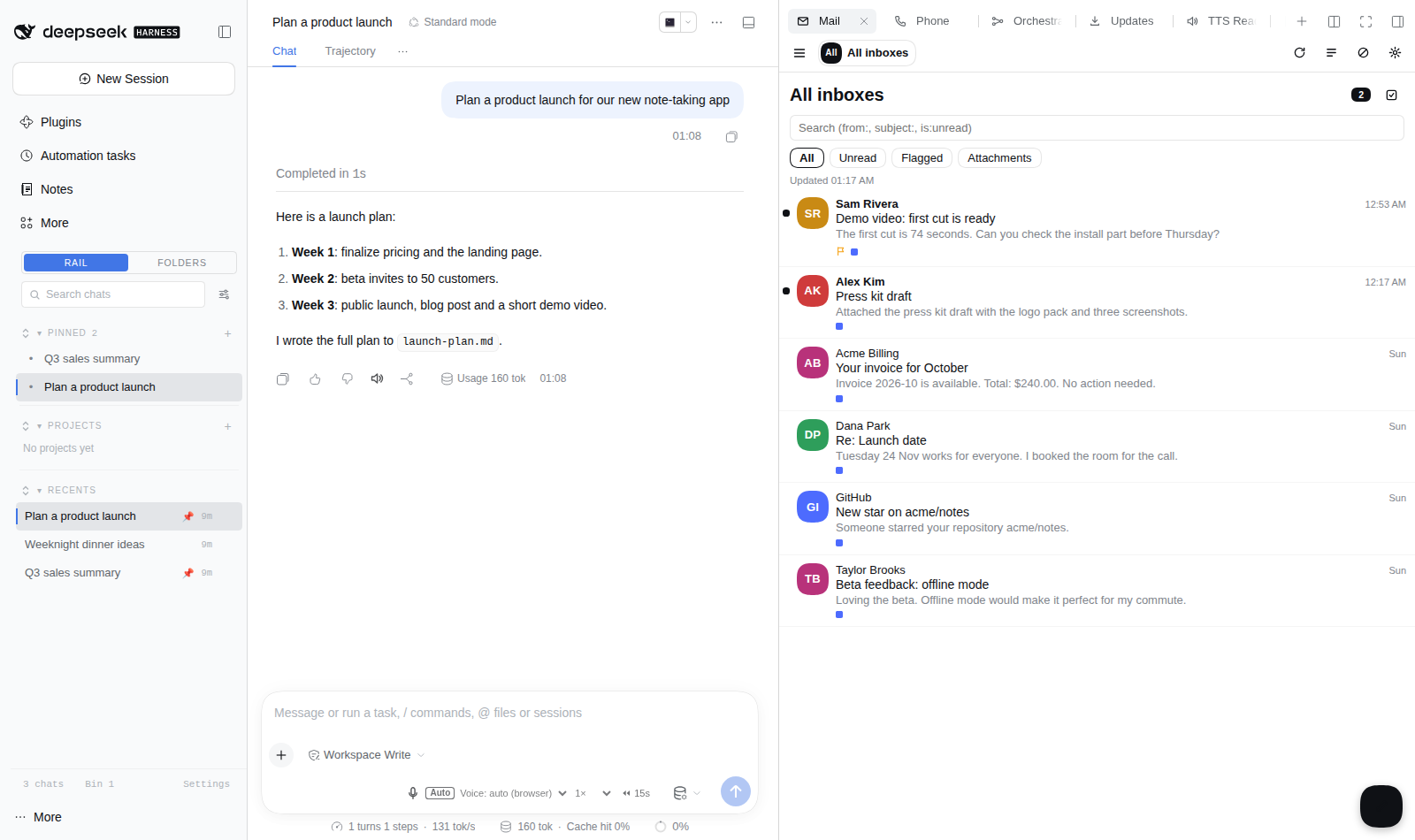
Screenshot from a demo DSH instance with sample data.
Mail for agents and humans in the DeepSeek Harness (DSH). Connect any IMAP or
POP3 mailbox, Gmail or Microsoft 365 / Outlook.com (OAuth2 with your own
client, or a Gmail app password), a Tzekos Mail webmail, or a sending
service (Lettermint, Resend, AgentMail). Read your mail in the sidebar Mail
tab, and let agents read, search, file and send mail through the mail_*
tools, with sends drafted first by default.
Everything runs on your DSH host: mail is fetched straight from your own servers into a local cache, nothing is sent anywhere else, and there is no telemetry.
What is in version 0.2 (phases 1 to 4 of v2)
-
Accounts in DSH Settings: a "Mail" settings section (and the gear in the tab) to add, edit, test and remove accounts. Several accounts at once.
-
Account types: generic IMAP + SMTP, POP3 + SMTP, Google (app password or OAuth2), Microsoft 365 / Outlook.com (OAuth2), self-hosted (IMAP or POP3), Tzekos Mail (webmail agent API, optional), Lettermint and Resend (send only), AgentMail.
-
Local cache (built-in
node:sqlite): folders, messages, threads and flags; initial sync of the last 90 days (newest 1000 per folder), then incremental by UID; background polling of every Inbox; retention setting. -
Mail tab: account switcher with "All inboxes", folder list with unread counts, thread list (unread dot, avatar, sender, time, subject, snippet, flag / attachment / count badges), search with
from:subject:is:unreadhas:attachmentafter:before:, filter chips, quick actions (archive, delete, read / unread, flag), multi-select, reading view with sanitised HTML in a sandboxed frame, "Load images" on request, attachment downloads, a simple composer with reply and forward, and the review queue with agent drafts. Keyboard: j / k, Enter, e, #, r, c, /. -
Agent tools: every v0.1 tool keeps its name and arguments; new tools
mail_accounts,mail_folders,mail_search,mail_mark,mail_move,mail_draft,mail_attachments,mail_doctor. -
Google and Microsoft with OAuth2 (phase 2): bring your own OAuth client, authorization code + PKCE, XOAUTH2 for IMAP and SMTP, tokens encrypted at rest, automatic refresh, a Reconnect banner, the Microsoft device code sign-in, and Microsoft Graph sendMail when a tenant disabled SMTP AUTH.
-
Presets, SendGrid, safer bulk mail (phase 3): server presets for 26 providers (European first, each checked by a probe script), Twilio SendGrid (send, optional Inbound Parse webhook), mass-send hardening (List-Unsubscribe with One-Click, suppression list, per-account rate limits, jitter, a circuit breaker, dry run), a first-contact check for agents, a local audit log,
mail_forward, and an explicit "Convert legacy settings to accounts" button. Settings work on DSH 0.1 and DSH 0.2. -
Unsubscribe and polish (phase 4): built-in unsubscribe for mass mail (signed per-recipient links, List-Unsubscribe mailto and RFC 8058 one-click, a footer in English, Italian or Greek, automatic processing of link clicks and unsubscribe replies, per-list and global suppression, campaigns, an Unsubscribes pane and
mail_suppression), IMAP IDLE push, FTS5 full-text search, Markdown and rich text compose, 6 s undo send, drafts kept in the IMAP Drafts folder, folder create and rename.
Accounts
Open Settings, Mail (or the gear in the Mail tab), pick a type and fill in the form. Test connection logs in (IMAP LIST, POP3 STAT, SMTP verify or an API call) and reports each step; it never shows a secret.
| Type | Incoming | Outgoing | Credentials |
|---|---|---|---|
| IMAP + SMTP | IMAP (TLS 993 or STARTTLS 143) | SMTP (TLS 465 or STARTTLS 587) | password or app password |
| POP3 + SMTP | POP3 (TLS 995 or STLS 110) | SMTP | password; read state is kept locally, mail stays on the server |
| imap.gmail.com | smtp.gmail.com | app password (2-Step Verification required), or OAuth2 with your own client | |
| Microsoft 365 / Outlook.com | outlook.office365.com | smtp.office365.com, or Microsoft Graph | OAuth2 only (your own Entra app) |
| Self-hosted | IMAP or POP3 | SMTP | password; plaintext allowed only to a loopback host |
| Tzekos Mail | webmail /api/agent | same API | service token (never a user password) |
| Lettermint, Resend | none | API | API key |
| Twilio SendGrid | optional Inbound Parse webhook | API v3 | API key |
| AgentMail | API inbox | API | API key + inbox id |
Settings shape (dsh-mail namespace):
dsh-mail:
  accounts:
    - id: work                 # [a-z0-9-]{2,32}, used as the tool argument `account`
      label: Work mail
      type: imap-smtp
      address: me@example.com
      receive: { protocol: imap, host: imap.example.com, port: 993, security: tls }
      send:    { protocol: smtp, host: smtp.example.com, port: 465, security: tls }
      passwordFile: /path/to/secret     # optional; or passwordEnv: NAME, or type it in the editor
      agent: { allow: true, canRead: true, canSend: true, canMass: false, default: true }
      limits: { maxRecipients: 500, perMinute: 20, perDay: 300 }   # 0 = no limit
  agents:
    confirmMode: all            # all | reply-only
  cache:
    retentionDays: 90           # 0 = headers only, -1 = keep
Secrets (passwords, API keys, OAuth client secrets) are never stored in
settings.yaml or in the DSH 0.2 profile row: the editor writes them to the
plugin's own ~/.dsh/mail/secrets.json (mode 0600, directory 0700). Routes
return them only as __set__ (stored) or empty; saving __set__ keeps the
stored value, typing a new one replaces it. passwordFile / passwordEnv
and, for API keys, apiKeyFile + apiKeyVar (a KEY=value credentials file)
keep a secret in a file you manage. OAuth tokens live encrypted in
tokens.enc.
Presets. "Add account" lists European providers first (Posteo,
mailbox.org, Infomaniak, Migadu, Runbox, Soverin, StartMail, Mailfence, Mailo,
mail.de, GMX, WEB.DE, eclipso, Hostpoint, Inbox.eu, Kolab Now, OVH, IONOS,
hosting mail, Proton Mail through Bridge, Zoho EU), then Gmail, Outlook,
iCloud, Yahoo and Fastmail. A preset fills hosts, ports and TLS and shows the
provider's quirk (app passwords, an "enable IMAP" switch). Tuta is listed as
not supported (it offers no IMAP or SMTP). Proton Mail needs Proton Mail Bridge
on the same host or LAN; use the password Bridge generates; the preset accepts
Bridge's self-signed certificate. npm run probe-presets checks every host
(TCP + TLS handshake, --docs also the documentation pages, --write
updates the verified flags); rows that did not answer show "unverified".
The last run is in docs/presets-probe.md.
Agents see an account only when agent.allow is on (new accounts start
off). canRead, canSend and canMass narrow it further, and
agents.allowedAccounts can restrict the list globally.
Draft first. With agents.confirmMode: all (the default for new installs)
mail_send without confirm: true only creates a draft, shows it, and returns
a draftId; mail_send({ draftId, confirm: true }) delivers it, or you send it
from the Queue pane of the tab. Mass and scheduled sends wait for approval in
the queue. reply-only keeps the v0.1 behaviour: a NEW mail_send / mail_forward is SENT IMMEDIATELY with or without confirm: true, only mail_reply drafts. Tool descriptions state both modes (they cannot follow a live settings change), mail_accounts states the current mode in one plain sentence, and every send result starts with SENT (delivered to the provider now, this is not a draft), DRAFT ONLY, NOTHING WAS SENT or SCHEDULED for <time>, not sent yet.
Google and Microsoft (OAuth2)
There is no shared app: you create your own OAuth client once (free), paste
its client id and secret into the account, press Save, then Connect.
The editor shows the exact redirect URI to register:
https://<your DSH host>/dsh-mail/api/oauth/callback (for a DSH used only on
the same machine, http://localhost:<port>/dsh-mail/api/oauth/callback). If
the host is shown wrong behind a proxy, set oauth.redirectBaseUrl to the
public base URL.
Google (Gmail, Workspace). The simplest way is an app password (account type Google, sign-in method "App password"). For OAuth2:
- Google Cloud console: create or pick a project.
- APIs and Services, OAuth consent screen: user type External (or Internal inside a Workspace organisation); add yourself as a test user while testing.
- Set the publishing status to In production. In "Testing", Google expires refresh tokens after 7 days and you would have to reconnect every week. An unverified app shows a warning screen on consent, which is fine for your own use.
- Credentials, Create credentials, OAuth client ID, type Web application, authorized redirect URI as shown in the editor.
- Scope requested:
https://mail.google.com/(IMAP and SMTP).
Microsoft 365 / Outlook.com (OAuth2 only; basic authentication for IMAP and SMTP is retired):
- Microsoft Entra admin center, App registrations, New registration.
Supported account types: any organizational directory and personal
Microsoft accounts (tenant
common), or only your organisation (enter its tenant id or domain in the account). - Authentication, Add a platform, Web, redirect URI as shown in the editor. For the device code sign-in (a DSH without public https), also enable "Allow public client flows"; the tab then shows a code to enter at microsoft.com/devicelogin.
- API permissions, Microsoft Graph, Delegated:
offline_access,IMAP.AccessAsUser.All,SMTP.Send,Mail.Send. Work or school tenants may need an administrator to grant consent, and IMAP must be enabled for the mailbox. - Certificates and secrets: create a client secret and paste its value (optional for a public client that only uses the device code).
- Send via: automatic (default) uses SMTP and switches to Microsoft Graph
sendMailwhen the tenant disabled SMTP AUTH (error 5.7.139); "SMTP only" or "Microsoft Graph only" force one path. Graph keeps the message in Sent Items.
How it works. Authorization code with PKCE (S256); the state is signed,
single use, valid for 10 minutes and bound to your browser session. The
provider redirects to a static callback page that hands the code to a gated
POST route, so the code only reaches the server through all four security
layers. Refresh and access tokens live only in ~/.dsh/mail/tokens.enc,
encrypted with AES-256-GCM (key derived from the plugin's 0600 capability
secret), never in settings, routes or logs. Access tokens are refreshed 120 s
before they expire, once per account even under concurrent use. A revoked or
expired grant marks the account "needs to reconnect" and the tab shows a
Reconnect banner. Disconnect revokes the token at Google (Microsoft
has no revocation endpoint; remove the app under My Apps) and deletes it
locally.
Twilio SendGrid
Account type SendGrid sends through the v3 Mail Send API (API key with Mail
Send permission and a verified sender; EU data residency: base URL
https://api.eu.sendgrid.com). Receiving is optional and off by default:
tick "Receive mail through SendGrid Inbound Parse", save, press Generate the
webhook URL (shown once; it carries a per-account secret), and set it as the
Inbound Parse destination with "POST the raw, full MIME message". This needs a
public https address for the DSH host. Incoming mail only goes into the local
cache; it never triggers agent actions.
Mass sending and agent guard rails
- More than 50 recipients (
mass.unsubscribeAbove, every account) need an unsubscribe: the built-in one (below) or a customunsubscribe: "mailto:...", "https://...?e={email}". Every mass message carriesPrecedence: bulk. Accounts that cannot set headers (Tzekos Mail, AgentMail) refuse such batches. - Suppression: the global list
~/.dsh/mail/suppress.txt(an address or@domainper line) and per-list entries insuppress-lists.jsonare skipped by mass sends; hard bounces (5.1.x) go to the global list. - Per-account limits
perMinute/perDay(0 = no limit); a send over the limit returnsrate limit: ...withretryAfterSec. Mass sends wait for the next minute and stop at the daily limit. Delays get a random +-20 % (mass.jitterPct); 5 consecutive failures stop the batch (mass.breakerFailures). mail_mass_send({ dryRun: true })previews the first 3 rendered messages, the suppressed count and the remaining budget, and sends nothing.agents.firstContactConfirm(default on): an agent's first message to a recipient domain the account never wrote to or heard from becomes a draft untilconfirm: true, even inreply-onlymode.- Audit log
~/.dsh/mail/audit.jsonl(0600): time, actor (agent, human, timer, webhook), account, action, recipient count and a hash of the subject; never bodies. Shown under "Recent activity" in the Queue pane and atGET /audit.
Unsubscribe
Each mass send is a campaign (mail_mass_send returns its campaignId)
on a list (list: "newsletter"; default: the campaign itself). Every
recipient gets a personal token: an HMAC signature (key derived from the
plugin's 0600 capability secret) over the account, list, campaign and a hash
of the address. The token never contains the address; the campaign record
on this host (0600) maps the hash back. Messages carry:
List-Unsubscribe: <mailto:ADDR?subject=unsubscribe%20TOKEN>, <https://BASE/dsh-mail-unsub/TOKEN>and, with the https link,List-Unsubscribe-Post: List-Unsubscribe=One-Click(RFC 8058, one-click from Gmail, Yahoo and Apple Mail).- A visible footer (English, Italian or Greek, per send with
language, or your own text per language with{sender}{url}{mailto}).
ADDR is the account's unsubscribe mailbox, the global unsubscribe.mailto,
or <your address>+unsubscribe@<domain> for accounts that read their mail.
When mail syncs, messages to that address (or with "unsubscribe TOKEN" in the
subject) are processed: a valid token unsubscribes that recipient from its
list; otherwise the sender is suppressed for all mail. Each message counts
once, so removing an address is not undone by the next sync.
The https link needs unsubscribe.publicBaseUrl (https only) and a public
path to the plugin. The page at /dsh-mail-unsub/<token> answers GET with a
confirm page (address masked, "this list" or "all mail") and POST (the form or
the one-click POST) with 200. It verifies the HMAC, is rate limited (20 per
minute per client, 600 in total), sends no referrer, a strict CSP and noindex.
It is served by DSH and, with unsubscribe.listenPort, by a small separate
listener that serves nothing else and only ever binds a loopback address
(unsubscribe.listenHost 127.0.0.1 or ::1; any other value falls back to
127.0.0.1). The rate limit keys on CF-Connecting-IP or the last
X-Forwarded-For entry, the one your edge appends. The edge route is
not created by the plugin. Expose only that path without login, for example
with Caddy:
unsub.example.org {
  @unsub path /dsh-mail-unsub/*
  handle @unsub { reverse_proxy 127.0.0.1:<listenPort> }
  handle { respond 404 }
}
(behind a Cloudflare tunnel: an ingress rule for that hostname and path to the same port). Keep the login on everything else.
The Unsubscribes pane (no-entry icon in the Mail tab) lists, searches,
removes (after a confirmation) and exports (CSV) the entries and shows the
campaigns with their sent and unsubscribed counts. Agents use
mail_suppression (list, check, campaigns; add and remove only
apply with confirm: true).
Reading and writing
- Instant new mail: tick "Instant (IMAP IDLE)" on an IMAP account (at
most
push.maxAccounts, default 5). One extra connection waits for new mail; a drop reconnects with backoff, and after 3 failures, or on a server without IDLE, the account stays on polling. - Search uses an SQLite FTS5 index over subject, sender, recipients and
cached text (word prefixes, accents ignored);
from:subject:and the other operators still apply. - Compose in plain text, Markdown or rich text. Generated HTML (Markdown,
rich editor) is sanitised and sent together with a text part; an explicit
htmlpart passed tomail_sendgoes out as given, as in v0.1. Drafts save every 5 s and, for IMAP accounts, are kept in the Drafts folder: the previous copy is replaced, and only a message that still carries\Draftand the plugin's own Message-ID is ever removed (on servers without UIDPLUS it is flagged deleted instead of expunged, so other deleted mail is untouched). - No duplicate sends: a queue entry is sent by one worker at a time, and a mass send that stopped (circuit breaker, restart, cancel) resumes from where it was: addresses already delivered are skipped.
- Undo send: messages sent from the tab wait
compose.undoSendSecseconds (default 6, 0 = off) with an Undo button. A restart in that window drops the message. - Folders: create custom folders and rename them (special folders keep
their names). Agents need
canManageFolderson the account.
Upgrading from v0.1
Nothing has to change. When no explicit account uses their ids, the v0.1
provider settings (providers.*, mailboxBaseUrl, mailboxAgentToken, the
Lettermint and AgentMail credential files, the mailbox credentials file)
become virtual accounts whose ids are the old provider ids (lettermint,
agentmail, resend, ovh, smtp, local, tzmail), so
provider: "lettermint" in old chats keeps working and they send through
exactly the v0.1 code path. An install that has only these virtual accounts
keeps reply-only and the old default provider (lettermint) unless you set
agents.confirmMode and defaultProvider yourself. Pinning them explicitly
before upgrading is recommended:
dsh-mail:
  defaultProvider: lettermint
  agents: { confirmMode: reply-only, firstContactConfirm: false }
  schemaVersion: 1
Convert legacy settings to accounts (Settings, Mail) turns the virtual
accounts into editable ones with the same ids. It runs only when you press the
button and confirm. It first backs up settings.yaml, settings.yaml.imported
and the profile rows (profiles/*/cordis.patch.yml) that exist, as
<file>.bak-YYYYMMDD-mailv2-convert, plus a JSON record of the current
settings with secret values masked. It pins today's agent behaviour (default account,
confirm mode, first-contact check). Secrets that sat in the settings move into
secrets.json; keys in credential files stay there and are referenced.
Accounts that use the per-user webmail login are kept as legacy.
Behaviour change: queue entries in state queued (manual queue) are no longer
sent by the timer; they wait for Send now or Approve in the tab, as the
v0.1 documentation already described.
DSH 0.1 and DSH 0.2
Settings go through lib/dual-settings.js (shared with the other estate
plugins). On DSH 0.1 the dsh-mail section of settings.yaml is a registered
namespace. On DSH 0.2 the plugin exports a live Config (built with the running
harness's schemastery, also on the default export). Every key of a v0.1 section
is declared, so the old dsh-mail: section is imported once into the profile
row; its secrets go to secrets.json first and never into the row. Writes use
ctx.settings.update. Without a settings service (headless, or settings not
injected), the plugin reads the row config, the old section and
~/.dsh/mail/settings.json.
Agent tools
| Tool | What it does |
|---|---|
mail_send | send one message (account/provider, to, cc, bcc, subject, text, format: markdown, html, replyTo, attachments, draftId, confirm) |
mail_mass_send | CSV-personalised bulk send (list, language, footer, unsubscribe, dryRun, delayMs; returns campaignId); staged for review under draft-first |
mail_suppression | unsubscribes and suppression: list, check, campaigns, add / remove with confirm: true |
mail_forward | forward a message with a note (id, to, note, attachments: true to include the originals); drafted in mode all, sent at once in reply-only |
mail_send_later | schedule a send (sendAt) or queue it for manual send |
mail_read | recent messages of any account that can read (folder, unread, since, domain, address) |
mail_fetch | one message as text, by composite id account:folder:uid, API id or thread id |
mail_domains | sender identities per account |
mail_list_queue, mail_cancel | the review queue |
mail_inbox, mail_thread, mail_reply, mail_triage | conversations (Tzekos Mail, or IMAP / POP3 via the cache with account) |
mail_contacts, mail_remind | Tzekos Mail address book and reminders |
mail_accounts | accounts visible to agents, capabilities, confirm mode, default account |
mail_folders | folders with unread and total counts; create and rename with the account permission canManageFolders |
mail_search | search the cache and the IMAP server |
mail_mark | read, unread, flag, unflag |
mail_move | inbox, archive, trash, spam or a folder path (never deletes permanently) |
mail_draft | create, update, list, get, delete drafts (never sends) |
mail_attachments | list attachments or save one to disk (returns the path) |
mail_doctor | read-only self-check: settings mode, accounts (id and type only), secrets present (booleans), reauth flags, last sync, cache, file modes, unsubscribe and IDLE, queue counts; offline, no secrets |
Tool output carries at most agents.maxBodyChars (default 8000) characters of
a body; HTML is converted to text.
Security
- Every route sits behind four layers: loopback peer, trusted Host (plus
trustedHosts), a short-lived capability token for mutations, and the DSH browser-session cookie. - No read response ever contains a secret; provider errors are scrubbed.
- HTML mail is sanitised on the host (no scripts, forms, frames or event handlers, remote images blocked until you ask) and shown in a sandboxed frame without script permission under a strict Content Security Policy. Relative links are removed (they would point at the DSH origin).
- Server-side first: the browser talks only to the DSH host. Every provider
connection (IMAP, POP3, SMTP, the HTTP APIs, OAuth token exchange and
refresh) is made by the server. In a rendered mail nothing points the
browser at another host:
- remote images, CSS background images,
@importand fonts are blocked by default (the count is shown). "Load images" rewrites images to a signed same-origin proxy (GET /dsh-mail/api/img): the server fetches them with no cookies, no Referer and a generic User-Agent, public addresses only (the DNS answer is checked and pinned for the connection, redirects are re-checked at every hop, at most 3), ports 80/443/8080/8443, raster images only (magic bytes checked, no SVG), 5 MB and 10 s caps. The frame's CSP allows images only fromdata:,cid:and the DSH origin. http://image URLs are upgraded to https. Plain http is used only whenrender.allowHttpImagesis on (default off); otherwise such an image stays blocked. There is no silent plaintext fallback.- links point at a signed page on the DSH origin (
GET /dsh-mail/api/link) that shows the real destination and opens it withrel="noopener noreferrer"(no Referer, no opener). - DNS prefetch is off in the frame. Avatars are initials (no Gravatar).
- remote images, CSS background images,
- Attachments download through the server as attachments with
nosniff; 25 MB cap. - HTTP API base URLs (Lettermint, Resend, AgentMail, SendGrid, Tzekos Mail)
must be https, or plain http to a loopback host, and never link-local; the
check runs on save and before Test connection, and again on every request
(redirects are not followed, so a redirect cannot downgrade to http). A
loopback relay is allowed so a relay at the end of an SSH tunnel (which SSH
encrypts) keeps working. IMAP, POP3 and SMTP hosts are free (self-hosted
mail on the LAN is normal), but they always need implicit TLS or required
STARTTLS/STLS: credentials are never sent on a plaintext socket except to a
loopback host, including the legacy
smtp,ovhandlocalproviders. - The browser half requires only the core
slotsservice; the Mail tab is added when dsh-better-sidebar is present, and a DSH without it still boots. - OAuth tokens are encrypted at rest (AES-256-GCM) and never leave the host; the sign-in state is signed, single use and bound to your browser session.
- TLS certificates are verified unless an account opts in to
allowSelfSigned(default off; the account editor shows it as an "Insecure" warning); plaintext only to a loopback host. - Cache, drafts, queue and settings files are created with mode 0600 in a
0700 directory (
~/.dsh/mail).
Install
Install from npm: dsh plugin --profile web add @lucagiftzek/dsh-mail, or from GitHub: dsh plugin --profile web add github:lucagiftzek/dsh-mail.
dsh plugin --profile web add @lucagiftzek/dsh-mail
# or from GitHub: dsh plugin --profile web add github:lucagiftzek/dsh-mail
# then restart dsh-web: the host half loads at start only
The package declares dsh.bundle, so dsh plugin add lists @lucagiftzek/dsh-mail in dsh.profile.bundles; the browser bundle lib/client.js is committed, so no build step is needed. The npm name dsh-mail belongs to an unrelated package: install from GitHub, not from npm.
From a checkout (for development):
cd /path/to/dsh-mail
npm install          # runtime dependencies + esbuild for the bundle
npm run build        # verified build of src/*.jsx into lib/client.js
npm test             # unit, route security and end-to-end tests
DSH_GLOBAL_PREFIX=<prefix of a DSH 0.2 install> npm test   # also the DSH 0.2 settings tests
Add the plugin to the web profile ("@lucagiftzek/dsh-mail": "link:/path/to/dsh-mail" in
~/.dsh/profiles/web/package.json dependencies and @lucagiftzek/dsh-mail in the bundle
list), then restart dsh-web. Ask the people using that DSH first: chats run
inside it. The browser half hot-reloads; the host half loads on restart.
Kill switches: DSH_MAIL_DISABLE=1 in the dsh-web environment, or
- id: dsh-mail with disabled: true in ~/.dsh/profiles/web/cordis.patch.yml.
agents.enabled: false hides all tools; enabled: false on an account turns
it off.
Dependencies
Runtime: imapflow (MIT), nodemailer (MIT-0), mailparser (MIT),
sanitize-html (MIT), marked (MIT), html-to-text (MIT), yaml (ISC).
Tests and build: esbuild (MIT), hoodiecrow-imap (MIT, in-memory IMAP +
SMTP test server), smtp-server (MIT-0), happy-dom (MIT), react and
react-dom (MIT, for the 360 px render test). The POP3 client is a small built-in module (lib/pop3.js).
Layout
lib/index.js           host entry: settings, routes, timers
lib/settings-store.js  settings access for DSH 0.1 and 0.2
lib/accounts.js        account model, legacy shim, secrets, permissions
lib/service.js         one interface over every account type
lib/oauth.js           OAuth2: PKCE, signed state, token endpoints, device code
lib/tokens.js          encrypted token store, single-flight refresh
lib/oauth-routes.js    /oauth routes and the callback page
lib/graph.js           Microsoft Graph sendMail (MIME)
lib/imap.js            IMAP (imapflow) and folder sync
lib/pop3.js            POP3 client
lib/smtp.js            SMTP (nodemailer), header and recipient checks
lib/cache.js           node:sqlite cache and threading
lib/html.js            HTML sanitising for the reading view
lib/remote.js          server-side image proxy (SSRF guard), link page, https-only API guard
lib/tools.js           agent tools
lib/drafts.js          local drafts
lib/dual-settings.js   settings on DSH 0.1 and 0.2 (vendored, shared)
lib/secrets.js         the 0600 secrets file
lib/outbound.js        audit log, suppression, rate limits, mass send
lib/presets.json       server presets (scripts/probe-presets.mjs checks them)
lib/inbound.js         SendGrid Inbound Parse webhook
lib/convert.js         "Convert legacy settings to accounts"
lib/unsub.js           unsubscribe tokens, campaigns, public page, reply processing
lib/compose.js         Markdown and rich text bodies
lib/idle.js            IMAP IDLE push
lib/outbox.js          undo send
lib/staging.js         review queue, CSV
lib/providers.js       API providers (Lettermint, Resend, AgentMail, v0.1 transports)
lib/mailbox.js         Tzekos Mail agent API client
lib/security.js        route security
src/*.jsx              browser half (Mail tab, accounts editor)
See docs/DESIGN.md for the design notes.
When something goes wrong
- Ask your agent to load the
mail-doctorskill. The plugin registers it whendsh webstarts (bundled inskills/; a copy of the same name in~/.dsh/skills/wins). If it is not listed (older host, or the server half is not loaded), copy it once:P=$(node -p "require('path').dirname(require.resolve('dsh-mail/package.json',{paths:[(process.env.DSH_HOME||require('os').homedir()+'/.dsh')+'/profiles/web']}))"); mkdir -p "${DSH_HOME:-$HOME/.dsh}/skills" && cp -r "$P/skills/mail-doctor" "${DSH_HOME:-$HOME/.dsh}/skills/" - Run the self-check:
GET /dsh-mail/api/doctor(offline, read-only, same access rules as the other read routes, no secrets in the output), or the agent toolmail_doctor. Rows and codes: docs/TROUBLESHOOTING.md. - Every error carries a stable
code: docs/ERRORS.md.
More plugins by the same author
All of them are open source and run on DeepSeek Harness 0.2.x (several on 0.1.5 too).
| Plugin | What it does |
|---|---|
| dsh-artifacts | An Artifacts tab that lists the files an agent produced and previews them in place, plus a template library agents can use and extend |
| dsh-mail (this one) | Mail client and agent mail tools: IMAP, POP3, SMTP and OAuth2 accounts, scheduled and bulk sends with unsubscribe handling |
| dsh-note-keeper | Obsidian-compatible Markdown notes in the sidebar with search, graph, audio notes and transcription, OCR and client-side encryption |
| dsh-phone | SMS and calls (Twilio, SIP via Asterisk) with call audio through your own server, live voicemail and Telegram |
| dsh-voice | Read-aloud, dictation and language-aware speech with 23 TTS and STT providers, per-language routing and word highlighting |
| dsh-orchestrator | Agent swarm and task orchestration: an Orchestrate tab, orch_* tools, runners, provider cards and a machine API |
| dsh-workspace-rail | A workspace-first sidebar rail: pinned chats, projects as folders, live Recents, search and unread markers |
| DSH-Idle-Watchdog | Idle-chat nudges and an authenticated HTTP API that posts a prompt into any chat |
| dsh-plugin-updates | Update checker that only offers releases your running DSH core can load |
| dsh-subagent-tiering | Subagents default to a cheaper sibling of the parent model unless the agent names a route |
| dsh-fs-reobserve | Ends self-inflicted stale-file errors after an agent's own shell commands |
| dsh-request-image-cap | Clamps every image sent to the model to a pixel cap, fixing many-image request errors |
| dsh-seal | An encrypted channel in front of DSH: a Go reverse proxy plus a service worker that seal all DSH browser traffic |
Built by Luca Tzekos, who also makes Job Opportunities API: employer-direct job data with per-field provenance you can verify yourself, free to read and available as an API. If this plugin is useful to you, a star on this repo or a look at jobopportunitiesapi.org is the best thanks.