prompt-optimizer-keep
lucky6star9/prompt-optimizer-keep
结合当前项目重写提示词:通过输入框按钮、斜杠命令或 Agent 工具,依据工作区的技术栈、结构与约定改写草稿。
安装
dsh plugin --profile web add github:lucky6star9/prompt-optimizer-keepREADME
Prompt Optimizer
一个 DeepSeek Harness(DSH)插件:结合当前项目的技术栈、代码结构与约定,优化你的提示词。
通过输入框图标按钮和 Agent 工具手动触发——绝不自动改写任何内容。
中文
这个插件做什么
点击发送按钮旁边的灯泡图标,插件会读取你工作目录的文件结构、关键配置文件(package.json、tsconfig.json 等)和代码约定,连同你的草稿一起发给 LLM,然后把优化后的提示词写回输入框。优化说明显示在输入框上方的面板里。
截图
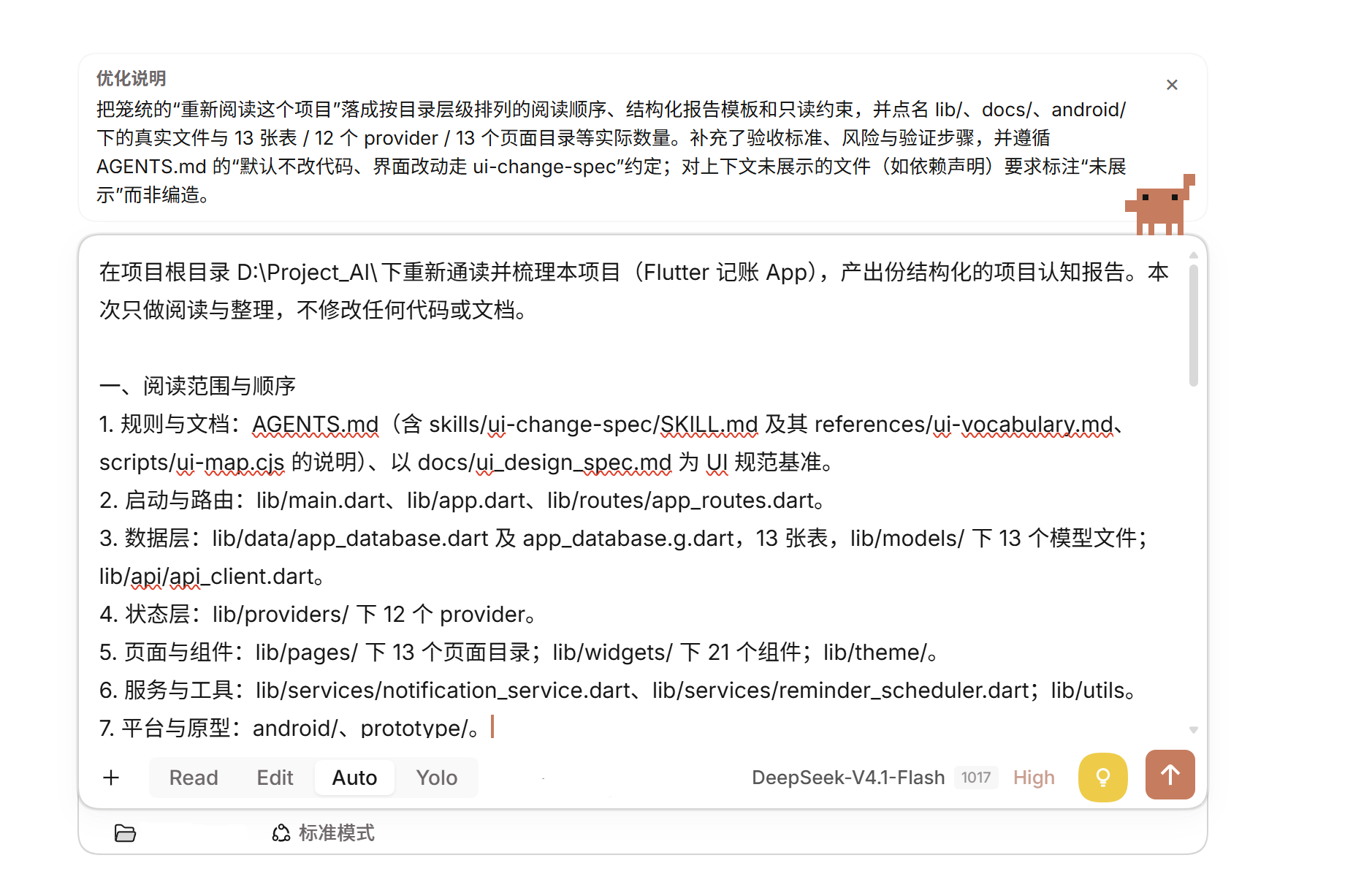
优化深度设为「深度」时的结果——输入框上方是优化说明面板,正文把“重新通读项目”落成按目录层级排列的阅读顺序、结构化报告模板和只读约束:
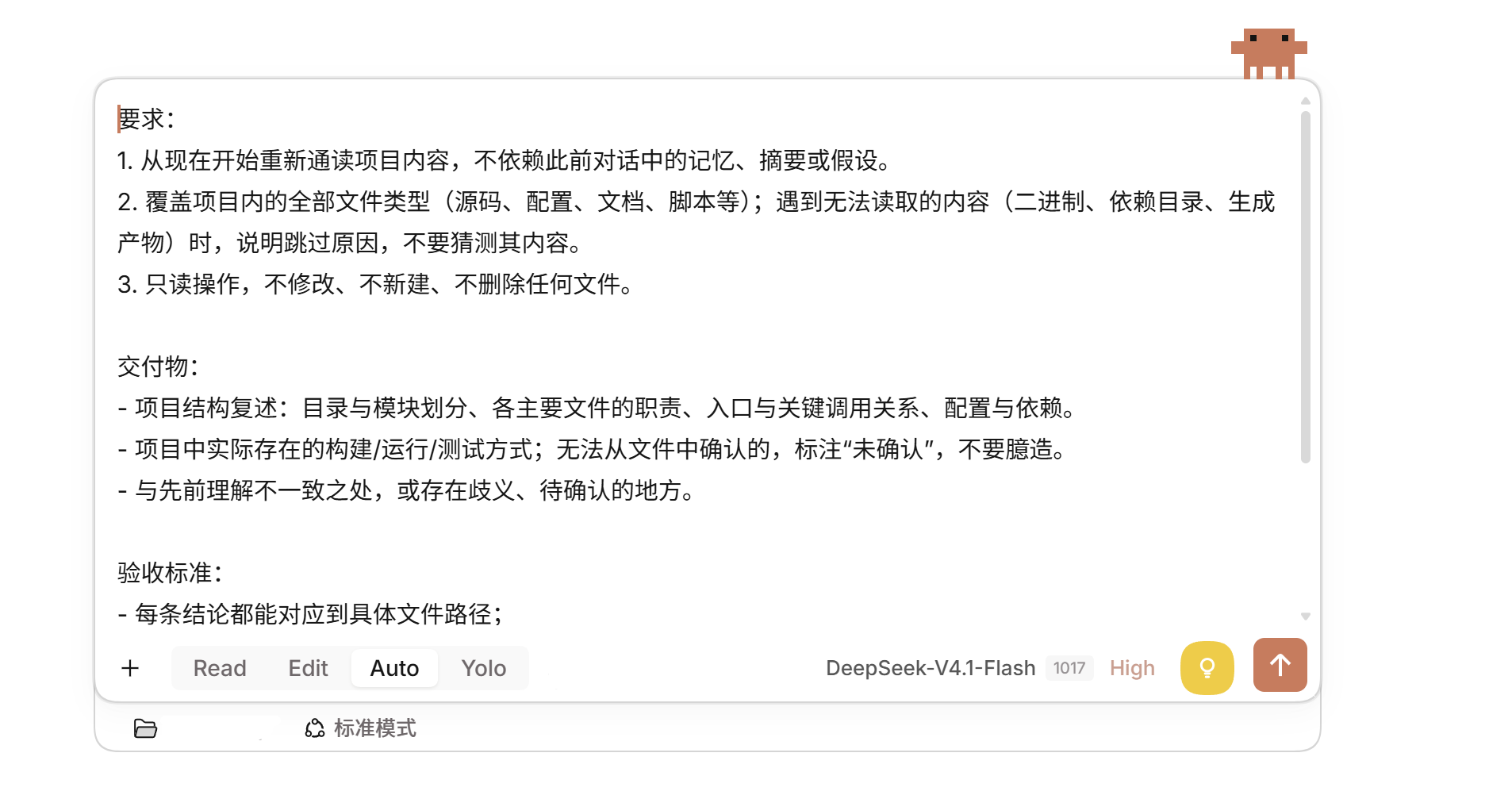
优化深度设为「标准」时的结果——提示词被整理成要求、交付物与验收标准三段:
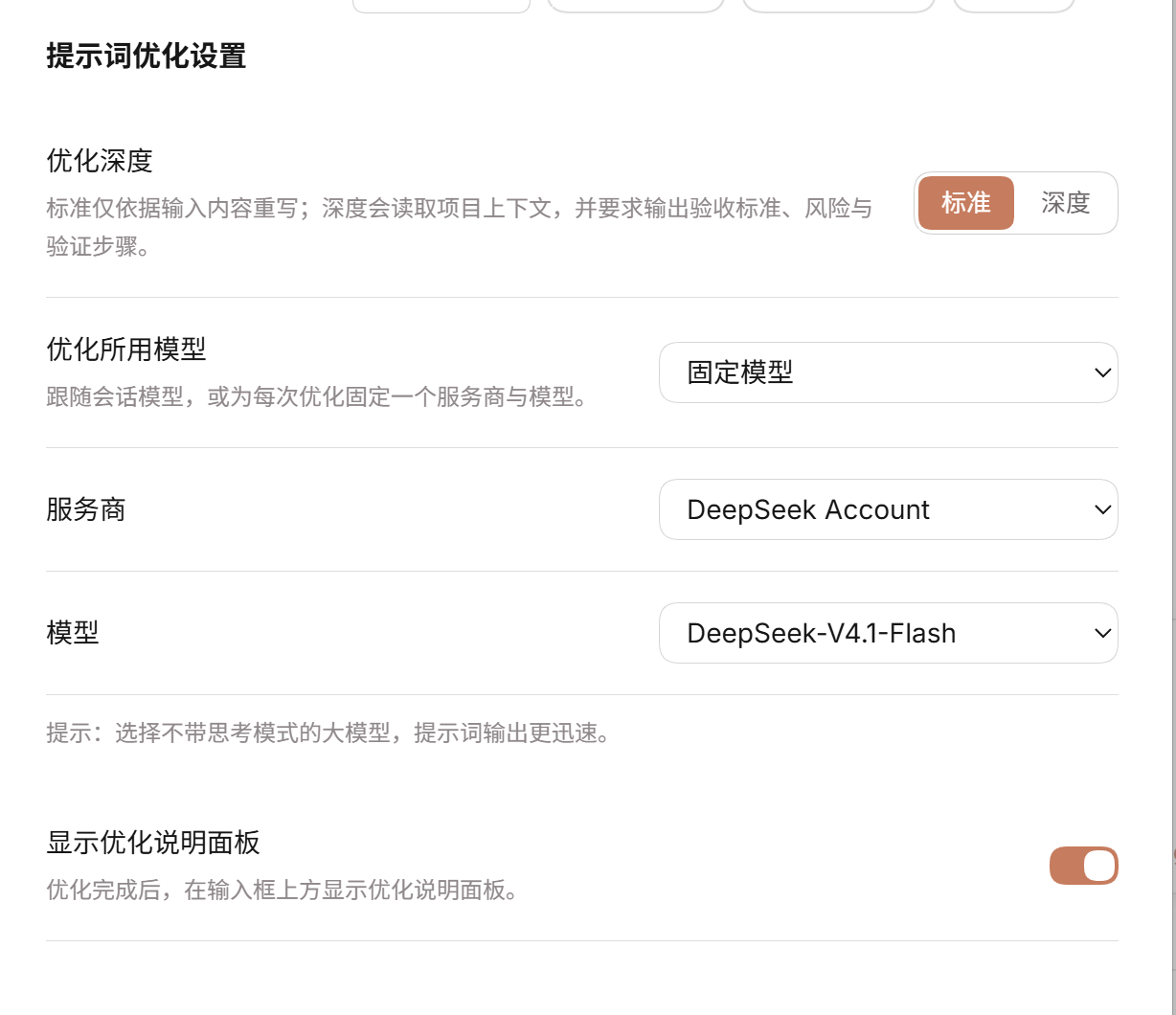
设置页——优化深度、优化所用模型、服务商与模型选择,以及说明面板开关:
前两张图底部工具条上的「标准模式」是 DSH 自身的会话模式,与本插件的优化深度(标准/深度)是两回事,二者互不影响。
功能
| 功能 | 说明 |
|---|---|
| 图标按钮 | 位于输入框工具栏,发送按钮左侧——黄色圆形按钮,灯泡图标 |
| Agent 工具 | optimize_prompt,会话中的 Agent 可以调用 |
| 斜杠命令 | /optimize <文本>,直接使用 |
| 说明面板 | 在输入框上方显示优化说明;输入框清空后自动关闭;可在设置的「提示词优化」页用开关隐藏 |
| 模型选择 | 在设置页选择优化所用的模型:跟随会话模型,或固定一个服务商与模型(经 DSH settings 表单持久化) |
| 流式回填 | 模型生成过程中把重写的提示词逐段写回输入框;进度经插件 Remote 通道读取,不会额外写入会话日志 |
| 优化深度 | 设置页两档切换:「标准」仅依据输入框内容优化;「深度」额外读取项目上下文,并要求模型输出验收标准、风险与验证步骤 |
| 双语界面 | 支持中英文 |
| 主题适配 | 使用 DSH 的 CSS 变量,明暗主题通用 |
项目上下文收集(仅深度模式)
后端扫描工作目录,收集:
- 技术栈标记 —
package.json、Cargo.toml、go.mod、pyproject.toml等 - 配置文档 —
README.md、CONTRIBUTING.md、.editorconfig等 - 工具链文件 —
tsconfig.json、.eslintrc、prettier.config.js等 - 源代码文件 — 在字符预算内采样,跳过
node_modules、.git、dist等目录
安装
dsh plugin add https://github.com/lucky6star9/prompt-optimizer-keep
安装后在 DSH 的插件管理器里启用这个 bundle。
English
What it does
Click the light bulb icon next to the send button. The plugin reads your workspace's file structure, key config files (package.json, tsconfig.json, etc.), and source code conventions, sends them together with your draft prompt to the LLM, and writes back an optimized version. The optimization notes appear in a panel above the input box.
Screenshots
With optimization depth set to deep: the notes panel above the input box, with the rewrite turning "re-read the project" into a directory-level reading order, a report template, and read-only constraints:
With optimization depth set to standard: the prompt reshaped into requirements, deliverables, and acceptance criteria:
The settings page — optimization depth, the model route, and the notes-panel switch:
The "standard mode" in the composer toolbar of the first two shots is DSH's own session mode. It is unrelated to this plugin's optimization depth (standard / deep); the two do not affect each other.
Features
| Feature | Description |
|---|---|
| Icon button | Sits left of the send button in the composer toolbar — a yellow circular button with a light bulb icon |
| Agent tool | optimize_prompt is available to any agent in the session |
| Slash command | /optimize <text> for direct use |
| Notes panel | Shows above the input box with optimization rationale; auto-dismisses when you clear the draft; can be hidden from the plugin's settings page |
| Model selection | Pick the model the optimizer runs on in the settings page: follow the session model, or pin a fixed provider and model (persisted through DSH's settings forms) |
| Live fill | Writes the rewrite into the composer while the model generates it; progress travels over the plugin's own Remote channel, so no extra session-log entries appear |
| Optimization depth | Two-stop toggle in the settings page: Standard rewrites the draft alone; Deep also reads the project context and asks the model for acceptance criteria, risks, and verification steps |
| Bilingual | English and Chinese UI strings |
| Theme-aware | Uses DSH's CSS variable tokens, works in both light and dark themes |
Project context gathering (deep mode only)
The host scans the working directory for:
- Stack markers —
package.json,Cargo.toml,go.mod,pyproject.toml, etc. - Config docs —
README.md,CONTRIBUTING.md,.editorconfig, etc. - Toolchain files —
tsconfig.json,.eslintrc,prettier.config.js, etc. - Source files — sampled up to a character budget, skipping
node_modules,.git,dist, etc.
Install
dsh plugin add https://github.com/lucky6star9/prompt-optimizer-keep
Then enable the bundle in your DSH profile via the Plugin Manager.
License / 许可证
MIT © luckystar6