dsh-archmap-explorer
merlinsassoon/dsh-archmap-explorer
把 Python 仓库变成可逐层下钻的架构图:一个命令生成自包含 HTML,从项目结构与执行流下钻到模块能力面、方法源码和调用者,不运行被测代码、不联网。
安装
dsh plugin --profile web add github:merlinsassoon/dsh-archmap-explorerREADME
ArchMap
Turn a Python codebase into a drillable architecture map — without running it.





▶ Live demo — browse a real project's map in the browser, no install, no sign-up.
archmap build . writes one self-contained architecture.html:
project overview → execution flow → module capability surface → method source & callers
Everything is static. No network, no execution of the analyzed code, no LLM tokens. The file opens from file://, survives an email attachment, and works on an air-gapped machine.
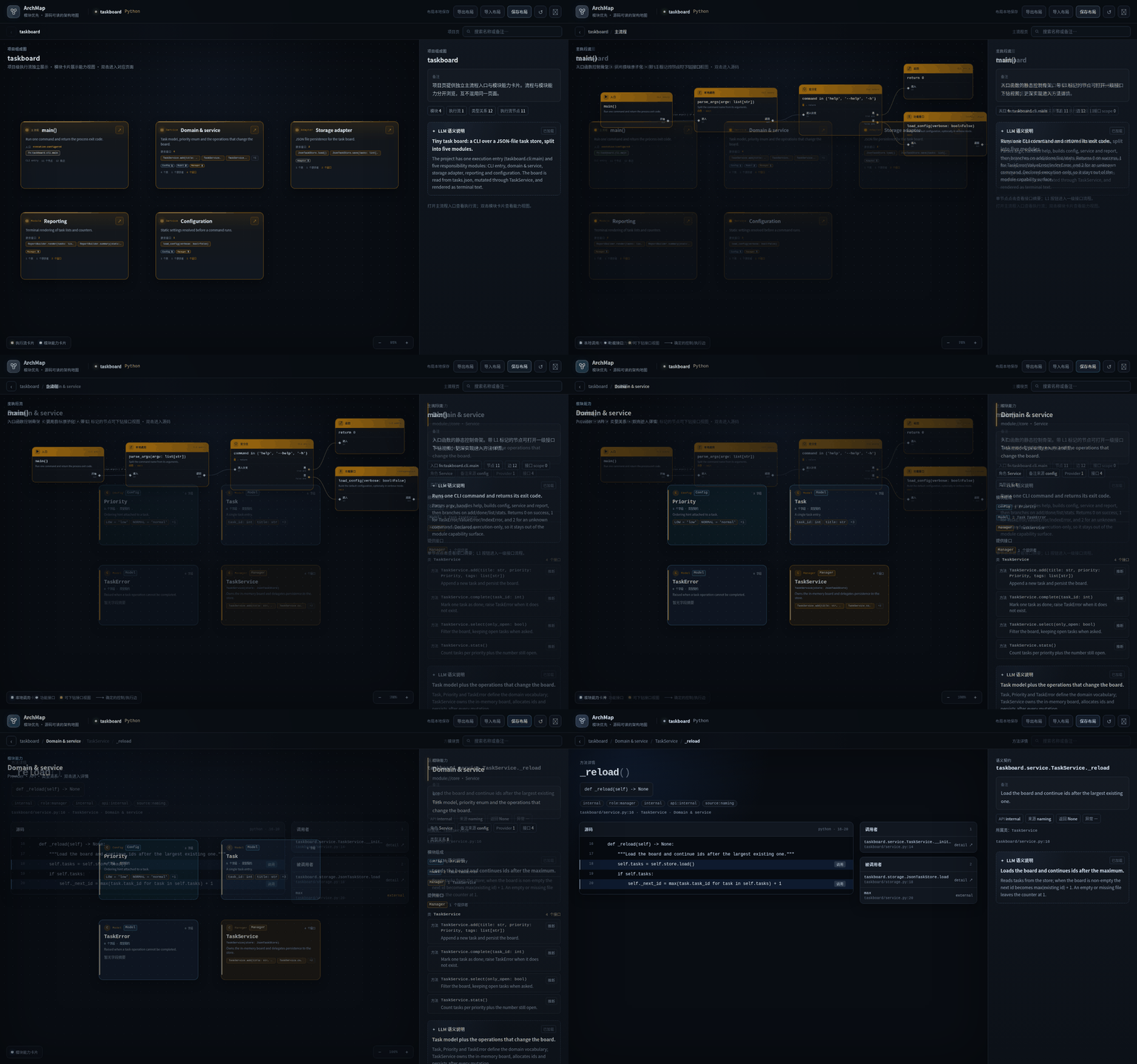
Three no-install demos, each a single HTML file:
| Demo | What it shows | Transfer |
|---|---|---|
| taskboard | 5 modules, 19 functions, hand-written semantic annotations | 65 KB |
| student_system | 6 modules, 52 functions, one server flow | 90 KB |
| ArchMap itself | the analyzer analyzing its own 308 functions | 600 KB |
The Web UI is currently in Chinese; labels in the screenshots are UI chrome, all content comes from your code.
Quick start
pip install "git+https://github.com/MerlinSassoon/dsh-archmap-explorer.git"

cd your-python-project
archmap build .            # → .archmap/architecture.html
archmap serve .archmap     # optional: local preview
Requires Python 3.10+, no third-party runtime dependencies.
Or try the samples that ship with this repository:
git clone https://github.com/MerlinSassoon/dsh-archmap-explorer
cd dsh-archmap-explorer
python3 -m archmap build examples/taskboard --out /tmp/taskboard
open /tmp/taskboard/architecture.html   # xdg-open on Linux
What it answers
| Question | Where it lives |
|---|---|
| Which modules exist and who owns what? | project page: one execution-flow card plus one card per capability module |
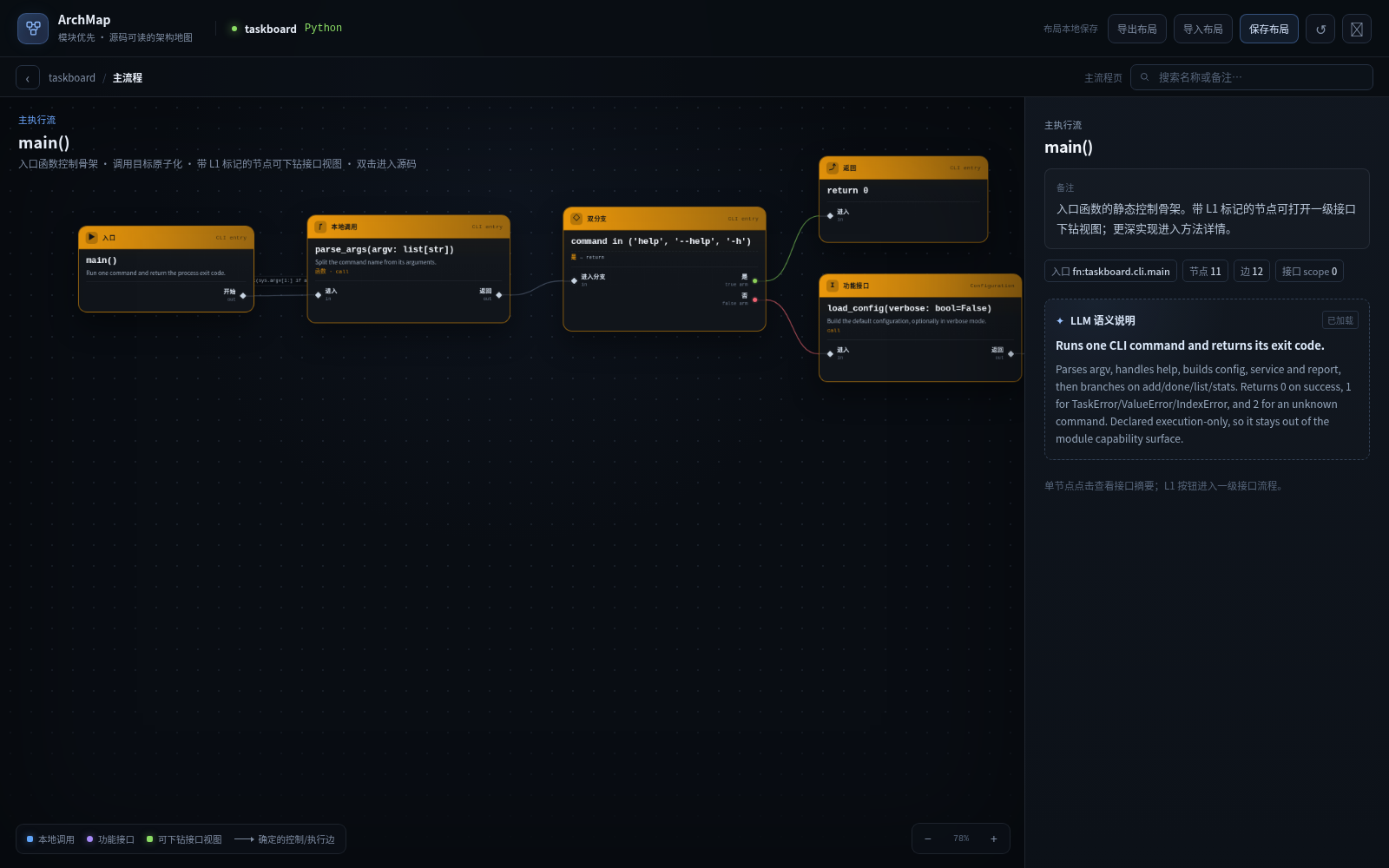
| What does the entry point actually do? | execution-flow page: bounded control skeleton — branches, loops, returns, dispatch |
| What does this module expose to the rest of the system? | module page: providers, public API surface, type relations in the right rail |
| Where is this method, who calls it, what does it call? | method page: source slice, callers, callees, unresolved calls kept separate |
| If I change this, what is affected? | archmap impact before.json after.json |
| What is the dependency structure? | archmap dsm architecture.json --level module |
Pages
| Route | Page |
|---|---|
#/project | Project: execution-flow cards and capability-module cards on the same grid |
#/flow[/<flowId>] | Execution flow of one entry point |
#/flow/<flowId>/scope/<nodeId> | Depth-1 interface scope of one orchestration callable |
#/module/<moduleId> | Module capability surface: classes, providers, API surface |
#/module/<moduleId>/function/<functionId> | Method detail: source, callers, callees, semantics |
Every page supports drag-to-arrange layouts, a resizable detail rail, and follows the system light/dark theme.
CLI
archmap build <project> [--out DIR] [--config FILE] [--annotations FILE]
archmap check <architecture.json>          # structural validation, exit code friendly
archmap method <project> --file F --function NAME
archmap serve <dir>                        # local preview, no build step
archmap diff <before.json> <after.json>

# read-only queries, no writes to the bundle
archmap impact <before.json> <after.json>
archmap trace <architecture.json> --from <function-id> [--direction inbound]
archmap surfaces <architecture.json> [--module ID]
archmap dsm <architecture.json> [--level module|provider]

# LLM annotation sidecar (the model writes text, Python decides what is valid)
archmap annotations context <architecture.json> --scope functions --json
archmap annotations apply <architecture.json> --proposal proposal.json --provider <id> --model <id>
Configuration
Settings are read from archmap.config.json at the project root, or from --config. A minimal file only needs modules, everything else has defaults:
{
  "projectName": "my-project",
  "language": "python",
  "include": ["src/**/*.py"],
  "exclude": ["**/__pycache__/**", "**/.venv/**"],
  "entrypoints": ["src.app.main:main"],
  "executionEntrypoints": ["src.app.main:App.run"],
  "modules": [
    {
      "id": "app",
      "name": "Application entry",
      "include": ["src/app/**"],
      "note": "Entry points, configuration and top-level orchestration.",
      "role": "service"
    }
  ]
}
Full rules, decision tables and checklists live in docs/archmap-config-generation.md and docs/archmap-architecture-spec.md.
DSH plugin
ArchMap also ships as a DSH bundle. The plugin only bridges DSH tools to the bundled Python core — AST work, graph projection, validation and HTML rendering stay in Python.
dsh plugin --profile web add github:MerlinSassoon/dsh-archmap-explorer
dsh --profile web --dump-config        # expect id: tool-archmap
A prebuilt tarball is attached to every release if you prefer a download over a git checkout:
dsh plugin --profile web add \
  https://github.com/MerlinSassoon/dsh-archmap-explorer/releases/latest/download/dsh-archmap-explorer.tgz
Since 0.2.2 the package ships no install-time build script, so no pnpm onlyBuiltDependencies
approval is needed. Details: docs/dsh-plugin.md.
| Tool | Purpose |
|---|---|
archmap_build | Build architecture.json + self-contained HTML, return structured diagnostics |
archmap_annotate | Generate source-level semantics through the DSH host model, refresh missing/stale/all |
archmap_query | Read-only check/trace/impact/surfaces/dsm/method |
archmap_guide | Read the bundled authoritative docs when no native skill tool exists |
The plugin carries two skills (archmap-config-generation, archmap-code-conventions) and the whole Python core, so users never pip install anything.
What it deliberately is not
- Not a runtime tracer. No call stacks, no timing, no dynamic imports.
- No statement-level CFG or dataflow. Flows are bounded to one entry point's control skeleton; call targets stay atomic.
- Dynamic dispatch is not guessed. Unresolved calls, incomplete candidate sets and low-confidence relations are surfaced as such, never as facts.
- Heuristic layout. Dense graphs can overlap; layout overrides are exported from the page.
- Python only. An ArkTS front end is planned, not implemented.
If an answer looks certain but the analysis could not see the call, the tool is supposed to say so. That contract is the reason to prefer it over an LLM sketching a diagram.
Documentation
- README.zh.md — full Chinese documentation (configuration, contracts, plugin internals)
- docs/archmap-v3-design.md — design and data model
- docs/dsh-plugin.md — plugin architecture, errors, acceptance commands
- docs/schema/archmap-v6.4-bundle.schema.json — bundle schema
Development
python3 -m pytest -q                                  # Python core
npm test                                              # plugin
ARCHMAP_RUN_BROWSER=1 python3 -m pytest -q tests/test_browser_smoke.py

python3 -m archmap build . --config examples/archmap_v3.archmap.json --out .archmap/self
python3 -m archmap check .archmap/self/architecture.json
License: MIT.