dsh-model-quickslots
moruteaven/dsh-model-quickslots
输入框上方的一排模型预设按钮:左键点击把当前会话切换到该预设的提供方、模型与思考强度,右键点击打开该预设的编辑弹窗,每个预设还可以自定义备注名称而不必使用模型名。编辑弹窗读取当前会话真实的模型目录,预设保存在本地。
安装
dsh plugin --profile web add github:moruteaven/dsh-model-quickslotsREADME
dsh-model-quickslots


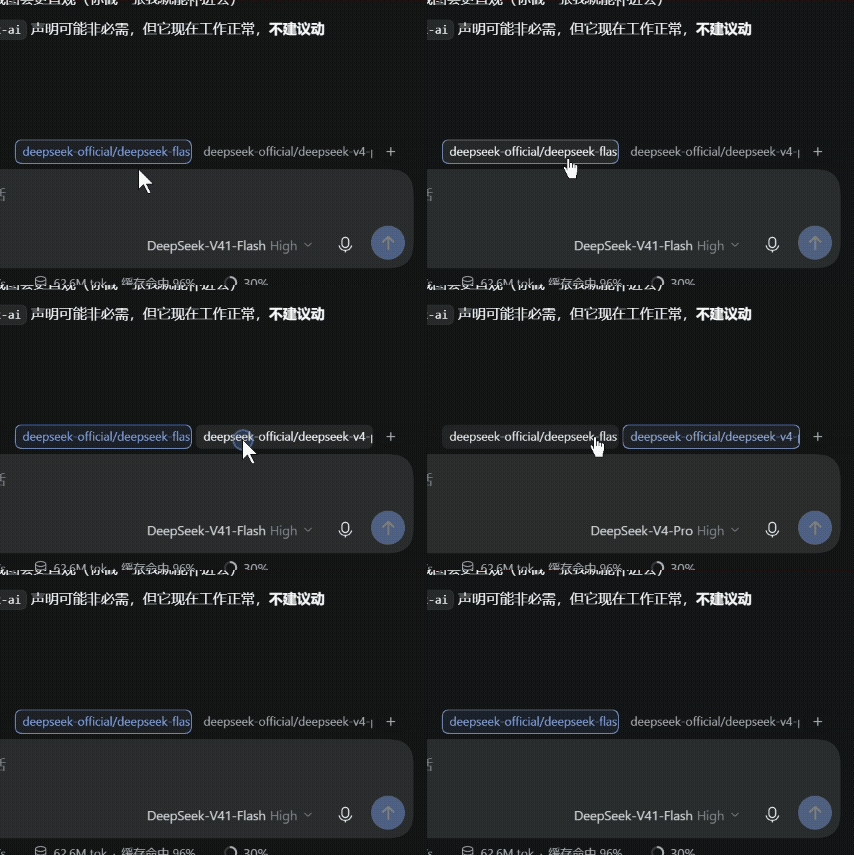
A row of one-click model preset buttons for the DeepSeek Harness (DSH) composer. Each button is a saved preset — provider + model + reasoning effort. Left-click switches the current session's model; right-click opens the editor.
Features
- One-click switching — left-click a preset to switch the current session's model and reasoning effort.
- Custom labels — every preset can carry its own name, so it does not have to read like a model id. Name one "Fast" and another "Deep thinking".
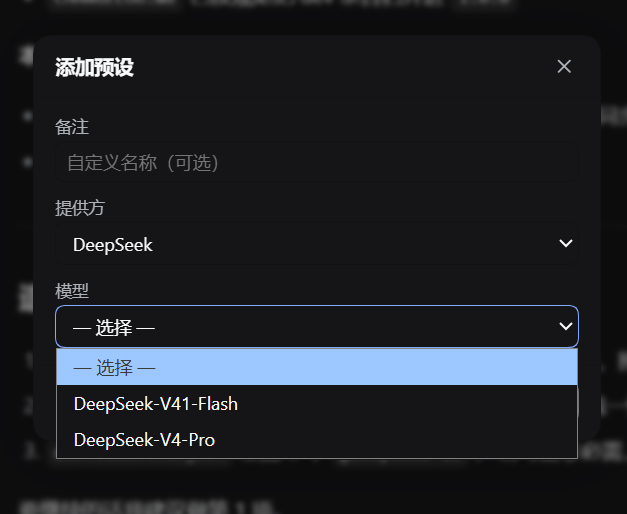
- Right-click to edit — right-click any preset to change its provider, model, effort, or label.
- Live model catalog — the editor's dropdowns are populated from the models actually available to the current session. No hardcoded model list.
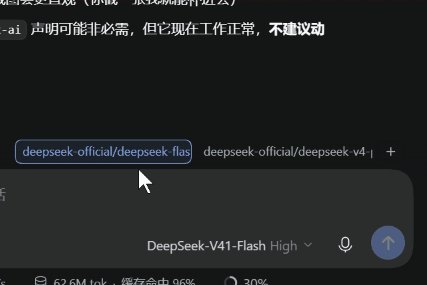
- Active preset highlight — the preset matching the session's current model is outlined.
- Failure feedback — a preset whose switch fails turns red instead of failing silently.
- Local persistence — presets are stored in the browser's
localStorage; no account or sync service involved. - Theme aware — styled with DSH theme variables, so it follows light and dark themes.
Demo
Left-click a preset to switch the current session's model:
Screenshots
Preset buttons sit right above the composer, aligned with the input card:
Right-click a preset to edit it — the dropdowns come from your live model catalog:
Installation
From npm (recommended)
pnpm add @moruteaven/dsh-model-quickslots
Then add the package to your profile's dsh.profile.bundles list and restart DSH.
Via the DSH plugin manager
Open Settings → Plugins, search for @moruteaven/dsh-model-quickslots, and install it.
From source
Two public mirrors are kept in sync — clone whichever is faster for you:
# GitHub
git clone https://github.com/MoruTeaven/dsh-model-quickslots.git

# Gitee (mirror, faster in mainland China)
git clone https://gitee.com/moruteaven/dsh-model-quickslots.git

cd dsh-model-quickslots
pnpm install
pnpm build
Usage
| Action | Result |
|---|---|
| Left-click a preset | Switch the session to that preset's model configuration |
| Right-click a preset | Open the editor for that preset |
| Click + | Create a new preset |
| Press Esc | Close the editor |
| Press Ctrl/Cmd + Enter | Save the preset |
When you have no presets yet, the row shows a single Model presets entry — click it to create your first one.
The button row sits directly above the composer and lines up with the input card's right edge.
Development
pnpm build   # bundle lib/client.js (browser half) and lib/index.js (host half)
pnpm dev     # rebuild on change
pnpm test    # run the self-test suite
The plugin is a pure client-side Web plugin registered into the conversation.input.dock slot. Model switching goes through DSH's own model-directory service, so it behaves exactly like the built-in model picker — including its availability rules and race handling.
License
Author
抹露茶柒 (MoruTeaven) — me@MoruTeaven.com — www.MoruTeaven.com