dsh-archive-manager
ms666666/dsh-archive-manager
归档管理:在设置页列出已归档会话,并可真正删除,连同会话日志、归档标记与投影缓存一并清理。
安装
dsh plugin --profile web add github:ms666666/dsh-archive-managerREADME
dsh-archive-manager-plus
Archive manager: list archived sessions in the Settings page and delete them for real (session log, archive marker, and projection cache removed together).
English | 中文



Features
- Adds an Archive Manager tab to the Settings page (official
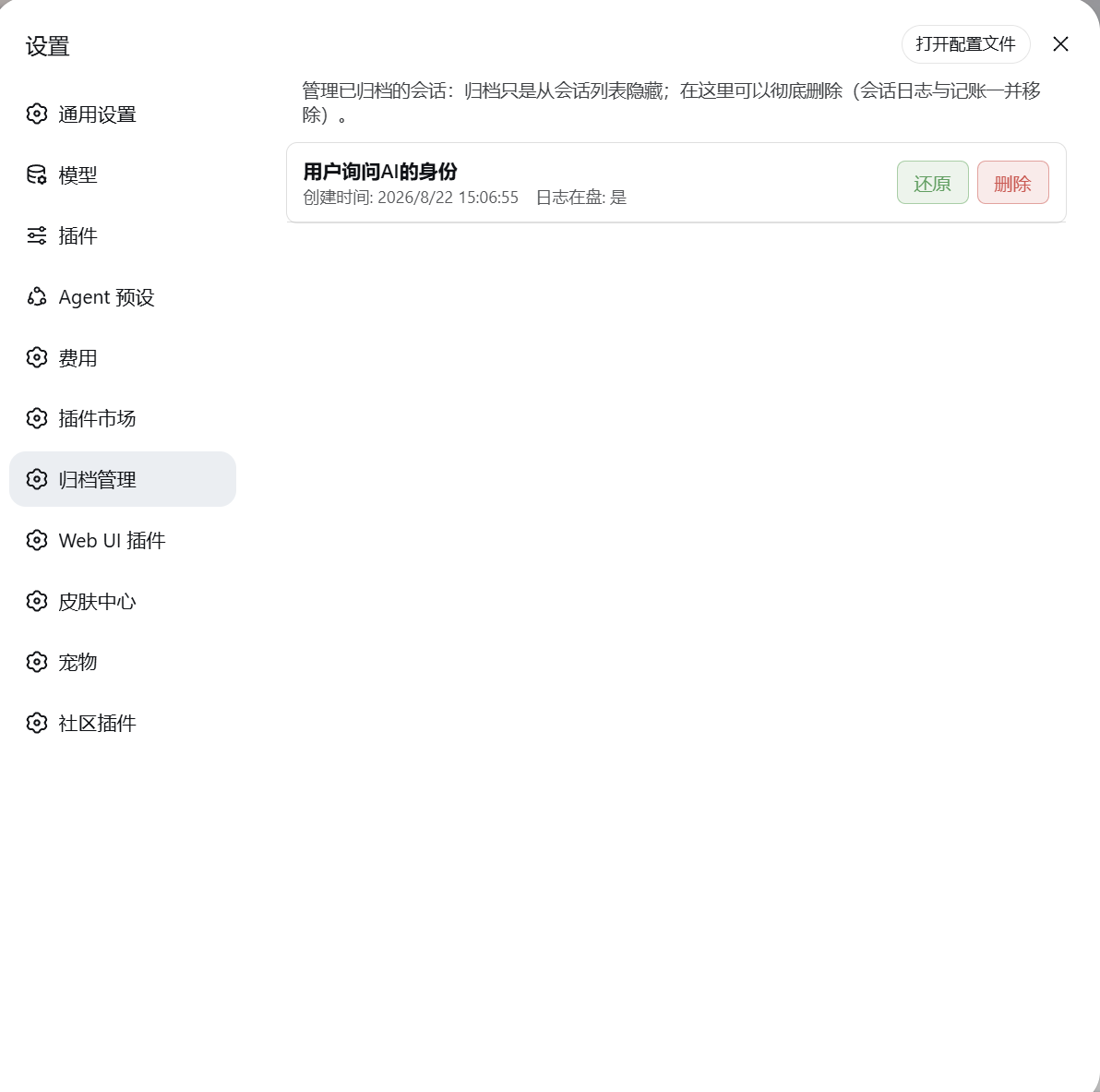
settings.sectionslot — peers with General, Models, etc.) - Lists all archived sessions: title, created time, and whether the log still exists on disk
- A Delete button on each row; a confirmation dialog, then a real delete
- Security-minded: same-origin POSTs only, strict session-id validation, Node self-verification after writes, automatic rollback on failure
- No UTF-8 BOM pitfalls across PowerShell editions (Windows PowerShell 5.1 and PowerShell 7 behave identically)
Why
DSH's "archive session" only hides a session from the grouped views: the session.jsonl.zstd log and its accounting stay untouched, and the official UI has no delete entry. This plugin adds the "real delete" capability — archiving is only hiding; when you actually want the disk cleaned up, do it here.
How it works
A dual-half plugin (the same shape as the official plugin ecosystem):
| Half | Location | Responsibility |
|---|---|---|
| host half | lib/ | Mounts two HTTP routes: GET /dsh-archive-manager-plus/list lists archived sessions; POST /dsh-archive-manager-plus/delete deletes (session directory + workspace accounting + projection cache) |
| browser half | client/ | Registers the settings.section page, renders the list + delete buttons (a confirm dialog first, then calls the host route) |
What a delete touches on disk:
- Removes the id from
global.archivedSessionIdsinworkspace.json - Removes the id from every workspace's
sessionIds - Deletes
<DSH_HOME>/sessions/<workspace-encoded>/<session-id>/ - Clears the session entry in
session_projcache.json
The
cost-meter/ledger.jsonis left alone (spend history is kept as a record).
Install
1. npm (recommended, the community standard)
npm install dsh-archive-manager-plus
This puts the package into your project/global node_modules; a DSH plugin must also be registered in a profile's bundle layer:
- In
<profile>/package.json→dependencies, add"dsh-archive-manager-plus": "^0.1.0" - In
dsh.profile.bundles, append"dsh-archive-manager-plus" - Run
npm install(orpnpm install), confirm the package landed in the profile, restart DSH and refresh the page
2. One-shot install script (local development)
powershell -ExecutionPolicy Bypass -File .\install.ps1
The script resolves the plugin root from its own location (runnable from anywhere) and does: whitelist-copy the shipped files → register the dependency and bundle → Node self-verification (no BOM / valid JSON / entries complete) → rollback from backup on failure.
| Parameter | Description |
|---|---|
-ProfileDir <path> | Explicit profile directory (highest priority) |
-ProfileName <name> | Profile name, default web |
-DSHHome <path> | DSH home (defaults to $env:DSH_HOME, then ~/.dsh) |
-DryRun | Preview only, write nothing |
-SkipCopy | Skip the file copy; update the manifest only |
.\install.ps1 -DryRun                    # preview
.\install.ps1 -DSHHome <your-dsh-home>   # point at a specific home
3. Manual
- Copy
lib/,client/,cordis.patch.yml,LICENSE,README.md,package.jsonto<profile>/node_modules/dsh-archive-manager-plus/ - In
<profile>/package.json→dependencies, add"dsh-archive-manager-plus": "<version>" - In
dsh.profile.bundles, append"dsh-archive-manager-plus" - Save (UTF-8 without BOM), restart DSH and refresh the page
⚠️ BOM trap: a
package.jsonwith a UTF-8 BOM makes DSH fail to boot withUnexpected token ''. Prefer the npm install or the one-shot script (both write BOM-less UTF-8 and self-verify).
Usage
- In the sidebar, open any session row's
⋯menu → Archive session (archive 1–2 sessions to try) - Open Settings (gear) → Archive Manager
- The list shows archived sessions: title / created time / whether the log is on disk
- Click Delete on a row → confirm → the row disappears and the disk log is removed
Privacy & Security
- Deletion is limited to archived sessions only; never delete a session that is currently running (caller's responsibility)
- Deletion removes the disk log and associated accounting; spend history is kept
- In-memory host state (e.g. leftover
session.listrows) may briefly remain visible until the next reconnect/refresh — the file and registry layers are always consistent and durable - The gateway accepts same-origin requests only, and session ids pass a strict format whitelist (
session-+ hex/dashes), preventing path traversal - All paths in this README are placeholders (
<DSH_HOME>,<profile>…); do not paste machine paths, usernames, or session ids into issues/discussions
Development
- Browser half is a hand-written CJS bundle (no build step): edit
client/client.jsand refresh the page (HMR picks it up) - Host half is plain ESM: edit
lib/and restart DSH - After version bumps, re-run
install.ps1to sync the manifest (no script edits needed)
Publishing new versions (npm)
- Bump
versioninpackage.json(follow SemVer) - Verify locally:
node --check lib/*.js client/client.js+npm publish --dry-run - Publish:
npm publish --registry=https://registry.npmjs.org/ - Create a matching GitHub release / tag (
v<version>) to keep repository and npm in sync