dsh-hybrid-memory
nonenameless/dsh-hybrid-memory
为 DeepSeek Harness 提供透明的 Markdown 长期记忆:分层事实、后台提炼、BM25 检索、人格编辑与心跳。它的 HTTP 路由没有 DSH 的访问检查,浏览器里打开的网页可以调用它们。
安装
dsh plugin --profile web add github:nonenameless/dsh-hybrid-memoryREADME
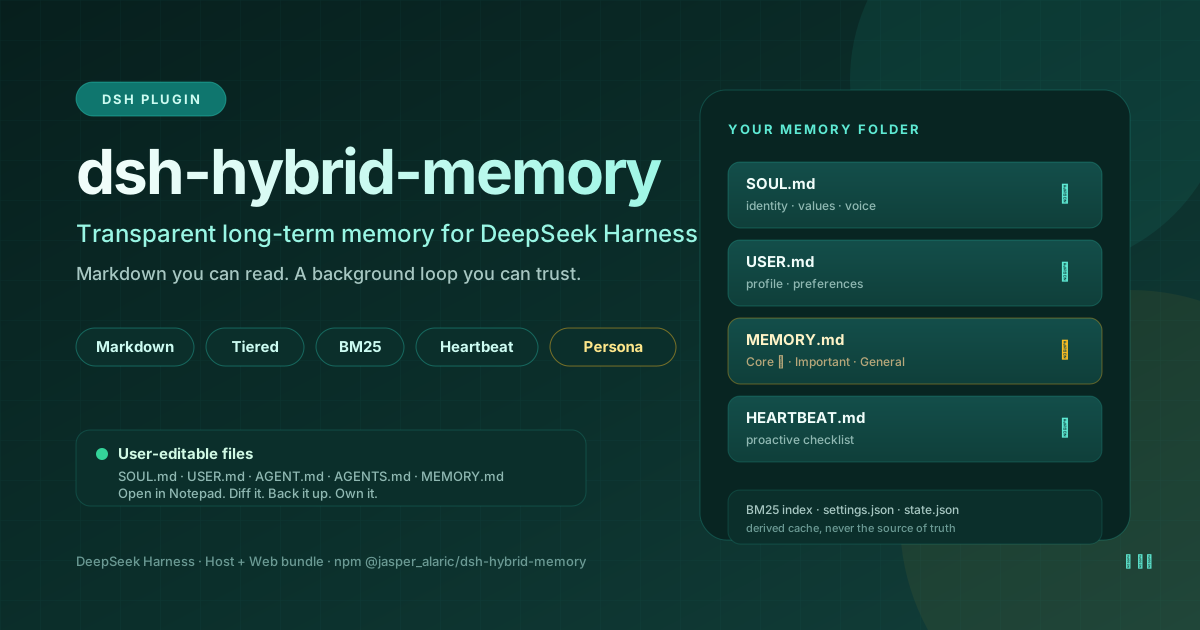
dsh-hybrid-memory





Transparent Markdown long-term memory for DeepSeek Harness.
Markdown you can read. A background loop you can trust. On-demand retrieval instead of full prompt stuffing.
Why this exists
Long-term memory in agent systems usually fails in one of three ways:
- It is opaque. Facts live in a vector store or a hidden summary; users cannot read, correct, diff, or back up what the agent believes.
- It is static. A single
AGENTS.mdor system prompt is written once and never updated, so stable preferences and decisions are lost between sessions. - It is expensive. The whole memory file is injected every turn, so context grows until quality drops and the KV cache stops helping.
dsh-hybrid-memory treats memory as a user-owned Markdown folder with a background maintenance loop and on-demand retrieval:
SOUL.md,USER.md,AGENT.md,AGENTS.mdare silently injected as a bounded system-prompt section.MEMORY.mdis not injected in full; it is indexed and queried throughmemory_search/memory_read.- A background worker extracts durable preferences and facts, merges them without duplicates, and refines the tiers.
- A heartbeat maintains the files and can optionally wake an idle agent with a plugin-sourced follow-up.
At a glance
| Storage | Plain Markdown under $DSH_HOME/hybrid_memory/ (or ~/.dsh/hybrid_memory/) |
| Memory tiers | Core → Important → General, with editable budgets |
| Retrieval | Local BM25 with Chinese single-character/bigram and English word tokenization |
| Injection | SOUL + USER + AGENT + AGENTS; MEMORY.md stays on-demand |
| Extraction | Async, single-concurrency, retry/backoff, threshold + idle + session-end triggers |
| Tools | memory_read, memory_search, memory_update, persona_update |
| UI | Settings section + optional sidebar quick-access panel |
| Heartbeat | Maintenance, idle extraction, optional proactive wake with cooldown |
| Dependencies | None beyond Node.js built-ins and the DSH Host/Web runtime |
Design principles
- The user owns the data. Every memory is a text file. Open it in Notepad, edit it, diff it, back it up.
- The session log remains the source of truth. Memory is a derived cache, not a replacement for the DSH session history.
- The top tier stays small.
Coreis reserved for important facts and explicit “remember this” requests; pinned entries are never auto-demoted. - Context is a budget. Inject a small, stable profile; retrieve large factual memory only when needed.
- Background work must not block the conversation. Extraction runs in a single async worker with backoff.
- Failure must be contained. Missing files are created, malformed sidecars fall back, registration is guarded, and tool schemas are strict.
Architecture
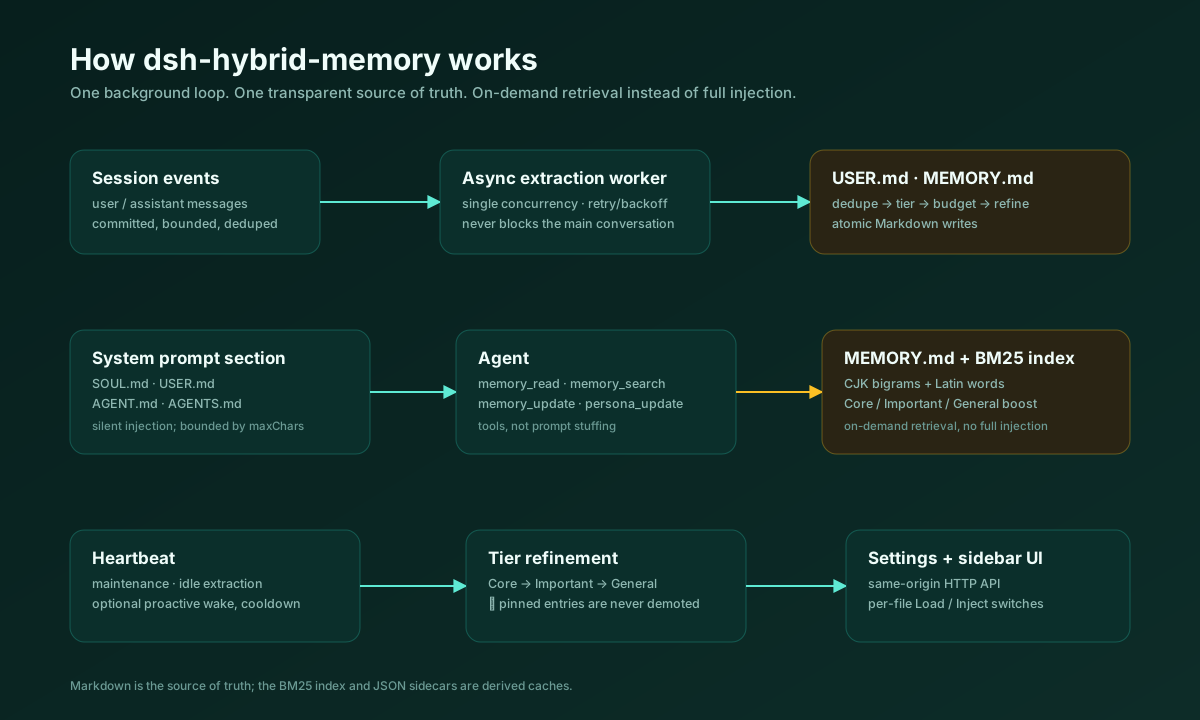
Session events
     │
     │  async, single worker, bounded transcript
     ▼
Extraction worker ──────────────► USER.md / MEMORY.md
     │
     ├── SOUL / USER / AGENT / AGENTS ──► system prompt section
     ├── MEMORY ──► BM25 index ──► memory_search / memory_read
     ├── memory_update / persona_update ──► atomic file writes
     └── heartbeat ──► maintenance / optional proactive wake
Storage layout
The plugin creates these files on first use:
| File | Purpose | Default |
|---|---|---|
SOUL.md | Agent persona: identity, values, voice, boundaries | Injected |
USER.md | User profile, preferences, boundaries | Injected; updated in background |
AGENT.md | Operating rules and self-model for this agent | Injected |
AGENTS.md | Multi-agent / team collaboration conventions | Injected |
MEMORY.md | Tiered long-term facts | Search-only; not injected in full |
MEMORY.archive.md | Old entries archived after General overflow | Not injected or searched; audit only |
HEARTBEAT.md | Proactive checklist used when a heartbeat wakes the agent | Search-only |
settings.json | Per-file switches, extraction, heartbeat, budgets | Auto-created |
state.json | Turn counters, last extraction, last heartbeat, errors | Auto-created |
Every Markdown file has independent Load and Inject switches:
- Load: include the file in the search index.
- Inject: add the file to the system prompt.
The default is “all files loaded”; only persona/profile files are injected by default.
Tiered memory
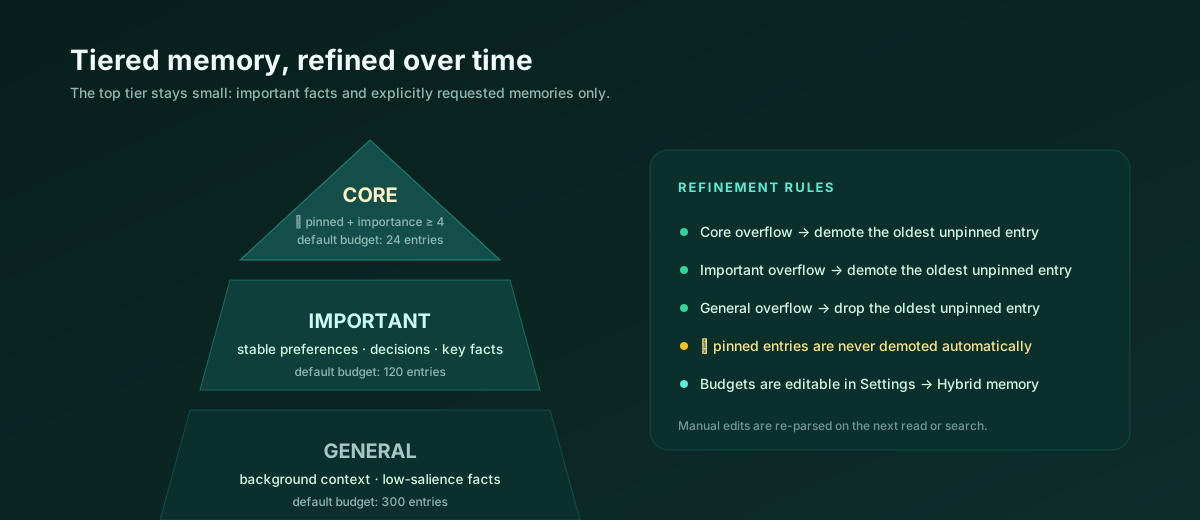
## Core
- ⭐ 用户明确要求永久记住:回答先给结论。

## Important
- 项目使用 TypeScript 与 Node.js。

## General
- 用户常在晚上工作。
Rules:
Coreis for important facts and explicit “remember this” requests. The extraction prompt only promotes items with high importance or a pin.- When
Coreexceeds its budget, the oldest unpinned entry is demoted toImportant. - When
Importantexceeds its budget, the oldest unpinned entry moves toGeneral. - When
Generalexceeds its budget, the oldest unpinned entry is appended toMEMORY.archive.mdinstead of being dropped silently. ⭐pinned entries are never moved automatically; when a tier is entirely pinned, lower tiers are still refined.- The extraction context includes all
Coreentries plus the newest lower-tier entries, not just the head of the file. - Manual edits are re-parsed on the next read or search; the file remains the authority.
- A total-character cap (default 12,000) archives the oldest General entries, then the oldest unpinned Important entries, once entry budgets alone would leave the corpus too large.
Default budgets: Core 8, Important 40, General 80, plus a 12,000 character total cap. All are editable in the UI.
Background extraction
The worker reads only committed user/message and assistant/message events, processing them in count- and character-bounded batches. Each batch starts at the oldest unprocessed message and commits only through the last message it actually processed, so anything that does not fit waits for the next batch instead of being skipped. It skips plugin notices, tool noise, and subagent sessions by default.
Triggers:
- every
Ncompleted turns (default 10); - when a session is disposed or an agent is released;
- after an idle timeout (default 10 minutes);
- on a heartbeat tick.
The extraction prompt asks for strict JSON:
{
  "user_preferences": [
    { "text": "…", "importance": 1, "pinned": false }
  ],
  "facts": [
    { "text": "…", "tier": "core|important|general", "importance": 1, "pinned": false }
  ]
}
The merge path:
- parse tolerant JSON (fences/prose tolerated, malformed JSON rejected);
- deduplicate against existing
USER.md/MEMORY.mdentries; - append new entries;
- refine tier budgets;
- commit the exact
throughSeqonly after success, so failures are retried without losing messages.
Model route selection: last request header → live agent model → extraction.provider + extraction.model in settings. If no route exists, extraction is skipped and the error is recorded; the conversation is unaffected.
Retrieval
memory_search uses a local BM25 index over enabled files:
- Chinese text is tokenized into single characters and bigrams; Latin text into words.
CoreandImportantresults receive a small boost.- Results include file, tier, line, score, and a bounded snippet.
- A query with multi-character terms requires at least one strong term, which avoids noisy single-character matches.
memory_read returns numbered lines with offset / limit paging. MEMORY.md is intentionally never injected in full.
Tools
| Tool | What it does |
|---|---|
memory_read | Read one memory file with line numbers, paged with offset / limit. |
memory_search | BM25 search over enabled files with file/tier/line results. |
memory_update | append, replace, delete, or move one memory entry; supports tiers and pinning. |
persona_update | Replace SOUL.md or append a section under a heading. |
All tool schemas use a single string type per node, string descriptions, and object-root required arrays. Registration is individually guarded so a schema or duplicate-name problem cannot take down the Host.
Settings UI
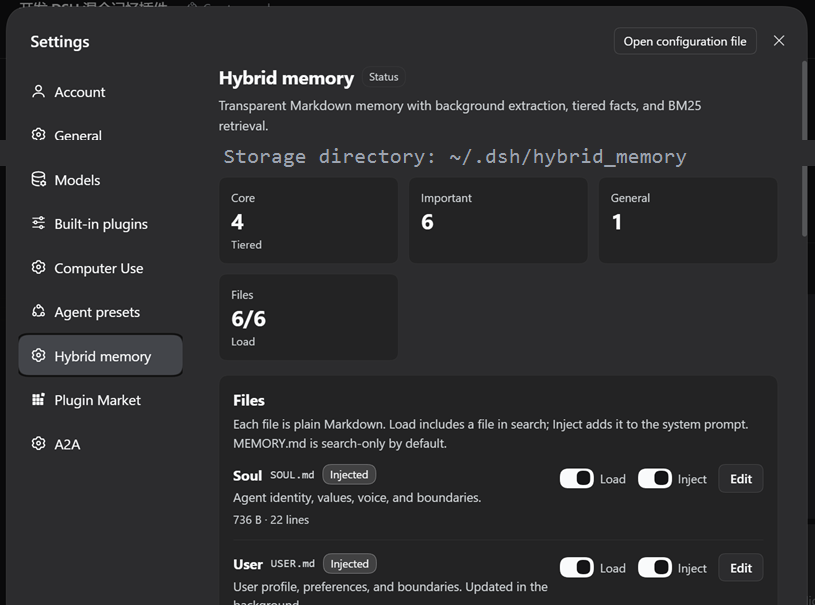
Settings → Hybrid memory gives you:
- storage directory and file status;
- Core / Important / General counts;
- per-file Load / Inject switches, size, line count, updated time, and an editor;
- automatic extraction switch, turn threshold, idle minutes;
- heartbeat switch, interval, proactive wake, cooldown;
- tier budgets;
- “Extract now”, “Pulse now”, “Reindex”;
- BM25 search with result preview;
- last extraction, last heartbeat, tracked sessions, and errors.
An optional sidebar quick-access panel uses the same component. It is disabled by default and can be enabled in settings.
Comparison
| Approach | Strength | Typical limitation | What this plugin adds |
|---|---|---|---|
| Vector-memory agents | Strong semantic recall | Opaque, not directly editable, embedding dependency | Transparent files, tiers, BM25, manual editing |
Static AGENTS.md / system prompt | Simple and stable | Static, no extraction, no retrieval | Background updates, tiers, search, heartbeat |
| OpenClaw-style file memory | Transparent and user-owned | Often manual/static | Background loop, BM25, UI, heartbeat |
| Hermes-style background loop | Automatic, low-friction | Memory can be a black box | Markdown results, auditability, on-demand retrieval |
| Cloud memory assistants | Cross-device convenience | Cloud-owned, not local-first | Local files, native tools, user control |
| MemGPT / Letta-style frameworks | Rich memory runtime | Heavy architecture, opaque to end users | Lightweight DSH-native bundle, readable files |
Compared with a pure vector-memory agent
- You can inspect, edit, diff, and back up every memory.
- Retrieval is deterministic and explainable: file, line, tier, score.
- No embedding service or vector database is required.
Trade-off: BM25 does not generalize paraphrases as well as embeddings. For “that thing we discussed last time”, use keywords or let the agent read the relevant file.
Compared with a static AGENTS.md
- Memory is updated in the background.
- Facts and preferences are separated into
USER.mdandMEMORY.md. - Long-term facts are searchable instead of fully injected.
- Tiers keep the important part small.
Compared with OpenClaw and Hermes
It keeps OpenClaw’s file transparency and Hermes’s background closure, then adds tiering, BM25 retrieval, DSH-native tools, a settings page, a sidebar entry, and crash-safe writes.
Install
dsh plugin --profile web add @jasper_alaric/dsh-hybrid-memory
Or install the bundle through the DSH Plugin Manager / DSH Market once the catalog entry is published.
For local development:
plugin_manager install_bundle
target: E:\path\to\dsh-hybrid-memory-release
After installation:
- Open Settings → Hybrid memory.
- Check the storage directory and file switches.
- Open a new session;
SOUL.md,USER.md,AGENT.md, andAGENTS.mdare injected silently. - Use
memory_searchormemory_readwhen the agent needs older facts.
The DSH Market catalog requires a PR to
awesome-dsh-plugin; the exact entry is indocs/awesome-dsh-plugin.md.
Configuration
The loader row only carries storageDir:
- insert:
    - id: hybrid-memory
      name: '@jasper_alaric/dsh-hybrid-memory'
      config:
        storageDir: ''
Everything else lives in settings.json and is editable in the UI:
{
  "files": {
    "soul": { "enabled": true, "inject": true },
    "user": { "enabled": true, "inject": true },
    "agent": { "enabled": true, "inject": true },
    "agents": { "enabled": true, "inject": true },
    "memory": { "enabled": true, "inject": false },
    "heartbeat": { "enabled": true, "inject": false }
  },
  "injection": { "maxChars": 12000 },
  "extraction": {
    "enabled": true,
    "everyTurns": 10,
    "idleMinutes": 10,
    "maxTranscriptChars": 14000,
    "maxMessages": 40,
    "provider": "",
    "model": "",
    "maxTokens": 1400,
    "retryMinutes": 10,
    "includeSubagents": false
  },
  "heartbeat": {
    "enabled": true,
    "intervalMinutes": 30,
    "proactive": true,
    "wakeCooldownMinutes": 180,
    "prompt": ""
  },
  "budgets": { "core": 8, "important": 40, "general": 80, "totalChars": 12000 },
  "ui": { "sidebar": false }
}
Safety and failure handling
- Atomic writes: temp file + rename; Windows falls back to
copyFile. - Missing files are created from templates; empty files are treated as missing.
- Malformed
settings.json/state.jsonfall back to defaults and record an error. - Tool, prompt-section, and HTTP-route registrations are individually wrapped; one failure does not stop the plugin.
- Tool schemas are strict JSON Schema with string types and descriptions.
- HTTP routes use the same-origin
connection.authorizeIndexcheck as the GUI; no CORS, no token in the page. - File IDs are whitelisted; path traversal is rejected; request bodies and entry lengths are bounded.
- Background extraction failures are recorded in
state.jsonand retried with backoff; they never reject a conversation turn.
Testing
node --test tests/*.test.mjs
The suite covers:
- first-run file creation;
- append / replace / delete;
- tier demotion and pinned-entry protection;
- Chinese and English BM25 behavior;
- malformed extraction JSON;
- transcript filtering and “remember” hints;
- settings and state persistence;
- tool-schema shape;
- a fake-Cordis activation smoke test.
Current release: 17 tests passing.
Known limitations
- BM25 is keyword-based; it does not provide embedding-level semantic recall.
- File writes are atomic per file, but the design is not a multi-user concurrent database.
- Extraction quality depends on the selected model and prompt; every result remains editable.
- The plugin is local-first; there is no cross-device sync.
- The DSH Market listing requires a separate GitHub PR to
awesome-dsh-plugin.
License
MIT © 2026 jasper_alaric