dsh-workspace-browse-picker
osman3n/dsh-workspace-browse-picker
应用内工作区文件夹选择器:每个工作区行的菜单旁边多一个悬停按钮,点开就直接停在该工作区自己的文件夹里,菜单里也有同一行入口;内置的三个目录流插槽都渲染这个对话框,因此「添加工作区」不会再退回系统选择框。它的 HTTP 路由没有 DSH 的访问检查,浏览器里打开的网页可以调用它们。
安装
dsh plugin --profile web add github:osman3n/dsh-workspace-browse-pickerREADME
@osman3n/dsh-workspace-browse-picker
In-app folder picker for Workspaces, plus a per-Workspace "add another workspace from here" shortcut.
What it adds
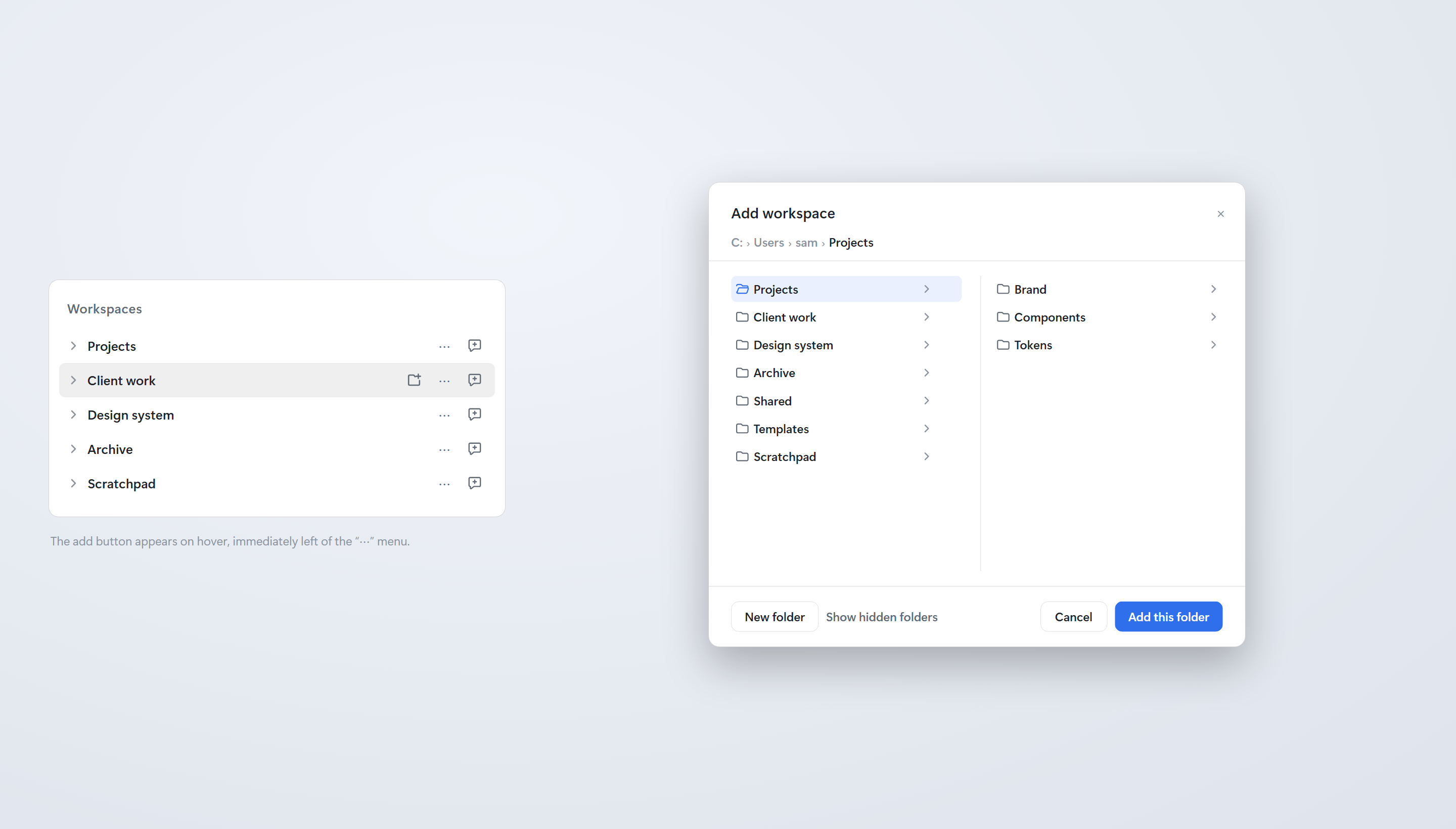
- A hover button in every Workspace row, immediately left of that row's
...menu trigger. It appears only while the pointer is over the row (or while the button itself has focus), and it carries a folder-with-plus glyph. Clicking it opens a folder dialog already sitting in that Workspace's own folder, soBasicopens at…\Projects\Basic. - An "Add workspace from this folder…" row on the Workspace
...menu. Same dialog and same starting folder; this is the upgrade-safe twin of the button. - The dialog itself: list subfolders, walk up through the breadcrumb, create a folder, then add the chosen folder as a Workspace and open a Session in it the way the shipped "Add workspace" flow does.
- The Workspace folder picker itself, restyled. The three shipped
directory-flow holes —
conversation.hero.workspace.directoryFlow,sidebar.workspaces.directoryFlowandworkspace.picker.directoryFlow— all render this bundle's dialog too, so every "Add workspace…" entry in the application opens the same in-app browser instead of the operating system's chooser.
Screenshots
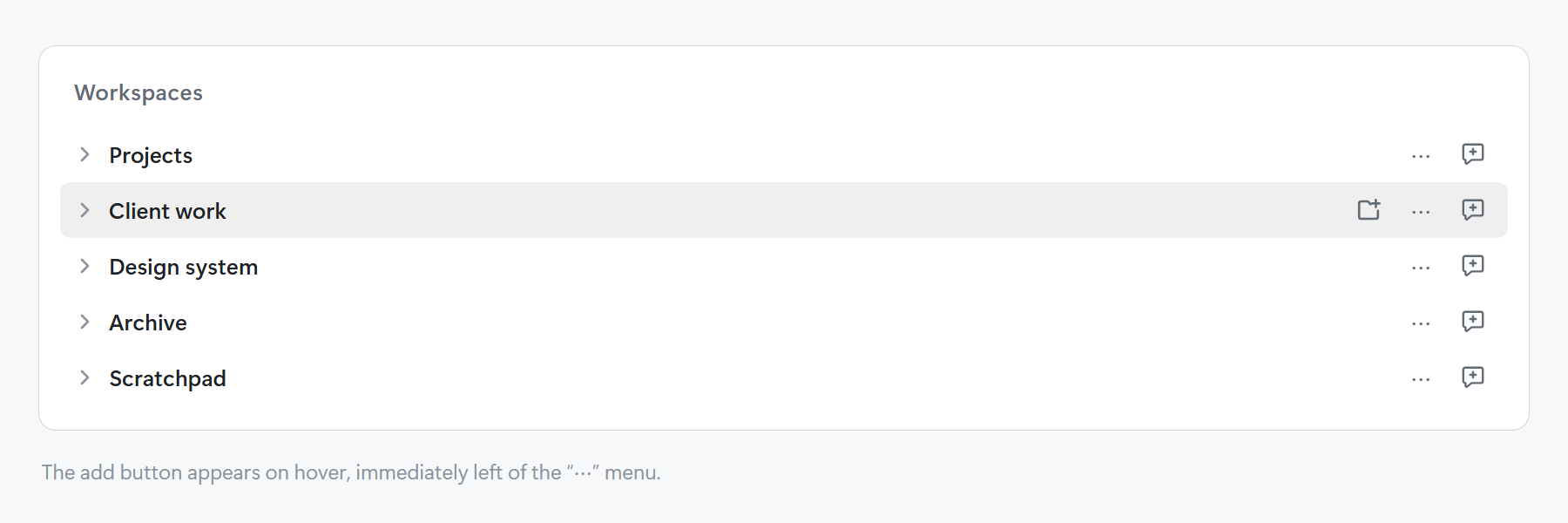 | 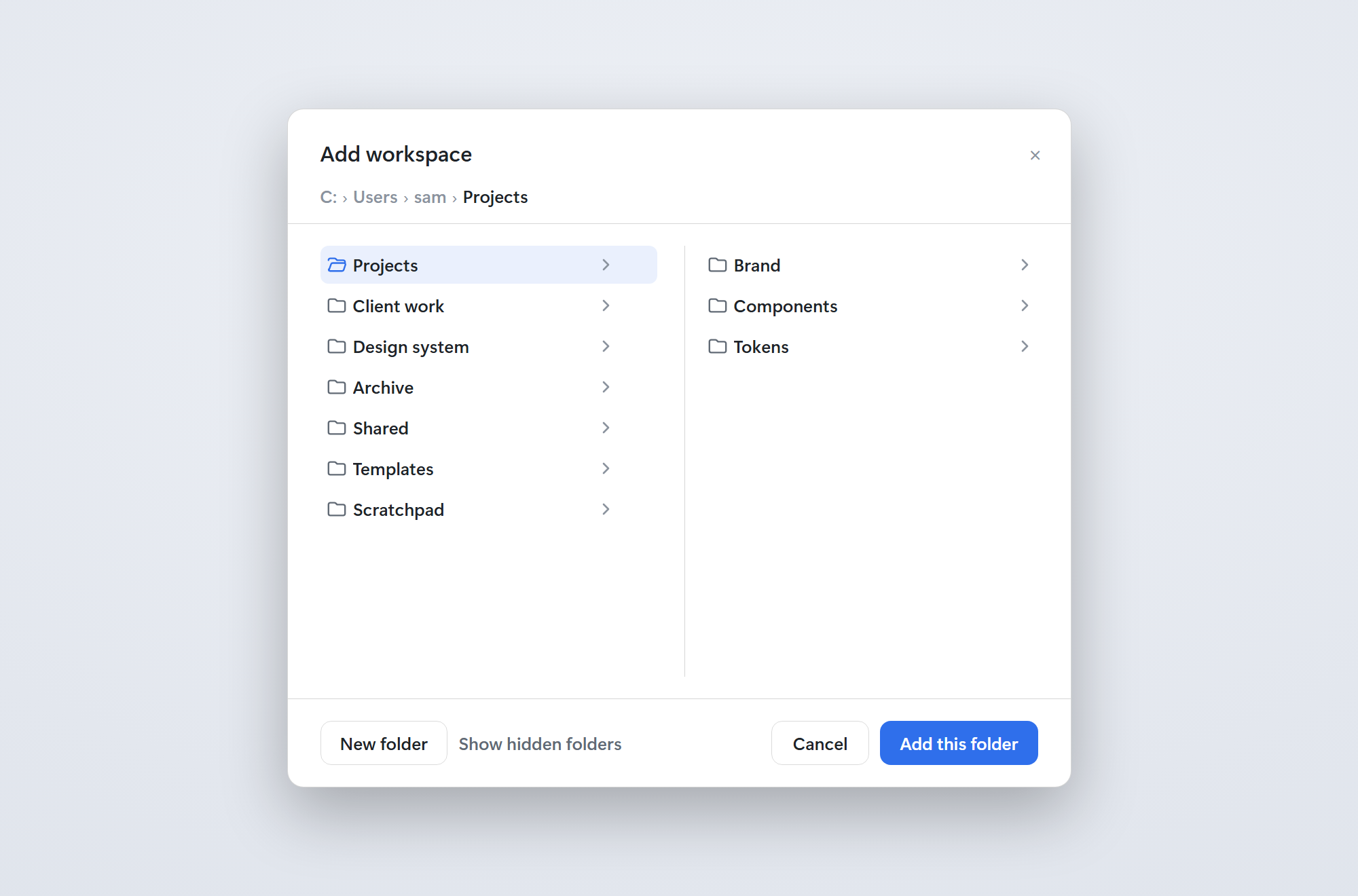 |
The add button appears on hover, immediately left of .... | Adding a folder as a Workspace, already sitting in that folder. |
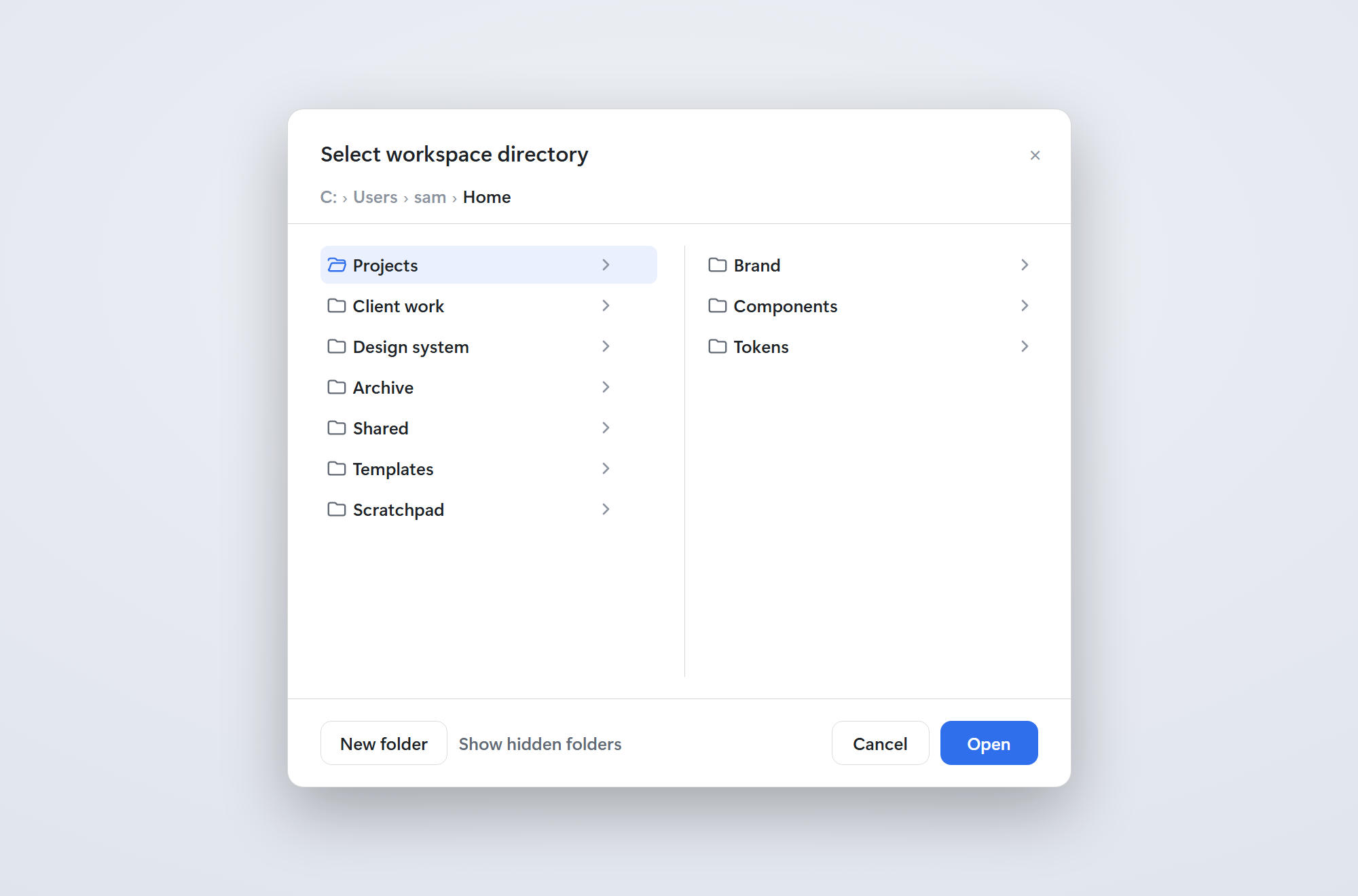 | |
| Every "Add workspace…" entry in the app opens this in-app browser. |
How the app-wide picker is covered without breaking it
Each directory-flow hole is a single cell, and a single cell renders the
first occupant in priority order (priority is a shadowing rank; lower runs
first). The shipped occupant sits at priority: 0, so this bundle registers at
priority: -10 and simply outranks it:
const flowInject = () => ({ listDirectory, createDirectory, pickDirectory })
for (const name of FLOW_SLOTS) {
  ctx.slots.inject(name, () =>
    ctx.slots.register({ name, priority: -10, locale: NS, inject: flowInject }, WorkspaceFlowEntry))
}
The replacement is presentation-only, and that is the whole point: the Host
keeps composing its own directoryPicker backend, so directoryPickerController
stays active and the OS chooser remains available everywhere (the dialog's
"Choose with system dialog…" button uses it). Nothing in cordis.patch.yml
disables a shipped row any more.
The dialog follows the shipped browser's design: the same --dsw-alias-*
tokens, the same two-pane Miller layout with the parent column, the divider and
the child column, the same 680×500 panel, 16px/510 title, 13px/510 row names,
0.5px border-l3 separators, and a footer of min-width: 72px buttons. Only the
class prefix differs (wbp- instead of the shipped CSS-module hash), because the
shipped stylesheet and its primitives are not importable.
Why the dialog is this bundle's own
The shipped directory browser always starts at the Host home directory. Its
owner contract, DirectoryFlowOwnerProps, is exactly { open, busy, onPicked, onCancel, onError } — there is no seed-path field, so the shipped browser
cannot be pointed at a chosen folder.
Why the folder listing comes from this bundle's own Host routes
The shared folder seam is the abstract directoryPicker service, and the Host
composes it once:
- on a local Windows desktop,
@deepseek-ai/dsh-host-directory-picker-autocomposes the native backend, whose only capability ispick;listandcreateDirectoryare refused, and @deepseek-ai/dsh-api-workspace-controllerdeclaresstatic inject = ["directoryPicker"], so removing or replacing the picker deactivatesdirectoryPickerControllerand breaks folder picking for the entire application (directoryPicker/list: active Service directoryPickerController is unavailable).
An earlier version of this bundle disabled the shipped directory-picker row to
mount the browse backend instead. That was the wrong trade: it silently broke
the app's own folder picker.
So index.js registers two routes on the Host web carrier
(ctx.webServer.register) and client.js calls them with plain same-origin
fetch — the same pattern git-autobackup uses:
| Route | Purpose |
|---|---|
GET /workspace-browse-picker/list?path=<absolute> | One directory level: { path, home, crumbs, entries, truncated } |
POST /workspace-browse-picker/create { path, name } | Create one folder, returns its absolute path |
Both answer { ok: true, value } or { ok: false, message }, only reply to a
loopback request, and refuse any path that is not absolute — checked on the
requested string before resolving, so a relative path can never silently
resolve against the Host's working directory.
The shipped native picker stays exactly as it was. When the browse dialog cannot reach its routes at all, the dialog says so and offers "Choose with system dialog…", which falls back to the shipped native chooser.
How the row button is placed
The sidebar declares no action slot for Workspace rows — only Session rows get
one (sidebar.workspaces.session.row.action). The button is therefore a guarded
DOM insertion into the row's existing hover action strip:
- it is inserted immediately before that row's
[data-context-menu-trigger], - it is re-added whenever the sidebar re-renders (
MutationObserver) and pruned when its row or Workspace disappears, - it refuses a trigger whose nearest
[data-row-key]is a nested Session row, so a Session never gets a Workspace button, - its reveal state is pure CSS on
[data-row-key^="workspace:"]:hover/:focus-withinwithopacity(notdisplay), so the row never shifts, and it stays visible on touch devices where hover does not exist.
Every DOM touch is wrapped in try/catch: a future sidebar restyle can make
the button disappear, but it cannot take the client down.
The button respects the ordinary Workspace-row reveal behaviour: hidden at rest, revealed with the rest of the row's actions on hover.
It only exists while Workspaces are grouped
The sidebar has three grouping modes, and only two of them render Workspace rows:
| Grouping | Workspace rows | This button |
|---|---|---|
Workspace (default) | yes | shown on hover |
Workspace tree | yes, nested | shown on hover |
In one list (flat) | no — the section is titled Sessions | absent |
That is deliberate, not a defect. In In one list every row is
data-row-key="session:…", so there is no Workspace to add from and nothing for
the button to anchor to; the code never injects into a Session row. If the button
seems to be missing, check the view-options menu (the sliders icon beside the
Workspace section header) and pick Workspace or Workspace tree.
Settings
Nothing to configure.
Disabling
Disable @osman3n/dsh-workspace-browse-picker in Settings → Plugins. This
bundle patches no shipped row, so disabling it restores the stock application
exactly.