dsh-prirex-preview
prirex/dsh-prirex-preview
DeepSeek Harness 实时预览标签页:本地服务器与 WebSocket 实时重载、设备框架、控制台错误流及点选提问式 DOM 检查器。
安装
dsh plugin --profile web add github:prirex/dsh-prirex-previewREADME

PriRex Preview
Live preview · static & Node.js servers · device frames · console error feed · point-and-ask DOM inspector — inside DeepSeek Harness.



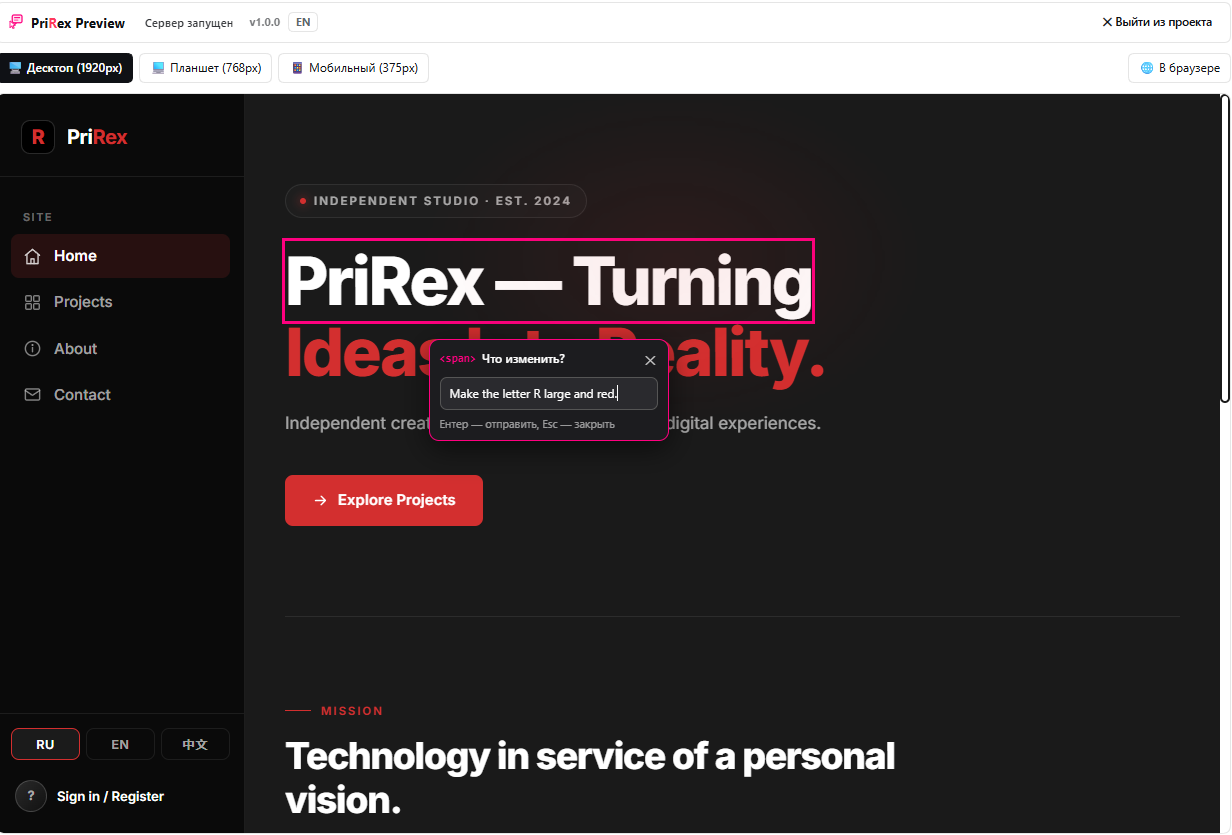
Screenshots · Скриншоты
| Device frames · Панель устройств | Point-and-ask inspector · Точечный инспектор |
|---|---|
 | 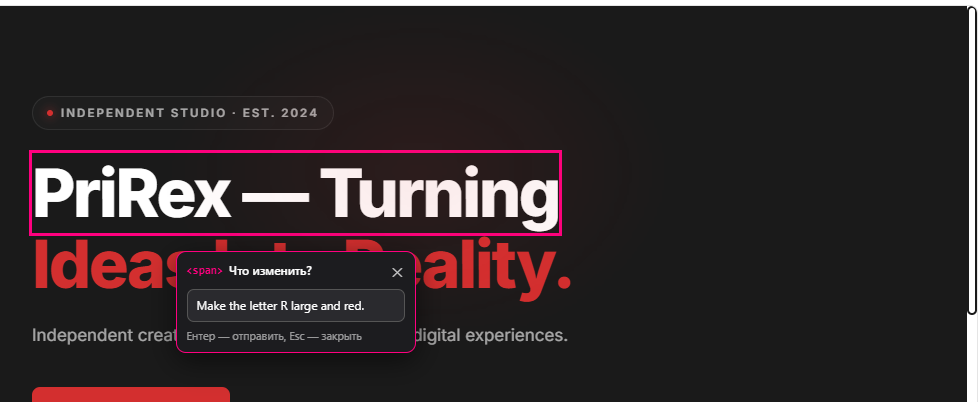 |
Desktop (1920px) / Tablet (768px) / Mobile (375px) switch the frame; the page is scaled to fit the sidebar, In browser opens the same URL outside DSH.Desktop (1920px) / Tablet (768px) / Mobile (375px) переключают фрейм, страница масштабируется под ширину боковой панели, In browser открывает тот же адрес вне DSH. | Hover → countdown → freeze (pink outline) → «Что изменить?». Наведение → обратный отсчёт → заморозка (розовый контур) → «Что изменить?». |
From the inspector to the chat draft · Из инспектора в черновик чата
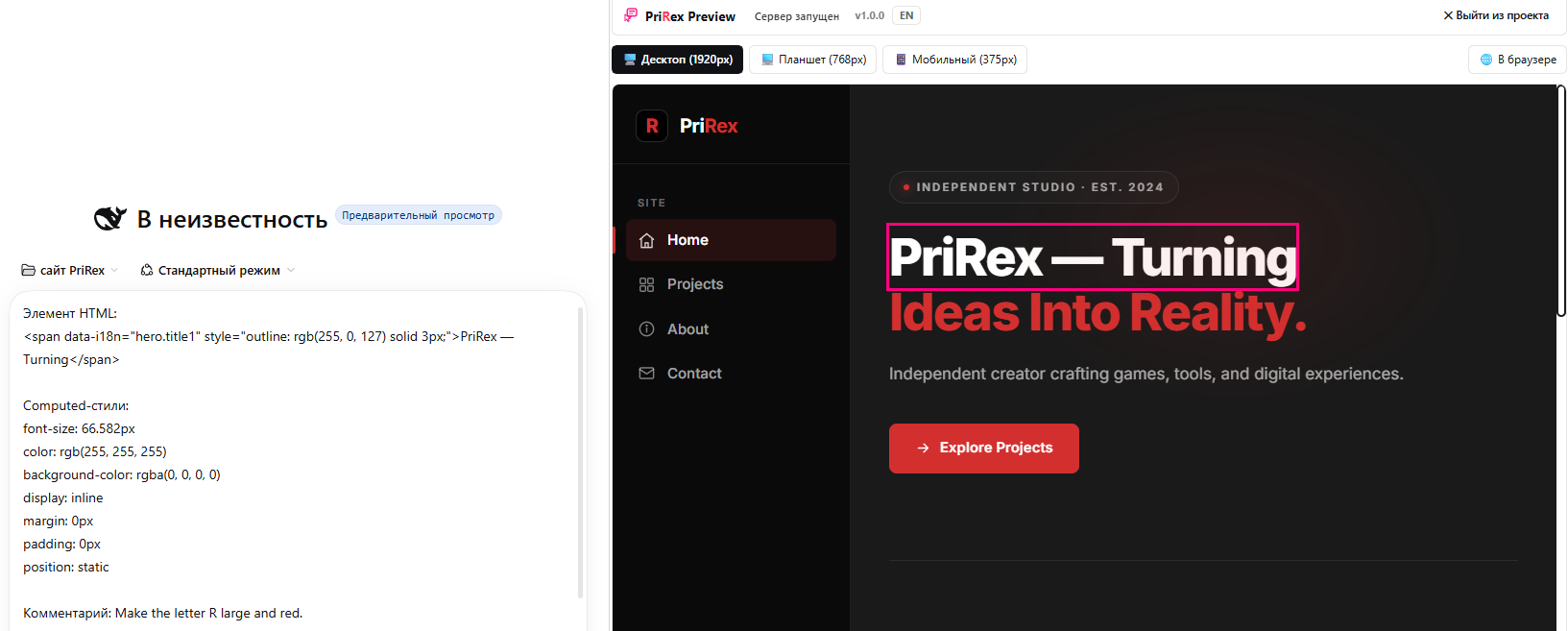
outerHTML + computed styles + your comment are inserted into the active chat draft; auto-submit is off, so you review and press send yourself — in the screenshot the payload is already in the input, the tab stays live beside it.
outerHTML + вычисленные стили + ваш комментарий вставляются в черновик активного чата; автоотправка выключена — вы проверяете текст и отправляете сами. На скриншоте payload уже в поле ввода, а вкладка с живой страницей остаётся рядом.
Result · Результат
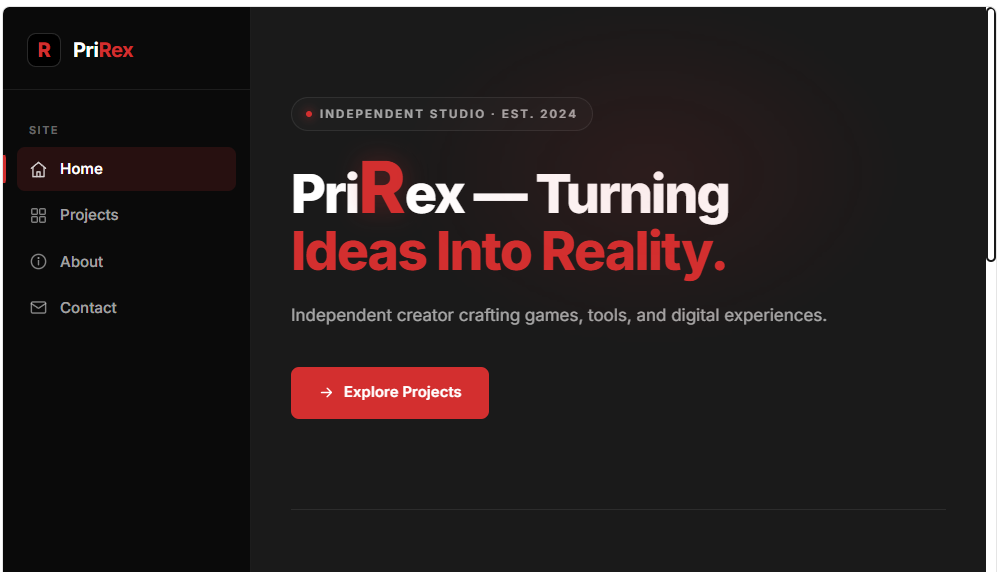
The loop closed: the agent edited the code and the page reloaded through live reload — the R in the headline is now red and large, exactly as asked in the panel.
Цикл замкнулся: агент поправил код, страница перезагрузилась через live reload — R в заголовке стала красной и крупной, ровно как просили в панели.
English
Overview
PriRex Preview is a local development companion for DeepSeek Harness (DSH). It adds a
PriRex Preview tab to the right panel: pick a project folder and get it served over HTTP with
live reload — a static site from the built-in server, or a Node.js project started with its own
dev/start script and proxied through localhost. Review it in desktop/tablet/mobile frames,
watch console errors stream in, and point at any element on the page to have its markup and
computed CSS dropped straight into your chat input.
Everything is local by design: the HTTP server and the WebSocket hub bind to 127.0.0.1,
no telemetry is emitted, and nothing leaves your machine.
Key Features
- Automatic project discovery — pick a folder and the tab scans it (and up to two levels of subfolders): a static HTML site wins, otherwise it finds a Node.js project — including one nested in a child folder — and starts it. You can pick the parent of the site, not only its exact root.
- Two preview modes — pick a folder: a plain static site is served from an ephemeral
localhost port with CORS enabled (
index.htmlis picked automatically), while a Node.js project is launched with its own dev script and previewed through a local reverse proxy. - Node.js dev servers —
dev/start/serve/previewscripts are detected inpackage.json(npm, pnpm, yarn and bun are recognised by lockfile orpackageManager), and a Node.js entry file is used when no script exists. If the declared manager is not installed in the DSH process, the script runs throughnpm runinstead (already-installednode_modulesare reused). The command is shown in the tab and can be edited before launch; the dev-server port is found in its output and the server log streams live into the tab. - Proxy keeps every feature — the proxy injects the inspector into HTML responses, rewrites absolute redirects, forwards API requests of any method and passes WebSocket upgrades through, so Vite/Next HMR keeps working inside the preview.
- WebSocket live reload —
chokidarwatches project sources and pushes areloadsignal to the embedded WebView (150 ms static / 350 ms Node.js debounce, so save storms stay quiet). - Device frames — 1920 px desktop, 768 px tablet, 375 px mobile, scaled to fit the sidebar.
- Console error feed — captures
window.onerror,unhandledrejectionandconsole.errorfrom the previewed page, with source/line/column; one click copies a ready-to-paste report. - Point-and-ask DOM inspector — hover an element for a configurable delay (1.5/3/5 s, default 3 s).
A dashed outline fills into a solid one, the element freezes behind a 🔒 badge, and a
"What should change?" panel opens. Your note plus
outerHTMLand computed styles are inserted into the active chat draft — auto-submit is always off, you review and send. - Freeze management — press R (or К) to release all frozen elements.
- Trilingual UI — RU → EN → 中文 switcher, persisted locally, theme-token styling.
- Project-aware — HTML discovery is depth-limited (≤3), capped (≤500 files) and skips
node_modules,.git,dist,build,.next.
Installation
Requirements: DeepSeek Harness with the Web surface, Node.js ≥ 20.
# 1. Clone
git clone https://github.com/Prirex/PriRex-Preview.git
cd PriRex-Preview

# 2. Install dependencies (pnpm or npm — the lockfile is pnpm's)
pnpm install        # or: npm install
pnpm run build      # or: npm run build

# 3. Verify the browser artifact is a valid classic script
pnpm run smoke      # or: npm run smoke
Then register the plugin in DSH: Plugins → Install bundle → local path and point it at this
folder. The bundled cordis.patch.yml inserts the prirexstudio row
automatically, so no manual patch editing is required.
lib/is committed on purpose — the compiled plugin works without a build step. Rebuild only after touchingindex.tsorclient.cts.
Installing from GitHub vs. from a local path
Both routes work, but they must not occupy the same slot at the same time.
- From GitHub (for users) — Plugins → Install bundle → GitHub, repository
Prirex/PriRex-Preview. pnpm copies the package into the profile as real files;lib/is already committed, so nothing is built during install. - From a local path (while developing) — DSH links the folder with a directory junction at
node_modules/dsh-prirex-preview.
If a local link is still in place and you then install the GitHub version, pnpm cannot replace the junction and aborts before writing anything:
[ERR_PNPM_EPERM] [importPackage ...\node_modules\dsh-prirex-preview]
EPERM: operation not permitted, rename '...dsh-prirex-preview_tmp_12345_8' -> '...dsh-prirex-preview'
Removing the local link fixes it — only the junction is deleted, the project folder stays intact:
# close DeepSeek Harness first
cmd /c rmdir "C:\Users\<you>\.dsh\profiles\desktop\node_modules\dsh-prirex-preview"
The same EPERM can also surface on the symlink step (symlink 'D:\...\node_modules\...' -> ...),
when the junction points at a folder with its own node_modules; both variants have the same root
cause. The reverse order matters too: before linking a local folder, remove the GitHub copy.
Quick Start
-
Create any static page, e.g.
index.html:<!doctype html> <html lang="en"> <head><meta charset="utf-8"><title>Demo</title></head> <body> <h1 id="title">Hello, PriRex!</h1> <button onclick="console.error('boom from the page')">Break me</button> </body> </html> -
Open the right panel → PriRex Preview tab → choose the folder (it is scanned and started automatically).
-
Switch device width, then hover the
<h1>for ~3 s: it freezes and the edit panel opens. -
Type
make the title red and larger→ Enter. The inspector payload lands in your chat draft; send it and let the agent edit the code — the page reloads itself on save. -
Click Break me to see the error arrive in the console feed.
The tab also auto-opens the current session's working directory on first connect when the server is not running yet. Picking a folder (from the session or manually) scans it and starts the found static site or Node.js project; opening the tab itself never executes a project script.
Node.js projects
- Pick a folder with a site or a
package.json— a parent folder is fine, the tab scans up to two levels of subfolders (Express, Vite, Next, Nuxt, SvelteKit, Astro, a plainserver.js, …). A static HTML site wins; if there is none, a Node.js project is found. - The tab shows the resolved project root and command, e.g.
package.json → npm run dev. The manager follows the lockfile (pnpm-lock.yaml,yarn.lock,bun.lockb) or thepackageManagerfield; if that manager is missing from the DSH PATH the script falls back tonpm run, and if there is no script a Node.js entry file is used. - The project starts automatically after you pick the folder. The tab streams the server log,
reads the first
http://localhost:<port>line from it, and opens the site through the proxy — the inspector, console feed, device frames and HMR all work as in static mode. - Press Stop server to kill the whole process tree.
Configuration
| Variable | Default | Description |
|---|---|---|
PRIREX_HUB_PORT | 3099 | Port of the local WebSocket hub (127.0.0.1). |
PRIREX_NODE_TIMEOUT | 120000 | How long to wait for a Node.js dev-server port (ms). |
PRIREX_ALLOWED_ORIGINS | – | Extra comma-separated browser origins allowed to use the hub (localhost and the DSH Desktop dsh-app://app origin are always allowed). |
Per-user settings stored in localStorage:
| Key | Values | Description |
|---|---|---|
prirex.lang | ru | en | zh | UI language. |
prirex.hoverMs | 1500 | 3000 | 5000 | Hover delay before inspecting. |
Wire Protocol
Hub: ws://127.0.0.1:3099. Page side identifies itself with hello; the sidebar tab sends
control messages. In static mode port is the preview server; in Node.js mode it is the proxy,
and devPort is the detected dev-server port.
| Direction | Message |
|---|---|
| tab → host | {type:'hello', sessionId} · {type:'detect', dir} · {type:'start', dir, file, mode?, command?} · {type:'stop'} · {type:'status'} · {type:'hover-ms', ms} |
| host → tab | {type:'detected', dir, mode, command, manager, script, entry, reason, files, file} · {type:'status', running, starting, mode, port, devPort, dir, file, files, command, logs} · {type:'node-log', line, stream} · {type:'node-exit', code, signal, error} · {type:'stopped'} · {type:'started-error', error} |
| host → page | {type:'reload', file} · {type:'hover-ms', ms} |
| page → host → tab | {type:'console-error', level, message, source, line, col} · {type:'inspector-prompt', comment, html, styles} |
Project Layout
PriRex-Preview/
├─ index.ts               # host service: WS hub, static server, Node.js runner, proxy, watcher, HTML injection
├─ client.cts             # browser artifact source: right-panel tab (React via DSH module table)
├─ logo-data.ts           # inlined brand logo for the client bundle
├─ cordis.patch.yml       # DSH bundle patch that registers the plugin row
├─ locale/{ru,en}.json    # plugin metadata strings
├─ scripts/               # finalize-client.mjs, smoke-client.mjs, test-hub.mjs
├─ types/                 # ambient typings
├─ lib/                   # committed build output: index.js, client.js (browser classic script)
└─ icon.svg               # plugin icon
Development
npm run build      # tsc → lib/, then rewrite lib/client.cjs into a browser classic script
npm run smoke      # execute lib/client.js in a bare VM (no exports/module/require)
npm run test:hub   # end-to-end host protocol test (temp project, HTTP fetch, start/stop)
npm run check      # build + smoke
client.cts is compiled to CJS and then rewritten by scripts/finalize-client.mjs
into an IIFE, because DSH evaluates client entries as classic scripts.
A running DSH keeps the host module it loaded at startup, so restart DSH after changing
index.ts; the client artifact is re-served on the next page refresh. The tab also tolerates an
older host: when detect is not answered it falls back to the v1.0 start flow.
Security
Local-only tool: both servers bind to 127.0.0.1, static serving is path-traversal guarded, the
inspector never auto-sends messages, and a project's Node.js script is started only after you
explicitly pick its folder (or press Start Node.js server) — never merely by opening the tab
or a session. Found a problem? See SECURITY.md — please report privately, never in
a public issue.
Publishing to npm (optional)
package.json sets "private": true to prevent accidental publishes. The package is named
dsh-prirex-preview; to ship it through npm, flip that flag and — if you need a different name or
scope — update name in package.json, cordis.patch.yml and the id in
client.cts together, because the client registers itself in the DSH module table
under the package name.
Changelog / What's new
v2.0.0 — automatic project discovery
- Picking a folder now scans that folder and up to two levels of subfolders: a static HTML site wins, otherwise a Node.js project is located (even inside a child folder) and started automatically. The resolved project root is shown in the tab.
- The main Launch button opens the folder picker directly; there is no separate path field and no mode switch — the static/Node.js choice is made by the automatic scan.
- DSH Desktop loads its UI from the
dsh-app://apporigin; the hub now accepts it (previously the tab connected and was immediately disconnected, so the preview stayed on “Scanning files…”). - If the project declares pnpm/yarn/bun but that manager is missing from the DSH PATH, the dev
script runs through
npm runinstead of failing with “command not found”. - A folder with neither an HTML site nor a Node.js project gets a clear message instead of an empty 404 preview.
- Version metadata is now 2.0.0; future-version notices were removed.
v1.1.0 — Node.js sites (unreleased: superseded by 2.0.0)
- Host: project detection (
dev/start/serve/previewscripts, package manager by lockfile orpackageManager, Node.js entry fallback), dev-server spawn with streamed logs and port detection, whole-process-tree stop, and a local reverse proxy that injects the inspector, rewrites absolute redirects, forwards any API method and passes WebSocket upgrades through. - Client: static / Node.js launch mode switch, editable command with the detected default, live server log, mode badge and updated trilingual copy.
- Tests: end-to-end Node.js fixture covering proxy HTML/API/POST/redirect, HMR upgrade, reload and process shutdown.
v1.0.0 — first public release
- Host service: WebSocket hub on
127.0.0.1:3099, ephemeral HTTP preview server,chokidarlive reload, HTML discovery with depth/file caps, session working-directory auto-open. - Client tab: device frames (1920/768/375), console error journal with AI-ready copy, point-and-ask DOM inspector with freeze/countdown mechanics, RU/EN/中文 UI.
- Tooling: reproducible build (
tsc+ client finalizer), VM smoke test, end-to-end hub test.
License
Русский
Описание
PriRex Preview — локальный инструмент разработки для DeepSeek Harness (DSH). Он добавляет
вкладку PriRex Preview в правую панель: выбираете папку проекта — получаете локальный
HTTP-сервер с живой перезагрузкой для статического сайта или запуск собственного
dev/start-скрипта Node.js с предпросмотром через локальный прокси; ниже — фреймы
«десктоп / планшет / мобильный», журнал ошибок консоли со страницы и DOM-инспектор, который по
наведению на элемент вставляет его разметку и вычисленные CSS-стили прямо в поле ввода чата.
Всё работает только локально: HTTP-сервер и WebSocket-хаб слушают 127.0.0.1, телеметрии
нет, данные не покидают машину.
Ключевые возможности
- Автопоиск проекта — выбираете папку, вкладка сканирует её и до двух уровней подпапок: приоритет у статического HTML-сайта, иначе находится Node.js-проект (даже во вложенной папке) и запускается сам. Можно выбрать родительскую папку, а не только корень сайта.
- Два режима предпросмотра — выбранная папка: статический сайт раздаётся на свободном порту
localhost с открытым CORS (
index.htmlподхватывается автоматически), а Node.js-проект запускается своим dev-скриптом и показывается через локальный обратный прокси. - Node.js dev-серверы — скрипты
dev/start/serve/previewнаходятся вpackage.json(npm, pnpm, yarn и bun определяются по lock-файлу или полюpackageManager), при их отсутствии используется точка входа Node.js. Если объявленный менеджер не установлен в процессе DSH, скрипт запускается черезnpm run(уже установленныеnode_modulesпереиспользуются). Команда видна во вкладке и её можно изменить перед запуском; порт dev-сервера берётся из его вывода, а лог сервера идёт в вкладку. - Прокси сохраняет все функции — инспектор внедряется в HTML, абсолютные редиректы переписываются, API-запросы любого метода пробрасываются, а WebSocket-апгрейды проходят насквозь, поэтому HMR Vite/Next продолжает работать внутри предпросмотра.
- Live-reload по WebSocket —
chokidarследит за исходниками и шлёт сигналreloadво встроенный WebView (дебаунс 150 мс для статики и 350 мс для Node.js, чтобы серии сохранений не спамили). - Панель устройств — 1920 px десктоп, 768 px планшет, 375 px мобильный, с подгонкой под ширину боковой панели.
- Журнал ошибок консоли — перехват
window.onerror,unhandledrejectionиconsole.errorпросматриваемой страницы с файлом, строкой и колонкой; копирование готового отчёта в один клик. - Точечный DOM-инспектор — наводите курсор на элемент, ждёте настраиваемую задержку
(1,5 / 3 / 5 с, по умолчанию 3 с). Пунктирный контур «дорисовывается» в сплошной, элемент
замораживается под бейджем 🔒 и открывается панель «Что изменить?». Ваша заметка вместе с
outerHTMLи вычисленными стилями попадает в черновик активного чата — автоотправка всегда выключена, отправляете вы сами. - Управление заморозкой — R (или К) снимает все замороженные элементы.
- Три языка интерфейса — переключатель RU → EN → 中文 с сохранением выбора, оформление на токенах темы DSH.
- Умный обход проекта — поиск HTML ограничен глубиной (≤3) и количеством (≤500 файлов),
каталоги
node_modules,.git,dist,build,.nextпропускаются.
Установка
Требования: DeepSeek Harness с веб-интерфейсом, Node.js ≥ 20.
# 1. Клонирование
git clone https://github.com/Prirex/PriRex-Preview.git
cd PriRex-Preview

# 2. Зависимости и сборка хоста + браузерного артефакта
pnpm install        # или: npm install
pnpm run build      # или: npm run build

# 3. Проверка, что браузерный артефакт — валидный классический скрипт
pnpm run smoke      # или: npm run smoke
Затем зарегистрируйте плагин в DSH: Плагины → Установить бандл → локальный путь и укажите эту
папку. Входящий в комплект cordis.patch.yml сам вставляет строку
prirexstudio — править патч вручную не нужно.
Каталог
lib/закоммичен намеренно: собранный плагин работает без шага сборки. Пересобирайте только после правокindex.tsилиclient.cts.
Установка с GitHub и из локальной папки
Работают оба способа, но они не должны занимать одно и то же место одновременно.
- С GitHub (для пользователей) — Плагины → Установить бандл → GitHub, репозиторий
Prirex/PriRex-Preview. pnpm копирует пакет в профиль настоящими файлами;lib/уже закоммичен, поэтому при установке ничего не собирается. - Из локальной папки (при разработке) — DSH подключает папку junction-ссылкой
node_modules/dsh-prirex-preview.
Если локальная ссылка уже стоит, а вы ставите версию с GitHub, pnpm не может заменить junction и падает до записи файлов:
[ERR_PNPM_EPERM] [importPackage ...\node_modules\dsh-prirex-preview]
EPERM: operation not permitted, rename '...dsh-prirex-preview_tmp_12345_8' -> '...dsh-prirex-preview'
Лечится удалением локальной ссылки — удаляется только junction, папка проекта остаётся на месте:
# сначала закройте DeepSeek Harness
cmd /c rmdir "C:\Users\<вы>\.dsh\profiles\desktop\node_modules\dsh-prirex-preview"
Тот же EPERM может прийти и с шага симлинков (symlink 'D:\...\node_modules\...' -> ...), когда
junction указывает на папку с собственным node_modules; причина у обоих вариантов одна. Обратный
порядок тоже важен: перед подключением локальной папки уберите копию, установленную с GitHub.
Быстрый старт
-
Создайте любую статическую страницу, например
index.html:<!doctype html> <html lang="ru"> <head><meta charset="utf-8"><title>Демо</title></head> <body> <h1 id="title">Привет, PriRex!</h1> <button onclick="console.error('ошибка со страницы')">Сломай меня</button> </body> </html> -
Откройте правую панель → вкладку PriRex Preview → выберите папку (она сама сканируется и запускается).
-
Переключите ширину устройства и наведите курсор на
<h1>на ~3 с: элемент заморозится и откроется панель правки. -
Напишите «сделай заголовок красным и крупнее» → Enter. Данные инспектора окажутся в черновике чата: отправьте их, и агент поправит код — страница перезагрузится сама.
-
Нажмите «Сломай меня», чтобы увидеть ошибку в журнале консоли.
Если сервер ещё не запущен, вкладка при первом подключении сама открывает рабочую папку текущей
сессии. Статическая папка запускается сразу; Node.js-проект останавливается на карточке запуска,
чтобы скрипт из package.json не выполнялся без явного нажатия.
Node.js-проекты
- Выберите папку с сайтом или с
package.json— можно даже родительскую: вкладка сама просканирует вложенные папки. Сначала ищется статический HTML-сайт, если его нет — Node.js-проект (Express, Vite, Next, Nuxt, SvelteKit, Astro, обычныйserver.js). - Вкладка покажет найденный корень проекта и команду, например
package.json → npm run dev. Менеджер берётся из lock-файла (pnpm-lock.yaml,yarn.lock,bun.lockb) или поляpackageManager; если такого менеджера нет в PATH процесса DSH, скрипт запускается черезnpm run, а при отсутствии скриптов используется точка входа Node.js. - Статический сайт и Node.js-проект запускаются автоматически после выбора папки. Лог сервера
идёт во вкладку, порт берётся из первой строки
http://localhost:<port>, сайт открывается через прокси — инспектор, журнал ошибок, фреймы устройств и HMR работают в обоих режимах. - Стоп сервера завершает всё дерево процессов.
Настройки
| Переменная | По умолчанию | Назначение |
|---|---|---|
PRIREX_HUB_PORT | 3099 | Порт локального WebSocket-хаба (127.0.0.1). |
PRIREX_NODE_TIMEOUT | 120000 | Сколько ждать порт Node.js dev-сервера (мс). |
PRIREX_ALLOWED_ORIGINS | – | Дополнительные Origin через запятую, которым разрешён хаб (localhost и dsh-app://app из DSH Desktop разрешены всегда). |
Пользовательские настройки в localStorage:
| Ключ | Значения | Назначение |
|---|---|---|
prirex.lang | ru | en | zh | Язык интерфейса. |
prirex.hoverMs | 1500 | 3000 | 5000 | Задержка наведения до инспектора. |
Структура проекта
PriRex-Preview/
├─ index.ts               # хост-сервис: WS-хаб, статический сервер, запуск Node.js, прокси, watcher, инъекция
├─ client.cts             # исходник браузерной части: вкладка правой панели (React из таблицы DSH)
├─ logo-data.ts           # инлайн-логотип для клиентского бандла
├─ cordis.patch.yml       # патч бандла DSH, регистрирующий строку плагина
├─ locale/{ru,en}.json    # строки метаданных плагина
├─ scripts/               # finalize-client.mjs, smoke-client.mjs, test-hub.mjs
├─ types/                 # ambient-типизация
├─ lib/                   # закоммиченный результат сборки: index.js, client.js (классический скрипт)
└─ icon.svg               # иконка плагина
Разработка
npm run build      # tsc → lib/, затем перепаковка lib/client.cjs в браузерный классический скрипт
npm run smoke      # запуск lib/client.js в чистой VM (без exports/module/require)
npm run test:hub   # сквозной тест протокола хоста (временный проект, HTTP-запрос, start/stop)
npm run check      # build + smoke
client.cts компилируется в CJS, а затем scripts/finalize-client.mjs
оборачивает результат в IIFE: DSH исполняет клиентские записи как классические скрипты.
Запущенный DSH держит в памяти хост-модуль, загруженный при старте, поэтому после правок
index.ts перезапустите DSH; клиентский артефакт подхватывается при следующем обновлении
страницы. Вкладка совместима и со старым хостом: если на detect нет ответа, она откатывается
к протоколу start версии 1.0.
Безопасность
Инструмент строго локальный: все серверы слушают 127.0.0.1, раздача файлов защищена от
path traversal, инспектор никогда не отправляет сообщения сам, а скрипт Node.js-проекта
запускается только после того, как вы явно выбрали его папку (или нажали
Запустить Node.js-сервер) — не при простом открытии вкладки или сессии. Нашли проблему —
см. SECURITY.md, сообщайте приватно, не через публичный issue.
Публикация в npm (опционально)
В package.json стоит "private": true, чтобы исключить случайную публикацию. Пакет называется
dsh-prirex-preview; для раздачи через npm снимите этот флаг, а если нужно другое имя или скоуп —
меняйте name в package.json, cordis.patch.yml и id в client.cts
одновременно: клиент регистрирует себя в таблице модулей DSH под именем пакета.
Что нового
v2.0.0 — автопоиск проекта
- Выбор папки теперь сканирует её и до двух уровней подпапок: приоритет у статического HTML-сайта, иначе находится Node.js-проект (даже во вложенной папке) и запускается сам. Найденный корень проекта показывается во вкладке.
- Большая кнопка Запустить проект сразу открывает выбор папки — отдельного поля пути и переключателя режимов больше нет: статику или Node.js выбирает автопоиск.
- DSH Desktop открывает интерфейс из
dsh-app://app; хаб теперь принимает этот Origin (раньше вкладка подключалась и сразу отключалась, поэтому предпросмотр висел на «Поиск файлов…»). - Если проект объявляет pnpm/yarn/bun, а менеджера нет в PATH процесса DSH, dev-скрипт
запускается через
npm run, а не падает с «команда не найдена». - Если в папке нет ни HTML-сайта, ни Node.js-проекта, выводится понятное сообщение вместо пустого предпросмотра с 404.
- Версия метаданных — 2.0.0; упоминания будущих версий убраны.
v1.1.0 — Node.js-сайты (не публиковалась: заменена 2.0.0)
- Хост: определение проекта (скрипты
dev/start/serve/preview, менеджер по lock-файлу илиpackageManager, запасная точка входа), запуск dev-сервера с потоковым логом и поиском порта, остановка всего дерева процессов и локальный обратный прокси с инъекцией инспектора, перезаписью абсолютных редиректов, пробросом API любого метода и WebSocket-апгрейдов. - Клиент: переключатель режимов «статический сайт / Node.js», редактируемая команда с определённым значением по умолчанию, живой лог сервера, бейдж режима и обновлённые тексты RU/EN/中文.
- Тесты: сквозной Node.js-фикстур (прокси HTML/API/POST/redirect, HMR, reload, остановка процесса).
v1.0.0 — первый публичный релиз
- Хост-сервис: WebSocket-хаб на
127.0.0.1:3099, HTTP-сервер предпросмотра на свободном порту, live-reload черезchokidar, поиск HTML с ограничениями по глубине и количеству, автооткрытие рабочей папки сессии. - Вкладка клиента: панель устройств (1920/768/375), журнал ошибок консоли с копированием для ИИ, точечный DOM-инспектор с таймером и заморозкой, интерфейс RU/EN/中文.
- Тулчейн: воспроизводимая сборка (
tsc+ финализатор клиента), VM smoke-тест, сквозной тест хаба.