dsh-one-click-new-session
prog656/dsh-one-click-new-session
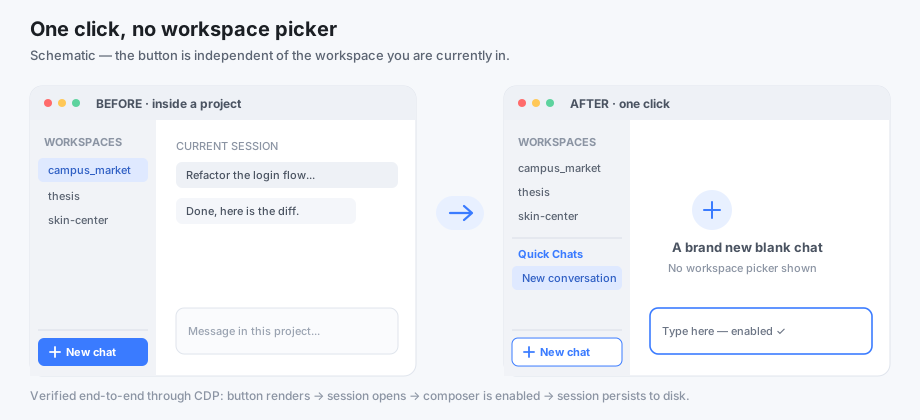
侧边栏底部新增一键入口,直接打开可输入的空白对话,不需要选择工作区;专用工作区自动创建,已有空白会话自动复用,连点也不会堆出一串空对话。
安装
dsh plugin --profile web add github:prog656/dsh-one-click-new-sessionREADME
dsh-one-click-new-session
One click → a blank, ready-to-type chat in DeepSeek Harness. No workspace picker, no context switching. 中文文档




Quick start
- Download the latest zip from Releases.
- Unzip it, then double-click
install.bat(Windows) or runnode install.mjs. - Fully quit DSH and reopen it — a "New chat" button appears at the bottom of the sidebar.
Needs Node.js 18+. No Node yet? Install the LTS build from nodejs.org first, then repeat step 2.
The problem
In the DSH desktop UI, "New session" is tied to the currently selected workspace. If you are inside a project and just want to ask a quick question, you either pollute that project with a throwaway session, or go build/select a folder first.
Worse: a blank session with no workspace at all is inert. The conversation view disables the composer via
const inert = sessionId === undefined || (hero && chipTitle === undefined);
A blank session (hero === true) without a workspace has no chipTitle, so the input is disabled and the placeholder becomes "select a workspace". Creating a workspace-free session through the API alone therefore produces a chat you can look at but not use.
This plugin fixes both halves: an entry point that is independent of the selected workspace, and a session that is actually typeable.
What it does
- Registers a New chat button in the
sidebar.footer.actionslot — a list slot that is always appended and never stolen by another plugin. It renders regardless of which workspace is selected. - On click, ensures a dedicated scratch workspace exists (
workspaces.createis idempotent by path), then calls the officialuiWorkspace.openWorkspace()path, which reuses an existing blank session. Clicking twice does not pile up empty chats. - Falls back to
sessions.create({ workspaceId })+uiWorkspace.openSession()if the official path throws. - Failures are visible: the button turns red, says "New chat failed", and its tooltip carries the error. No silent failures.
- Uses host theme CSS variables only, so light/dark themes work.
Install
Requires Node.js 18+ (DSH already depends on Node). Windows / macOS / Linux.
Option A — zip installer (this is the path for the desktop app):
# download dsh-one-click-new-session-vX.Y.Z.zip from Releases, unzip it, then inside:
node install.mjs            # English UI
node install.mjs --lang zh  # Chinese UI
On Windows you can simply double-click install.bat (Chinese UI).
Option B — plugin manager (only if your setup ships the dsh CLI; the desktop app does not):
dsh plugin --profile desktop add dsh-one-click-new-session
Use --profile web instead of desktop when you run the Web UI.
node install.mjs            # English UI
node install.mjs --lang zh  # Chinese UI
On Windows you can simply double-click install.bat (Chinese UI).
The installer auto-detects your DSH profile, creates ~/dsh-blank-sessions, writes the four plugin files into node_modules/@local/dsh-one-click-new-session, and registers the bundle in the profile's package.json.
node install.mjs --dry-run                  # preview, writes nothing
node install.mjs --profile /path/to/profile
node install.mjs --dir /path/to/scratch
node install.mjs --uninstall
Option B — manual: see docs/INSTALL.md.
Then fully quit and restart DSH. See docs/INSTALL.md for troubleshooting.
Usage
- Expand the sidebar.
- Click New chat at the bottom (next to Settings).
- Type and send. That's it.
Every new chat lands in the same Quick Chats workspace; sessions themselves are fully independent (own history, title, context). Clicking again while the current chat is still blank reuses it.
Configuration
The scratch folder defaults to ~/dsh-blank-sessions. The host half resolves it at startup and writes it into the client bundle, so you never edit a path by hand; set the DSH_BLANK_SESSION_DIR environment variable to use a different folder.
lib/client.js still carries the UI strings, which install.mjs --lang localises:
| Setting | Meaning | Default |
|---|---|---|
DSH_BLANK_SESSION_DIR (env) | Folder used for workspace-free chats | ~/dsh-blank-sessions |
SCRATCH_TITLE | Workspace group name in the sidebar | Quick Chats / 临时对话 |
LABEL, HINT, FAIL_LABEL | Button text | localised by --lang |
How it works
The technical write-up — the inert root cause, why host-side inline-script injection fails, the slot registry, and the client service call chain — is in docs/HOW-IT-WORKS.md.
Known limitations
- A dedicated workspace still exists (visible as "Quick Chats"). DSH's UI does not accept input for a blank session with no workspace, so this is a deliberate, invisible-to-the-user workaround. Chats share that one folder — files written in chat A are visible in chat B.
- The button hides when the sidebar is collapsed, because the host hides the whole footer action area in rail mode. Expand the sidebar to see it.
- Verified on the Windows desktop build. The web profile should work but has not been end-to-end tested — please report.
Compatibility
| DSH | >= 0.1.7-rc.1 (developed against 0.2.x) |
| Runtime | Node.js 18+, browser renderer |
| Platforms | Windows (verified), macOS / Linux (installer is cross-platform) |
Contributing
Issues and PRs are welcome — read CONTRIBUTING.md first. To report a security issue privately, see SECURITY.md.
License
MIT — do whatever you want, just keep the notice.
Disclaimer
This is an unofficial community plugin. It is not affiliated with, endorsed by, or published by DeepSeek. "DeepSeek Harness" is a trademark of its respective owner. This repository contains only the four files written for this plugin — no DSH source code, no app.asar contents, no credentials.