dsh-desktop-windowos
rafolie/dsh-desktop-windowos
Windows 托盘桌面壳:自动从 GitHub Releases 安装并升级 exe、创建应用与网页端两个桌面快捷方式,并提供 desktop_launch 工具在对话中一键启动。
安装
dsh plugin --profile web add github:rafolie/dsh-desktop-windowosREADME
DSH Desktop (dsh-desktop-windowos)
中文
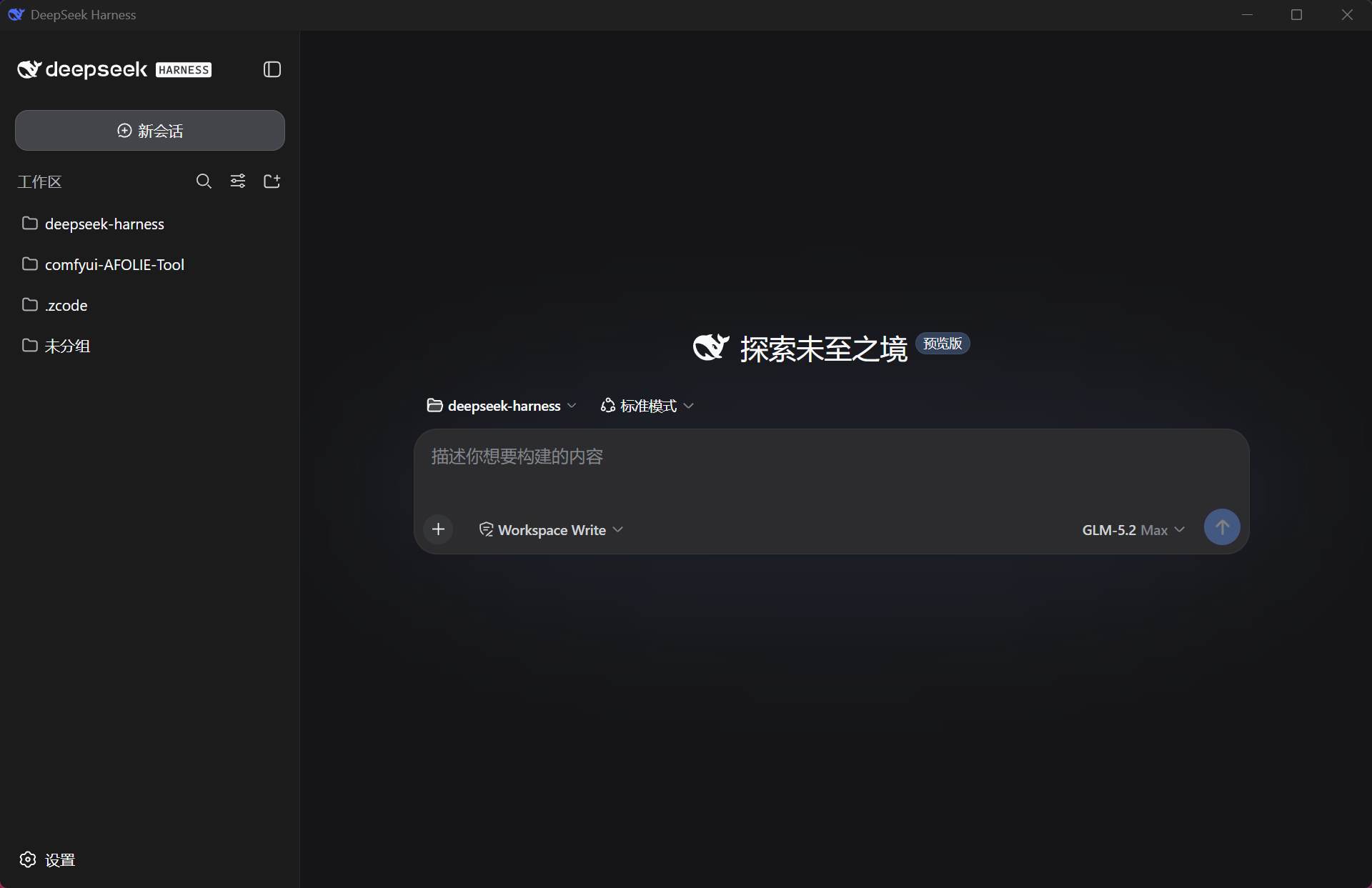
DeepSeek Harness(DSH)的 Windows 桌面壳,基于 Tauri v2 + React 18 + TypeScript。 打开应用 → 自动拉起本机 DSH Web 服务 → 窗口内嵌原生 webchat(常驻壳) → 托盘常驻,任务完成弹系统通知。 交付物是单个免安装裸 exe(约 4.5 MB)。
推荐用法:在任意文件夹执行 pnpm add @deepseek-ai/dsh(或 npm i @deepseek-ai/dsh),把 exe 放进同一文件夹的根目录双击即可——应用自动发现旁边的 node_modules\.bin\dsh.cmd,启动零下载、零配置、不询问。
桌面「DeepSeek Harness Web」快捷方式在应用 v1.6.52+ 首次启动后自动迁移为登录入口:点击时启动/唤起桌面应用,等待后端就绪并在默认浏览器完成登录。升级后请先从托盘退出旧版应用再重新打开一次;自定义网页地址保持原样。
更新通道(三段式发布)
应用按三段式节奏发布,releases/latest 即稳定通道:
- 开发期:每个迭代版本发为 GitHub 预发布(开发版)——自动更新不触碰(latest 天然排除),想尝鲜从 Releases 手动下载
- 稳定性检查:功能收敛后的检查版与修 bug 迭代仍走预发布
- 稳定版:仅当作者确认稳定使用后才转正(latest),桌面端自动更新开闸——已装用户下次启动即升级
桌面端自动更新支持稳定与预发布两个通道(更新中心可切换或关闭自动更新):稳定通道为默认,预发布通道供尝鲜与测试机验证。
功能
- 开箱即用:双击 exe 启动本机 DSH 并嵌入原生 webchat。已安装候选等待最多 120 秒,npx 最多 300 秒;通过只读包文件识别
--no-open,不会为参数检测启动 profile。 - 自绘标题栏:无边框窗口,Comfy 式胶囊控件(鲸鱼标+名字+箭头)整颗居中——点击打开环境管理面板(开启态蓝边高亮、箭头翻转);拖拽区/最小化/最大化/关闭自绘,Win 贴靠与边缘缩放原生保留
- 设置工作区:点击标题栏胶囊打开左右布局的设置页,包含常规、外观、环境、更新和日志;支持全局设置搜索、图标导航、键盘操作与窄窗口布局。聊天 iframe 常驻,切换设置页保留聊天状态。
- 外观定制:浅色 / 深色 / 跟随系统;DSH、海洋、森林、紫罗兰、琥珀、玫瑰六个预设。分别设置强调色、背景色、文字、前景卡片和顶部/侧栏边框色;自由选色、层次对比度、字体字号、手形光标和半透明侧栏。主题支持复制、粘贴、导入与重置;语言位于常规。
- 日志体系(ComfyUI 式):dsh.log 只记壳自身事件(启动/监护/更新;DSH web 输出不入日志,不再膨胀),
[本地时间] [INFO/WARN/ERROR]格式逐行着色,每次启动轮转历史文件;启动页「查看日志」实时看终端在跑什么;日志页带等级筛选/自动跟随/清空显示 - 诊断包:面板「更多 → 导出诊断信息」一键把环境配置+本次日志组装成 markdown——复制到剪贴板可直接粘贴给 AI 排障,无需翻目录查全局安装
- 托盘常驻:关闭窗口(X)只是隐藏到托盘,DSH 后台继续运行;双击托盘图标或右键 → Open DSH 随时唤回窗口;右键还有「重启 dsh web(后端)」「前后端重启」「检查前端更新」「环境信息」
- 故障自愈与可见性:DSH 崩溃的真实原因以 ERROR 写入日志并直接显示在启动页错误视图(摘要自动定位到 Error 行而非堆栈尾巴),附手动修复命令——再无静默崩溃循环;缺 profile 包时自动带冷却期旁路补装并重试;
settings.yaml被 Web UI 写坏(如key:value缺空格)时自动备份+修复+round-trip 校验后才落盘;启动链用绝对路径解析 dsh/pnpm,不受 GUI 环境 PATH 影响 - DSH 监护自愈:DSH 意外退出(市场更新自重启/崩溃)时自动重拉并刷新界面,无需人工干预;连续快速崩溃自动熔断报错
- 自动更新带进度:更新时顶栏名字旁绿色圆环旋转 → 完成对勾 → 自动重启生效(无需手动重开;更新只在启动时发生,不打断对话);应用每次启动自检 GitHub 最新 Release,更新通道与自动更新开关见更新中心
- 更新中心:分别管理 DSH 内核和桌面壳。内核按完整 SemVer 比较运行版本与所选 npm 标签(latest / next / 高级 alpha),避免将较旧的 rc 版误报为更新;降级需要确认,复制命令不执行安装。仅对经过来源验证的应用托管全局 npm 安装提供一键更新,并核验重启后的进程、路径与版本;其他安装来源显示对应操作建议。桌面壳继续提供稳定 / 预发布通道、自动更新开关及完整性校验。
- 设置中心(环境面板第四标签):窗口置顶 / 开机自启(最小化待命) / 关闭按钮行为(隐藏到托盘[默认] 或 直接退出) / 记住上次页签——全部以滑动开关呈现、点击即时生效并跨重启持久化;各子项说明收纳在功能名旁的「?」里,点击弹出气泡详读
- 主题模式:跟随系统 / 深色 / 浅色,桌面外壳即时切换;内嵌聊天的明暗模式重启后同步。
- 六种界面语言实时切换:设置 → 外观 → 语言(简体中文/繁體中文/English/日本語/한국어/Русский),整个壳界面与托盘菜单即时换语言、无需重启;默认「跟随系统」——启动时按 Windows 显示语言自动选择(简繁分流,未适配语言回退英文),也可手动指定;Rust 侧系统通知(更新流程/下载完成/任务完成)同步六语;新增语言只需一份字典(欢迎提 issue/PR)
- 缩放与下载:Ctrl +/-/0 与 Ctrl+滚轮缩放整个界面(焦点在内嵌页也生效);内嵌页面触发的下载(session log 导出等)统一落「下载」文件夹并弹系统通知
- 桌面快捷方式可配置:通过 profile 的
cordis.patch.yml控制创建行为;本插件目前不提供 GUI 开关。见下方“快捷方式配置”。 - 插件包自动同步(带验真):应用启动时自动把已安装的 dsh-desktop-plugin 对齐到 npm 最新版(只升不降,带 pnpm 新发布冷却期旁路);安装后回读 node_modules 验证真实落地,pnpm 冷却期静默保留旧版不再虚报成功
- 图片拖放/粘贴:与浏览器一致——可拖入或粘贴 png/jpg/webp/gif 作为对话附件(DSH v1 支持的四种格式)
- 一键重启 DSH:托盘「重启 dsh web(后端)」只重启 DSH 服务(会话数据在
~/.dsh持久化);「前后端重启」连壳带后端全新拉起(无论后端是谁启动的都会清干净),新装插件随之加载,插件卡死 webchat 时一键满血——面板「更多」里也有同款 - 托盘图标固定任务栏:启动时自动写入 Windows 通知区域设置(
IsPromoted),图标不再每次被收进任务栏角溢出 - 任务完成通知:会话从运行中转为空闲时弹 Windows 系统通知,带两个按钮——「打开窗口」(复现并聚焦窗口)和**「明白」**(收起通知);不点击则数秒后自动收起
- 外链统一接管:聊天/插件市场里的 http(s) 外链,左键点击与右键「在浏览器中打开」都会送达系统默认浏览器——包括 target=_blank 等在壳内会被 WebView2 吞掉激活的链接(替换误导性的 WebView2 默认菜单)
- 升级失败自动回滚:dsh 后端升级前自动保存当前版本号;升级后如果启动失败,错误界面提供「回滚之前版本」按钮一键恢复,回滚过程后台执行不卡界面
- ⚠️ 不同 DSH 版本间的会话历史:dsh 使用 fail-closed 会话格式保护——新版本写入的会话日志包含旧版本不认识的事件类型,旧版本会拒绝加载(防止数据损坏)。跨版本切换(升级/降级/源码↔npm)后历史对话可能暂时不可读,等升级到相同或更新版本即可恢复。会话数据不会丢失,只是暂时无法读取
- 附加模式:启动时若 3080 已有 DSH 在跑,直接连接不重复拉起;退出时也不会动别人(先于应用存在)的实例
- 干净退出:仅托盘右键 → 「退出(关闭 DSH)」才真正退出,自动
taskkill /T杀掉自己拉起的整棵进程树,零孤儿进程 - 防重复实例:exe 被再次双击只会唤回已有窗口,不会开第二个
- 便携小巧:单文件、无安装器、无 DLL 依赖,数据/日志写在
%LOCALAPPDATA%\dsh-desktop\ - 本地优先启动,npm 全局为主推荐:按候选链自动启动 DSH——
DSH_CMD环境变量(失败自动降级,不再卡死)→ 自定义路径(启动页可填,永久记住)→ PATH 全局安装的dsh web→ 项目本地node_modules\.bin\dsh.cmd(exe 同目录/工作目录/用户目录)→ 已确认过的 npx;全都找不到时启动页提供一键全局安装(应用直接执行npm install -g @deepseek-ai/dsh,约 1-3 分钟,装完永久走最快路径、终端获得dsh命令)、npx 下载(备选)、手动填路径、重新检测、退出——不会静默下载任何东西
前提条件
目标机器需已具备(exe 不携带):
| 项 | 要求 |
|---|---|
| Node.js | ^22.19 或 ≥ 24(必须;DSH 的 Node 版本要求) |
| DSH | 可选,三种方式任一:全局安装 npm i -g @deepseek-ai/dsh(最快,推荐);本地安装(在 exe 旁或任意被搜索目录执行 pnpm add @deepseek-ai/dsh);都没有则首次启动时点「下载并启动」走 npx |
| DSH 版本兼容 | 保留旧协议与进程 token + Cookie 鉴权适配;v1.6.65 将 0.1.6-alpha.2 / 0.1.7-alpha.2 纳入真实内核连接回归。桌面更新无需升级内核,第三方插件兼容性单独确认。见 双版本验证 |
| 从源码跑 DSH 的开发者 | 设 DSH_CMD(pnpm dsh web)与 DSH_CWD(DSH 仓库路径)环境变量 |
| WebView2 | Windows 11 自带 |
快速开始
方式一:装 DSH 插件(推荐给 DSH 用户)
dsh plugin --profile web add dsh-desktop-plugin
重启 DSH 后插件自动把 exe 装到 %LOCALAPPDATA%\Programs\dsh-desktop-windowos\,并在桌面生成两个快捷方式——「DeepSeek Harness」(桌面应用)和「DeepSeek Harness Web」(浏览器打开前端);之后每次激活还会自动升级 exe 到最新 Release(应用运行中也能安全替换)。对话里说“打开桌面应用”可通过 desktop_launch 工具直接拉起(exe 缺失时走后台任务安装,完成后自动启动,聊天里可轮询进度)。首次运行 exe 会弹 SmartScreen(未签名),点「更多信息 → 仍要运行」即可。
插件 npm 与应用是两条独立版本线(npm 现 1.5.12,应用现 v1.6.63,不一致是有意设计)——npm 只在插件代码变更时发布,内容相同的空包只会触发所有用户的插件市场更新提示与重复下载;应用走 GitHub Release 自由前进,桌面端启动时自动把已装插件对齐 npm 最新版(只升不降)。详见 plugin/README.md。
方式二:直接下载 exe
- 从 Releases 下载
dsh-desktop-windowos-v<版本>.exe,双击运行(免安装单文件,无需解压)。首次运行 Windows SmartScreen 可能拦截(exe 未签名):点「更多信息 → 仍要运行」即可 - 机器满足以下任一状态,双击后自动进入 webchat:
- 已有 DSH 在跑(如自己开过
dsh web)→ 自动附加,直接使用,无需 Node 在 PATH - 全局装了 DSH(
npm i -g @deepseek-ai/dsh,推荐)→ 启动最快,无需网络 - 本地装了 DSH(在 exe 同目录、工作目录或用户目录
pnpm add @deepseek-ai/dsh)→ 自动发现node_modules\.bin\dsh.cmd并使用 - 之前选过「下载并启动」 → 自动经
npx --yes @deepseek-ai/dsh web拉起(首选项记录在%LOCALAPPDATA%\dsh-desktop\settings.json)
- 已有 DSH 在跑(如自己开过
- 若本地没有任何 DSH:启动页提供选择——「一键全局安装并启动(推荐)」(应用直接执行
npm install -g @deepseek-ai/dsh,约 1-3 分钟)/「下载并启动(npx,备选)」/粘贴已知dsh.cmd路径/「重新检测」/「退出」,不会未经同意就下载;需 Node.js(^22.19 或 ≥ 24)
构建前提(Windows)
- Rust msvc 工具链 + VS 2022 生成工具("MSVC v143 C++ 生成工具" + Windows 11 SDK)
pnpm install        # 本项目是独立工作区根
pnpm tauri dev      # 开发模式
pnpm tauri build    # 产物:src-tauri\target\release\dsh-desktop-windowos.exe
开发提示:D 盘紧张时用
CARGO_TARGET_DIR=C:\dsh-build-target把编译产物指到 C 盘;重建前先退出正在运行的应用(exe 被进程锁定会导致链接失败)。
工作原理
- Rust 侧以
POST /api/host.describe探测就绪(result.ok === true即就绪);启动走本地优先候选链:DSH_CMD环境变量(失败自动降级)→ 自定义路径 →dsh web(PATH 全局)→ 项目本地node_modules\.bin\dsh.cmd→ 已确认过的 npx;链空则发notfound事件,启动页提供一键npm install -g、npx 备选、路径输入;每个候选独立就绪窗口,失败自动降级并逐次入日志;DSH web 子进程经cmd /S /C拉起(CREATE_NO_WINDOW,绝对路径解析),其输出进有界内存尾部(仅崩溃原因可见用,不写日志文件;DSH 有自己的~/.dsh/logs,壳日志只记自身事件并按会话轮转) - 监听
ws://127.0.0.1:3080/api/remote.mux上的$events事件流(携带 webchat 登录换取的浏览器会话 cookie,适配 dsh 0.1.2+ BrowserAuth),在api-session/status的running出现 true→false 边沿且主窗口隐藏时,经session/list取会话标题弹通知 - 裸 exe 无安装器,Windows 会静默吞 Toast——应用启动时自动在注册表注册 AppUserModelID(
HKCU\Software\Classes\AppUserModelId\com.dsh.desktop)保证通知可达
项目结构
src/                 React 常驻壳:自绘顶栏 + boot 视图 + webchat iframe
  EnvPanel.tsx       环境管理面板(搜索/环境|日志|更新标签/信息卡/日志控制台/更新中心)
src-tauri/src/
  dsh.rs             DSH 生命周期:探测 / spawn / 监护自愈 / 会话日志(轮转+等级)
  monitor.rs         remote.mux $events 流监听:running 边沿 + 两按钮通知 + 断线重连
  update.rs          自更新(多路由下载+完整性校验) / 插件同步 / 完整重启
  lib.rs             托盘、窗口 X=隐藏、single-instance、AUMID 注册、面板命令
plugin/              DSH 插件(npm: dsh-desktop-plugin):自动安装/升级 exe + 双快捷方式 + desktop_launch 工具
icon-src/            图标源(DeepSeek 鲸鱼标,品牌蓝 #4D6BFE)
English
A Windows desktop shell for DeepSeek Harness (DSH), built with Tauri v2 + React 18 + TypeScript. Launch the app → it auto-starts the local DSH web service → the window embeds the native webchat in a persistent shell → tray-resident with system notifications on task completion. Ships as a single portable bare exe (~4.5 MB, no installer).
Recommended setup: run pnpm add @deepseek-ai/dsh (or npm i @deepseek-ai/dsh) in any folder, then drop the exe into that folder's root and double-click — the app auto-discovers the adjacent node_modules\.bin\dsh.cmd: zero download, zero config, no questions asked.
Release channels (three-stage)
releases/latest is the stable channel:
- Development: every iteration ships as a GitHub pre-release — auto-update never touches it (latest excludes pre-releases); grab one manually from Releases to try early builds
- Stability checks: post-convergence check builds and bugfix rounds stay on pre-release
- Stable: promoted to latest only after the author confirms real-world stability — that is when auto-update picks it up (next app launch)
The desktop auto-updater tracks the stable channel by default (the update center can switch it to prerelease or turn auto-update off); pre-releases are mainly for manual early adoption and test machines.
Shortcut creation is configured in the profile YAML, not a GUI switch; see Shortcut configuration.
The default desktop Web shortcut is migrated by app v1.6.52+ on first launch. It opens the current authenticated web UI through the desktop app rather than a bare URL. Restart the desktop app once after upgrading; custom web URLs are preserved.
Features
- Zero-setup: starts local DSH and embeds native webchat. Installed candidates get 120 seconds; npx gets 300. Read-only package inspection identifies
--no-opensupport without starting a profile. - Custom title bar: undecorated window with a Comfy-style capsule control (whale mark + name + arrow) centered — click the capsule to open the environment panel (blue highlight, arrow flips while open); drag/min/max/close are self-drawn, native snap and edge-resize intact
- Settings workspace: a two-column layout with General, Appearance, Environment, Updates and Logs; searchable settings, icon navigation, keyboard controls and responsive layouts. The chat iframe stays mounted while settings are open.
- Appearance: independent light/dark themes and previews, system mode, DSH, Ocean, Forest, Violet, Amber and Rose presets, custom background/text/surface/frame colors and surface contrast, UI/code fonts and sizes, pointer cursors, translucent sidebar, and theme copy/paste/import/reset. Language now lives in General with system mode and six locales. Custom colors and fonts affect the desktop shell; chat light/dark mode follows after an app restart.
- ComfyUI-style logging: dsh.log records only shell events (startup/supervision/updates; DSH's own output is not logged), timestamped
[INFO/WARN/ERROR]rows with level coloring, rotated per session; a 查看日志 link on the boot page streams what the terminal is doing - Diagnostic bundle: 更多 → 导出诊断信息 packs env facts + the session log into markdown on your clipboard — paste it to any AI instead of hunting through the install
- Tray-resident: closing the window (X) only hides it to the tray while DSH keeps running; double-click the tray icon or right-click → Open DSH brings the window back; the menu also has "重启 dsh web(后端)" (backend restart), "前后端重启" (full restart — shell and backend both, however the backend was started) and the update check
- Fault visibility & self-heal: the child's real death cause lands in the log as ERROR and in the boot error view with a manual fix command (digests lead with the Error line, not the stack tail) — no more silent crash loops; a missing profile bundle is auto-installed with the cooldown bypass and retried; a settings.yaml corrupted by the web UI (e.g.
key:valuemissing its space) is backed up, repaired, and parse-verified before writing back; dsh/pnpm resolve to absolute paths, immune to GUI-env PATH quirks - DSH supervision self-heal: an unexpected DSH exit (market self-restart / crash) is auto-respawned and the view refreshed, no manual tray action; three consecutive quick deaths trip a crash-loop guard
- Auto-update with progress: while updating, a small green ring spins next to the name → check mark → auto-restart onto the new build (checks happen at startup only, never mid-conversation); the update channel and the auto-update switch live in the update center
- Update center: full SemVer ordering compares the running backend with the selected npm tag (latest/next/advanced alpha), so an older RC is not offered as an upgrade. Downgrades require confirmation; copying a command never runs it. One-click installation is limited to verified app-owned global npm sources, with process, path and target-version verification after restart. Other sources show appropriate manual guidance. Desktop stable/prerelease channels, automatic updates and integrity checks remain available.
- Plugin auto-sync (verified): at startup the installed dsh-desktop-plugin is aligned to npm latest (upgrade-only, cooldown bypassed); the install is then verified against node_modules, so pnpm silently keeping the old version can no longer masquerade as success
- Tray icon pinned to the taskbar: the app writes the Windows notification-area setting (
IsPromoted) at startup, so the icon no longer falls into the overflow on every launch - Task-done notification: when a session transitions from running to idle, a Windows toast fires with two buttons — "Open Window" (restore & focus) and "Got it" (dismiss); left untouched it auto-collapses after a few seconds
- Link context menu: right-clicking a link in the chat shows a clean two-item menu — "Open in browser" / "Copy link" (replacing the misleading default WebView2 menu); left-click still opens external links in the system default browser
- Attach mode: if DSH is already listening on 3080 at startup, the app attaches instead of spawning a second one — and never kills an instance it didn't start
- Clean exit: only tray right-click → "Quit (close DSH)" exits, tearing down the process tree it spawned via
taskkill /Twith zero orphans - Single instance: launching the exe again just focuses the existing window
- Portable & small: one file, no installer, no DLL dependencies; data/logs go to
%LOCALAPPDATA%\dsh-desktop\ - Local-first launch, global npm as the primary recommendation: starts DSH via a candidate chain —
DSH_CMDenv var (falls through on failure instead of stalling) → a custom path entered on the boot page (remembered) → PATH-globaldsh web→ project-localnode_modules\.bin\dsh.cmd→ a previously consented npx; when nothing local exists the boot page offers a one-click global install (the app runsnpm install -g @deepseek-ai/dshfor you, ~1-3 min, permanently on the fast path with a terminaldshcommand), the npx download as fallback, a manual path input, re-detect, and exit — nothing downloads silently
Prerequisites (target machine)
Not bundled with the exe:
| Item | Requirement |
|---|---|
| Node.js | ^22.19 or ≥ 24 (required; the Node version DSH declares) |
| DSH | optional, any of: global install npm i -g @deepseek-ai/dsh (fastest, recommended); local install (pnpm add @deepseek-ai/dsh beside the exe or in any searched dir); or click "下载并启动" on first launch to go through npx |
| DSH version support | Legacy protocol and token/cookie authentication adapters are retained. v1.6.65 adds real-backend connection regression coverage for 0.1.6-alpha.2 / 0.1.7-alpha.2. Desktop updates do not require backend upgrades; third-party plugins require separate compatibility checks. See verification |
| Running DSH from source | set the DSH_CMD (pnpm dsh web) and DSH_CWD (DSH repo path) env vars |
| WebView2 | included with Windows 11 |
Quick Start
Option A: install the DSH plugin (recommended for DSH users)
dsh plugin --profile web add dsh-desktop-plugin
After restarting DSH, the plugin auto-installs the exe into %LOCALAPPDATA%\Programs\dsh-desktop-windowos and creates two desktop shortcuts — "DeepSeek Harness" (the desktop app) and "DeepSeek Harness Web" (the web UI in a browser); each later activation also auto-updates the exe to the latest Release (safe even while the app is running). Saying "open the desktop app" in chat launches it via the desktop_launch tool (a missing exe installs as a background job that auto-launches when done, with progress pollable in chat). First run of the unsigned exe shows SmartScreen — click "More info → Run anyway". The plugin npm and the app run on two independent version lines (npm currently 1.5.12, app currently v1.6.63 — the mismatch is deliberate): npm publishes only when the plugin code changes, since identical empty packages would just trigger update prompts and re-downloads for every plugin user; the app advances freely via GitHub Releases, and the desktop app aligns installed plugins to npm latest (upgrade only). See plugin/README.md.
Option B: download the exe directly
- Download
dsh-desktop-windowos-v<version>.exefrom Releases and double-click it (single portable file, no unzip needed). Windows SmartScreen may warn on first run (the exe is unsigned): click "More info → Run anyway" - Any of these machine states works — the app auto-enters the webchat after launch:
- DSH already running (e.g. you started
dsh webyourself) → auto-attach, works immediately, no Node needed on PATH - DSH installed globally (
npm i -g @deepseek-ai/dsh, recommended) → fastest launch, no network needed - DSH installed locally (
pnpm add @deepseek-ai/dshbeside the exe, in the working dir, or the user profile) →node_modules\.bin\dsh.cmdis discovered and used - "Download" picked before → DSH auto-starts via
npx --yes @deepseek-ai/dsh web(choice persisted in%LOCALAPPDATA%\dsh-desktop\settings.json)
- DSH already running (e.g. you started
- With no local DSH at all: the boot page offers — "一键全局安装并启动" (one-click global install, recommended; the app runs
npm install -g @deepseek-ai/dshitself, ~1-3 min) / "下载并启动" (npx fallback) / paste a knowndsh.cmdpath / "重新检测" (re-detect) / "退出" (exit). Nothing downloads without consent; Node.js ^22.19 or ≥ 24 is required
Building (Windows)
- Rust msvc toolchain + VS 2022 Build Tools ("MSVC v143 C++ build tools" + Windows 11 SDK)
pnpm install        # this project is its own workspace root
pnpm tauri dev      # dev mode
pnpm tauri build    # output: src-tauri\target\release\dsh-desktop-windowos.exe
Dev tips: point
CARGO_TARGET_DIRat a roomier drive if needed, and quit the running app before rebuilding (a running exe locks the linker output).
How it works
- The Rust side probes readiness via
POST /api/host.describe(result.ok === true); launch runs a local-first candidate chain:DSH_CMDenv var (first candidate, falls through on failure) → custom path from the boot page (persisted insettings.json) →dsh web(PATH-global, checked viawhere dsh) →node_modules\.bin\dsh.cmd(exe dir / working dir / user profile) → a previously consentednpx --yes @deepseek-ai/dsh web; an empty chain emitsnotfoundand the boot page offers a one-clicknpm install -g(run by the app), the npx fallback, and a manual path input — each candidate has its own readiness window, falls through on failure with every attempt logged; the DSH web child is spawned viacmd /S /C(CREATE_NO_WINDOW, absolute-path resolution); its output feeds a bounded in-memory tail (crash-cause visibility only, never written to the log file — DSH keeps its own logs under~/.dsh/logs, and the shell log records only shell events, rotated per session) - It listens to the gateway's
$eventslogical stream onws://127.0.0.1:3080/api/remote.mux, authenticated with the browser-session cookie from the webchat login exchange (dsh 0.1.2+ BrowserAuth, issue #18); on a true→false edge ofrunninginapi-session/statuswhile the window is hidden, it resolves the session title viasession/listand fires the toast - A bare exe has no installer, so Windows would silently drop toasts — the app registers its AppUserModelID in the registry at startup (
HKCU\Software\Classes\AppUserModelId\com.dsh.desktop) to make notifications work
快捷方式配置 / Shortcut configuration
本插件目前不提供 GUI 配置开关。编辑 %USERPROFILE%\.dsh\profiles\web\cordis.patch.yml(使用其他 profile 或 DSH_HOME 时替换对应路径),在现有 YAML 列表中合并下面的覆盖项。已有相同 id 时合并其 config,不要重复添加或覆盖整个文件:
- id: dsh-desktop-plugin
  name: dsh-desktop-plugin
  config:
    createShortcut: false
    createWebShortcut: false
保存后重启 dsh web 生效。关闭配置只会停止创建/刷新,不会删除已有快捷方式;可自行删除桌面副本或移到开始菜单。配置开启时插件激活会创建/刷新桌面固定位置,移动副本不会改变这个行为。桌面 v1.6.52+ 会把已有的默认 Web 地址迁移为登录入口;本次源码修复使插件保留该迁移结果,旧 npm 1.5.12 仍可能重写裸地址,桌面运行时会修回。
The plugin currently has no GUI configuration switches. Edit the profile's cordis.patch.yml at the path above (adjust for your profile or DSH_HOME), merging this entry into the existing list and merging config when the same id already exists. Restart dsh web after saving. Disabling creation does not delete existing shortcuts; remove or move them yourself. When enabled, plugin activation creates/refreshes the fixed desktop locations. Moving a copy does not disable recreation. The source fix preserves the desktop's migrated default login entry; published npm 1.5.12 can still overwrite it, which a running desktop repairs.