dsh-session-tree-extension
robiteame/dsh-session-tree-extension
Pi 风格的追加式多分支会话树:在任意历史节点开分支或跳转而不删除旧历史,可将分支克隆为新会话,并在 WebUI 树面板中浏览(明暗主题)。在原版 Harness 上优雅降级运行。
安装
dsh plugin --profile web add github:robiteame/dsh-session-tree-extensionREADME
dsh-session-tree



Append-only, multi-branch conversation trees for DeepSeek-Harness — fork any historical node, clone a branch into a new session, and browse the whole lineage as one merged WebUI graph. Old history is never edited or deleted.
Three commands:
| Command | What it does |
|---|---|
/tree | Open the merged lineage graph: every non-subagent session and node, clickable and bindable |
/fork | Branch from any historical node — the fork appears in the graph and as an inline menu under its source session |
/clone | Duplicate the current conversation into an independent new session under the same project |
Screenshots
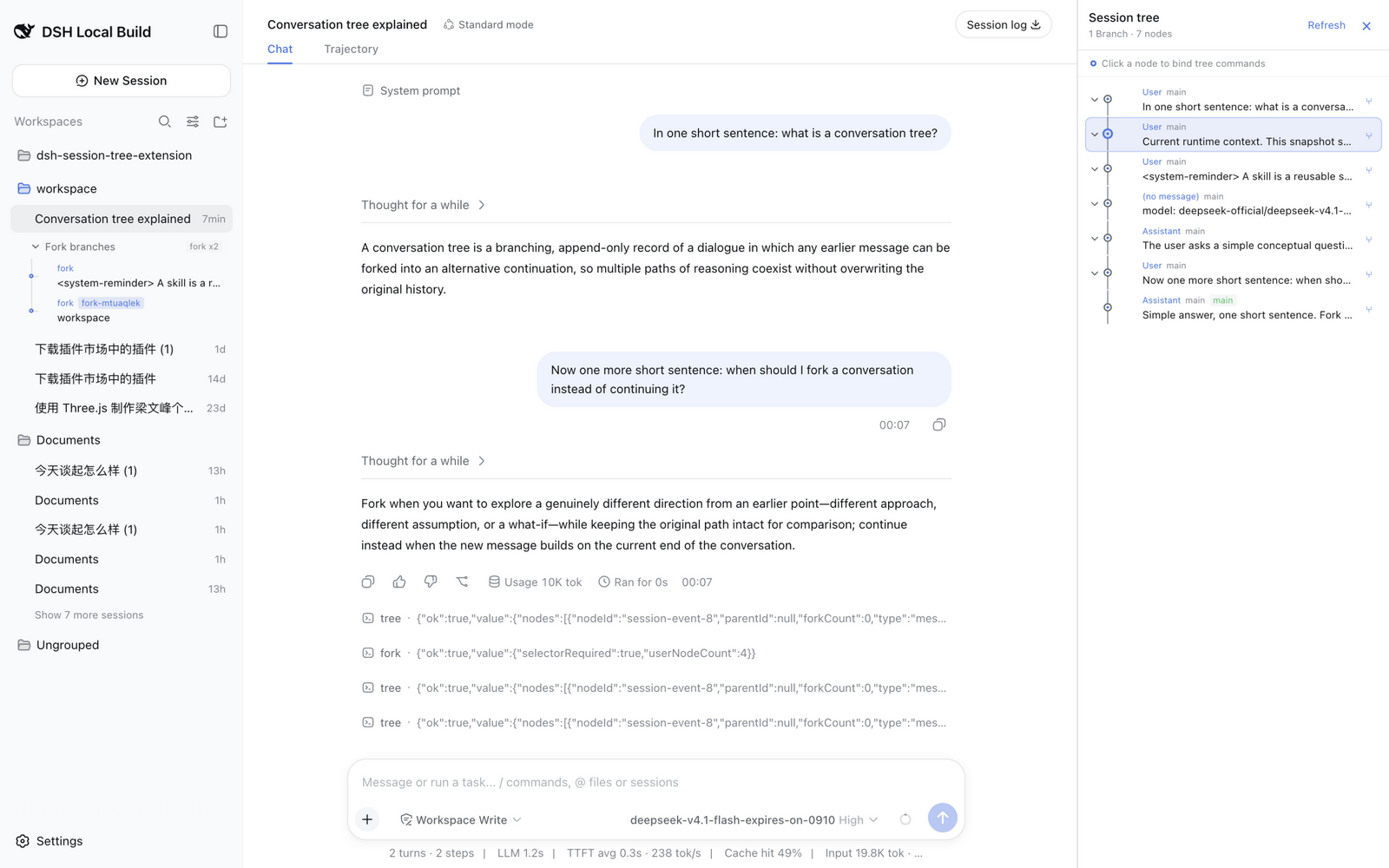
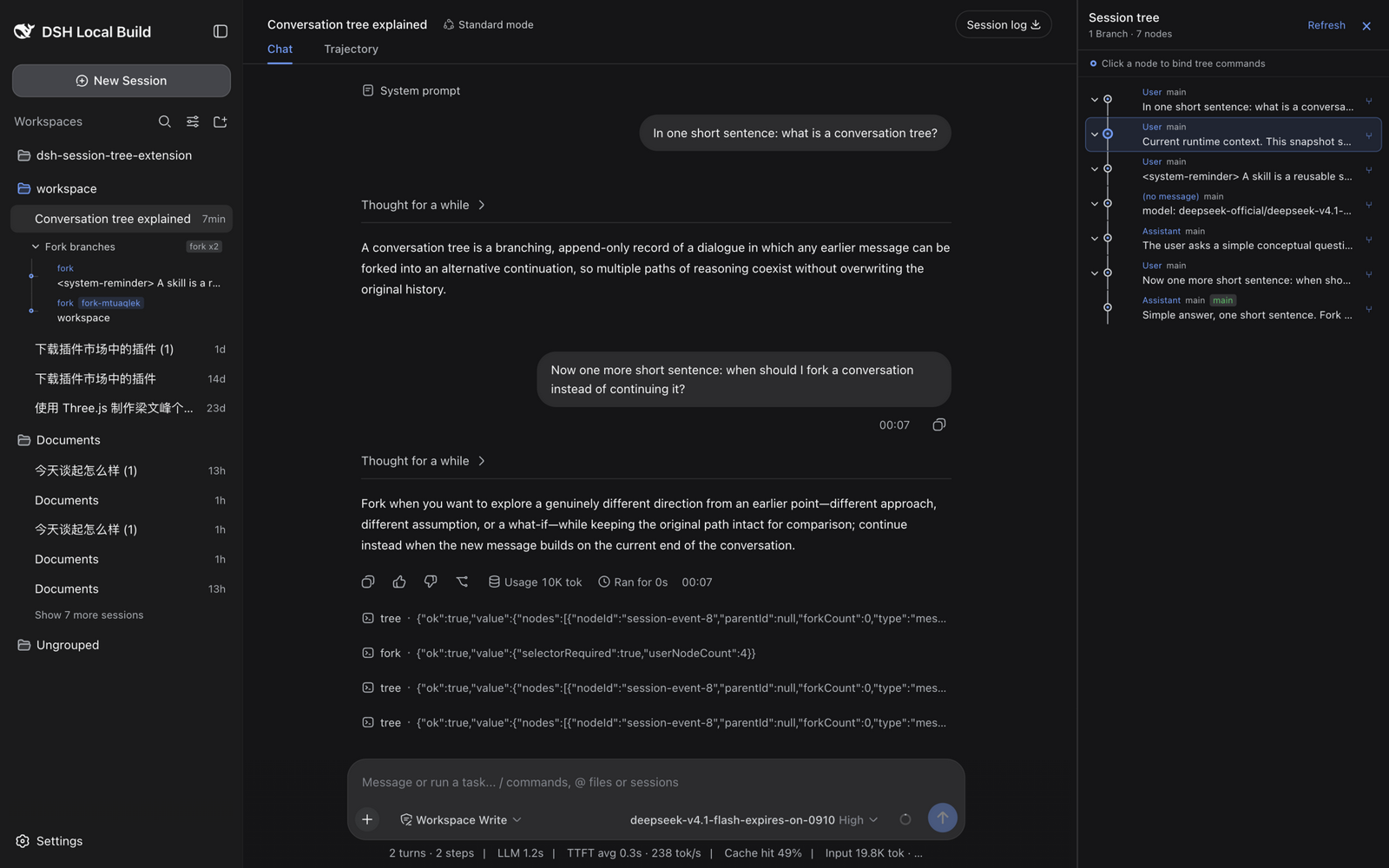
Tree panel (light and dark) with the sidebar's inline fork-branch menu:
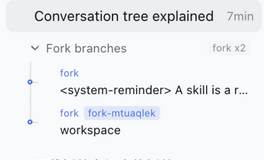
The inline /fork branch menu beneath its source session:
Published as four npm packages under the @robiteame scope:
| Package | Role |
|---|---|
@robiteame/dsh-session-tree | Carrier Bundle: one install mounts everything below through its composition layer |
@robiteame/dsh-pi-agent-session-tree | Host domain service: the SessionTree/SessionTreeStore domain model and the sessionTree Remote |
@robiteame/dsh-tool-session-tree | Command surface: the /tree /fork /clone commands |
@robiteame/dsh-client-ui-session-tree | WebUI tree panel: a native tab in the Harness 0.2 right Sidebar, with an additive overlay fallback for older stock builds |
Install (users)
DeepSeek Harness Desktop
Open Settings → Plugins → Market, search for
@robiteame/dsh-session-tree, install it, and restart the desktop app. The
desktop plugin manager activates the carrier bundle, so the next boot composes
the three rows (pi-agent-session-tree, tool-session-tree,
ui-session-tree) that load the Host service, the commands, and the browser
panel.
The desktop app currently bundles the 0.2.1-rc.2 CLI, whose dsh plugin
command only forwards to pnpm and does not activate a newly installed bundle.
Use the in-app market there; after the restart, /tree opens the panel.
CLI (0.2.1-rc.3 and newer)
On a CLI that ships the 0.2.1-rc.3 plugin manager, one command installs and
activates the bundle:
dsh plugin --profile <profile> add @robiteame/dsh-session-tree
Prebuilt tarballs install the same way and need no build scripts:
dsh plugin --profile <profile> add robiteame-dsh-session-tree-0.7.0.tgz
After installing, restart the profile. Verify the composed layer:
dsh --profile <profile> --dump-config # should list the three session-tree rows
Requires DeepSeek-Harness 0.2.1-rc.2 through 0.2.1-rc.3 (the latest
published next is 0.2.1-rc.3; the current desktop build is 0.2.1-rc.2) and
Cordis ~4.0.5; the target installation provides those peers. No install
scripts run — the tarballs ship prebuilt lib/ artifacts.
The three commands
/tree — open the tree panel
/tree opens the right-side panel as one merged graph for the current
session's lineage: ancestors, forks, and clones appear in a single git-style
view, with user messages, assistant replies, tool calls, and model switches
shown as connected nodes. Shared copied prefixes are deduplicated, fork points
carry session badges, and the current session's path stays highlighted. Click
a node to bind it; clicking a node owned by another session opens that session
first. Collapse individual subtrees or whole session branches to focus the
graph.
/fork — branch from any historical node
/fork picks an earlier user prompt and grows a new branch from there: the
conversation continues along the new path while the original one stays intact.
The fork is created through the official native fork API, so it appears in the
session list with real parent linkage. The plugin adds the new branch to the
merged graph and also renders it as an inline collapsible menu directly beneath
its source session's row. Both views follow the official reactive session list,
so new branches appear without a refresh.
/clone — duplicate into a new session
/clone copies the current conversation — through its root path — into an
independent Session under the same project. The source history stays
read-only; the clone is yours to continue separately.
Branch switching and graceful degradation
The plugin never modifies Harness core files. It capability-detects the optional branch-selection engine API at runtime:
- Native mode — on a checkout carrying
dev/session-branch-surface.patch(Session.selectMessageSurface()), jump/fork switch the model-visible history directly: the next turn genuinely starts from the new branch. - Stock mode — on an unmodified official Harness, the plugin emulates the
switch through official append APIs (an empty
replacesurface event) plus a plugin-owned sidecar under$DSH_HOME/storages/session-tree/for durable branch state. The log stays resume-valid. - Projection mode — if even the emulation is unavailable, navigation moves the tree projection and panel only, and the next turn keeps the canonical history.
Every mode is honest about itself: the Host log prints a one-time notice when
a session runs in a non-native mode. Move the raw session.jsonl.zstd between
machines together with the matching sidecar file.
How it works
- Append-only — every node is immutable; branching and jumping only move the cursor. Old branches are never edited or deleted.
- Every entry is a node — messages, tool calls, model switches, compaction
records, and branch summaries all become typed nodes; each has a unique
nodeIdand aparentId(root isnull). A node may have multiple children — that is the fork. - Cursor navigation — jumping moves the active leaf to a historical node; the next append grows a new branch from there. Sibling branches stay intact.
- LLM context — the model always receives the standard
messagesarray for the root→cursor path only.
Development (contributors)
The repository is a pnpm workspace building the three implementation packages standalone (no Harness checkout needed):
pnpm install
pnpm verify      # build + typecheck (host & client) + pack dry-run + vitest
pnpm pack:all    # produce the four tarballs
Tests run against the published Harness packages (0.2.1-rc.3) — the
stock-mode paths — with vitest from the repository root. The same suite is
green against 0.2.1-rc.2, the version bundled by the current desktop build. The
browser spec in packages/client/ui-session-tree exercises both the 0.2 native
right-Sidebar registration and the older overlay fallback in the standalone
suite.
Source integration against a Harness checkout
For debugging against a 0.2.1 Harness source checkout (native branch switching and source integration):
dev/install.sh /path/to/deepseek-harness     # applies both dev patches + copies packages
cd /path/to/deepseek-harness && pnpm install && pnpm run build
See dev/README.md for what each patch does. This flow is
for contributors only — user installs never touch a Harness checkout.
License
MIT.