dsh-otaku-study-board
sorenlorn/dsh-otaku-study-board
溯时学习工作台,为DSH提供番茄计时、任务管理与学习热力图的学习工作台插件。记录只存在浏览器的 localStorage(可导出 JSON 备份),插件不发任何网络请求。
安装
dsh plugin --profile web add github:sorenlorn/dsh-otaku-study-boardREADME
Sorchron Study Board



English · 中文
A DSH (DeepSeek Harness) plugin that adds a single left-nav panel for solo study and coding:
dashboard, tasks, a pomodoro focus timer with crash-safe settlement, session capture, a 365-day
activity heatmap and JSON backup. All records stay in the browser's localStorage; the plugin makes
no network requests.
Contents
Features · Installation · Quick start · Configuration · Screenshots · Development · Uninstall · Contributing · License
✨ Features
Four pages — Dashboard, Tasks, History, and Settings (opened from the top bar as “Data” / 数据). Every entry below is implemented and reachable from the UI; there are no placeholder buttons.
| Area | Capability |
|---|---|
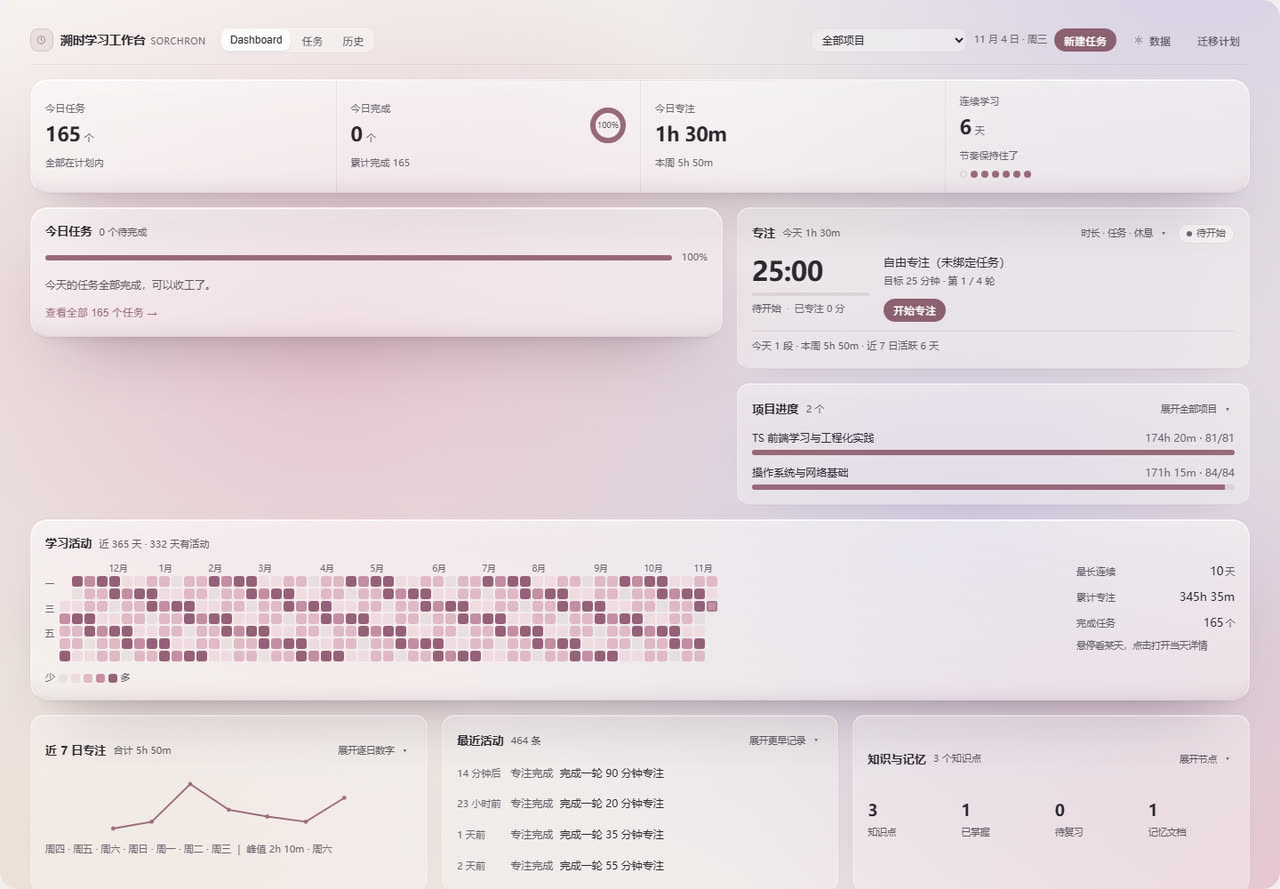
| Dashboard | Four summary metrics (tasks, completed, focus time, streak), today's tasks with inline check-off, focus card, per-project progress, 365-day activity heatmap, 7-day trend, recent activity, read-only knowledge and memory overview |
| Tasks | Create, edit, complete, reopen, two-step delete, search, sort, status filter, inline expand, detail drawer |
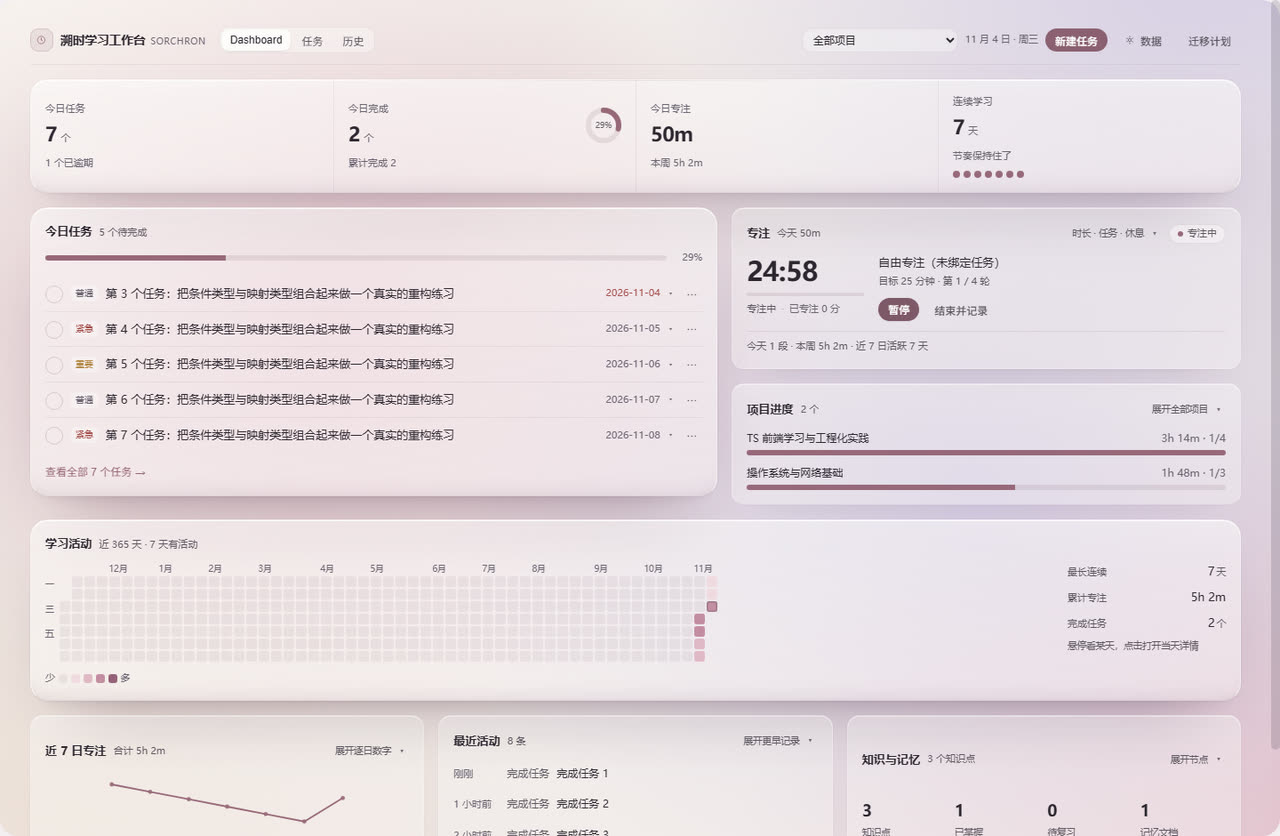
| Focus timer | Timestamp-based countdown, pause and resume, short and long breaks, task binding, explicit settlement on finish, retry after a failed write, idempotent accounting across refreshes and multiple tabs |
| Session capture | Mounted once at the workspace root; consumes DSH session events and counts sessions only — it never adds to focus minutes |
| History | 30 / 90 / 365-day heatmap with five intensity levels, active days, per-day timeline, streak |
| Backup / restore | Export full, last 7 days or current month; import with preview; merge or overwrite; transactional rollback; storage probe; two-step clear |
| Settings | Data overview, session-capture toggle, storage status, export, import, danger zone, capability boundaries |
How settlement works
Finishing a focus round writes four entities — the log, the daily aggregate, the task totals and the timeline event — inside a single transaction. If that transaction fails, the round stays pending with a persisted baseline; the plugin verifies all four entities before deciding whether to repair, retry, or leave everything untouched.
The UI reports exactly one of three states:
| State | Meaning |
|---|---|
| Saved | All four entities verified |
| Not saved (red) | The write failed; the round is kept and can be retried |
| Discarded (neutral) | Shown only after a discard was proven safe to perform |
A discard is refused when the daily aggregate or the task totals have already been counted for the
round: those structures carry no round id, so the amount to subtract cannot be derived. See
KNOWN-LIMITATIONS.md.
📦 Installation
From GitHub (recommended)
dsh plugin --profile desktop add github:SorenLorn/dsh-otaku-study-board
lib/index.js and lib/client.js are committed, so nothing is built locally. Reload the DSH window
afterwards; the panel appears in the left navigation as 溯时学习工作台 (clock icon, order 20).
The short form
dsh plugin add dsh-otaku-study-boardrequires the package to be published on npm. It is not published yet — use thegithub:form above.
From a local clone
npm install
npm run build

dsh plugin --profile desktop add "file:/absolute/path/to/dsh-otaku-study-board"
dsh plugin --profile desktop list      # confirm the entry
Requirements
| Requirement | Value |
|---|---|
| Node.js | >= 20 |
| DSH | 0.1.1-rc.1 – 0.2.x (declared in engines.dsh and peerDependencies) |
| Browser | Any current Chromium or Firefox; storage must be enabled |
A symlink works as well: if node_modules/dsh-otaku-study-board inside the profile points at your
clone, re-running npm run build is enough — no reinstall needed.
🚀 Quick start
- Run a focus round — Dashboard → focus card → “开始专注”. Default 25 minutes; 10–90 minutes in the expanded settings. Pause at any time, then press “结束并记录”.
- Record a task — Tasks → “新建” → type a title → tick it in the list.
- Check the feedback — today's cell in the heatmap changes colour; hover for the day's numbers, click to open that day.
- Back up once — top bar → “数据” → Export JSON. Data lives only in this browser profile.
What one session produces:
09:30  start a 25-minute focus round bound to "Chapter 3 exercises"
09:55  finish → 1 focus log (25 min) + daily aggregate +25
                + task +25 min / +1 pomodoro
09:56  tick the task → status completed, completedAt recorded
       dashboard: focus 25m · tasks 1 · heatmap score 25 + 25×1 = 50 → level 2
Every button is documented in USER-GUIDE.md.
⚙️ Configuration
There is no configuration file — the host half is intentionally a no-op and the plugin registers
itself from the client bundle. Runtime options live in Settings (数据) and are persisted in
localStorage:
| Option | Default | Range / notes |
|---|---|---|
| Focus duration | 25 min | 10–90 min, per round |
| Short break | 5 min | 1–30 min |
| Long break | 15 min | 1–30 min |
| Rounds before long break | 4 | Drives the cycle indicator |
| Session capture | on | Off stops new captures |
| Active project scope | all projects | Archived projects are excluded either way |
Data is stored under 14 keys prefixed dsh-otaku-study-board:, each wrapped in
{ schemaVersion: 4, data }. The timer key is transient and aiRuns is an audit key; neither is
included in backups. V1 / V2 / V3 data is read in place and upgraded on read without writing back.
🖼️ Screenshots
| Dashboard (light) | Focus timer |
|---|---|
 |  |
| Dashboard (dark) | Tasks |
|---|---|
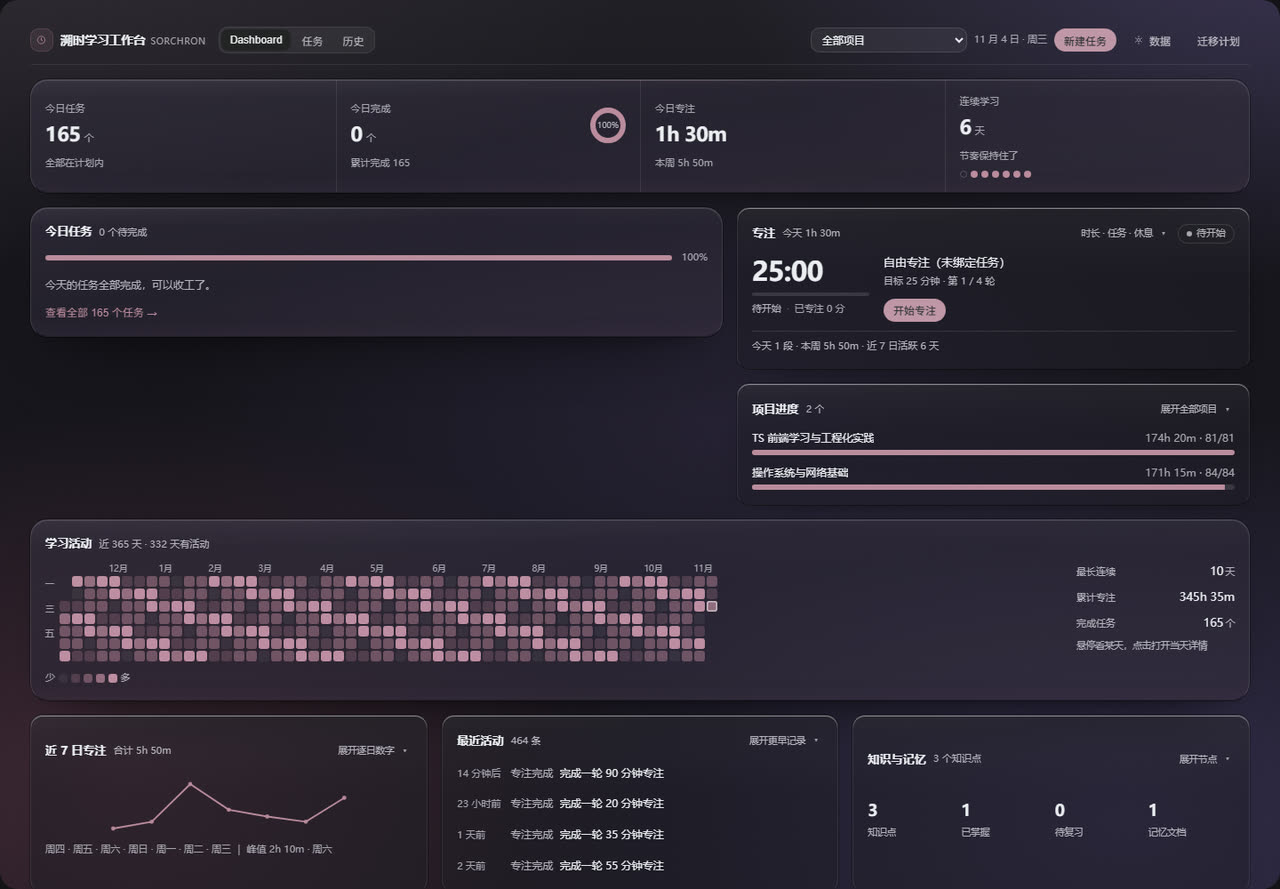 | 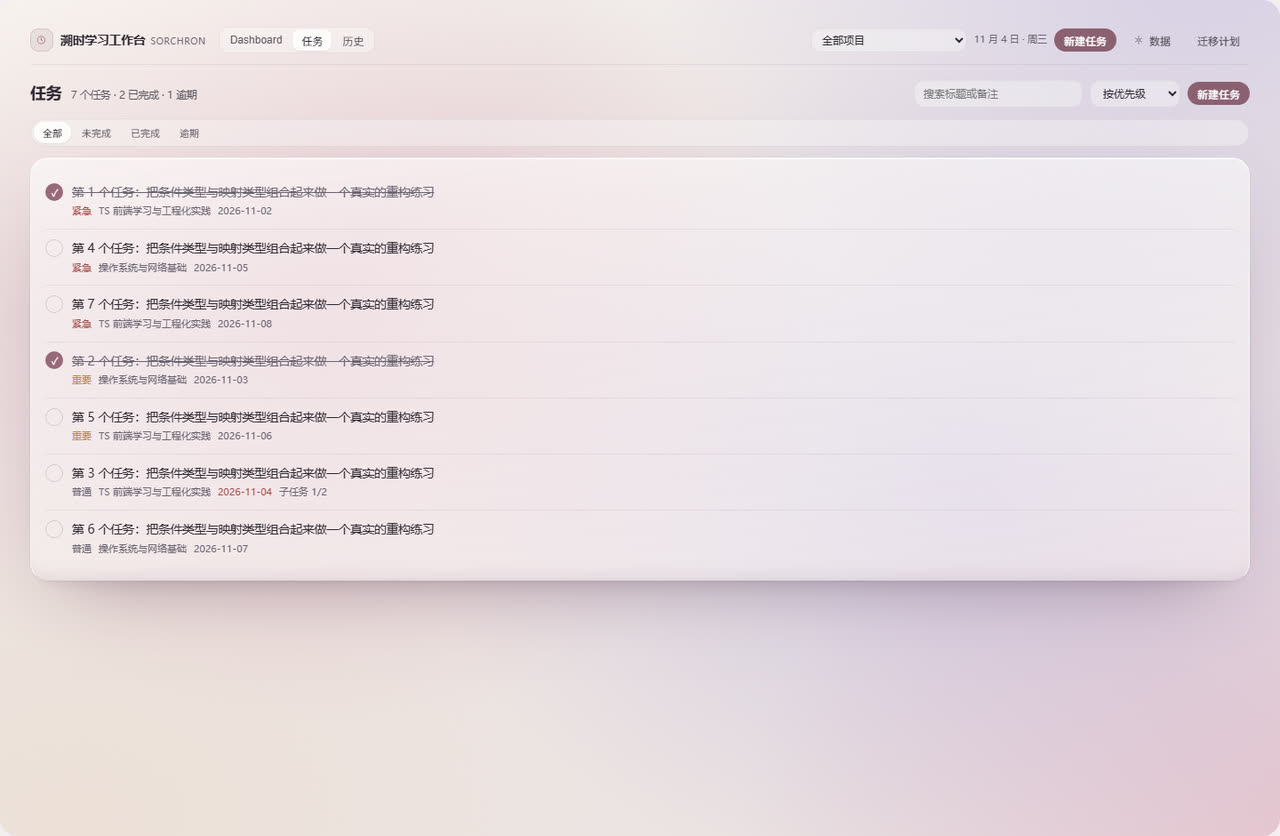 |
Captured from a standalone Chromium at 1440 px using real components and the real stylesheet; the
numbers are demo data. The plugin market reads the same files through
screenshots.json — see assets/README.md for adding or
replacing images.
🛠️ Development
npm run typecheck     # tsc --noEmit — must report 0 errors
npm run build         # writes lib/index.js + lib/client.js
npm run clean         # removes lib/
Stack: React 18 function components and hooks, TypeScript 5.6 (strict), esbuild 0.25 producing two
artifacts with no bundler config file, cordis as the DSH plugin runtime, and a hand-written .v4-*
CSS namespace. Tests are plain scripts — jsdom for component tests, a standalone Chromium over CDP
for browser tests; there is no jest or vitest. The most-used command:
npx esbuild scripts/smoke.ts --bundle --platform=node --format=cjs --outfile=smoke.cjs && node smoke.cjs
Project layout
src/
  index.ts                 host half (Node ESM, intentionally a no-op)
  client/
    index.tsx              registers the nav entry and the panel
    v4/                    workspace: Shell, Dashboard, Tasks, History, Settings,
                           FocusPanel, Heatmap, CaptureBridge, overlays
    hooks/                 storage, board data, timer, backup
    lib/                   focus state machine, settlement, transactions,
                           daily aggregation, activity scoring, schema
    style/board.css        all styles, inlined into the bundle at build time
scripts/                   build, register check, smoke tests, UI test suites
lib/                       build output (committed)
assets/                    market icon and screenshots
docs/                      listing entry for awesome-dsh-plugin
Commands, suites and uncovered areas are listed in TESTING.md. Design constraints —
host API behaviour, transaction semantics, storage rules — are in ARCHITECTURE.md.
🗑️ Uninstall
dsh plugin --profile desktop remove dsh-otaku-study-board
If the profile's package.json still lists dsh-otaku-study-board under dsh.profile.bundles,
delete that line too, otherwise the loader keeps looking for a package that is gone. Reload the
window afterwards.
Uninstalling does not delete your data. To remove it as well, run this in the DevTools console of the DSH window:
Object.keys(localStorage)
  .filter(k => k.startsWith('dsh-otaku-study-board:'))
  .forEach(k => localStorage.removeItem(k))
🤝 Contributing
Issues and pull requests are welcome. Before opening a PR:
npm run typecheckand the smoke command above must pass.- A failed write is reported as failed, an undecided state is reported as undecided, and no button may exist that does nothing.
- Changes to business logic should come with a test; documentation-only changes do not need one.
📄 License
MIT — see LICENSE.
Further reading
| Document | Contents |
|---|---|
USER-GUIDE.md | Every button, step by step, plus FAQ |
ARCHITECTURE.md | Modules, data flow, consistency constraints |
KNOWN-LIMITATIONS.md | Real limits and what is not implemented yet |
TESTING.md | How to run the tests and what they cover |