dsh-process-fold
uigdwunm/dsh-process-fold
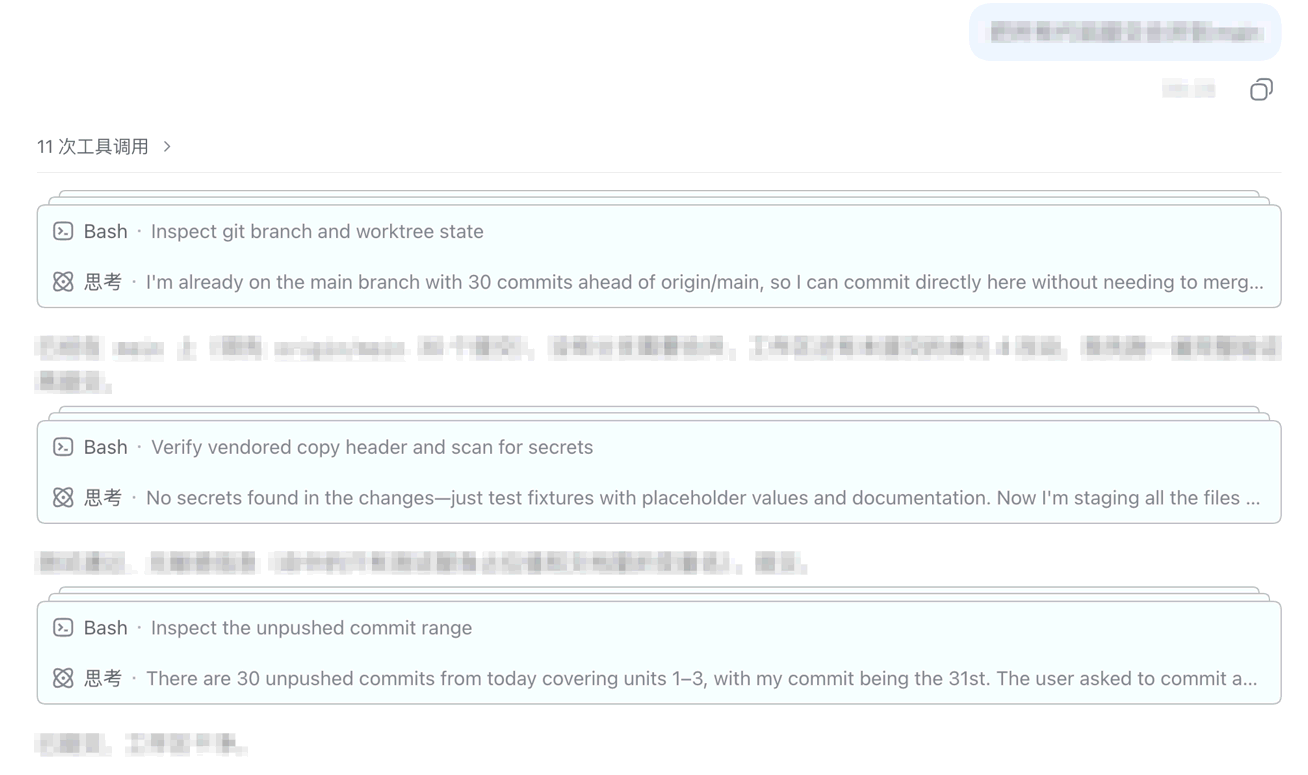
把每轮 DSH Web 会话中的思考、工具调用与上下文折叠进带边框的过程框,在每段模型文本处切开;折叠时每框只显示最新两项,点上边框的堆叠线展开这一个框、再点上边框收回,用户对话、交互式提问与模型文本始终留在框外。
安装
dsh plugin --profile web add github:uigdwunm/dsh-process-foldREADME
dsh-process-fold

中文
dsh-process-fold 是一个 DeepSeek Harness Web 客户端 UI 插件。它把执行过程折叠进带边框的过程框,默认只显示每个框的最新两项。
框在模型文本处切开:模型每输出一次文本,这段文本之前的框就至此完结,之后的思考过程另起一框,因此一轮里可能有多个框。文本本身永远不进框——它留在框外,充当框与框之间的间隔。
折叠时藏了内容的框,会在上边框之上再堆叠两条线,提示"里面还有东西"。点这两条线只展开这一个框(就地长出来,不做滚动跳转)。展开之后,同一条上边框反过来就是收回控件:鼠标移到框的上边缘,线中间会浮出那两条堆叠线的缩小版(约 52px 宽、居中)当图标,点它就只把这一个框收回去(同样不跳)。每个框各自记住自己的展开状态;每轮那行开关(或官方按钮)仍然一次开关这一轮的全部框。
它和官方自带的「过程折叠」按钮是协作关系而不是竞争关系:某一轮只要有官方那行「N 次工具调用 ▾」,那一行就是这一轮唯一的开关——点它在「最新两项」和「全部过程」之间切换(管这一轮的所有框);官方按钮不在场时(流式输出中、更早历史未加载完、官方设为标准显示、被中断或没有最终回答的轮次)由插件自己的那行顶替它——一轮一行,样式与官方一致(左侧「N 次工具调用」、右侧箭头,同样的尺寸和 token)。
用户消息、用户重定向消息、交互式 ask_user_question 提问以及所有模型文本(中间输出和最终回答)始终留在框外并完整显示。
与把已结束轮次的过程替换成一行耗时摘要的自动折叠插件不同,本插件把过程留在原处:合并进可以随时重新展开的框,并且从不隐藏用户消息、交互提问、错误提示和模型文本。插件停用时,它注入的样式、属性、标签和控件全部清除。
安装
dsh plugin --profile web add github:uigdwunm/dsh-process-fold
重启 dsh web,然后刷新页面。
行为
- 把思考、工具调用和上下文项合并为带边框的过程框,并在每一段模型文本处切开。
- 折叠时保留每个框的最新两项,展开时显示每个框的全部过程。
- 折叠时藏了项的框,在上边框之上堆叠两条线;点这两条线只展开这一个框(就地展开,不做滚动跳转)。
- 展开后同一条上边框变成收回控件:鼠标移到框的上边缘时,线上的堆叠线缩小版图标(约 52px 宽)淡入,点它只把这一个框收回去(藏起来的项原地消失,不会跳)。
- 某一轮官方折叠按钮存在时,以它作为这一轮所有框的开关。
- 不存在时,每轮渲染一行替代它的开关:与官方同款外观(33px 高、底部细线、左侧「N 次工具调用」、右侧箭头,展开时箭头旋转)。
- 展开状态按框存:堆叠线只展开它自己的那个框,开关行(或官方按钮)则一次开关这一轮的全部框。
- 不读取官方按钮的展开状态:只用一条 CSS 把官方
hidden="until-found"对「插件要显示的项」(含承载模型文本的流项)失效掉;只把插件状态写回官方按钮的data-open/aria-expanded以对齐箭头方向。 - 补回官方
hidden属性抹掉的、模型文本周围及其之后的流间距。 - 浏览器查找(Ctrl+F)命中时跟随进入展开态。
- 展开/折叠时保持按钮以下内容在视口中的位置。
- 所有模型文本都在框外,作为框与框之间的间隔。
user、steering、ask_user_question、模型文本、turn-error、turn-max-tokens、turn-process作为过程边界。- 插件停止时清理所有注入的样式、属性、标签和按钮。
依赖的 DOM 契约
插件只依赖官方挂载的稳定属性,不依赖会随构建变化的 hash 类名:
[data-chat-flow]/[data-chat-flow-kind]:会话流容器与流项类型[data-chat-turn]/[data-chat-flow-key]:轮次号(折叠状态的键)与流项唯一键[data-turn-process]:官方折叠按钮(点击源 + 是否在场的判据)[data-turn-process-member]:官方的过程成员标记(用于 Ctrl+F 跟随)
English
dsh-process-fold is a client-side UI plugin for DeepSeek Harness Web. It folds execution steps into bordered process boxes that show only their latest two items by default.
Boxes are cut at model text: every piece of assistant text closes the box in front of it and starts a new one after it, so a turn can hold several boxes. That text is never folded into a box — it stays outside and separates the boxes.
When a collapsed box is hiding items, two lines are stacked above its top border, so you can see it holds more than it shows. Click those lines to expand that one box in place. Once expanded, the same top border becomes the collapse control: hover the box's top edge and a miniature of those stacked lines (about 52px wide, centred) fades in on the line — click it to fold that one box back. Each box keeps its own expanded state; the per-turn row (or the official button) still opens and closes all of that turn's boxes at once.
It cooperates with the shipped turn-process disclosure instead of competing with it: while the official N 次工具调用 ▾ row is present for a turn, that row is the only toggle — clicking it switches that turn's boxes between their latest two items and the whole process. When the official row is absent (a streaming turn, unloaded older history, the standard transcript view, or an interrupted/answerless turn), the plugin's own row takes its place: one per turn, styled like the official one (N 次工具调用 on the left, chevron on the right, same sizes and tokens).
User messages, steering messages, interactive ask_user_question prompts, and every piece of model text (intermediate output and the final answer) remain outside the boxes and fully visible.
Unlike auto-collapse plugins that replace a finished turn's process with a single timing row, this one keeps the process in place: it folds the items into boxes you can reopen, and it never hides the user's own messages, interactive questions, errors, or model text. Stopping the plugin removes every style, attribute, label, and control it injected.
Install
dsh plugin --profile web add github:uigdwunm/dsh-process-fold
Restart dsh web, then refresh the page.
Behavior
- Folds think, tool-call, and context items into bordered process boxes, and cuts a box at every piece of model text.
- Shows the latest two items of each box while collapsed, every box's whole process when expanded.
- Stacks two lines above the top border of a collapsed box that is hiding items; clicking those lines expands just that box, in place and without a scroll jump.
- Turns that same top border into the collapse control once the box is open: hovering the top edge fades in a miniature of the stacked lines (about 52px wide, centred on the line), and clicking it folds that one box back (the collapsed items disappear in place, so nothing jumps).
- Uses the official disclosure button as the toggle for that turn's boxes whenever it exists.
- Otherwise renders one replacement row per turn — same look as the official one: 33px high, bottom hairline,
N 次工具调用label, right-hand chevron that rotates on expand. - Keeps expanded state per box: the stacked lines open only their own box, while the row (or the official button) opens or closes every box of the turn.
- Reads none of the official disclosure state: one CSS rule neutralizes the official
hidden="until-found"for the items the plugin keeps visible (including the flow items that hold model text), and the plugin's per-turn state is only written back onto the official row'sdata-open/aria-expandedso its chevron matches. - Restores the flow gap the official
hiddenattribute removes around model text and after it. - Follows browser find (
beforematch) into the expanded state. - Expands and collapses without moving content below the toggle in the viewport.
- Keeps all model text outside process boxes; it separates the boxes instead.
- Treats
user,steering,ask_user_question, model text,turn-error,turn-max-tokens, andturn-processas process boundaries. - Removes all injected styles, attributes, labels, and controls when the plugin stops.
Development
npm install
npm run typecheck
npm run build
The browser source is in src/client.ts; the prebuilt DSH client bundle is committed at lib/client.js.
Original requirements notes: docs/requirements.md.
Releasing
Attach two tarballs to every release, not one:
npm version <version> --no-git-tag-version   # then date the changelog section
git commit -am "chore(release): <version>"
git tag -a v<version> && git push origin main v<version>
npm pack && cp dsh-process-fold-<version>.tgz dsh-process-fold.tgz
gh release create v<version> dsh-process-fold-<version>.tgz dsh-process-fold.tgz
dsh-process-fold-<version>.tgz is the archive. dsh-process-fold.tgz is the version-free name the
plugin list resolves through
releases/latest/download/ — that URL takes the filename literally, so a release that ships only the
versioned name leaves the listing broken until someone notices.
License
MIT